
BetterChatX
No reviews yet
A custom chat with advanced filters and customization
Forge is a popular mod loader for versions 1.1+ of Minecraft.
Community voices
Reviews
Click once to include, again to exclude, again to clear
No reviews yet. Be the first to review this project!
Get it on
Available Platforms
 Modrinth
Compatibility
Supported Environments
About
Project Details
For authors
Embed Badge
If you're the author of this project, you can embed a live badge anywhere that supports HTML or Markdown. It updates automatically whenever ratings change.
Use HTML for any page that supports it, or Markdown for README files and Markdown-based descriptions.
Identifiers
Platform IDs
Resources
External Links
About
Description
BetterChat
A Minecraft Forge mod for 1.8.9 that completely replaces the default chat with a powerful, customizable, multi-tab chat system.
Features
🗂️ Tabbed Chat Windows
- Create as many chat tabs as you want, each with its own filter settings
- Double-click a tab to rename it
- Right-click a tab to delete it (confirm with a second right-click)
- Drag tabs to reorder them within a window, just like a browser
- Drag tabs out of the window to spawn them as their own independent floating window
- Drag tabs onto another window to merge them back together
- Click [+] to add a new tab at any time
🪟 Multiple Floating Windows
- Each window is independently draggable and resizable
- Windows remember their position and size between sessions
- Tabs can freely move between windows or become their own window
- Lock window position via the settings menu to prevent accidental moves
🔍 Per-Tab Filtering
Every tab has its own independent filter configuration, letting you build a chat layout that only shows what you care about:
- Inclusion keywords — only show messages that contain at least one of these words (comma-separated). Useful for a specific player's name, a server channel prefix, or a keyword like
trade - Exclusion keywords — always hide messages containing these words, even if they pass the inclusion filter. Great for muting spam or specific players
- Include All Messages — bypass all filters and show everything on this tab, useful for a dedicated "Global" tab
- Include Player Messages — show chat from other players (messages in
<name>format) - Include Server Messages — show system/server messages that aren't from players (join/leave messages, announcements, etc.)
- Include Commands — show commands you type (messages starting with
/) - Include Command Responses — show server responses to commands you ran within the last few seconds
- Prefix / Suffix — text automatically added before/after every message you send from this tab. For example, a prefix of
[Trade]lets you type naturally while always tagging your messages
Exclusions are checked first, then inclusions. Your own messages always appear on every tab regardless of filters.
📜 Persistent Chat History
- All chat messages are saved to disk and persist across sessions — your full history is always there when you log back in
- History is shared across all tabs — each tab just filters the same global log differently, so no messages are ever lost
- Date separator bars are shown inline whenever the date changes, so you can always tell when a conversation happened
- Chat always jumps back to the latest messages when you open it
- History saving can be toggled off in settings if you prefer a clean slate each session
📅 Smart Day-Based Scroll Bar
- The scroll bar represents only the current day's messages — always a comfortable, usable size no matter how much history you have
- ▲ / ▼ arrows appear on the scroll bar to jump between days
- The date (
MM/DD) is shown next to the arrows when browsing older history
🎨 Full Visual Customization
Open the settings panel (⚙ gear icon on any window) to customize:
Colors & Opacity
- 8 individually configurable color slots: tab selection bar, top bar, background, text, timestamps, input bar, and both HUD fade overlay colors
- Each slot has its own fully independent color and opacity setting
- A full HSB color picker per slot — hue ring, saturation/brightness square, live preview swatch, opacity slider, and direct hex code input
Toggles
- Timestamps — shows
HH:MMnext to each message on the right side - Unread notification dots — a colored dot marks any tab with unseen messages
- Save chat history — disable if you don't want messages persisted to disk
- Lock position — freezes all windows in place so they can't be accidentally moved or resized
- Reset to defaults — restores all colors and toggles to their original values
Per-Tab Settings (accessible from the Filters page)
- Configure inclusion/exclusion keywords, message type toggles, and prefix/suffix per tab, all from one panel
🔔 Unread Notifications
- A colored dot appears on any tab that received a new message while you weren't looking at it
- Disappears as soon as you switch to that tab
Controls
| Action | How |
|---|---|
| Switch tab | Click the tab |
| Rename tab | Double-click the tab |
| Delete tab | Right-click tab (once to mark red, again to confirm) |
| Reorder tab | Drag left/right within the tab bar |
| Detach tab to new window | Drag tab downward out of the bar |
| Merge tab into window | Drag tab onto another window's tab bar |
| Move window | Drag the top bar |
| Resize window | Drag the bottom-right corner handle |
| Scroll by day | Click ▲ / ▼ on the scroll bar |
| Open settings | Click the ⚙ icon (top-right of any window) |
| Add tab | Click [+] in the tab bar |
Installation
- Install Minecraft Forge 1.8.9
- Download the latest
betterchat-1.0.jarfrom Releases - Drop it into your
.minecraft/mods/folder - Launch Minecraft with the Forge profile
Building from Source
Requires JDK 8.
git clone https://github.com/DanielRomanovski/BetterChat.git
cd BetterChat
gradlew build
The compiled jar will be in build/libs/betterchat-1.0.jar.
Compatibility
- Minecraft: 1.8.9
- Forge: 11.15.1.2318
- Side: Client-only — no server installation needed
Config Files
Stored in your Minecraft config/ directory:
| File | Contents |
|---|---|
betterchat.txt |
Window positions, colors, tab names, filter settings |
betterchat_logs.dat |
Full chat history |
Screenshots
Gallery
-
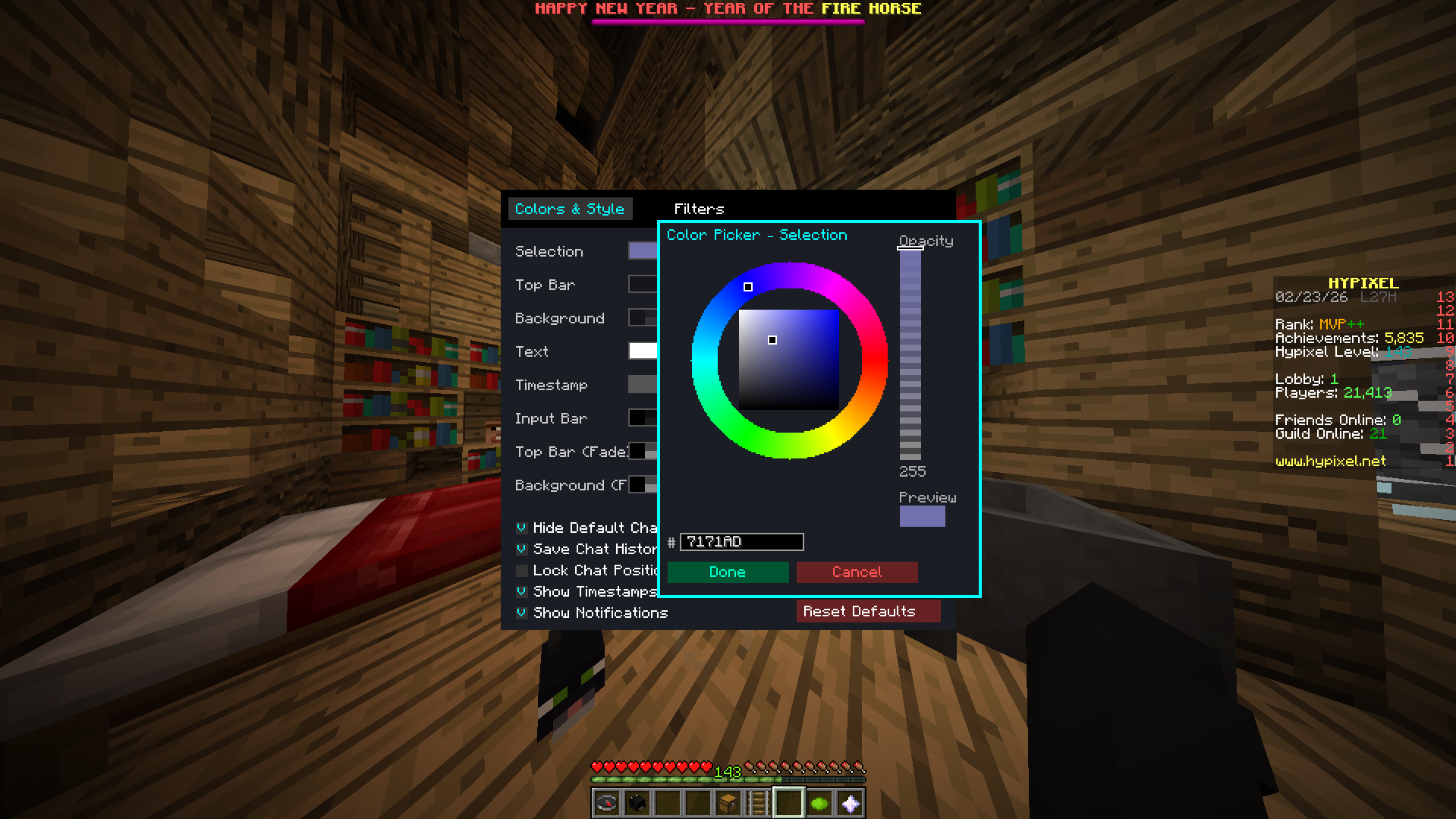 Color Picker
 -
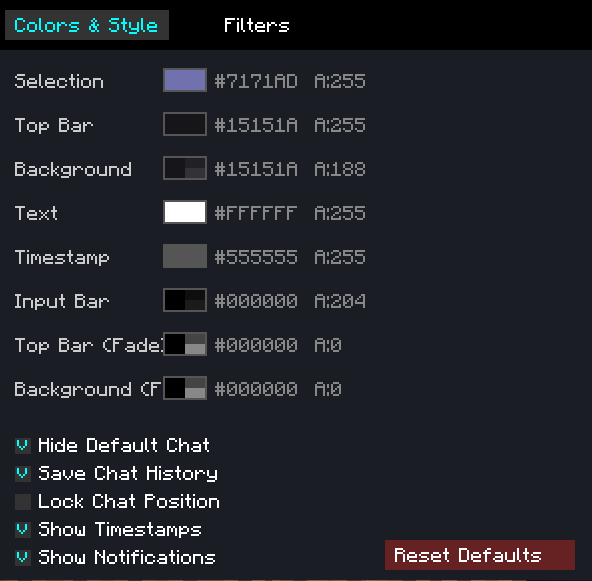 Settings
 -
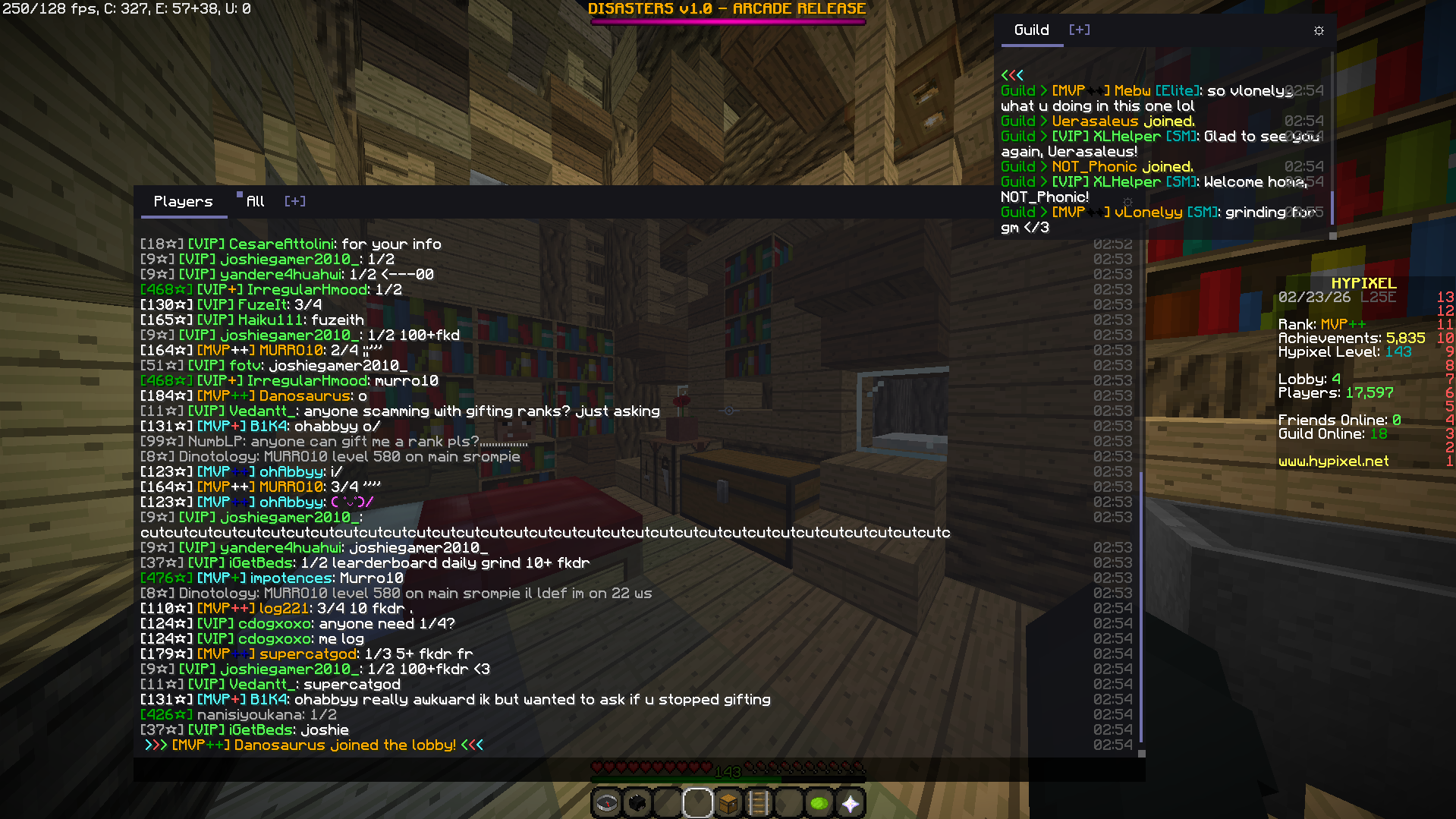 Multi Windows + Resizing
 -
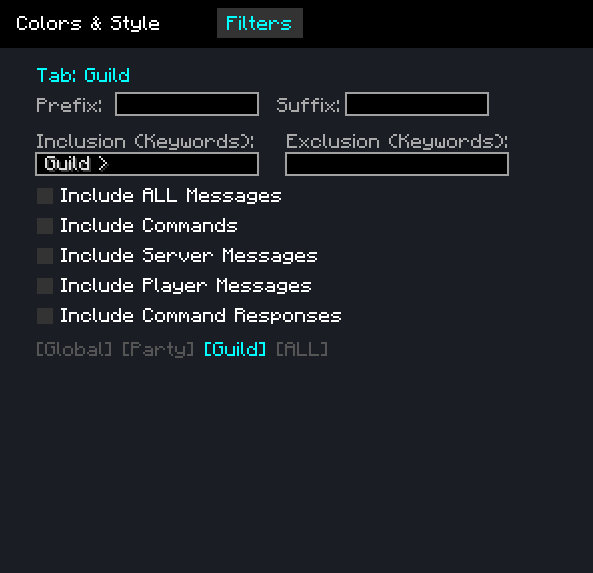 Filter Settings
 -
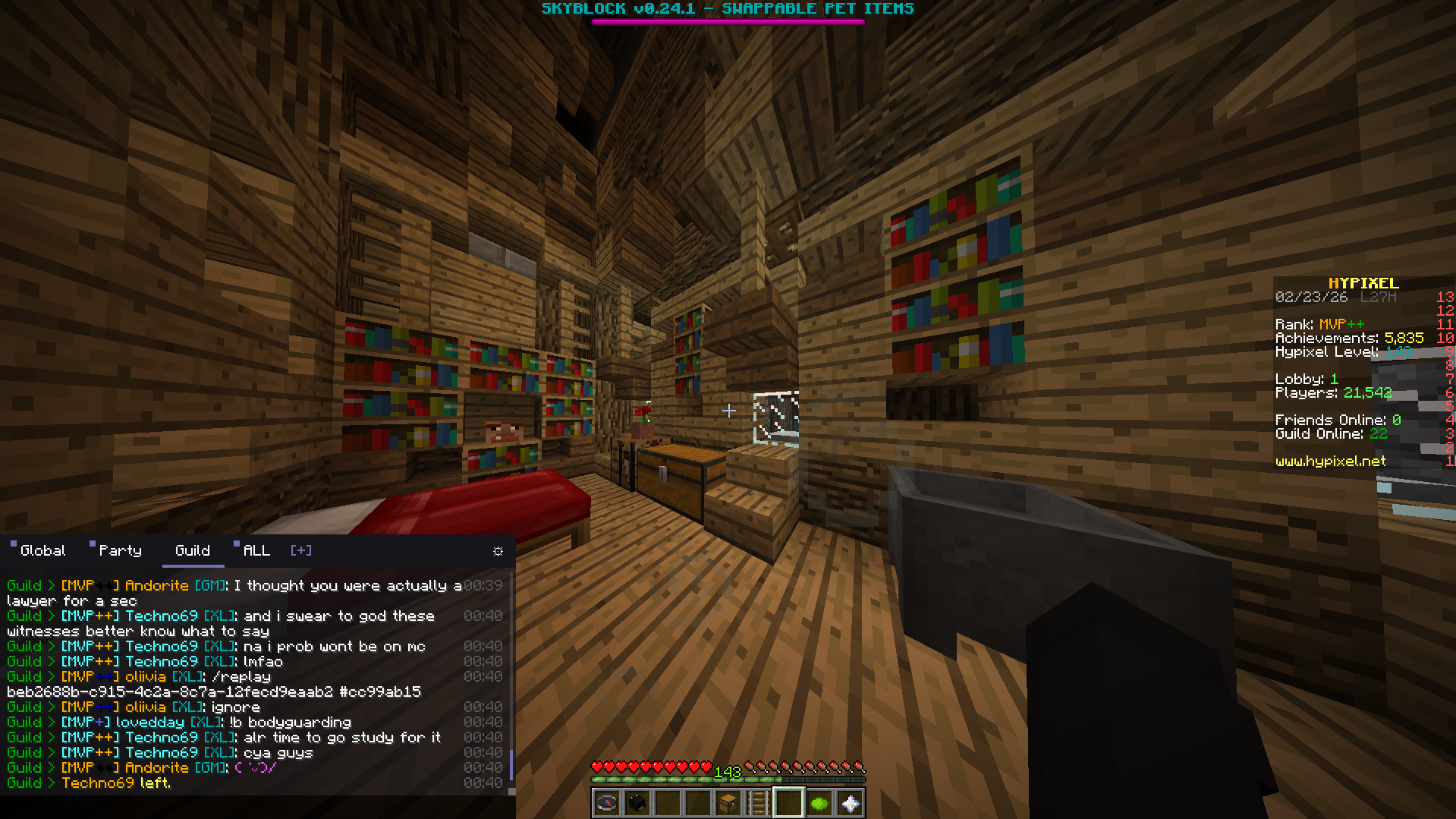 Guild only messages (filtered)
 -
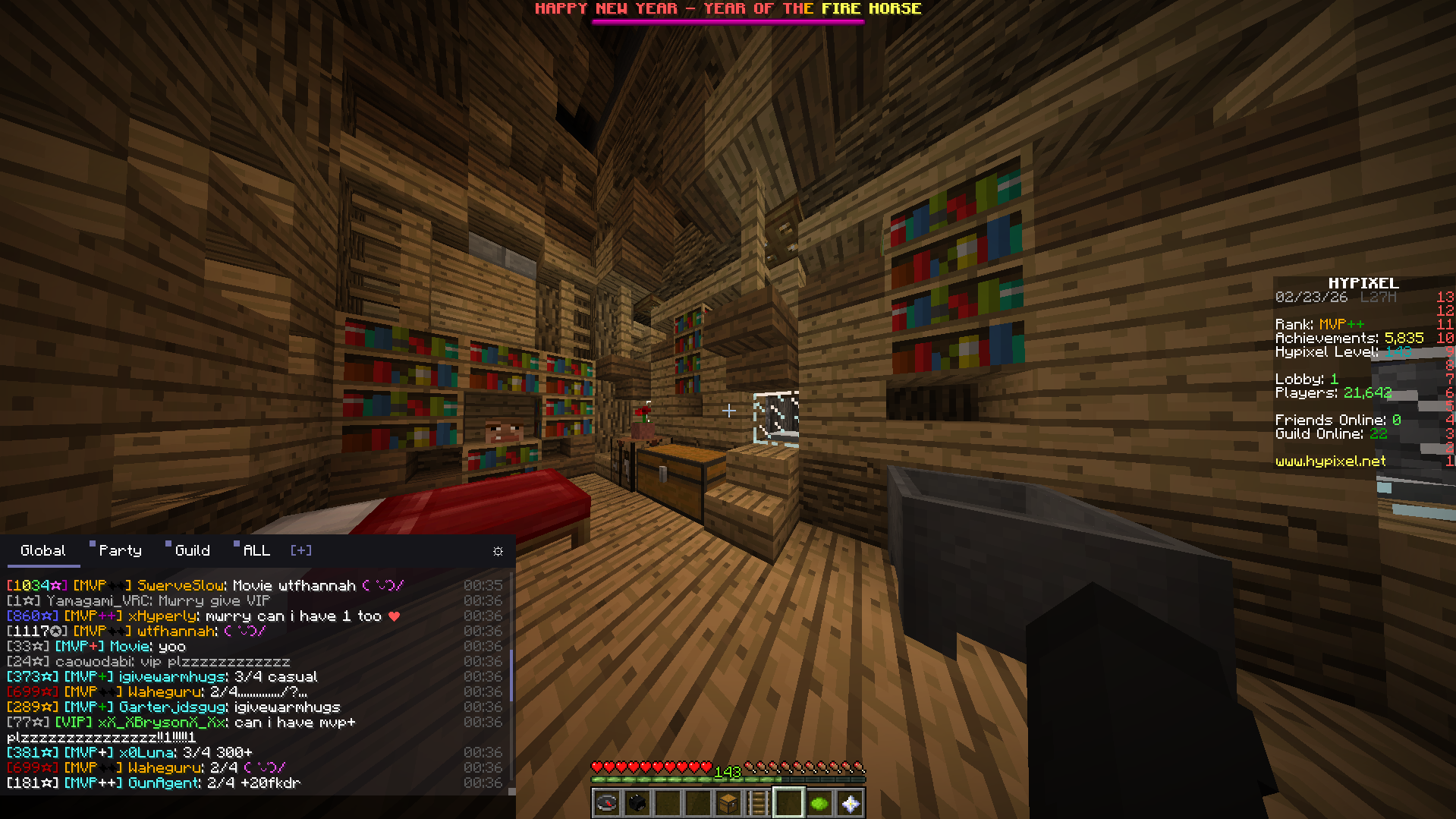 Player only messages
Versions
Files
Relations
Project Relations
More like this
Similar Mods
Suggestions use data such as tags, dependencies, dependents, descriptions, titles, and more to rank how much they overlap with this mod.
On ModDex
Community snapshot
By the numbers
Statistics

Want to reach Minecraft players?
We're looking for a server hosting partner to feature here and other parts of the site. Interested? Send us a message!
Get in touchGet it on
Available Platforms
On ModDex
Community snapshot
By the numbers
Statistics
Resources