
BetterHead Chat
No reviews yet
Displays chat messages above players' heads. Supports vanilla chat, whispers, and configurable /tellraw patterns.
Fabric is a mod loader for versions 1.14+ of Minecraft, particularly popular for client side and optimization mods.
Community voices
Reviews
Click once to include, again to exclude, again to clear
No reviews yet. Be the first to review this project!
Get it on
Available Platforms
 Modrinth
Compatibility
Supported Environments
About
Project Details
For authors
Embed Badge
If you're the author of this project, you can embed a live badge anywhere that supports HTML or Markdown. It updates automatically whenever ratings change.
Use HTML for any page that supports it, or Markdown for README files and Markdown-based descriptions.
Identifiers
Platform IDs
About
Description
A Fabric mod that displays chat messages above players' heads in Minecraft.
Features
- Chat messages appear as floating text above the sender's head
- Supports vanilla chat,
/msgwhispers, and/tellrawsystem messages - Configurable message patterns for parsing
/tellrawoutput (e.g.<%player%> %message%) - Heuristic player name detection as a fallback
- Adjustable display range, line lifetime, line height, and max lines
- Optional chat hiding — show messages only above heads, not in chat
- YACL-based config screen with ModMenu integration
Installation
- Install Fabric Loader
- Download the appropriate module for your Minecraft version
- Place the
.jarfile in yourmodsfolder - Install Fabric API and YACL if not already installed
Configuration
Open the mod settings via ModMenu or the in-game config screen. Options include:
- Mod Enabled — toggle the mod on/off
- Max Lines — maximum number of lines displayed above a player
- Line Lifetime — how long messages stay visible (seconds)
- Attach to Head — position text at head level or fixed height
- Line Height — vertical offset above the head
- Hide Nametag — hide the vanilla nametag when overhead chat is active
- Hide Chat Messages — suppress messages from the chat window
- Enable Whisper — show
/msgwhispers above heads - Range — maximum render distance for overhead text
- Reverse Order — display newest messages at the top
- Max Line Length — character limit before wrapping
- Chat Patterns — regex patterns for parsing
/tellrawmessages (e.g.<%player%> %message%) - Heuristic Player Detection — attempt to detect player names in unrecognized system messages
License
All Rights Reserved
Links
Screenshots
Gallery
-
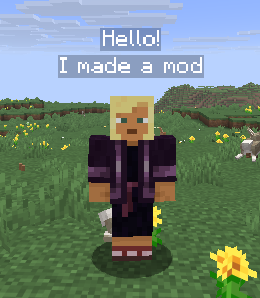 Messages above the player's head
Versions
Files
Relations
Project Relations
More like this
Similar Mods
Suggestions use data such as tags, dependencies, dependents, descriptions, titles, and more to rank how much they overlap with this mod.
On ModDex
Community snapshot
By the numbers
Statistics

Want to reach Minecraft players?
We're looking for a server hosting partner to feature here and other parts of the site. Interested? Send us a message!
Get in touchGet it on
Available Platforms
On ModDex
Community snapshot
By the numbers