
BetterPrisons
No reviews yet
A client side mod for usage on CosmicPrisons intended to replace CosmicClient.
Fabric is a mod loader for versions 1.14+ of Minecraft, particularly popular for client side and optimization mods.
Community voices
Reviews
Click once to include, again to exclude, again to clear
No reviews yet. Be the first to review this project!
Get it on
Available Platforms
 Modrinth
Compatibility
Supported Environments
About
Project Details
For authors
Embed Badge
If you're the author of this project, you can embed a live badge anywhere that supports HTML or Markdown. It updates automatically whenever ratings change.
Use HTML for any page that supports it, or Markdown for README files and Markdown-based descriptions.
Identifiers
Platform IDs
Resources
External Links
About
Description
BetterPrisons: Quick Reference Guide
BetterPrisons is a client-side enhancement mod for CosmicPrisons. No external dependencies required.
HUDs (On-Screen Overlays)
- Cooldown HUD — Timers for /jet, /feed, /fix, /home, /tpa, /tpahere, /dangle, /adangle, /near, /pulse, and combat. Super Breaker & Powerball tracked by Enchant HUD.
- Satchel HUD — Fill level and capacity for all satchels (works with renamed ones). Covers every ore-satchel variant (deepslate, block, …) and special satchels (shard, contraband, clue scroll). Combines same-type satchels. Threshold color alerts.
- Stats HUD — XP, XP/hour, Cosmic Energy, session totals, time until next level. Shows visual indicator when paused.
- Enchant HUD — Countdown timers for Super Breaker and Powerball. Powerball Ready alert (title + sound) when cooldown ends.
- Events HUD — Coordinates, icon, and landing countdown for each meteor (natural 7 min / summoned 1 min), meteorite showers, and bandit rushes in your badlands sub-world. Active Ore Merchants with per-tier toggles, distance, timeout.
- Waypoints — Screen-edge arrows and optional 3D beacon beams for every active meteor, merchant, bandit rush, and meteorite shower. Renders at any distance.
- Gang Pings — Broadcast your position to gang (G) or truce (H) chat. Bind an extra key to ping the block you're looking at. Received pings show as player head icons with beacon beams, info text (name, timer, coords, HP, facing), and sound alerts. 3-second cooldown. Dedicated config tab.
- Super Breaker Aura — Centered ring timer (WeakAura-style) for Super Breaker. Timer offset and enable/disable toggle.
EasyView (Inventory Overlays)
Compact text labels on inventory items — no tooltip needed. Supports: Cosmic Energy, Money Notes, Gang Points, Black Scrolls, Charge Orbs, Dust, Pages (with optional tier coloring), Prestige Tokens, XP Bottles, Armor, Weapons, and Pickaxes. Each type is toggleable and color-configurable independently.
Tools & Search
- Energy Calculator — Calculate pickaxe/satchel upgrade costs by level (up to 750). GUI in the Tools tab or the
/calccommand. - Chest Search — Open any container for a search bar + filter-rule sidebar that highlights matching items. Filter rules have per-rule colors and Any/All matching. Search enchant books by success rate, destroy rate, or energy cost too.
- Clue Scroll Sorting — Clue scrolls show their current step number large on the item (containers and hotbar), so a chest of scrolls sorts at a glance.
Item Tooltips
- Enchant Book Costs — Hover an enchant book (in your inventory or linked in chat) to see per-level upgrade energy costs and running total to max level. Tier-aware formula.
- Gang Point Expiry — Hover a gang point note to see a live countdown and the expiry time in your local timezone (no more EDT math).
- All BP-added lines are prefixed with
[BP]so they're easy to distinguish.
Peaceful Mining
- Nearby players become translucent while holding a pickaxe or mace (opacity 0–255, radius configurable). Pickaxe and mace each have their own toggle.
- Always active in the PrisonBreak world regardless of what you're holding (toggleable).
- Block-breaking progress remains visible through ghosted players.
- Disables accidental hits and right-clicks on players while mining.
- Auto-disable on combat: peaceful mining turns off when you enter combat and re-enables when combat ends (toggleable).
Quality-of-Life
- Message Notifications — Audio alert on private messages. 7 sounds to choose from, volume 0–200%.
- Powerball Ready Alert — Title popup + configurable sound when Powerball cooldown ends.
- Auto Trade — Shift-right-click another player to send
/trade <username>automatically. - Bold XP/Energy Popups — Optionally bold the on-screen
+XPand+Energytitle popups. - PrisonBreak Texture Pack — Bundled ore texture pack that auto-applies in the PrisonBreak world and removes itself on leave.
- Held Item Scaling — Resize held items per type (pickaxe, sword, axe, other) from 25–150%.
- Pickaxe Drop Protection — Requires pressing drop twice within 3 seconds to drop a pickaxe. Options to block dropping entirely or block dragging out of inventory.
Config Screen
Fully custom UI — no external mod required. Open with I or via Mod Menu.
- Tabs in a left sidebar (HUD Settings / Feature Settings / Configuration).
- Collapsible sections and per-setting reset buttons (X icon).
- Hover tooltips on most settings.
- Color picker — HSV selector square, hue bar, live preview, and hex input.
- HUD Editor — Drag to reposition. Right-click a HUD for an inline scale slider (70–150%). Color-coded: green = hovered, yellow = dragging, orange = scaling. Reset Positions button available.
- Theme — 27 color settings (backgrounds, borders, text, accents, etc.) with real-time preview.
Keyboard Shortcuts
- I — Open config screen
- R — Reset Stats HUD (clears session totals)
- B — Pause / Resume Stats HUD tracking
- G — Send gang ping (your position)
- H — Send truce ping
- (unbound) — Send gang ping at the block you're looking at — bind in Controls
Support: Contact nishu06 on Discord or open a ticket at https://discord.gg/gW4sBdNmac.
Screenshots
Gallery
-
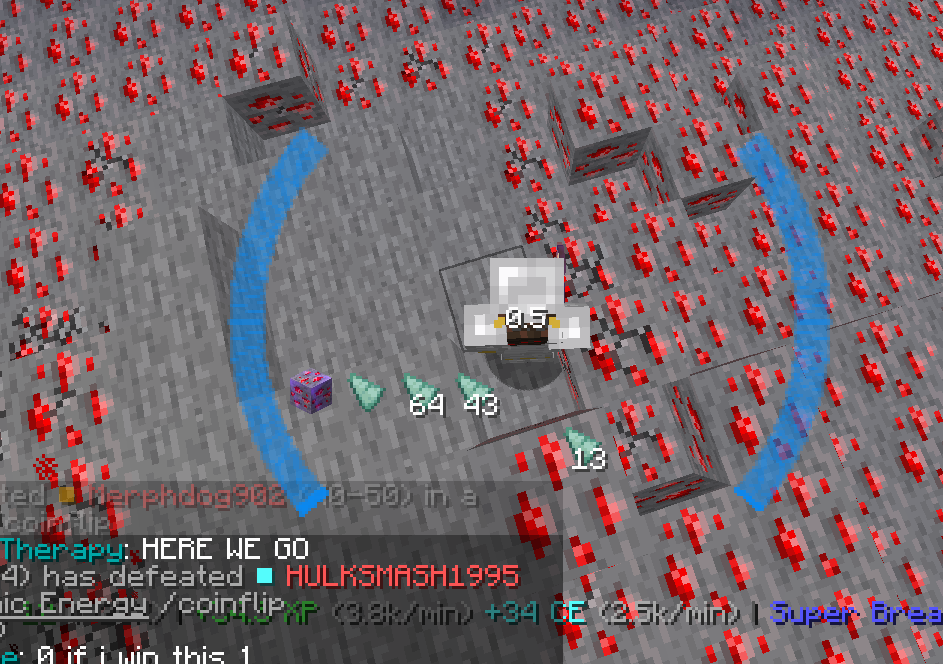 Super Breaker Aura An example view of super breaker aura
 -
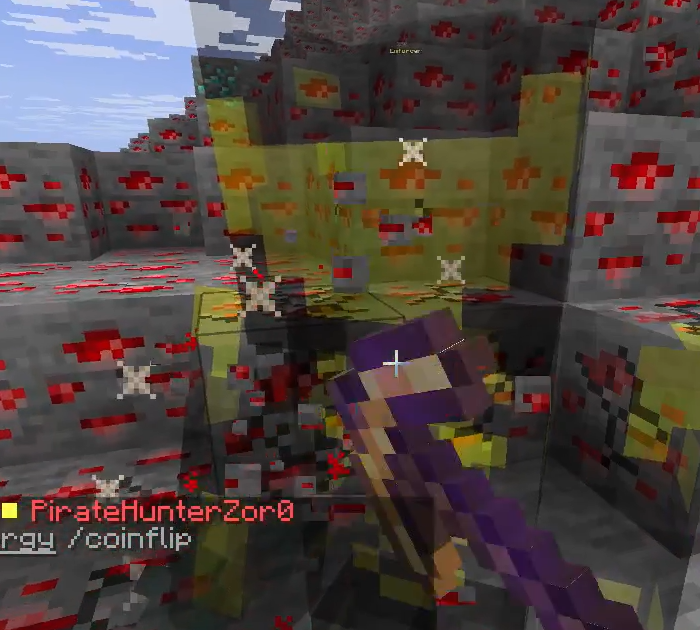 Peaceful Mining An example view of what peaceful mining looks like
 -
 Satchel Hud An example view of the satchel hud
 -
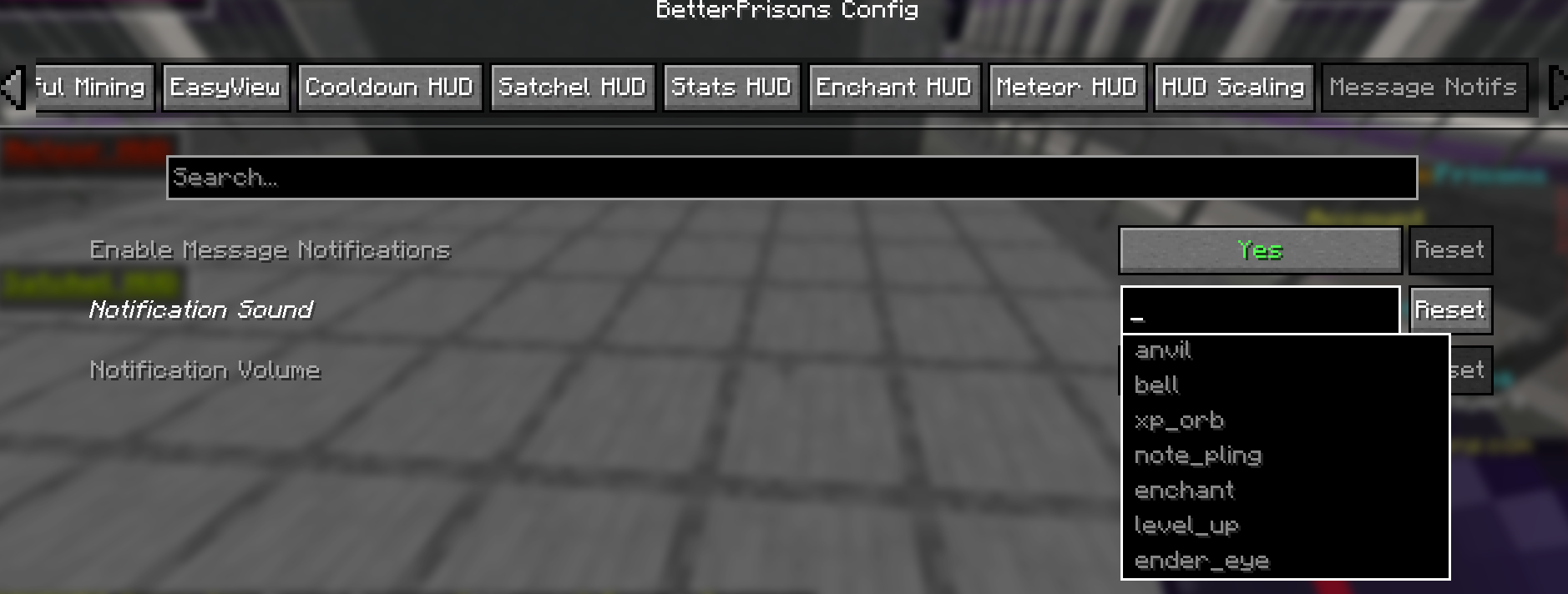 Message Notif Config A view of the config page for Message Notifs
 -
 Cooldown Hud An example view of the Cooldown Hud
 -
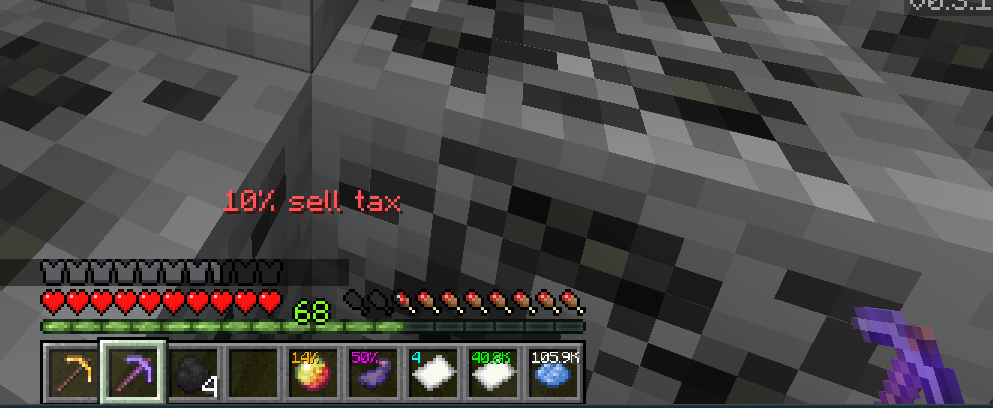 EasyView and Held Item Scaling An example view of the EasyView feature as well as Held Item Scaling
 -
 Stats HUD An example view of the stats hud
 -
 Meteor Hud An example view of the meteor hud
Versions
Files
Relations
Project Relations
More like this
Similar Mods
Suggestions use data such as tags, dependencies, dependents, descriptions, titles, and more to rank how much they overlap with this mod.
On ModDex
Community snapshot
By the numbers
Statistics

Want to reach Minecraft players?
We're looking for a server hosting partner to feature here and other parts of the site. Interested? Send us a message!
Get in touchGet it on
Available Platforms
On ModDex
Community snapshot
By the numbers
Statistics
Resources