
Community listing page, reviews may not be monitored by the author.
BetterTimer


No reviews yet
A per-world timer for challenges and speedruns: 3 styles, 7 animated effects, an hourly celebration, a live-preview settings screen and drag-and-drop positioning. Client-side.

Community voices
Reviews
No reviews yet. Be the first to review this project!
Get it on
Available Platforms
Compatibility
Supported Environments
Runs entirely on the client. Works on vanilla servers.
About
Project Details
For authors
Embed Badge
If you're the author of this project, you can embed a live badge anywhere that supports HTML or Markdown. It updates automatically whenever ratings change.
Use HTML for any page that supports it, or Markdown for README files and Markdown-based descriptions.
Identifiers
Platform IDs
Resources
External Links
About
Description
# BetterTimer
**A timer on your HUD for challenges, speedruns and long survival worlds.** Every world and every server gets its own
timer, it's saved automatically, and it looks good enough that you'll want to leave it on.
- ⏱ **One timer per world and server**: leaving pauses it, coming back continues it
- 🎨 **3 styles, 3 formats, any colour**: Minimal, Panel or Glass, with an HSV colour picker
- ✨ **7 animated effects** and animations for start, pause, reset and every full hour
- 🛠 **Settings with a live preview** and a **drag-and-drop position editor**
- 💻 **Client-side only**: works on every server, nobody else needs the mod
## ⏱ Commands & keys
| Command | What it does |
|---|---|
| `/timer` | Shows the current time |
| `/timer start` · `/timer pause` · `/timer toggle` | Start, pause or switch between them |
| `/timer reset` | Back to zero (fades out on screen) |
| `/timer set <time>` | Set the time, e.g. `1h30m`, `90m`, `1:30:00`, `45` |
| `/timer add <time>` | Add time, e.g. `5m` |
| `/timer settings` | Opens the settings |
Optional keys for **start/pause**, **reset** and **settings** under *Controls → BetterTimer* (unbound by default).
Reset has to be pressed twice, so a stray key press can't throw away hours of progress.
## 🎨 Looks
| | |
|---|---|
| **Styles** | **Minimal** (just the digits), **Panel** (clean dark panel with accent stripe), **Glass** (translucent with a soft, breathing glow) |
| **Formats** | **Classic** `1h 2m 3s` · **Digital** `1:02:03` · **Precise** `00:05.27` (hundredths) |
| **Size** | 0.5× to 3× |
| **Extras** | Background opacity, status icon (▶ / ❚❚), glowing text |
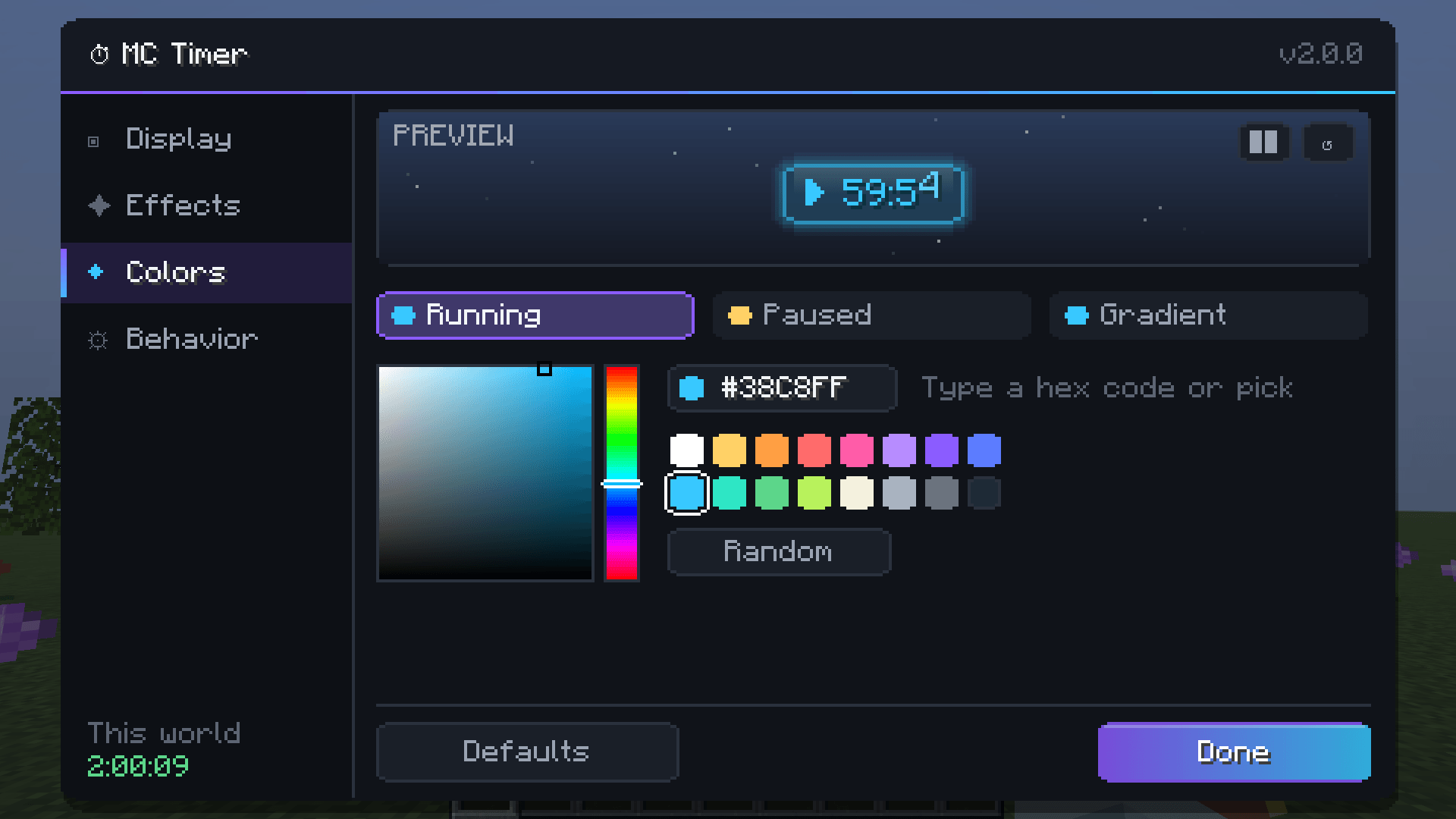
| **Colours** | Own colours for *running*, *paused* and the gradient: HSV picker, 16 presets, hex code or random |
## ✨ Effects & animations
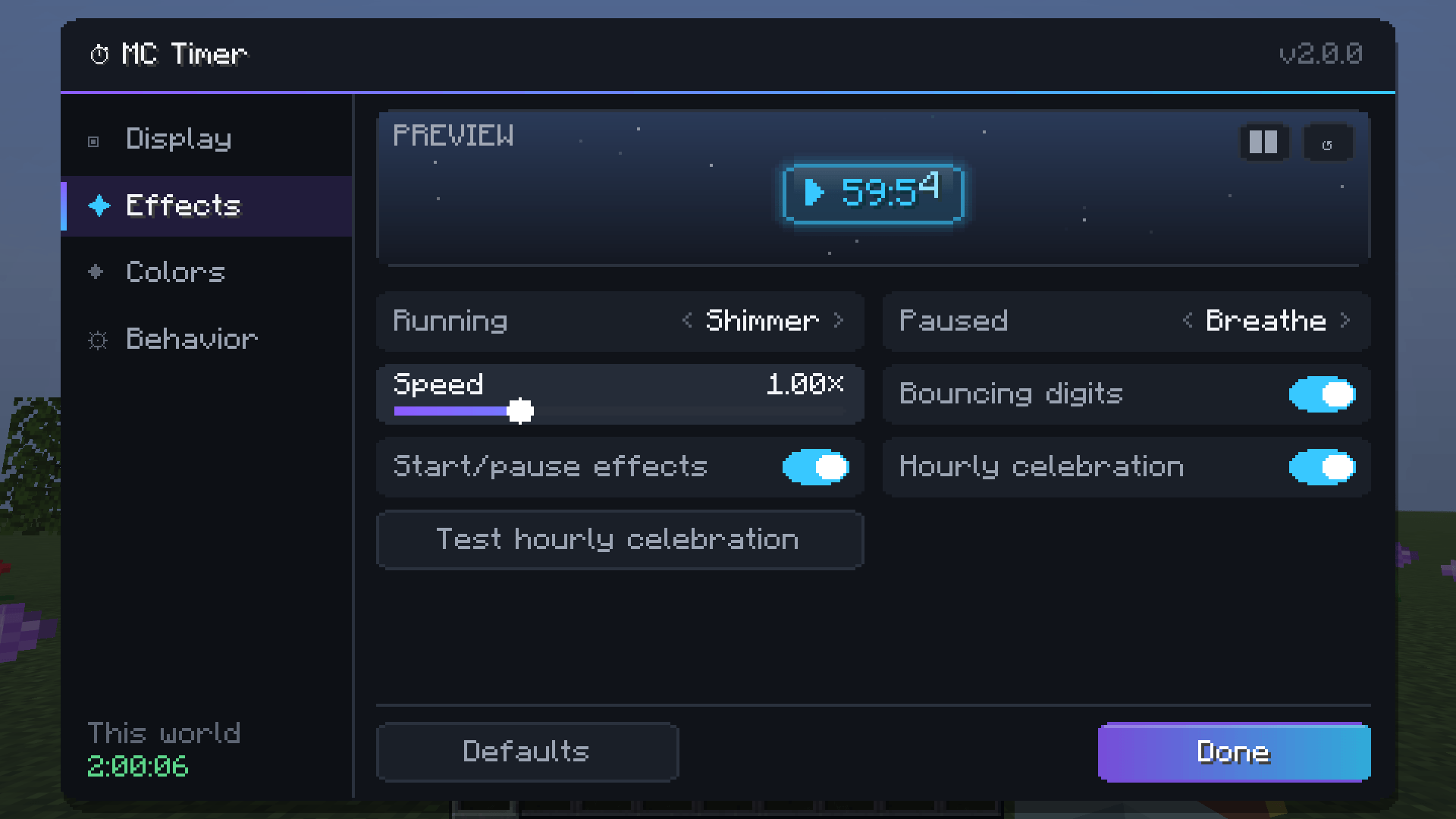
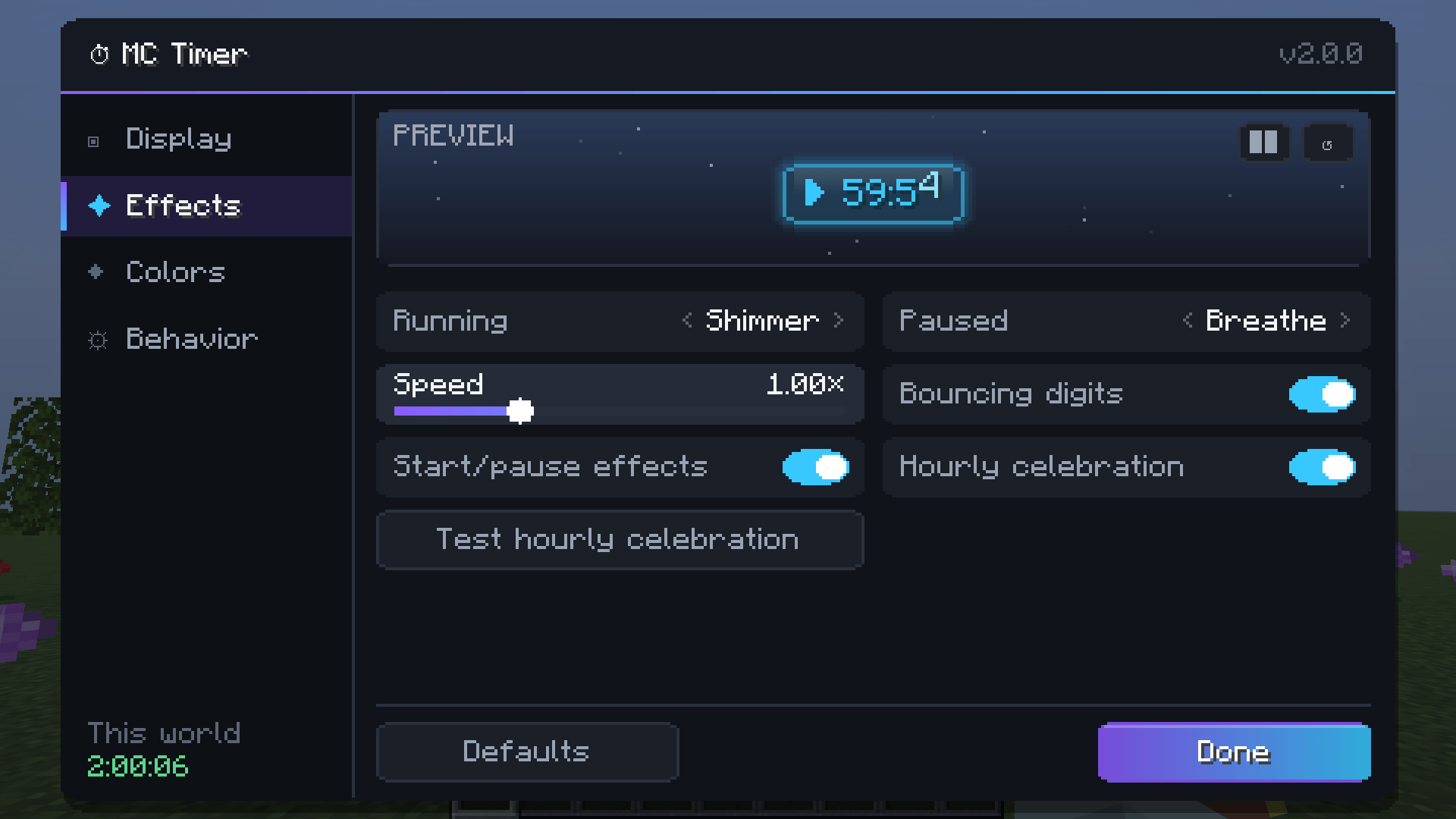
Pick one effect for while the timer **runs** and another for while it's **paused**:
| Effect | |
|---|---|
| **Rainbow** | A rainbow wave flowing through the digits |
| **Gradient** | Your two colours flowing back and forth |
| **Pulse** | Brightness pulsing like a heartbeat |
| **Breathe** | Gently fading in and out (default while paused) |
| **Shimmer** | A highlight sweeping across the digits |
| **Wave** | The digits bob up and down |
| **None** | Calm and static |
Plus, all optional and with adjustable speed:
- **Start**: the timer pops up with a short flash
- **Pause**: the colour fades smoothly to the paused colour
- **Reset**: fades out and drifts away
- **Ticking digits**: every digit that changes hops and lights up briefly
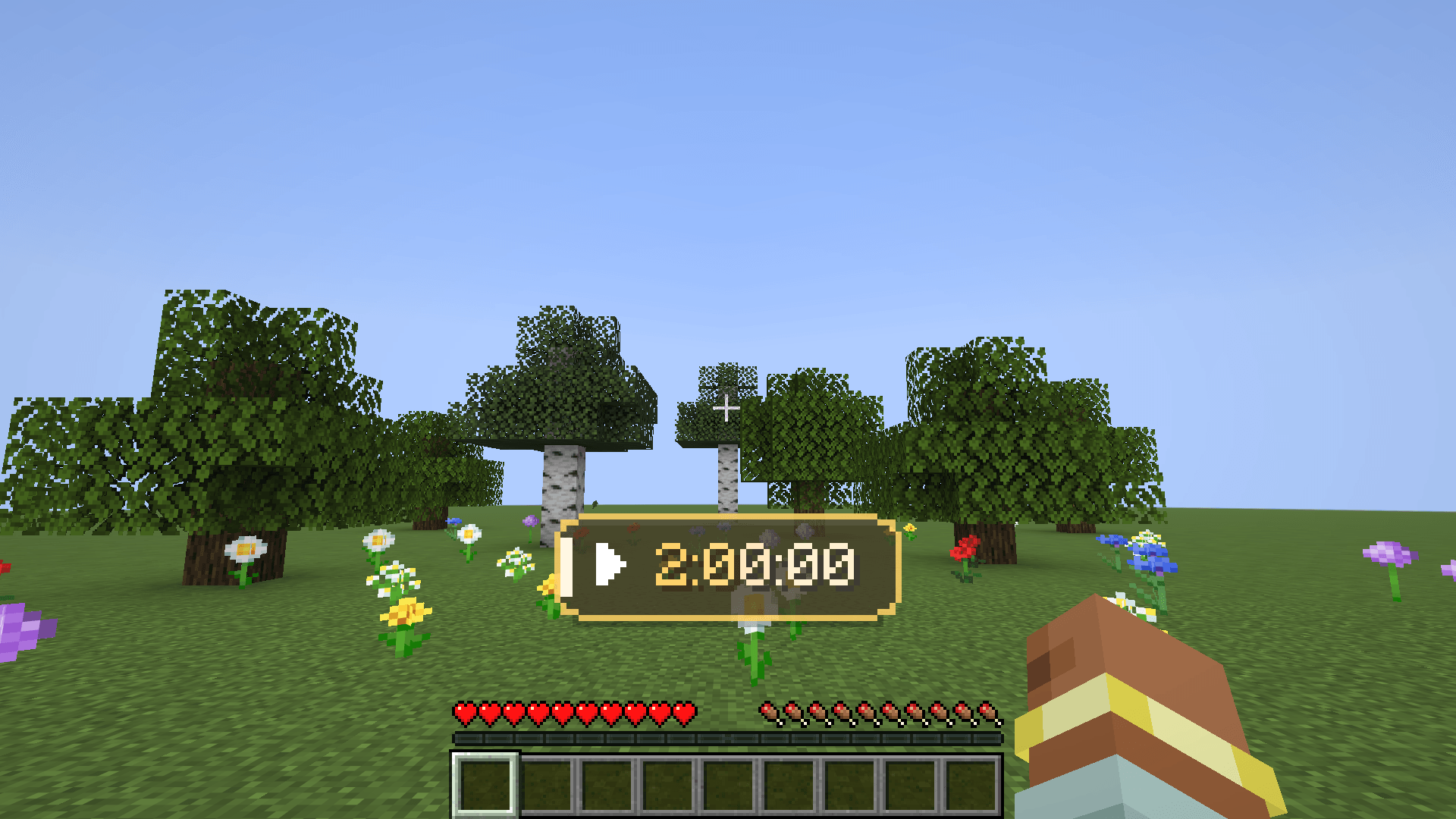
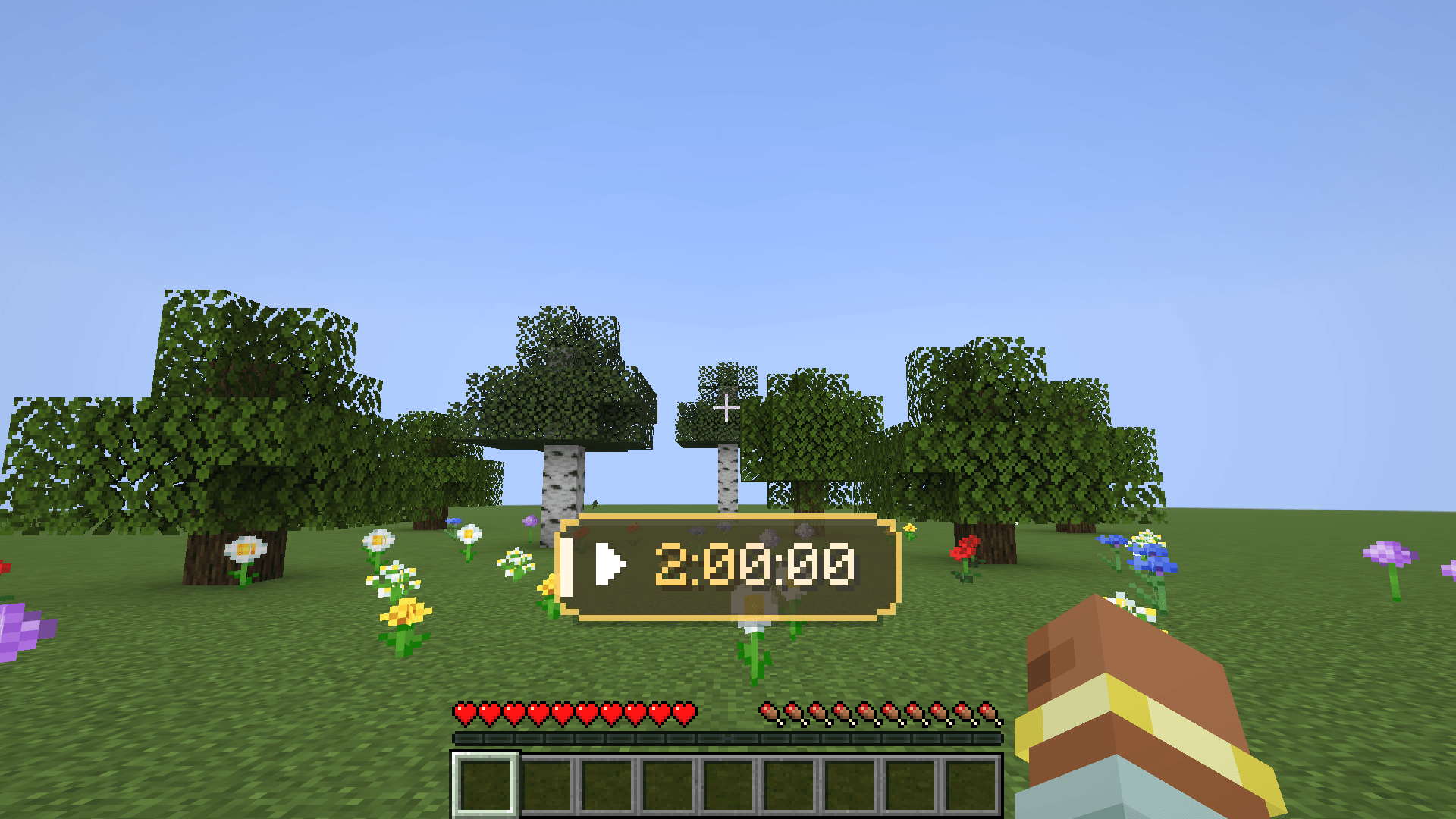
- **Hourly celebration**: at every full hour the timer lights up gold, with a level-up sound if you like
## 🛠 Settings
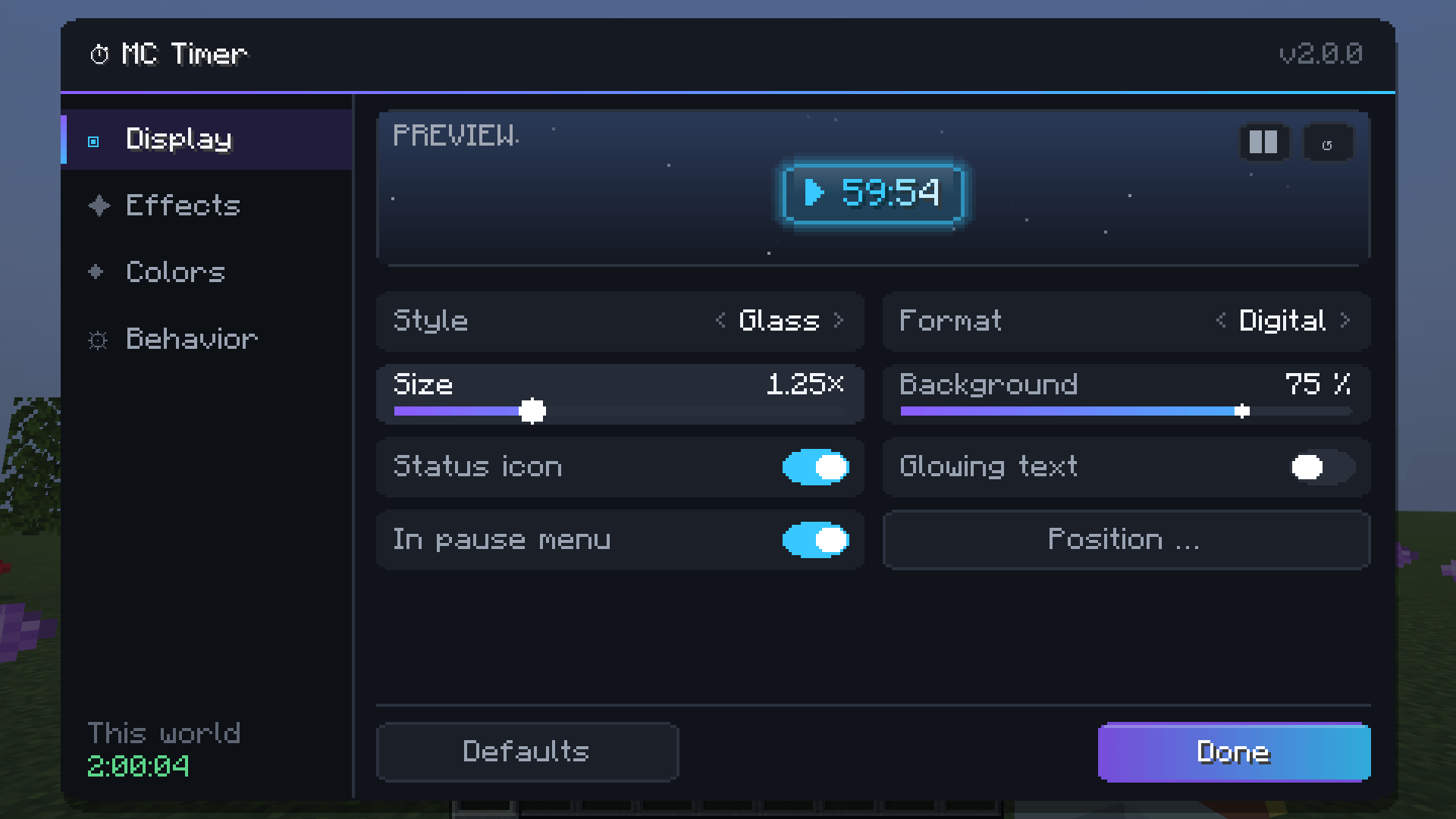
Open them with **Mod Menu**, `/timer settings` or a key. Four tabs (*Display*, *Effects*, *Colours*, *Behaviour*) and a
**live preview** with its own demo timer. It starts at 59:52, so you can see the hourly celebration within seconds.
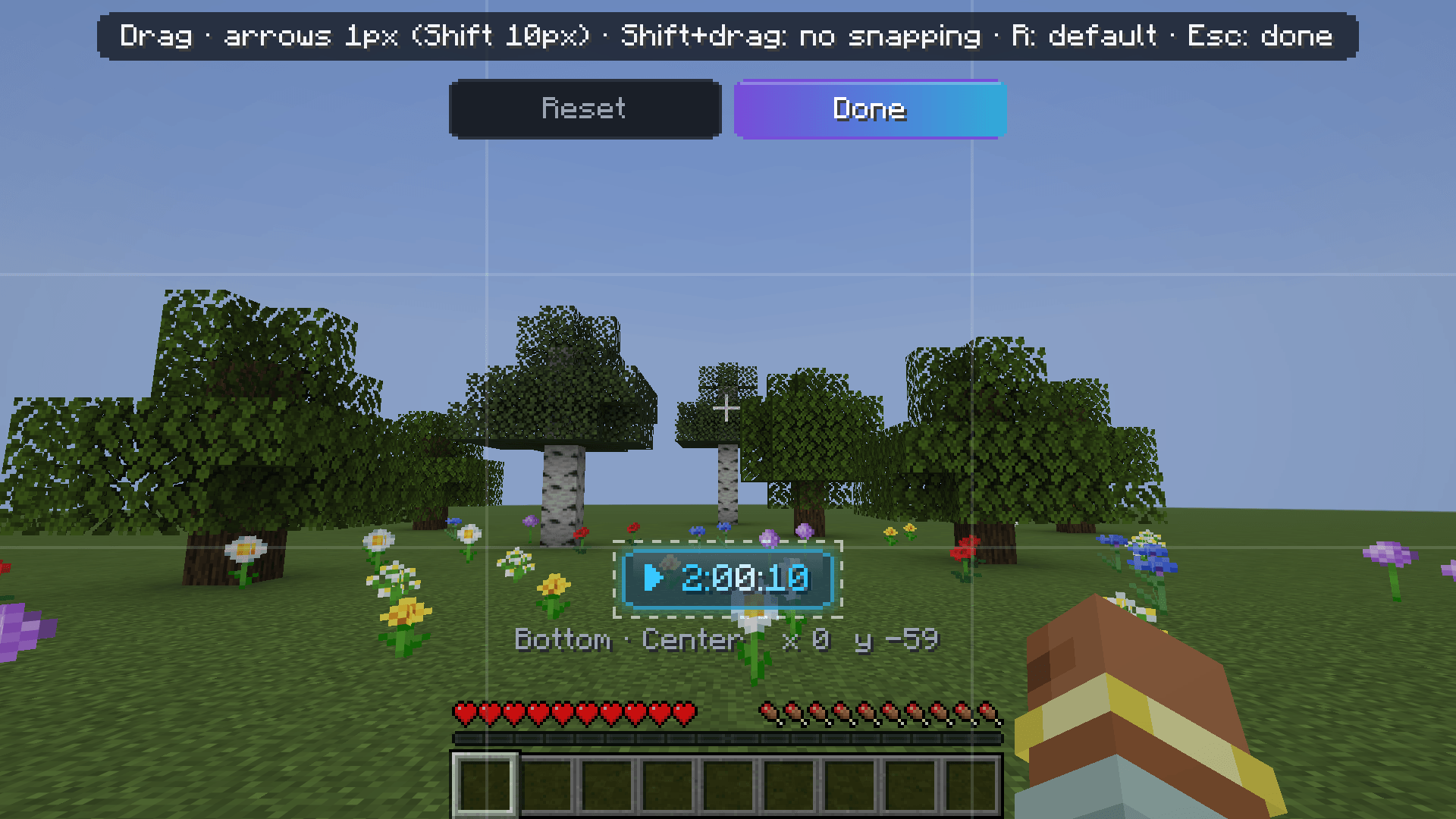
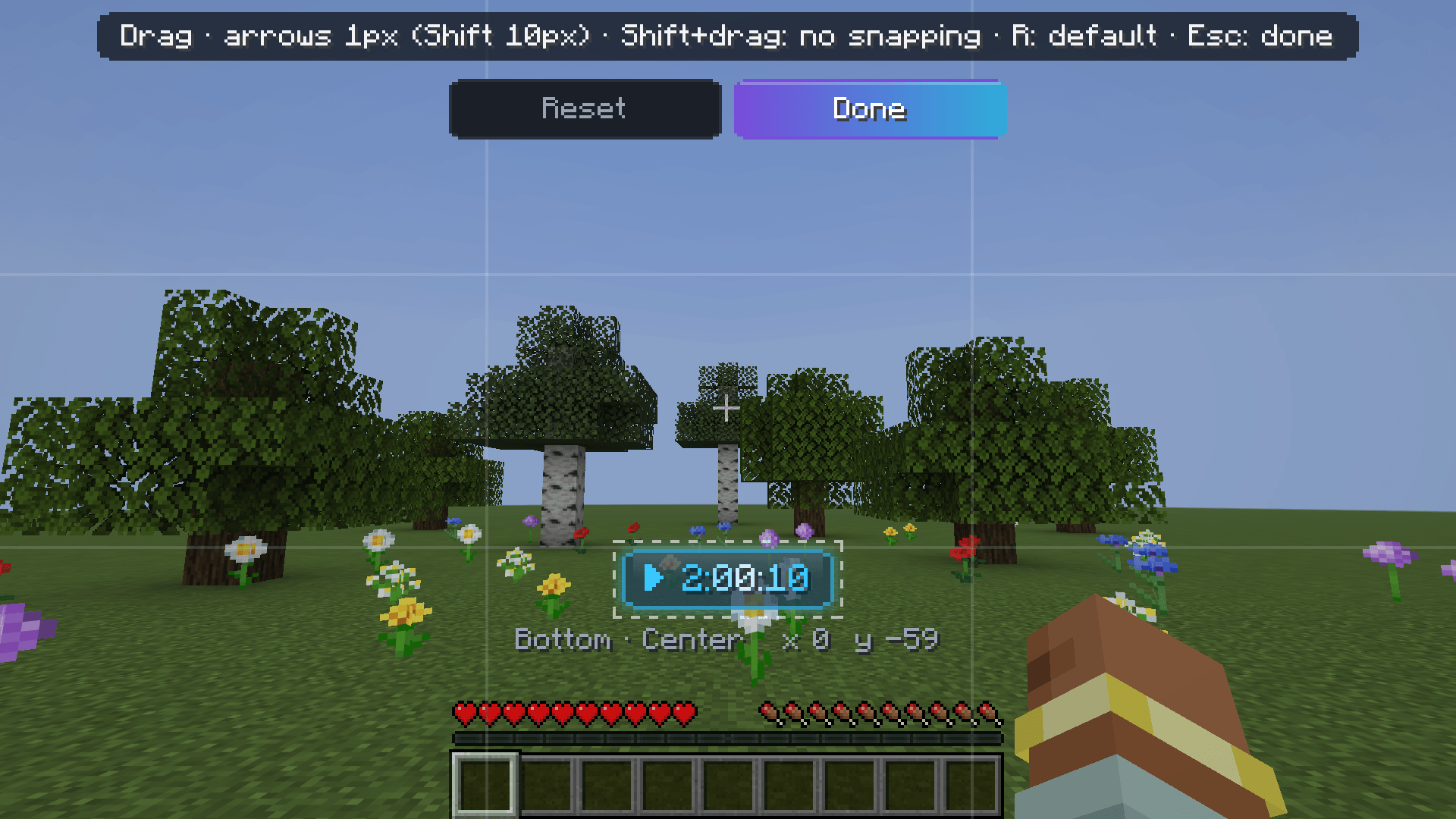
**Position editor:** drag the timer wherever you want. It snaps to the corners, edges and centre (with guide lines),
arrow keys nudge it pixel by pixel, and it stays anchored to its edge when you resize the window.
**Behaviour:**
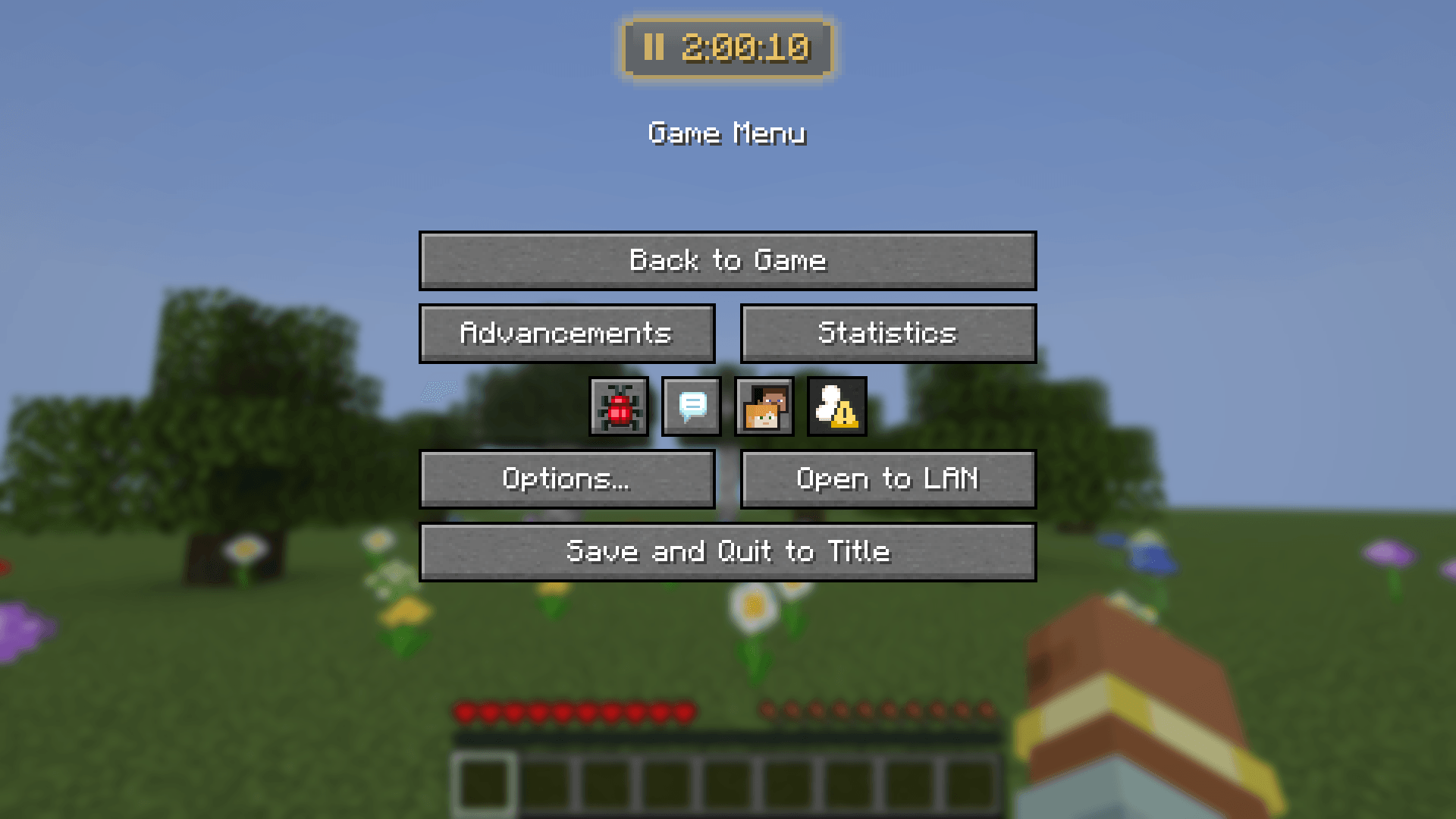
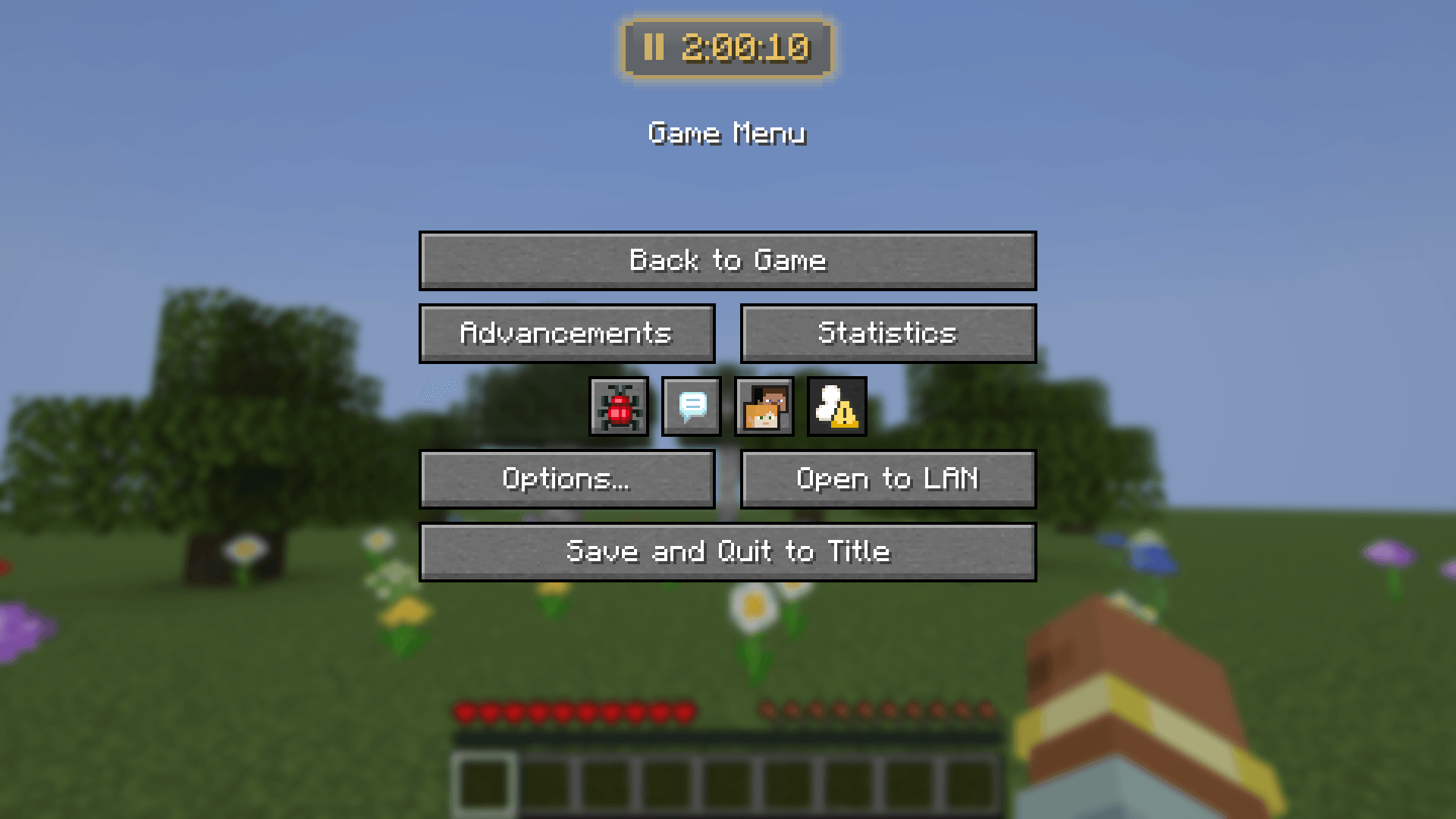
- **Pause menu**: the timer stays sharp on top of the pause menu instead of blurred behind it
- **Pause with game**: in singleplayer, the timer stops while the game is paused
- **Resume on join**: a timer that was running when you left continues when you come back
- **Sounds** on or off
## 📦 Requirements
- Minecraft **26.2** or **26.3** with **Fabric Loader** 0.20.1 or newer (pick the matching file)
- **[Fabric API](https://www.curseforge.com/minecraft/mc-mods/fabric-api)**
- Optional: **[Mod Menu](https://www.curseforge.com/minecraft/mc-mods/modmenu)** for the settings button. Without it, use `/timer settings`
or a key.
- Also works in **Lunar Client**'s Fabric profiles
## ❓ FAQ
**Do other players or the server need the mod?** No. Everything happens on your client, so it works on any server.
**Does the timer keep running when I leave the world?** No. It pauses when you leave and continues when you come back.
You can turn that off with *Resume on join*.
**Are timers shared between worlds?** No. Every singleplayer world and every server has its own timer.
**Can I use it for speedruns?** Yes. Use the *Precise* format for hundredths. Turn on *Pause with game* if you want
pauses not to count.
**I'm coming from 1.0.x. Do I lose my time?** No. Settings and timers are carried over automatically. Versions 1.0.x
for Minecraft 1.21.4–1.21.10 stay available in the version list.
**Where are the files?** `config/mctimer.json` (settings) and `config/mctimer_timers.json` (timers).
---
<details>
<summary><b>🇩🇪 Deutsch</b></summary>
**Ein Timer auf deinem HUD für Challenges, Speedruns und lange Survival-Welten.** Jede Welt und jeder Server hat einen
eigenen Timer, der automatisch gespeichert wird.
**Befehle:** `/timer` (zeigt die Zeit), `/timer start`, `pause`, `toggle`, `reset`, `set 1h30m`, `add 5m`, `settings`.
Optionale Tasten unter *Steuerung → BetterTimer*. Zurücksetzen muss man zweimal drücken.
**Aussehen**
- 3 Stile: Minimal, Panel, Glas (mit weichem Leuchten)
- 3 Formate: Klassisch `1h 2m 3s`, Digital `1:02:03`, Präzise `00:05.27`
- Größe 0,5× bis 3×, Hintergrund, Status-Symbol, Leuchtschrift
- Eigene Farben für „läuft“, „pausiert“ und den Verlauf: Farbwähler, Vorlagen, Hex-Code
**Effekte:** Regenbogen, Farbverlauf, Pulsieren, Atmen, Schimmer, Welle. Getrennt für „läuft“ und „pausiert“ wählbar.
**Animationen:** Aufploppen beim Start, Farbwechsel beim Pausieren, Ausblenden beim Zurücksetzen, hüpfende Ziffern und
eine goldene Feier zu jeder vollen Stunde.
**Einstellungen** mit Live-Vorschau (Mod Menu, `/timer settings` oder Taste) und ein **Positions-Editor**, in dem du
den Timer mit der Maus verschiebst. Er rastet an Ecken, Kanten und der Mitte ein.
**Außerdem:** Der Timer bleibt über dem Pausenmenü scharf, pausiert auf Wunsch mit dem Spiel (Einzelspieler) und läuft
beim Wiederbetreten einer Welt weiter.
**Voraussetzungen:** Minecraft 26.2 oder 26.3, Fabric Loader, Fabric API. Optional: Mod Menu. Läuft auch im Lunar Client.
Komplett clientseitig, funktioniert auf jedem Server.
</details>
BetterTimer
A timer on your HUD for challenges, speedruns and long survival worlds. Every world and every server gets its own timer, it's saved automatically, and it looks good enough that you'll want to leave it on.

- ⏱ One timer per world and server: leaving pauses it, coming back continues it
- 🎨 3 styles, 3 formats, any colour: Minimal, Panel or Glass, with an HSV colour picker
- ✨ 7 animated effects and animations for start, pause, reset and every full hour
- 🛠 Settings with a live preview and a drag-and-drop position editor
- 💻 Client-side only: works on every server, nobody else needs the mod
⏱ Commands & keys
| Command | What it does |
|---|---|
/timer |
Shows the current time |
/timer start · /timer pause · /timer toggle |
Start, pause or switch between them |
/timer reset |
Back to zero (fades out on screen) |
/timer set <time> |
Set the time, e.g. 1h30m, 90m, 1:30:00, 45 |
/timer add <time> |
Add time, e.g. 5m |
/timer settings |
Opens the settings |
Optional keys for start/pause, reset and settings under Controls → BetterTimer (unbound by default). Reset has to be pressed twice, so a stray key press can't throw away hours of progress.
🎨 Looks
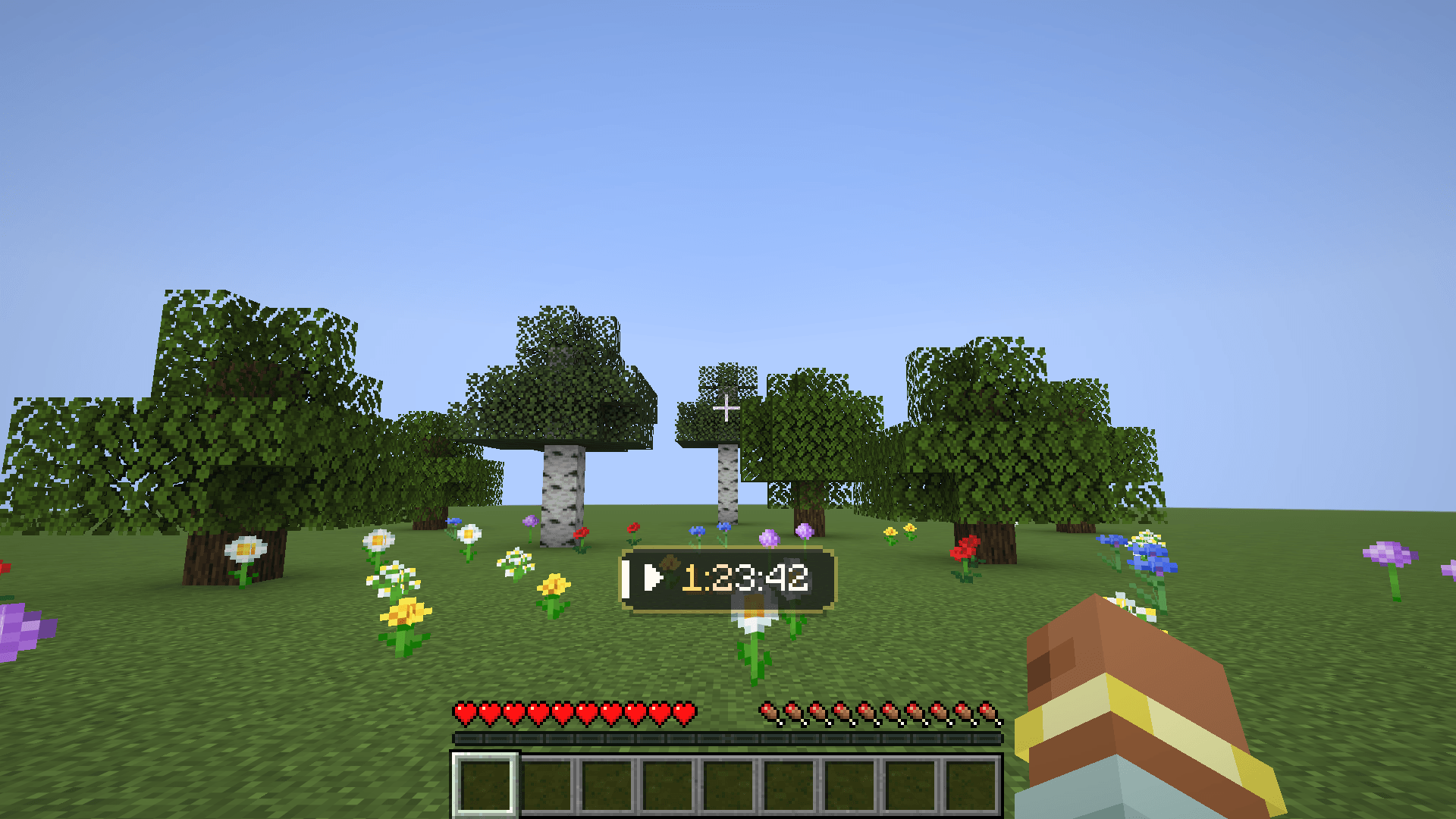
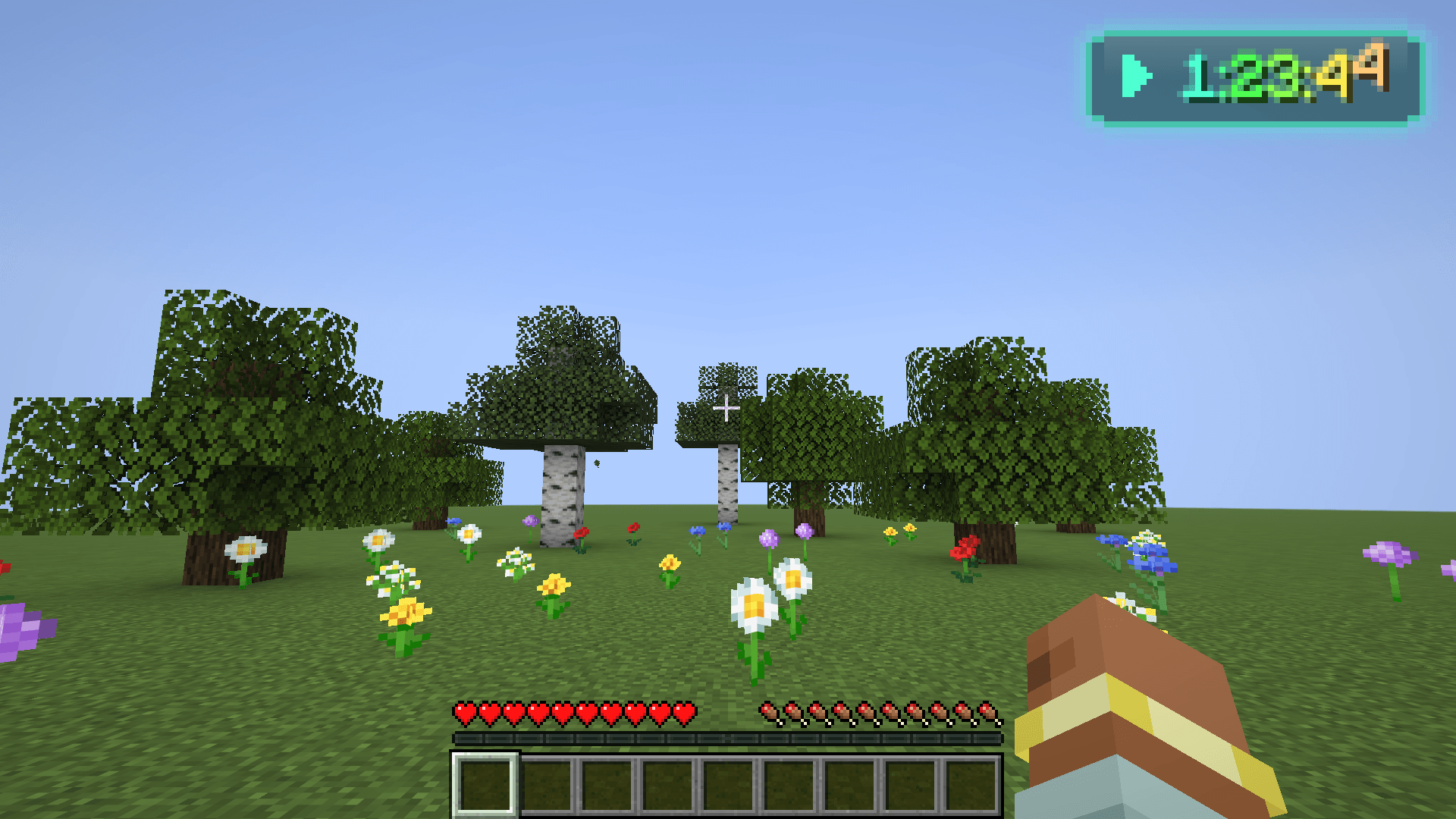
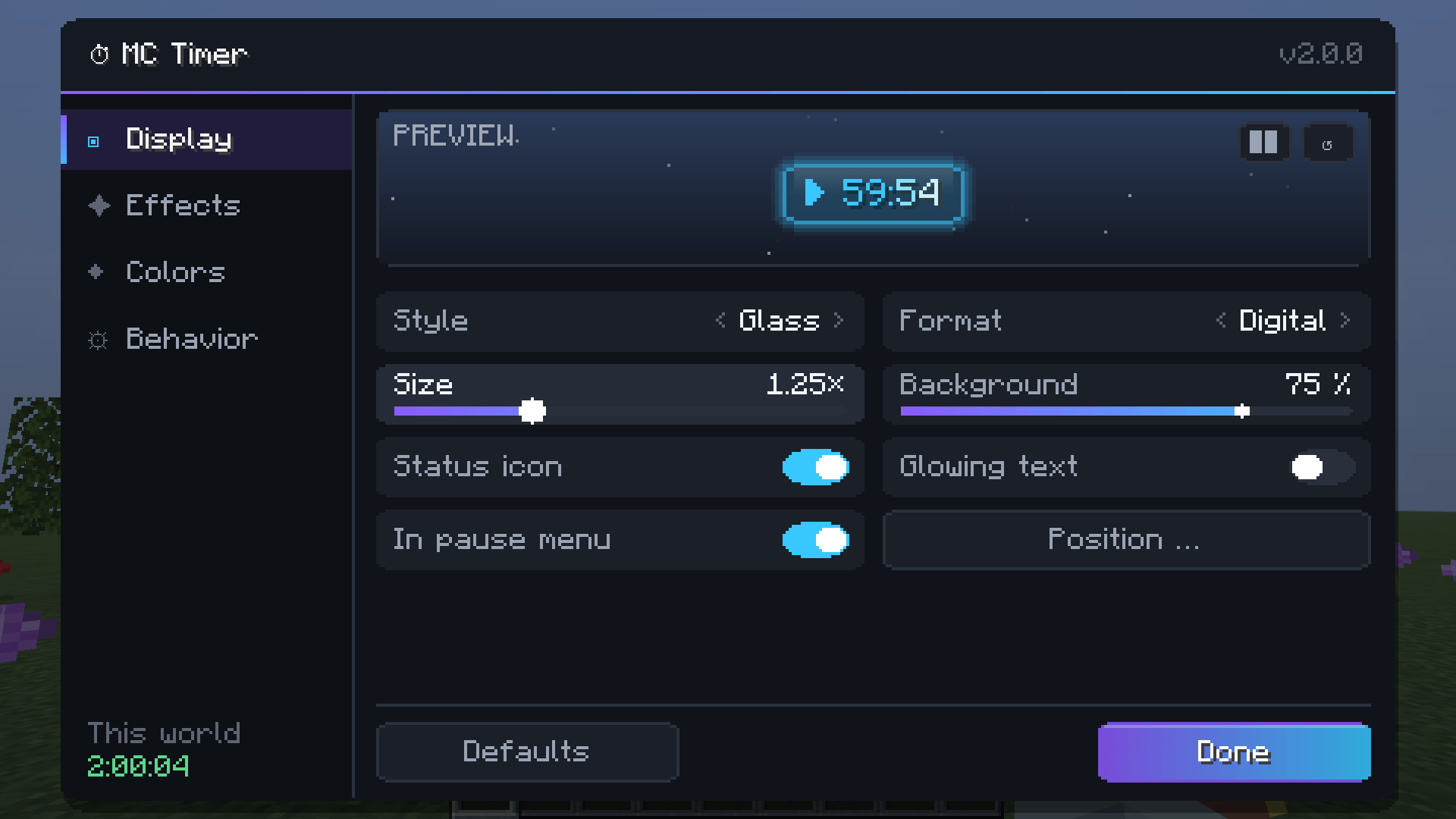
| Styles | Minimal (just the digits), Panel (clean dark panel with accent stripe), Glass (translucent with a soft, breathing glow) |
| Formats | Classic 1h 2m 3s · Digital 1:02:03 · Precise 00:05.27 (hundredths) |
| Size | 0.5× to 3× |
| Extras | Background opacity, status icon (▶ / ❚❚), glowing text |
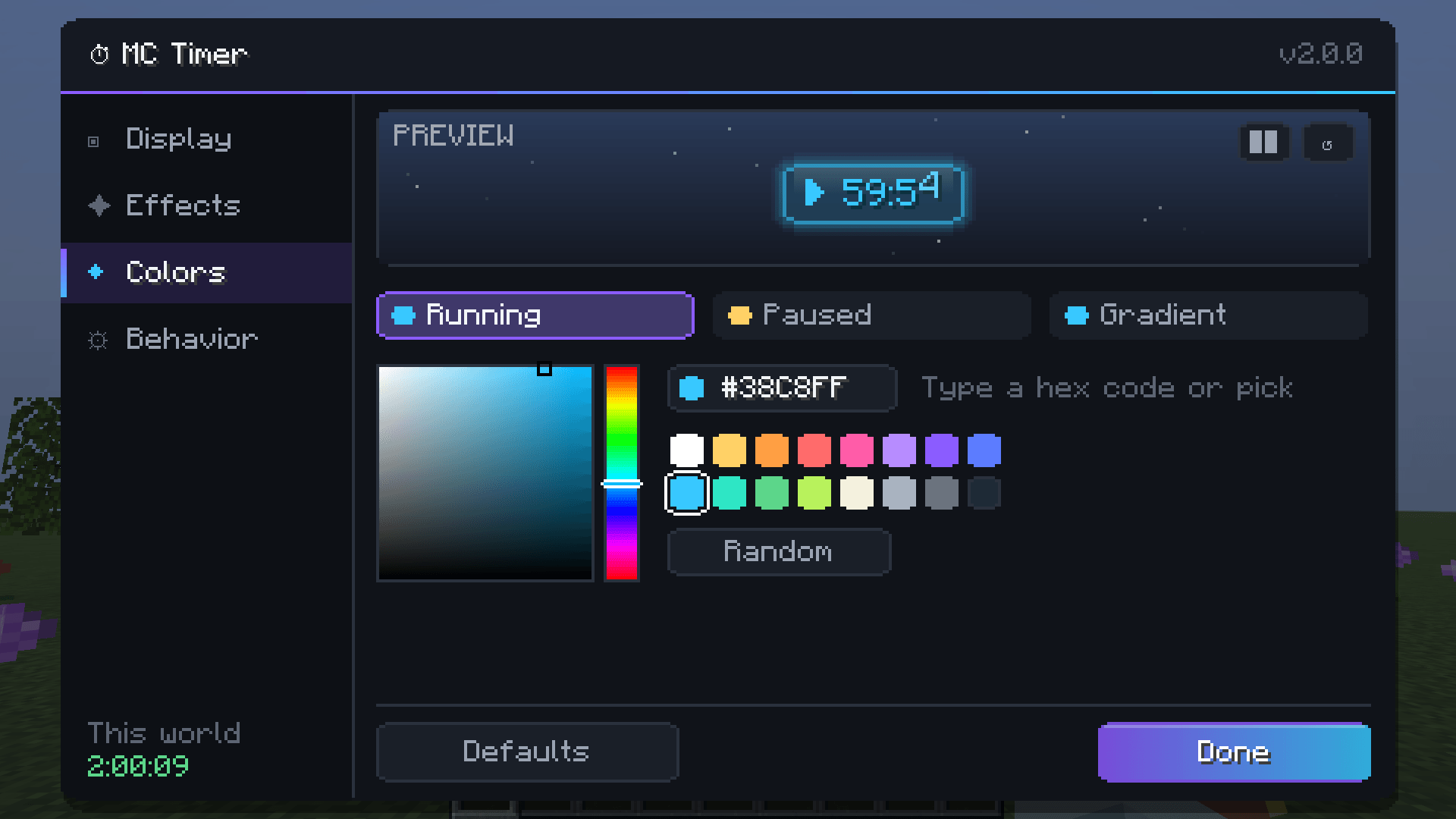
| Colours | Own colours for running, paused and the gradient: HSV picker, 16 presets, hex code or random |

✨ Effects & animations
Pick one effect for while the timer runs and another for while it's paused:
| Effect | |
|---|---|
| Rainbow | A rainbow wave flowing through the digits |
| Gradient | Your two colours flowing back and forth |
| Pulse | Brightness pulsing like a heartbeat |
| Breathe | Gently fading in and out (default while paused) |
| Shimmer | A highlight sweeping across the digits |
| Wave | The digits bob up and down |
| None | Calm and static |
Plus, all optional and with adjustable speed:
- Start: the timer pops up with a short flash
- Pause: the colour fades smoothly to the paused colour
- Reset: fades out and drifts away
- Ticking digits: every digit that changes hops and lights up briefly
- Hourly celebration: at every full hour the timer lights up gold, with a level-up sound if you like

🛠 Settings
Open them with Mod Menu, /timer settings or a key. Four tabs (Display, Effects, Colours, Behaviour) and a
live preview with its own demo timer. It starts at 59:52, so you can see the hourly celebration within seconds.

Position editor: drag the timer wherever you want. It snaps to the corners, edges and centre (with guide lines), arrow keys nudge it pixel by pixel, and it stays anchored to its edge when you resize the window.

Behaviour:
- Pause menu: the timer stays sharp on top of the pause menu instead of blurred behind it
- Pause with game: in singleplayer, the timer stops while the game is paused
- Resume on join: a timer that was running when you left continues when you come back
- Sounds on or off
📦 Requirements
- Minecraft 26.2 or 26.3 with Fabric Loader 0.20.1 or newer (pick the matching file)
- Fabric API
- Optional: Mod Menu for the settings button. Without it, use
/timer settingsor a key. - Also works in Lunar Client's Fabric profiles
❓ FAQ
Do other players or the server need the mod? No. Everything happens on your client, so it works on any server.
Does the timer keep running when I leave the world? No. It pauses when you leave and continues when you come back. You can turn that off with Resume on join.
Are timers shared between worlds? No. Every singleplayer world and every server has its own timer.
Can I use it for speedruns? Yes. Use the Precise format for hundredths. Turn on Pause with game if you want pauses not to count.
I'm coming from 1.0.x. Do I lose my time? No. Settings and timers are carried over automatically. Versions 1.0.x for Minecraft 1.21.4–1.21.10 stay available in the version list.
Where are the files? config/mctimer.json (settings) and config/mctimer_timers.json (timers).
🇩🇪 Deutsch
Ein Timer auf deinem HUD für Challenges, Speedruns und lange Survival-Welten. Jede Welt und jeder Server hat einen eigenen Timer, der automatisch gespeichert wird.
Befehle: /timer (zeigt die Zeit), /timer start, pause, toggle, reset, set 1h30m, add 5m, settings.
Optionale Tasten unter Steuerung → BetterTimer. Zurücksetzen muss man zweimal drücken.
Aussehen
- 3 Stile: Minimal, Panel, Glas (mit weichem Leuchten)
- 3 Formate: Klassisch
1h 2m 3s, Digital1:02:03, Präzise00:05.27 - Größe 0,5× bis 3×, Hintergrund, Status-Symbol, Leuchtschrift
- Eigene Farben für „läuft“, „pausiert“ und den Verlauf: Farbwähler, Vorlagen, Hex-Code
Effekte: Regenbogen, Farbverlauf, Pulsieren, Atmen, Schimmer, Welle. Getrennt für „läuft“ und „pausiert“ wählbar.
Animationen: Aufploppen beim Start, Farbwechsel beim Pausieren, Ausblenden beim Zurücksetzen, hüpfende Ziffern und eine goldene Feier zu jeder vollen Stunde.
Einstellungen mit Live-Vorschau (Mod Menu, /timer settings oder Taste) und ein Positions-Editor, in dem du
den Timer mit der Maus verschiebst. Er rastet an Ecken, Kanten und der Mitte ein.
Außerdem: Der Timer bleibt über dem Pausenmenü scharf, pausiert auf Wunsch mit dem Spiel (Einzelspieler) und läuft beim Wiederbetreten einer Welt weiter.
Voraussetzungen: Minecraft 26.2 oder 26.3, Fabric Loader, Fabric API. Optional: Mod Menu. Läuft auch im Lunar Client. Komplett clientseitig, funktioniert auf jedem Server.
Screenshots
Gallery
-
 09_pause_menu.png 09_pause_menu.png
-
 08_position_editor.png 08_position_editor.png
-
 07_settings_colors.png 07_settings_colors.png
-
 06_settings_effects.png 06_settings_effects.png
-
 05_settings_display.png 05_settings_display.png
-
 04_minimal_gradient.png 04_minimal_gradient.png
-
 01_hud_panel.png 01_hud_panel.png
-
 02_glass_rainbow.png 02_glass_rainbow.png
-
 03_hour_celebration.png 03_hour_celebration.png
-
 01_hud_panel.png 01_hud_panel.png
-
 02_glass_rainbow.png 02_glass_rainbow.png
-
 03_hour_celebration.png 03_hour_celebration.png
-
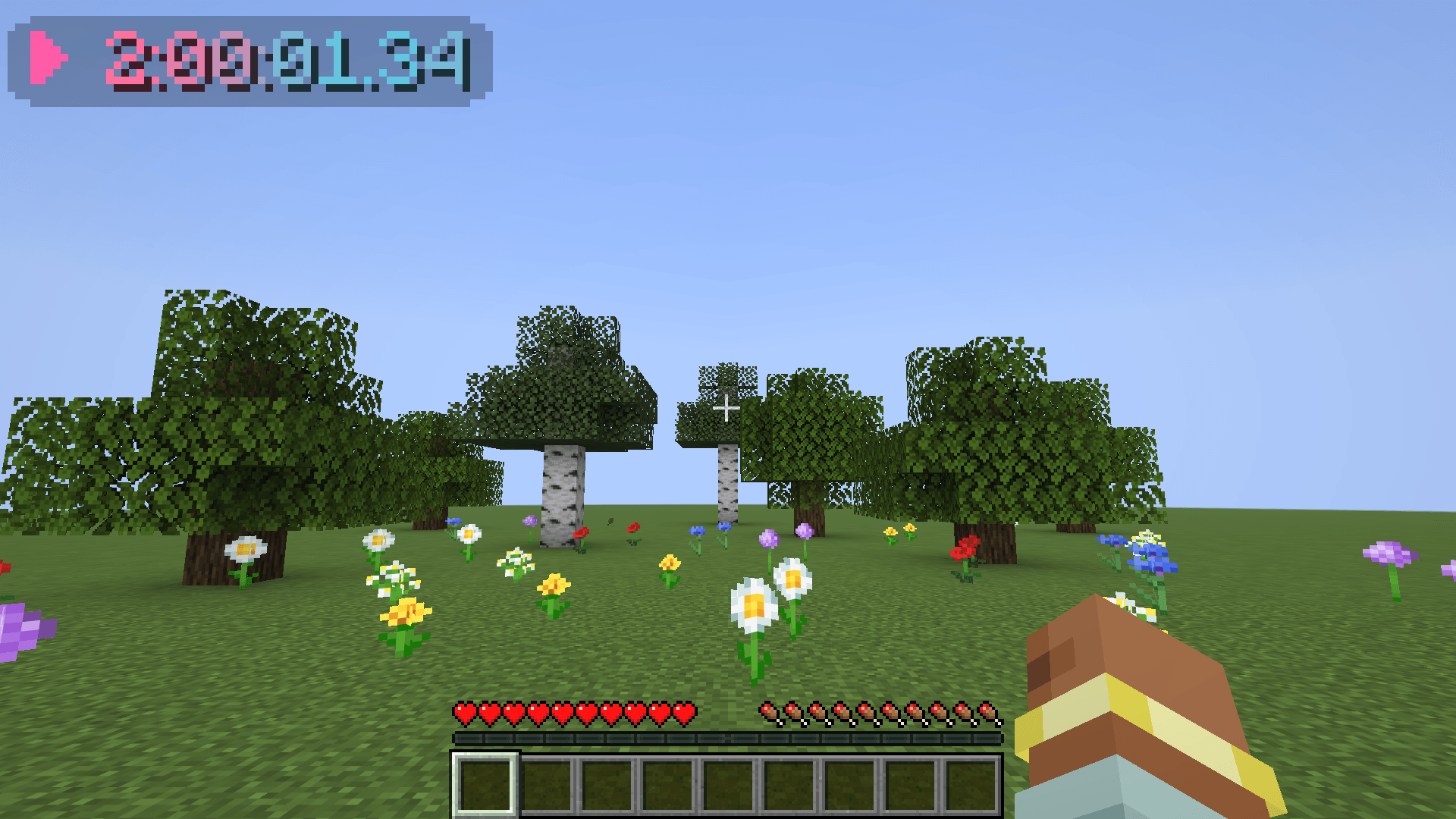 04_minimal_gradient.png 04_minimal_gradient.png
-
 05_settings_display.png 05_settings_display.png
-
 06_settings_effects.png 06_settings_effects.png
-
 07_settings_colors.png 07_settings_colors.png
-
 08_position_editor.png 08_position_editor.png
-
 09_pause_menu.png 09_pause_menu.png
-
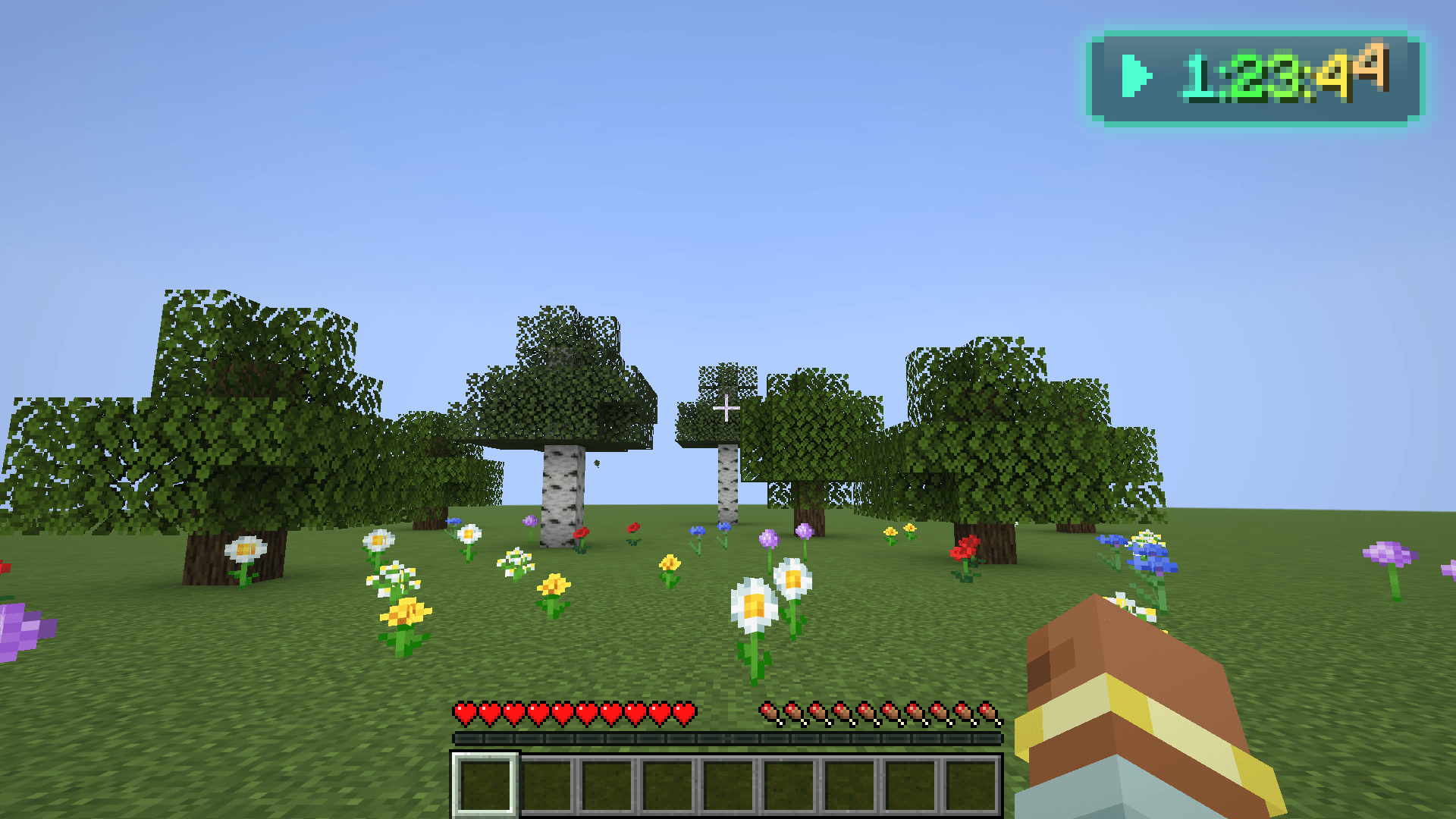
Glass + rainbow Glass style with a soft glow, the rainbow wave effect and glowing text, top right at 2×.
-
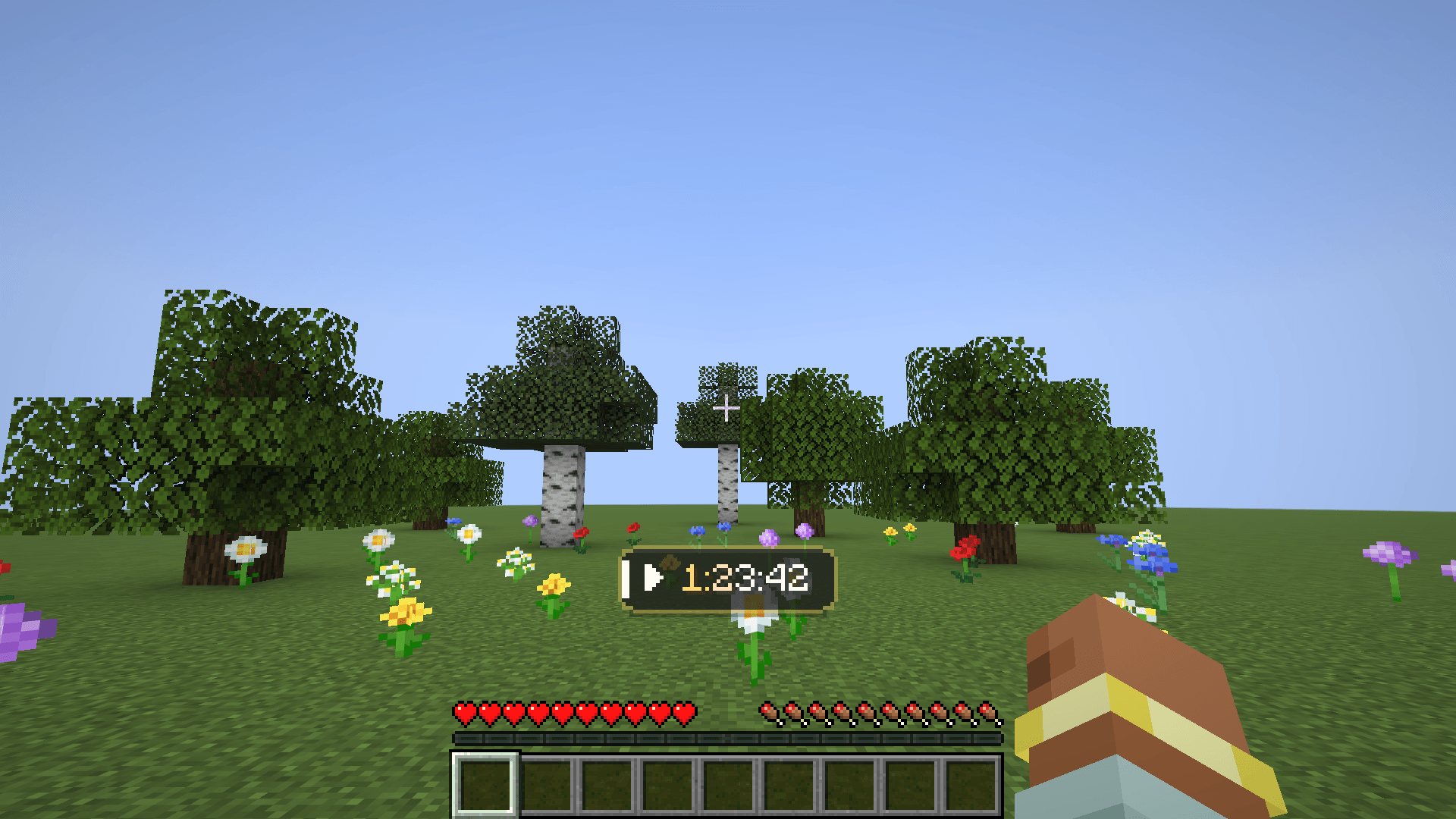
 Panel style The default look: a clean panel above the hotbar with a status icon.
-
Hourly celebration Every full hour the timer lights up gold (with a sound, if you like).
-
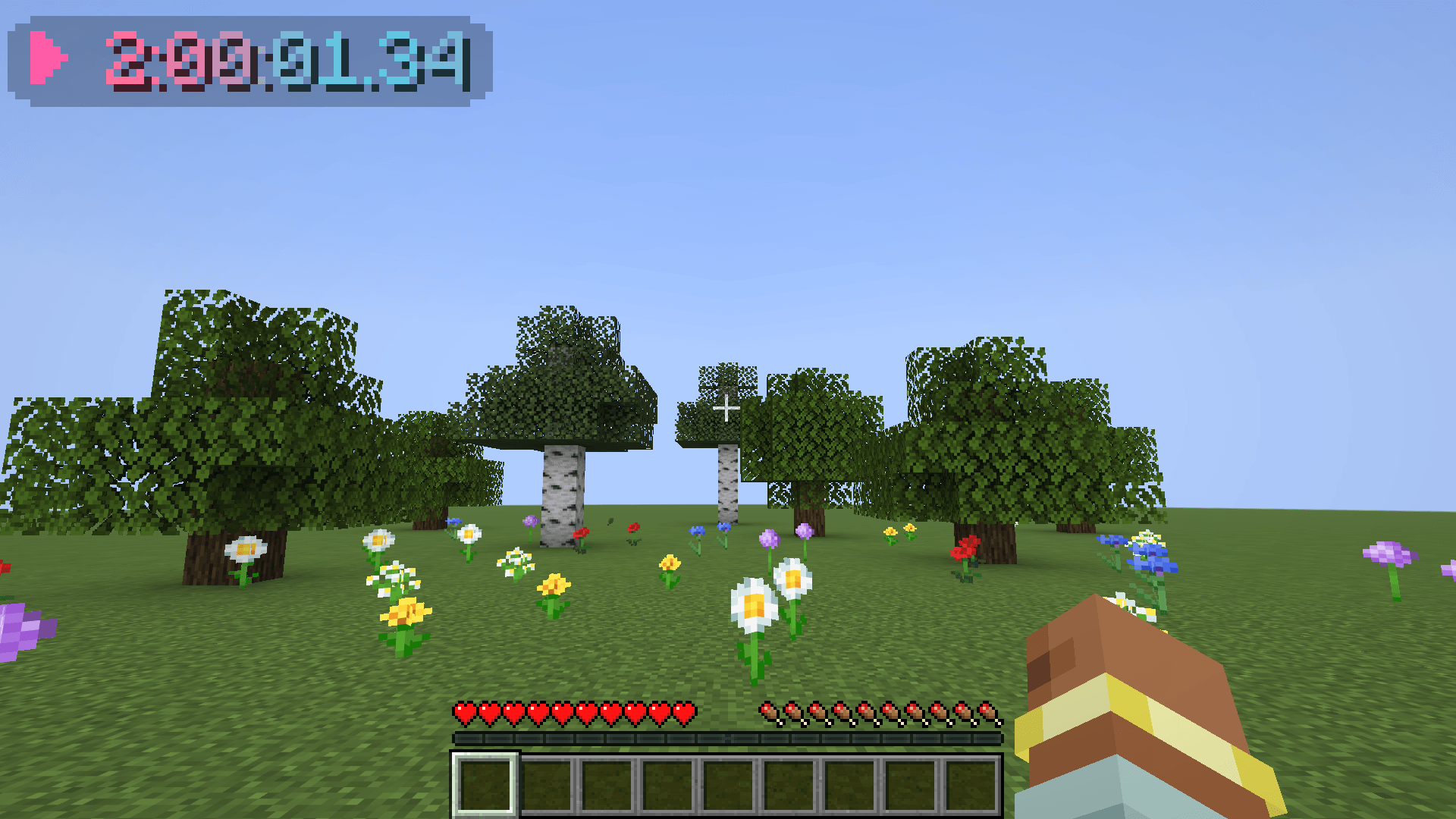
Minimal + gradient Just the digits: a flowing two-colour gradient and the precise format with hundredths.
-
Settings with live preview Style, format, size and background: the preview shows every change right away.
-
 Effects Separate effects while running and while paused, speed, ticking digits and more.
-
 Colour picker HSV picker, presets and hex input for the running, paused and gradient colours.
-
Position editor Drag the timer anywhere; it snaps to corners, edges and the centre.
-
 Pause menu The timer stays sharp on top of the pause menu, clear of the buttons.
Versions
Files
Relations
Project Relations
More like this
Similar Mods
Suggestions use data such as tags, dependencies, dependents, descriptions, titles, and more to rank how much they overlap with this mod.
On ModDex
Community snapshot
By the numbers
Statistics

Get it on
Available Platforms
On ModDex
Community snapshot
By the numbers
Statistics
Resources