
Community listing page, reviews here may not be monitored by the author.
Better TNT Minecart

No reviews yet
Recolor your cart hitbox like u want. You can also add a label :)
Community voices
Reviews
No reviews yet. Be the first to review this project!
Get it on
Available Platforms
Compatibility
Supported Environments
Runs entirely on the client. Works on vanilla servers.
About
Project Details
For authors
Embed Badge
If you're the author of this project, you can embed a live badge anywhere that supports HTML or Markdown. It updates automatically whenever ratings change.
Use HTML for any page that supports it, or Markdown for README files and Markdown-based descriptions.
Identifiers
Platform IDs
About
Description
Have you ever wanted to know exactly where your TNT minecarts are without pressing F3+B every time? Or maybe you just want to make them look cooler? BetterTNTMinecart is a lightweight client-side Fabric mod that gives you full visual control over TNT minecarts in Minecraft 1.21 and above.
Colored Hitbox 😍
The mod draws a colored outline box around every TNT minecart in your view. The outline works just like the vanilla F3+B hitbox, but it is always visible without needing to toggle debug mode. You can pick any color you want using the built-in color picker, adjust the opacity so it does not clutter your screen, and change the line thickness to your preference. If a single color is not enough, you can enable Rainbow RGB mode which smoothly cycles through the entire color spectrum. The speed of the rainbow cycle is also adjustable.
Custom Label 😺
Each TNT minecart can display a floating name tag above it, similar to how a name tag item works on mobs. The label text is fully customizable. You can type anything you want, or you can use MiniMessage gradient format generated by Birdflop to create beautiful multi-color gradient text. Just go to rgb.birdflop.com, design your gradient, select MiniMessage as the output format, copy the result, and paste it directly into the Label Text field in the config. The label respects walls and distance just like a regular name tag.
In-Game Configuration ⚙️
All settings are accessible through a clean in-game config screen powered by Cloth Config. You can open it from the ModMenu mod list by clicking the gear icon next to BetterTNTMinecart, or by pressing a keybind that you can assign in Options > Controls > Miscellaneous. No need to edit any files manually.
Requirements ‼️
- Fabric Loader 0.19+
- Fabric API
- Cloth Config
- ModMenu (optional, but recommended for easy access to settings)
- Compatibility
The mod is client-side only. It works on any server without needing to be installed server-side. Compatible with Minecraft 1.21 and all 1.21.x versions.
Screenshots
Gallery
-
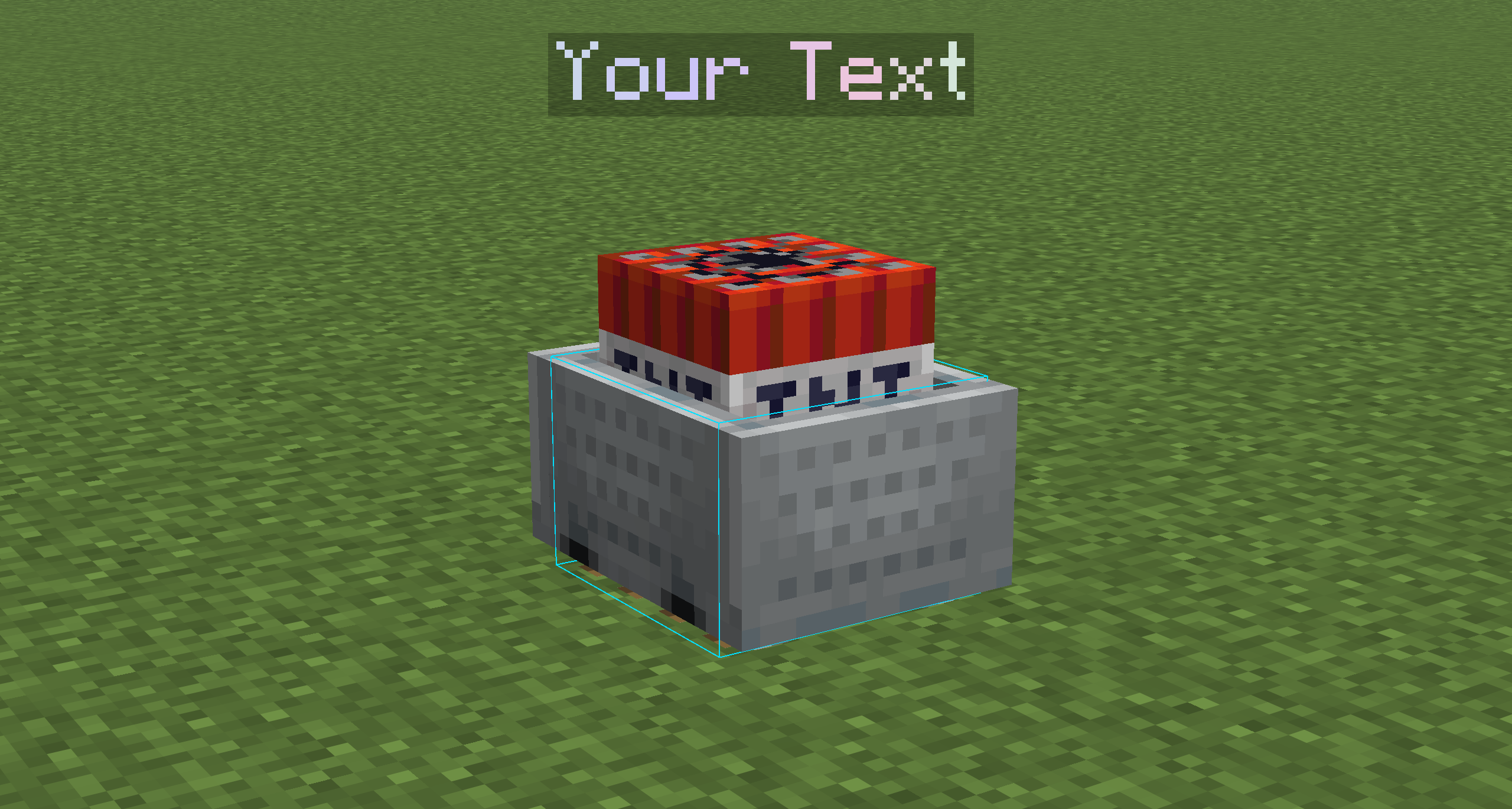 In-Game View RGB Cart Hitbox + Your Text(you can change it use MiniMessage style)
Versions
Files
Relations
Project Relations
More like this
Similar Mods
Suggestions use data such as tags, dependencies, dependents, descriptions, titles, and more to rank how much they overlap with this mod.
On ModDex
Community snapshot
By the numbers
Statistics

Want to reach Minecraft players?
We're looking for a server hosting partner to feature here and other parts of the site. Interested? Send us a message!
Get in touchGet it on
Available Platforms
On ModDex
Community snapshot
By the numbers