
Community listing page, reviews here may not be monitored by the author.
Big Items API

No reviews yet
A really simple library that allows developers to make items take up more inventory slots.
Community voices
Reviews
No reviews yet. Be the first to review this project!
Get it on
Available Platforms
Compatibility
Supported Environments
Must be installed on both the client and the server.
About
Project Details
For authors
Embed Badge
If you're the author of this project, you can embed a live badge anywhere that supports HTML or Markdown. It updates automatically whenever ratings change.
Use HTML for any page that supports it, or Markdown for README files and Markdown-based descriptions.
Identifiers
Platform IDs
Resources
External Links
About
Description
A simple to use library mod that allows mod developers to make their items take up more inventory space... for whatever reason you want to make people's lives harder
For players
Does nothing if installed not as a dependency or by itself!
For mod developers
Getting started:
- Import the .jar into your project root folder (or any folder branching from root)
- In your dependencies block in build.gradle add this line:
modImplementation(files("path/big-items-a1.2.3.jar"))
Usage:
- In an item class, implement silly.homak.bigitems.interfaces.IBigItem

IBigItem:
-
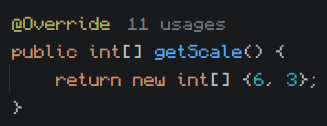
To set the item's scale override the getScale() array, has to return an array of 2 integers, this is the item's scale in slots on the X and Y axis.
-
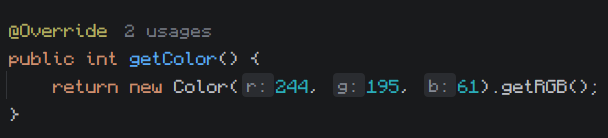
Big items have a rendered background that displays their actual scale, it's color is based on the average color of the item's texture (disregarding empty pixels). To set the background color explicitly override getColor(), has to return an integer color value.
-
The interface contains a boolean isScaled() that returns if the item is big or not, returns false in scenarios like being in the hotbar or a crafting block, has to be called on the client side.
Misc:
TextureUtils:
- Contains a bunch of helper methods for working with integer color values:
- darkenColor: Decreases an int color's brightness, accepts an integer color and a double factor, which has to be a decimal between 0 and 1, 1 being no effect and 0 being fully black.
- fadeColor: Decreases an int color's alpha, same arguments as the previous.
- darkenColor: Decreases an int color's saturation, same arguments as the previous.
- getAverageColor: Returns the mathematical average color of all pixels in an item's texture, disregards alpha.
Screenshots
Gallery
-
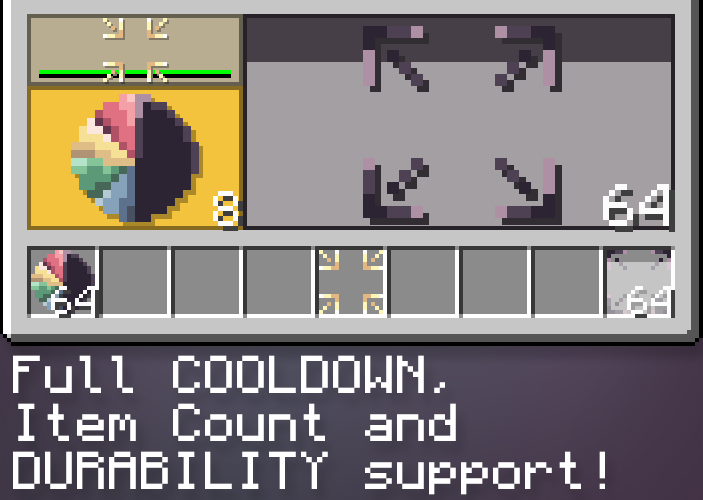 Supports all vanilla actions Cooldown, Dourability, Item Count support
Versions
Files
Relations
Project Relations
More like this
Similar Mods
Suggestions use data such as tags, dependencies, dependents, descriptions, titles, and more to rank how much they overlap with this mod.
On ModDex
Community snapshot
By the numbers
Statistics

Want to reach Minecraft players?
We're looking for a server hosting partner to feature here and other parts of the site. Interested? Send us a message!
Get in touchGet it on
Available Platforms
On ModDex
Community snapshot
By the numbers
Statistics
Resources