
Bilingual
No reviews yet
Bilingual mod displays item names in two languages simultaneously in tooltips, supporting all mods and vanilla translations with easy language switching.
Fabric is a mod loader for versions 1.14+ of Minecraft, particularly popular for client side and optimization mods.
Community voices
Reviews
Click once to include, again to exclude, again to clear
No reviews yet. Be the first to review this project!
Get it on
Available Platforms
 Modrinth
Compatibility
Supported Environments
About
Project Details
For authors
Embed Badge
If you're the author of this project, you can embed a live badge anywhere that supports HTML or Markdown. It updates automatically whenever ratings change.
Use HTML for any page that supports it, or Markdown for README files and Markdown-based descriptions.
Identifiers
Platform IDs
Resources
External Links
About
Description
Bilingual (Dual Language Mod) A Minecraft 1.21.1 Fabric mod that displays item names in two languages simultaneously within the game, facilitating bilingual learning and comparison.
Features Bilingual Item Display — Simultaneously display both primary and secondary language names in hotbar selection, item tooltips, and boss health bars Flexible Language Selection — Set any secondary language via commands (e.g., en_us, zh_cn, ja_jp), supporting all mod and vanilla translation files Toggle On/Off — Enable or disable bilingual display with a single command Automatic Fallback — If the selected secondary language lacks translation files, automatically falls back to a compatible language Language Selector GUI — Press V key to open a vanilla-like language selection interface with visual borders for primary (blue) and secondary (yellow) languages Commands /bilingual toggle # Toggle bilingual display /bilingual language # Set secondary language (e.g., en_us, zh_cn) /bilingual language # View current secondary language Language Selector Press V key to open the language selection interface:
Ctrl + Click → Select primary language (vanilla behavior) Shift + Click → Set secondary language Plain Click → No action (just plays click sound) Configuration Configuration file located at config/bilingual.json:
{ "secondaryLanguage": "zh_cn", "enabled": true } Requirements Minecraft 1.21.1 Fabric Loader >= 0.19.3 Fabric API Fabric Language Kotlin Java >= 21 Bilingual (双语言模组) Minecraft 1.21.1 Fabric 模组,在游戏内同时显示两种语言的物品名称,方便中英双语学习与对照。
功能 物品双语显示 — 在快捷栏选中物品、鼠标悬停提示框、Boss 血条等处,同时显示主语言和副语言的物品名称 语言自由选择 — 可通过命令设置任意副语言(如 en_us、zh_cn、ja_jp 等),支持所有模组及原版翻译文件 开/关切换 — 一条命令即可启用或禁用双语显示 自动回退 — 若所选副语言缺少翻译文件,自动回退到兼容语言 命令 /biling
Screenshots
Gallery
-
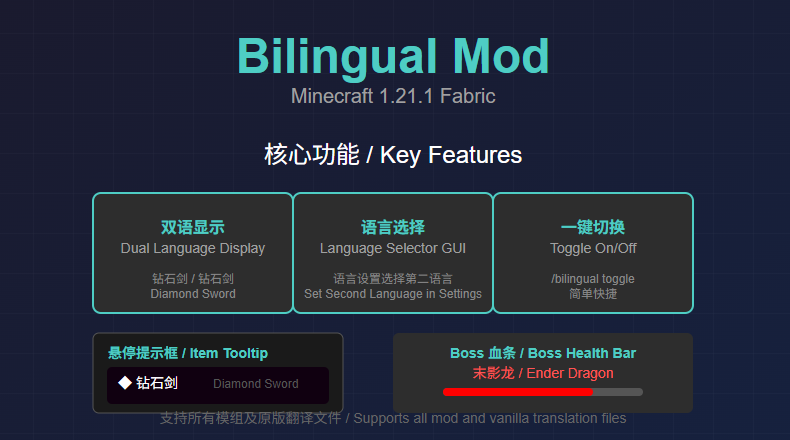 Bilingual Mod 这是Bilingual Mod 的功能
Versions
Files
Relations
Project Relations
More like this
Similar Mods
Suggestions use data such as tags, dependencies, dependents, descriptions, titles, and more to rank how much they overlap with this mod.
On ModDex
Community snapshot
By the numbers
Statistics

Want to reach Minecraft players?
We're looking for a server hosting partner to feature here and other parts of the site. Interested? Send us a message!
Get in touchGet it on
Available Platforms
On ModDex
Community snapshot
By the numbers
Statistics
Resources