Bingo
No reviews yet
A multiplatform data-driven Bingo mod
Features small, self-contained games within Minecraft.
Neoforge is a fork of the Minecraft Forge available for versions 1.20.1+ of Minecraft. Many Forge mods are compatible with Neoforge and vice versa.
Fabric is a mod loader for versions 1.14+ of Minecraft, particularly popular for client side and optimization mods.
Community voices
Reviews
Click once to include, again to exclude, again to clear
No reviews yet. Be the first to review this project!
Get it on
Available Platforms
 Modrinth
Compatibility
Supported Environments
About
Project Details
For authors
Embed Badge
If you're the author of this project, you can embed a live badge anywhere that supports HTML or Markdown. It updates automatically whenever ratings change.
Use HTML for any page that supports it, or Markdown for README files and Markdown-based descriptions.
Identifiers
Platform IDs
Resources
External Links
About
Description
Bingo
A Bingo mod that displays the bingo board on players' screens and tracks progress in real time.
Features
-
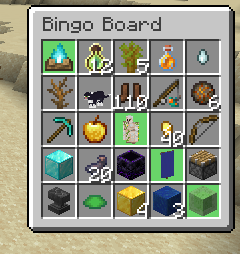
A bingo board rendered in the corner of the screen:
-
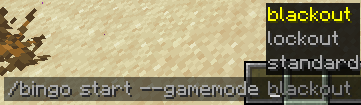
Different gamemodes:
-
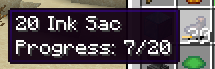
Tracking the progress of goals:
-
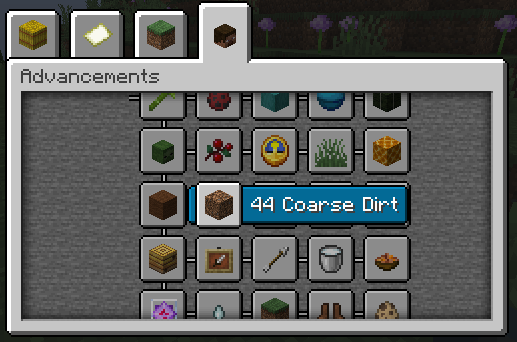
Vanilla friendly:
Installation
Fabric
- Install Fabric.
- Download Fabric API and put it in your mods folder.
- Download the Bingo mod from Modrinth, and put it in your mods folder.
NeoForge
- Install NeoForge.
- Download the Bingo mod from Modrinth, and put it in your mods folder.
Usage
The Bingo mod works with vanilla teams. Use /bingo teams create <color> to create a new team, and /bingo teams randomize to add a player to a team. The Bingo mod also uses the Vanilla teams system, so you can use the Vanilla /team command to manage teams as well.
To start a game, use /bingo start [options...] <teams...>. For example, if you want to start a bingo game between two teams called red and blue with default settings,
you can use /bingo start red blue.
Here is a more complicated example with a smaller board and easier goals: /bingo start --difficulty bingo:easy --size 3 red blue.
Datapacks
The Bingo mod's goals, difficulties, and tags (used in board generation) are entirely data-driven and can be modified with datapacks. For examples of the formats of these, check the mod's default data folder.
Credits
Many of the goals this Bingo mod adds originally come from v4 of the mcbingo website.
Contributing
The process of contributing is the same as for any other Minecraft mod. Please ask before making any large changes.
Screenshots
Gallery
-
Progress display of a goal
-
Vanilla friendly Shows bingo board in Advancements
-
Different gamemodes
-
Bingo board
Versions
Files
Relations
Project Relations
More like this
Similar Mods
Suggestions use data such as tags, dependencies, dependents, descriptions, titles, and more to rank how much they overlap with this mod.
On ModDex
Community snapshot
By the numbers
Statistics

Want to reach Minecraft players?
We're looking for a server hosting partner to feature here and other parts of the site. Interested? Send us a message!
Get in touchGet it on
Available Platforms
On ModDex
Community snapshot
By the numbers
Statistics
Resources