
Community listing page, reviews here may not be monitored by the author.
Biome Compass Item


No reviews yet
A Minecraft Forge mod for 1.20.1 that adds a craftable compass capable of locating any biome in your world
Community voices
Reviews
No reviews yet. Be the first to review this project!
Get it on
Available Platforms
Compatibility
Supported Environments
Must be installed on both the client and the server.
About
Project Details
For authors
Embed Badge
If you're the author of this project, you can embed a live badge anywhere that supports HTML or Markdown. It updates automatically whenever ratings change.
Use HTML for any page that supports it, or Markdown for README files and Markdown-based descriptions.
Identifiers
Platform IDs
About
Description
Biome Compass Item
A Minecraft Forge mod for 1.20.1 that adds a craftable compass capable of locating any biome in your world. Point it, tune your search range, lock onto a target, and navigate - all from a clean in-game UI.
Server-friendly! An optimised algorithm to retain TPS.
Biome selection UI
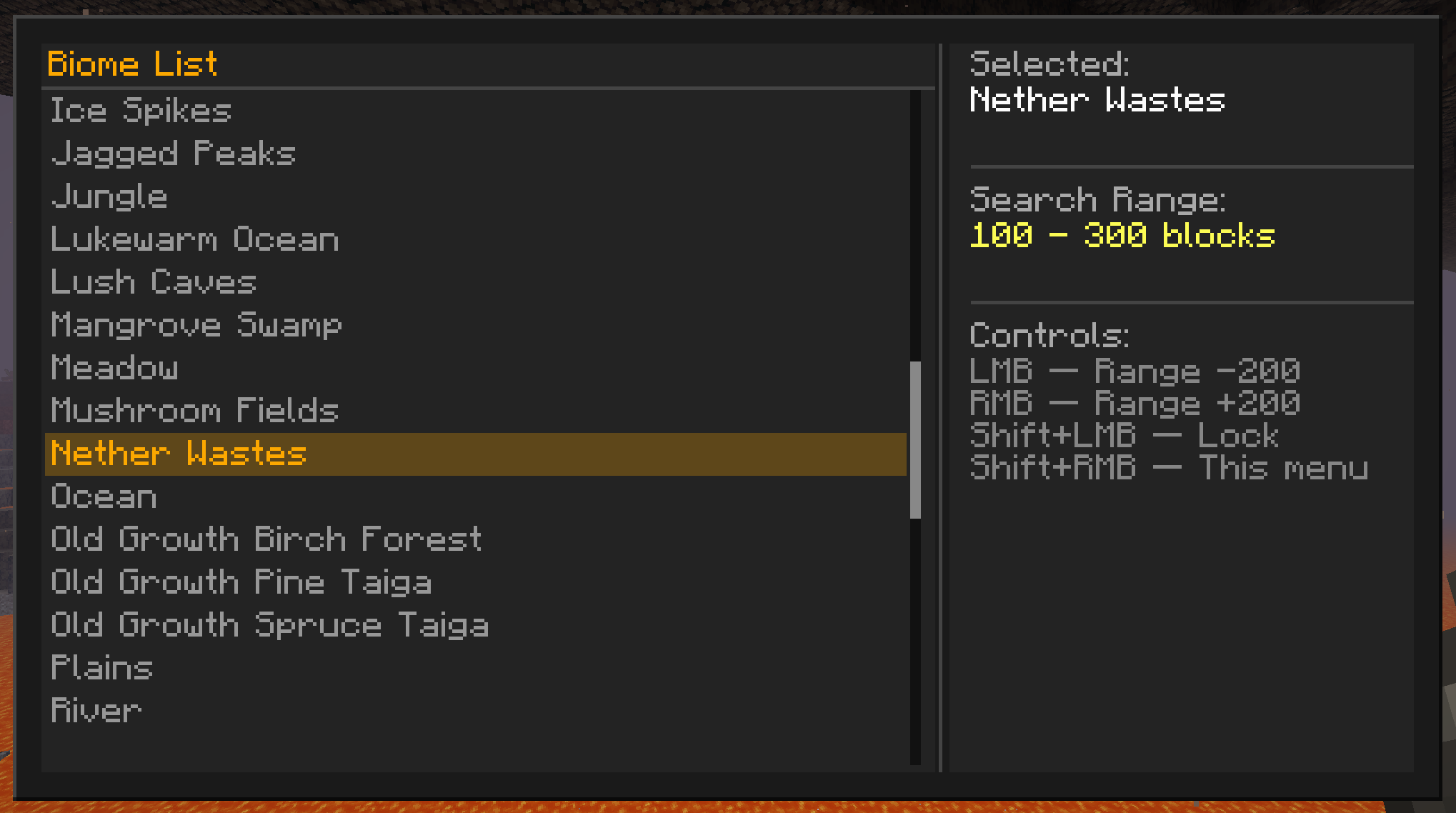
Adjustable search range - tune the scan radius from 100m up to 10,000m.
Crafting
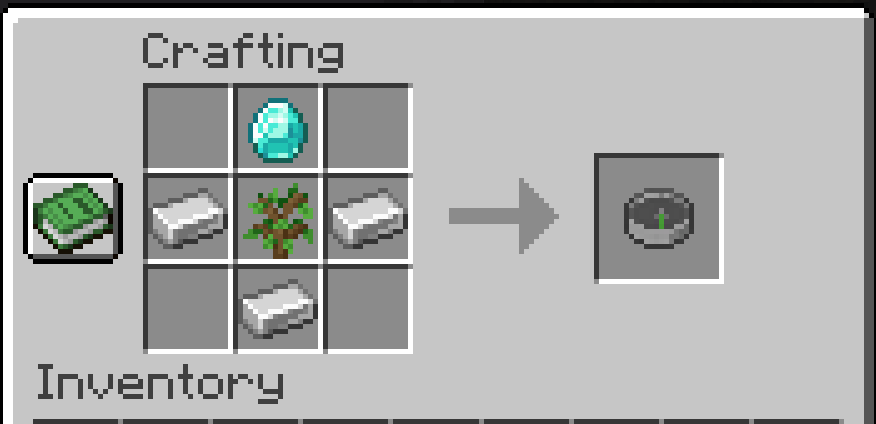
Controls
| Input | Action |
|---|---|
| Left Click | Increase search range (+200 m) |
| Right Click | Decrease search range (−200 m) |
| Shift + Left Click | Toggle lock / unlock |
| Shift + Right Click | Open biome selector menu |
All controls work from both the main hand and the offhand.
How It Works
Selecting a Biome
Press Shift + Right Click to open the biome selector. The left panel lists every biome loaded in your world, sorted alphabetically and scrollable with the mouse wheel. Click any entry to immediately begin searching for it. Selecting a new biome always unlocks the compass so the search can run freely.
Searching
Once a biome is selected the compass scans outward from your position in rings, checking blocks in steps of around 32m. The scan is incremental - only a small slice of work happens each tick - so it stays smooth even at the 10,000 m maximum range.
Lock Mode
IMPORTANT Don't forget to LOCK your compass when you get a trail to your biome.
- State -
TRACKING(actively pointing) orLOCKED(frozen on the last found position)
Press Shift + Left Click to lock the compass. When locked:
- No new searches run, keeping server load at zero while navigating
Press Shift + Left Click again to unlock and resume live tracking.
Search Range
The range defines the annular band the compass searches within - a minimum and maximum radius around you. This lets you skip nearby biomes you have already visited and hunt for ones further away.
- Minimum inner radius: 100m
- Maximum outer radius: 10,000m
The range is shown in the action bar and in the item tooltip so you always know what window is active.
Sound Effects
Sound effects are tied to the Player source.
Compatibility
- Minecraft: 1.20.1
- Mod loader: Forge 47.x
- Modded biomes: fully supported — the biome list is read directly from the world's registry at runtime, so any biome added by another mod appears automatically in the selector
- Multiplayer: fully server-authoritative; all searches run on the server and results are synced to the client
Installation
- Install Minecraft Forge 47.x for 1.20.1
- Drop the mod
.jarinto yourmods/folder - Launch the game — no configuration required
License
MIT — see LICENSE for details.
Made by @LukieD4 — source available at github.com/LukieD4/BiomeCompassMod
Biome Compass Item
A Minecraft Forge mod for 1.20.1 that adds a craftable compass capable of locating any biome in your world. Point it, tune your search range, lock onto a target, and navigate - all from a clean in-game UI.
Server-friendly! An optimised algorithm to retain TPS.
Biome selection UI
Adjustable search range - tune the scan radius from 100m up to 10,000m.
Crafting
Controls
| Input | Action |
|---|---|
| Left Click | Increase search range (+200 m) |
| Right Click | Decrease search range (−200 m) |
| Shift + Left Click | Toggle lock / unlock |
| Shift + Right Click | Open biome selector menu |
All controls work from both the main hand and the offhand.
How It Works
Selecting a Biome
Press Shift + Right Click to open the biome selector. The left panel lists every biome loaded in your world, sorted alphabetically and scrollable with the mouse wheel. Click any entry to immediately begin searching for it. Selecting a new biome always unlocks the compass so the search can run freely.
Searching
Once a biome is selected the compass scans outward from your position in rings, checking blocks in steps of around 32m. The scan is incremental - only a small slice of work happens each tick - so it stays smooth even at the 10,000 m maximum range.
Lock Mode
IMPORTANT Don't forget to LOCK your compass when you get a trail to your biome.
- State -
TRACKING(actively pointing) orLOCKED(frozen on the last found position)
Press Shift + Left Click to lock the compass. When locked:
- No new searches run, keeping server load at zero while navigating
Press Shift + Left Click again to unlock and resume live tracking.
Search Range
The range defines the annular band the compass searches within - a minimum and maximum radius around you. This lets you skip nearby biomes you have already visited and hunt for ones further away.
- Minimum inner radius: 100m
- Maximum outer radius: 10,000m
The range is shown in the action bar and in the item tooltip so you always know what window is active.
Sound Effects
Sound effects are tied to the Player source.
Compatibility
- Minecraft: 1.20.1
- Mod loader: Forge 47.x
- Modded biomes: fully supported — the biome list is read directly from the world's registry at runtime, so any biome added by another mod appears automatically in the selector
- Multiplayer: fully server-authoritative; all searches run on the server and results are synced to the client
Installation
- Install Minecraft Forge 47.x for 1.20.1
- Drop the mod
.jarinto yourmods/folder - Launch the game — no configuration required
License
MIT — see LICENSE for details.
Made by @LukieD4 — source available at github.com/LukieD4/BiomeCompassMod
Screenshots
Gallery
-
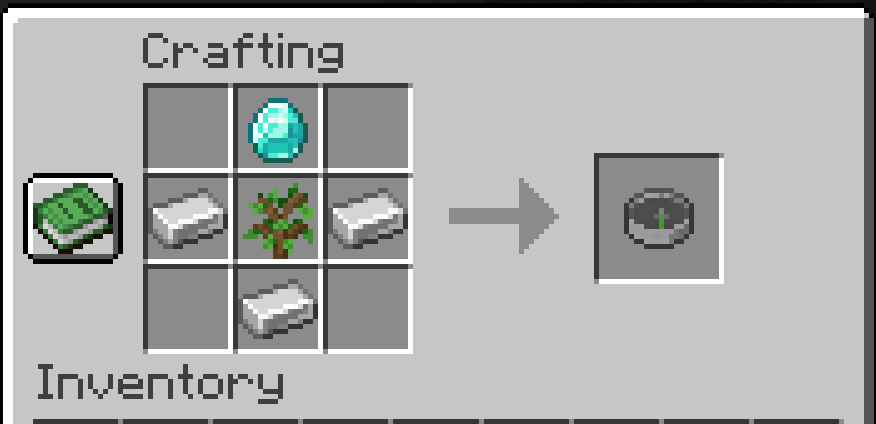 Recipe
 -
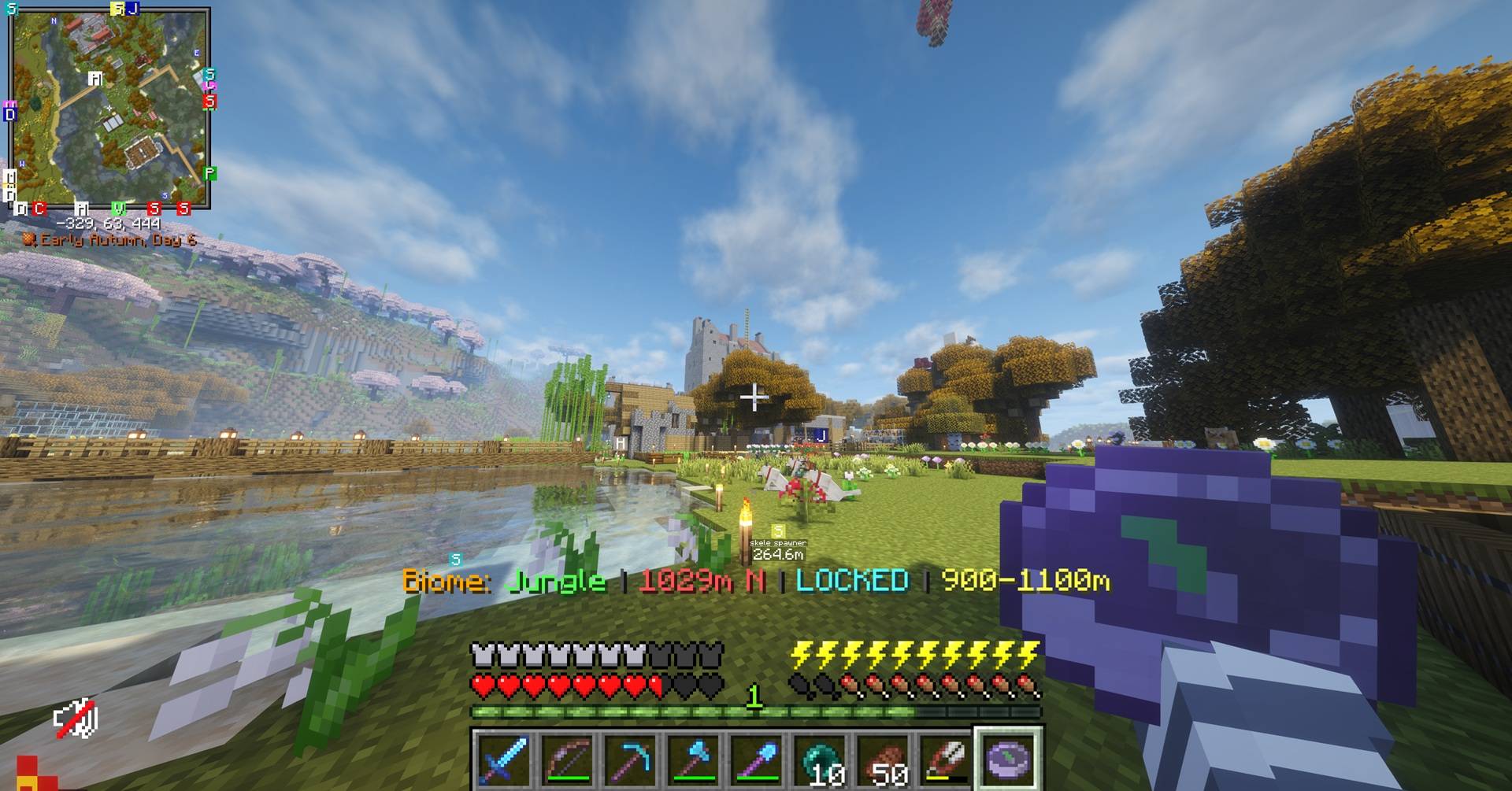 Appearance
 -
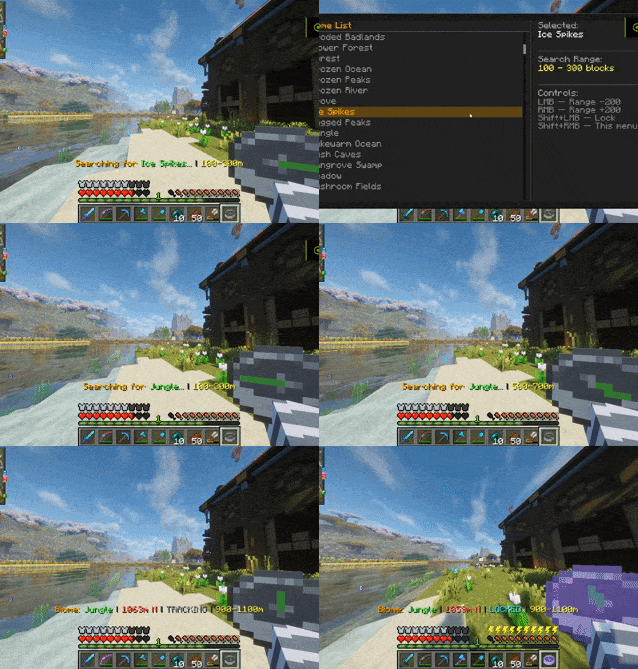 How to use 1) Shift + Right Click (Opens UI) 2) Select biome 3) Adjust range if needed 4) If you've found the biome, Shift + Left Click to LOCK the compass.
-
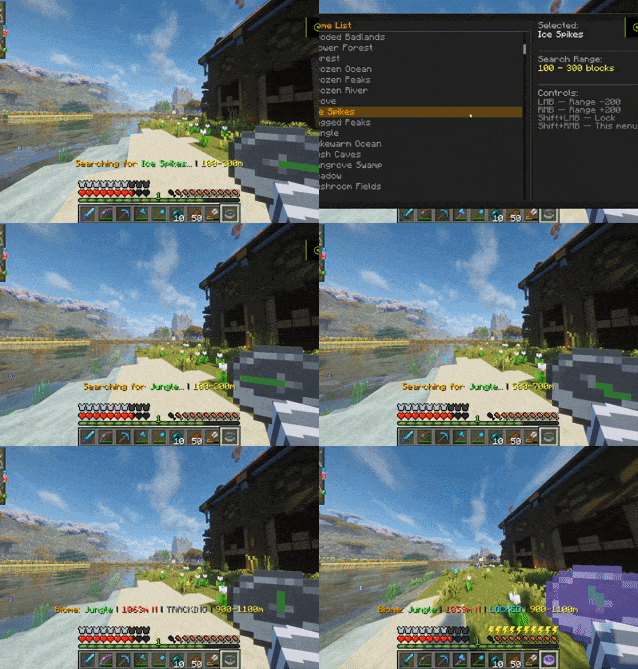 How to use 1) Shift + Right Click (Opens UI) 2) Select biome 3) Adjust range if needed 4) If you've found the biome, Shift + Left Click to LOCK the compass.
 -
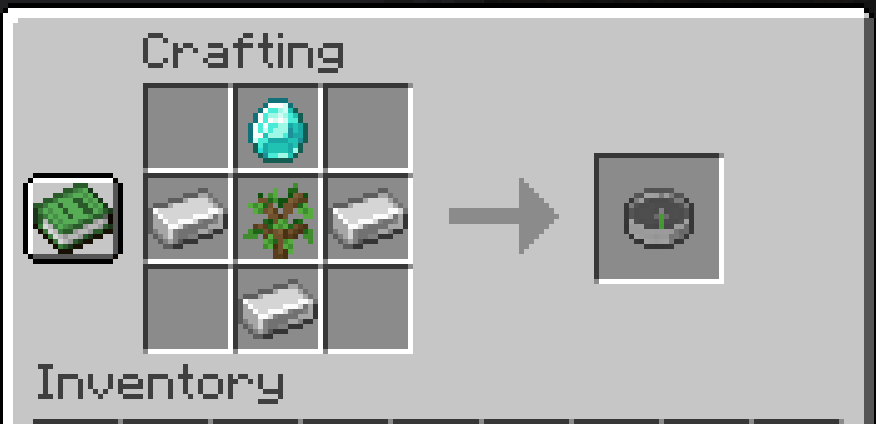 Recipe
 -
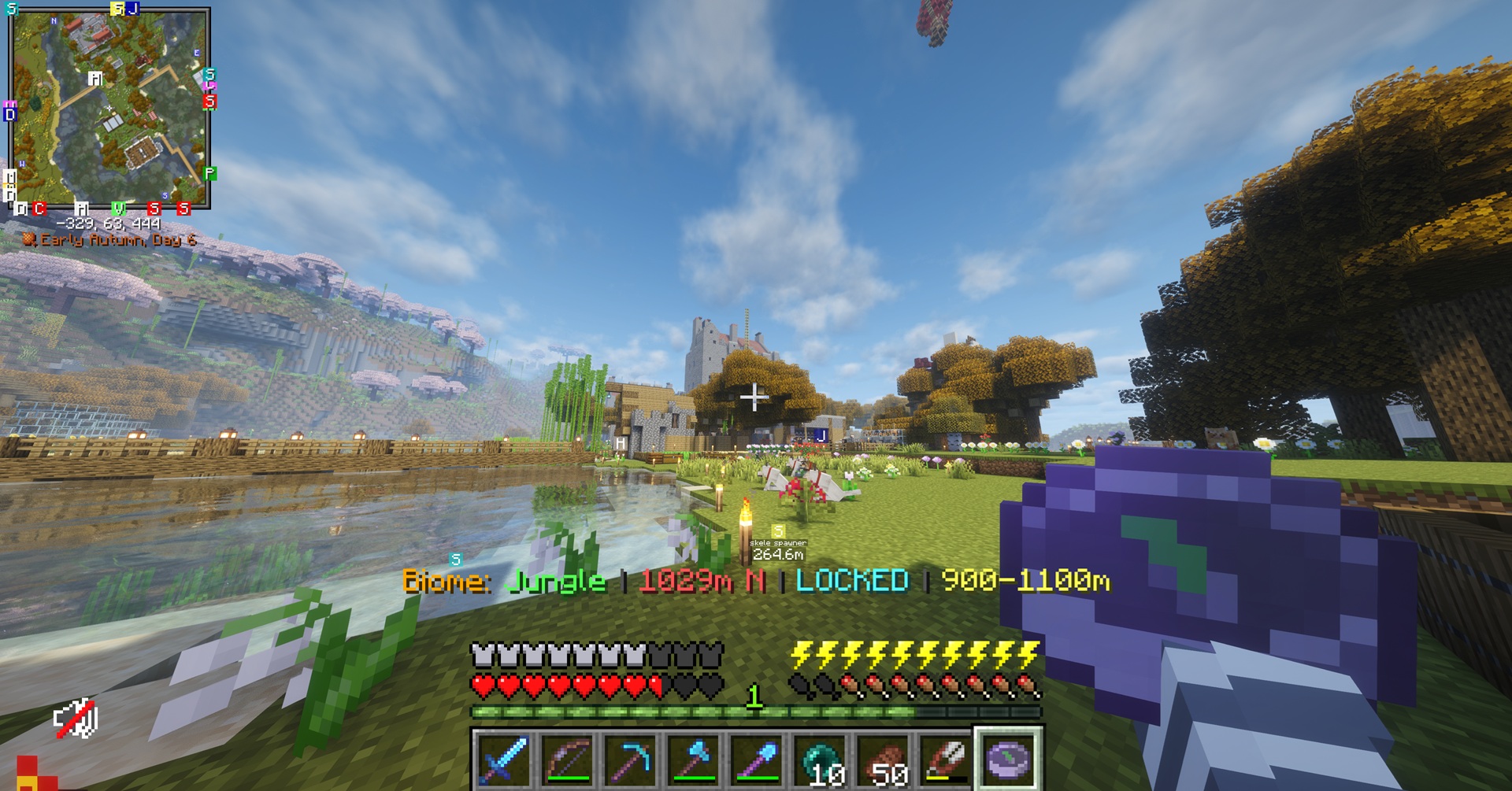 Appearance
Versions
Files
Relations
Project Relations
More like this
Similar Mods
Suggestions use data such as tags, dependencies, dependents, descriptions, titles, and more to rank how much they overlap with this mod.
On ModDex
Community snapshot
By the numbers
Statistics
Want to reach Minecraft players?
We're looking for a server hosting partner to feature here and other parts of the site. Interested? Send us a message!
Get in touchGet it on
Available Platforms
On ModDex
Community snapshot
By the numbers