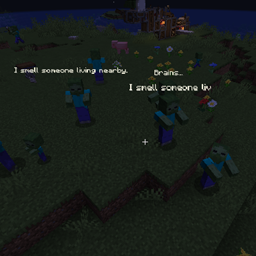
Community listing page, reviews here may not be monitored by the author.
Blabby World


No reviews yet
Blabby World gives Minecraft mobs configurable speech and ordered A/B conversations based on combat state, time, weather, and nearby entities.
Community voices
Reviews
No reviews yet. Be the first to review this project!
Get it on
Available Platforms
Compatibility
Supported Environments
Must be installed on both the client and the server.
About
Project Details
For authors
Embed Badge
If you're the author of this project, you can embed a live badge anywhere that supports HTML or Markdown. It updates automatically whenever ratings change.
Use HTML for any page that supports it, or Markdown for README files and Markdown-based descriptions.
Identifiers
Platform IDs
About
Description
Blabby World
Blabby World gives Minecraft mobs configurable speech and ordered A/B conversations based on combat state, time, weather, and nearby entities. It is designed for modpack authors and includes an in-game visual editor, so users do not need to type entity IDs or edit JSON manually.
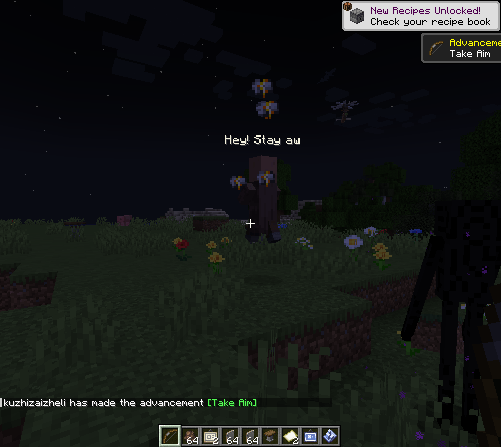
Using the visual editor(Press B)
B
The left panel lists registered mob types and supports searching by display name or entity ID. The right panel contains five pages: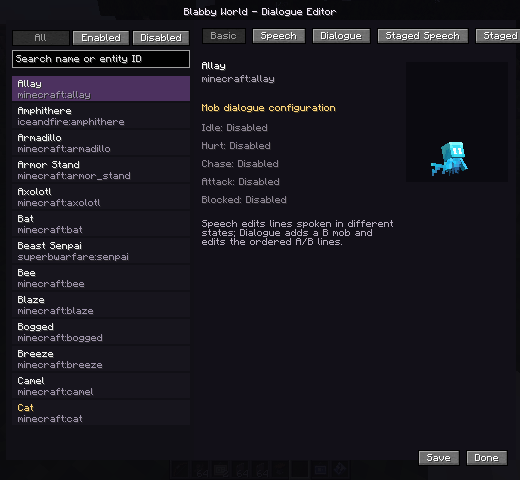
- Basic: shows the selected mob and which speech triggers are configured.
- Speech: edits single-mob lines for idle, hurt, chase, attack, and blocked states.
- Dialogue: adds a B mob for the selected A mob and edits an ordered A/B exchange.
- Staged Speech: edits single-mob lines for day, night, rain, snow, and thunder.
- Staged Dialogue: edits environment-specific A/B conversations.
Adding and editing lines
- Select a mob in the left list.
- Open Speech, Dialogue, Staged Speech, or Staged Dialogue.
- Select a trigger, stage, and B mob where applicable.
- Press
+beside the text editor to add a line. - Select the line and edit it in the input box.
- On dialogue pages, use the A/B control to choose the speaker.
- Right-click a line to set its repeat frequency:
- Fast: eligible again after about 1 second
- Medium: about 5 seconds
- Slow: about 10 seconds
- Press Save. The server writes and reloads the rules immediately.
Use /blabby reload to reload rules from disk.
Triggers
- Idle: the mob has no hostile target.
- Hurt: the mob actually loses health.
- Chase: the mob has a visible attack target.
- Attack: the mob attacks a target.
- Blocked: the mob hates a target but remains unable to see or attack it.
- Dialogue / Meet: A is close to the configured B mob; neither participant is hostile or already in another conversation.
During an A/B conversation, both mobs stop navigation, look at each other, and play the current speaker's ambient sound. After a line finishes, the other speaker starts after a random 0.5–1 second pause.
Text priority
The default trigger order is:
- Hurt
- Attack
- Blocked
- Chase
- A/B dialogue
- Idle
Environment specificity and the rule's own priority are added to this base score. Weather and time are not mutually exclusive: during daytime rain, a rain rule wins when present, while a day rule remains a valid fallback.
Higher-priority text may interrupt lower-priority text. Lower-priority packets cannot replace text that is currently more important.
Built-in localized dialogue
The mod includes a small set of example lines for villagers, zombies, skeletons, creepers, iron golems, wolves, cats, cows, pigs, and sheep, plus a few A/B exchanges.
Built-in text is stored in:
assets/blabby_world/lang/en_us.jsonassets/blabby_world/lang/zh_cn.json
It automatically follows each client's language. Built-in rules are not written to the user's rule file and do not clutter the visual editor.
Set enableDefaultDialogues=false in the common config to disable and hide every built-in line with one option.
Configuration
Common configuration:
enableDefaultDialogues: master switch for built-in localized lines.debugLogging: trigger and packet diagnostics; disabled by default.conversationDistance: distance at which A/B conversations may begin.playMobSounds: plays the speaking mob's ambient sound.
Client configuration:
textDistance: maximum text rendering distance.maxVisibleMobs: maximum number of mobs with visible text.textScale: base text scale; collision-box scaling is still applied.animationSpeed: global typewriter and fade speed.
Custom rules are stored in config/blabby_world/conversations.json. The in-game editor is the recommended way to modify them.
License and contributions
Blabby World is licensed under the GNU General Public License v3.0. Modified distributions must comply with GPL-3.0 source and license requirements.
Read CONTRIBUTING.md before contributing.
github
https://ifdian.net/a/kuzhi
1.1
What's New
- Rebuilt the in-game editor with entity-grouped rules and per-line trigger, phase, speed, and enabled controls.
- Added idle and combat dialogue states; combat dialogue no longer pauses the fight.
- Added NBT, name, and UUID matching plus AI prompt import/export.
- Restored optional DeepSeek runtime lines with request limits, caching, and fallback; disabled by default.
- Added localized default lines for popular mobs including zombies, skeletons, creepers, endermen, witches, pillagers, and piglins.
The original DeepSeek integration was contributed by GitHub user [yiyuyan (commonplace)](https://github.com/yiyuyan) in [PR #1](https://github.com/Ku00115/blabby-world-forge/pull/1). Version 1.1 adapts that work to the new dialogue engine and adds request limits, caching, and failure fallback.
Blabby World
Blabby World gives Minecraft mobs configurable speech and ordered A/B conversations based on combat state, time, weather, and nearby entities. It is designed for modpack authors and includes an in-game visual editor, so users do not need to type entity IDs or edit JSON manually.
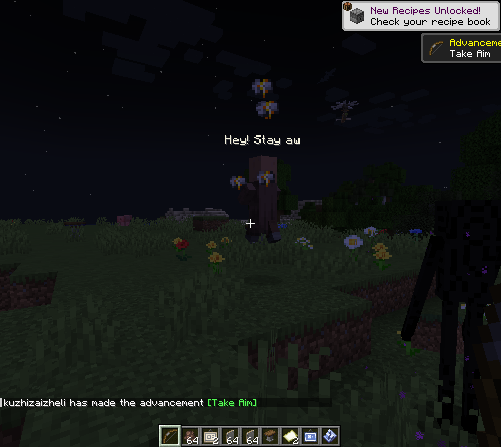
Using the visual editor(Press B)
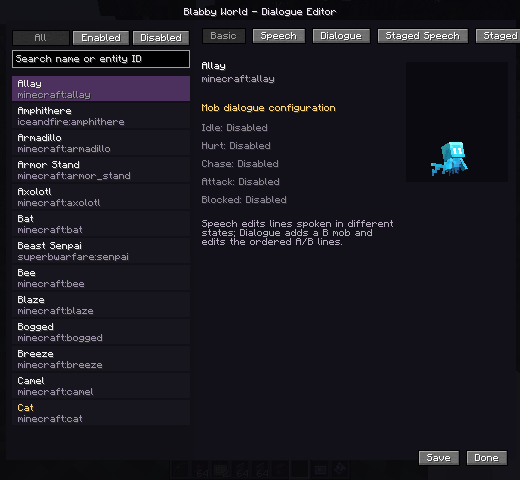 The left panel lists registered mob types and supports searching by display name or entity ID. The right panel contains five pages:
- Basic: shows the selected mob and which speech triggers are configured.
- Speech: edits single-mob lines for idle, hurt, chase, attack, and blocked states.
- Dialogue: adds a B mob for the selected A mob and edits an ordered A/B exchange.
- Staged Speech: edits single-mob lines for day, night, rain, snow, and thunder.
- Staged Dialogue: edits environment-specific A/B conversations.
- Adding and editing lines
- Select a mob in the left list.
- Open Speech, Dialogue, Staged Speech, or Staged Dialogue.
- Select a trigger, stage, and B mob where applicable.
- Press + beside the text editor to add a line.
- Select the line and edit it in the input box.
- On dialogue pages, use the A/B control to choose the speaker.
- Right-click a line to set its repeat frequency:
- Fast: eligible again after about 1 second
- Medium: about 5 seconds
- Slow: about 10 seconds
- Press Save. The server writes and reloads the rules immediately.
Use /blabby reload to reload rules from disk.
Triggers Idle: the mob has no hostile target. Hurt: the mob actually loses health. Chase: the mob has a visible attack target. Attack: the mob attacks a target. Blocked: the mob hates a target but remains unable to see or attack it. Dialogue / Meet: A is close to the configured B mob; neither participant is hostile or already in another conversation.
During an A/B conversation, both mobs stop navigation, look at each other, and play the current speaker's ambient sound. After a line finishes, the other speaker starts after a random 0.5–1 second pause.
Text priority
The default trigger order is:
Hurt Attack Blocked Chase A/B dialogue Idle
Environment specificity and the rule's own priority are added to this base score. Weather and time are not mutually exclusive: during daytime rain, a rain rule wins when present, while a day rule remains a valid fallback.
Higher-priority text may interrupt lower-priority text. Lower-priority packets cannot replace text that is currently more important.
Built-in localized dialogue
The mod includes a small set of example lines for villagers, zombies, skeletons, creepers, iron golems, wolves, cats, cows, pigs, and sheep, plus a few A/B exchanges.
Built-in text is stored in:
assets/blabby_world/lang/en_us.json assets/blabby_world/lang/zh_cn.json
It automatically follows each client's language. Built-in rules are not written to the user's rule file and do not clutter the visual editor.
Set enableDefaultDialogues=false in the common config to disable and hide every built-in line with one option.
Configuration
Common configuration:
enableDefaultDialogues: master switch for built-in localized lines. debugLogging: trigger and packet diagnostics; disabled by default. conversationDistance: distance at which A/B conversations may begin. playMobSounds: plays the speaking mob's ambient sound.
Client configuration:
textDistance: maximum text rendering distance. maxVisibleMobs: maximum number of mobs with visible text. textScale: base text scale; collision-box scaling is still applied. animationSpeed: global typewriter and fade speed.
Custom rules are stored in config/blabby_world/conversations.json. The in-game editor is the recommended way to modify them.
License and contributions
Blabby World is licensed under the GNU General Public License v3.0. Modified distributions must comply with GPL-3.0 source and license requirements.
Screenshots
Gallery
Versions
Files
Relations
Project Relations
More like this
Similar Mods
Suggestions use data such as tags, dependencies, dependents, descriptions, titles, and more to rank how much they overlap with this mod.
On ModDex
Community snapshot
By the numbers
Statistics
Want to reach Minecraft players?
We're looking for a server hosting partner to feature here and other parts of the site. Interested? Send us a message!
Get in touchGet it on
Available Platforms
On ModDex
Community snapshot
By the numbers