
Community listing page, reviews here may not be monitored by the author.
Bloccupations

No reviews yet
Tired of boring, featureless blocks used SOLELY for decoration? Luckily, I've added a plethora of blocks with unique functionality and interactions!
Community voices
Reviews
No reviews yet. Be the first to review this project!
Get it on
Available Platforms
Compatibility
Supported Environments
Must be installed on both the client and the server.
About
Project Details
For authors
Embed Badge
If you're the author of this project, you can embed a live badge anywhere that supports HTML or Markdown. It updates automatically whenever ratings change.
Use HTML for any page that supports it, or Markdown for README files and Markdown-based descriptions.
Identifiers
Platform IDs
Resources
External Links
About
Description
Important Stuff
-My Other Projects-
These mods may not all be updated to the latest version. All of these mods are owned and maintained by me.
Rainbows & Radium - Powerful new ores can be used to make customizable bombs, 128-slot barrels, a modular chest-locking system, Ender Pearls enchanted with infinity, Paxels, multi-use Totems, and more!
Savage Cyclopes - New Cyclops entities can be found across all 3 dimensions. Some are hostile, attacking you with poisonous darts or magic, while others are neutral or passive, bartering with or assisting you in your various adventures. Enticing rewards are granted to those who can defeat them.
Beastly Buggers - Unique and useful items can be obtained by facing new and difficult insects and arachnids, each with a unique spawn location to incentivize exploration. Increasing the challenge of Minecraft in fun and vanilla-friendly ways is the purpose of this mod.
Funky yet Functional - Adds a few silly new items, all of which have their own functionality, including spicy peppers that make you breathe fire, beans that let you fly via flatulence, and so much more!
Bloccupations - Tired of boring, featureless blocks used SOLELY for decoration? Luckily, I've added a plethora of blocks with unique functionality and interactions!
Frequently Asked Questions (FAQs)
How may I use this mod in my own content?
"Credit" refers to either a link to my Modrinth profile or to this Modrinth page.
Servers - When using this mod on a server, credit is appreciated but NOT required.
Videos - When using this mod in a video, if the mod is prominently featured (like in a showcase) credit IS required. Otherwise (for example, if the video is an SMP and the mod just comes with it), credit is appreciated but NOT required.
Modpacks - When adding this mod to a modpack, credit IS required on the page of the modpack. When playing a modpack with this mod, credit is appreciated but NOT required.
How can I help?
I am currently just doing this as a hobby, so you cannot donate to me. However, if you find any issues or bugs, reporting the issues on the issue tracker would be extremely helpful. Also, to let me know that people are enjoying the mods I make, liking/following the mod would be greatly appreciated.
May I make a port of this mod?
No, you MAY NOT port this mod to a different modloader, a different Minecraft version, or a different platform. I worked very hard to concept, program, and publish this mod, and while I understand that the loader/version/platform of this mod might not suit everybody's wishes, I do not want anyone to make a port of this mod.
Currently, I try to keep all of my (unarchived) mods up-to-date with the latest version of Minecraft. Please be patient if the mod is not updated as soon as you like. I am probably working on it when I have time.
What Minecraft versions do you plan on updating/backporting this mod to?
I try to update the mod to the latest Minecraft version as soon as possible. When the mod itself gets updates like new features or content, only the latest version of Minecraft will receive that content. I do not plan on backporting this mod.
Where do you recommend I start learning how to mod?
I mostly taught myself, but I definitely used resources like Datapack Generators which is a useful tool for legibly creating .json files. Also, Modding by Kaupenjoe is a YouTube channel with EXTREMELY helpful tutorials about most aspects of modding Minecraft.
How do I install this mod?
First, download the Fabric Installer and the Fabric API. Put the Fabric API into your “mods” folder along with this one. Then, open the Minecraft Launcher and launch the game. (MAKE SURE that the Fabric Loader, Fabric API, and this mod are all the same version!)
Screenshots
Gallery
-
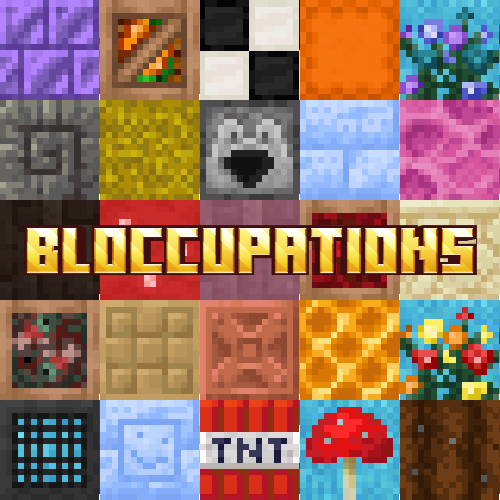 Mod Logo Wowie Zowie! Yippee-Kye-Yay! Zoo-Wee-Mama! Zipidee-Doo-Da, Zippi-Dee-Day! (The Large Red Mushroom is from a different mod. Whoops!)
 -
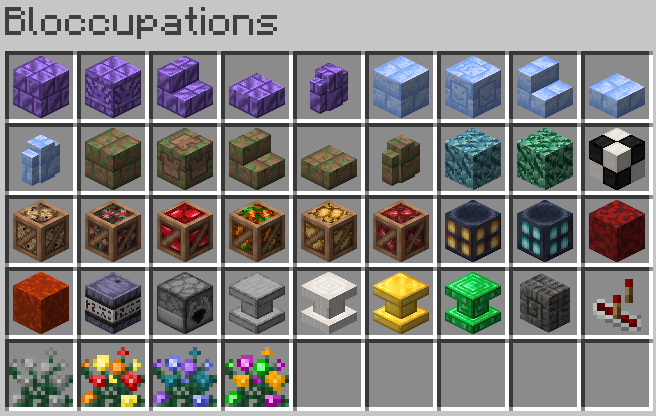 Creative Tab Top to Bottom, Left to Right: Amethyst Bricks, Packed Ice Bricks, Mossy Mud Bricks, Colored Prismarine, Checkerboard Block, Crates, Big Lanterns, Nether Sponges, Powder Keg, Dumper, Pedestals, Ram Block, Redstone Randomizer, Butterfly Bushes
Versions
Files
Relations
Project Relations
More like this
Similar Mods
Suggestions use data such as tags, dependencies, dependents, descriptions, titles, and more to rank how much they overlap with this mod.
On ModDex
Community snapshot
By the numbers
Statistics

Want to reach Minecraft players?
We're looking for a server hosting partner to feature here and other parts of the site. Interested? Send us a message!
Get in touchGet it on
Available Platforms
On ModDex
Community snapshot
By the numbers
Statistics
Resources