
Community listing page, reviews here may not be monitored by the author.
BlockEditorMod

No reviews yet
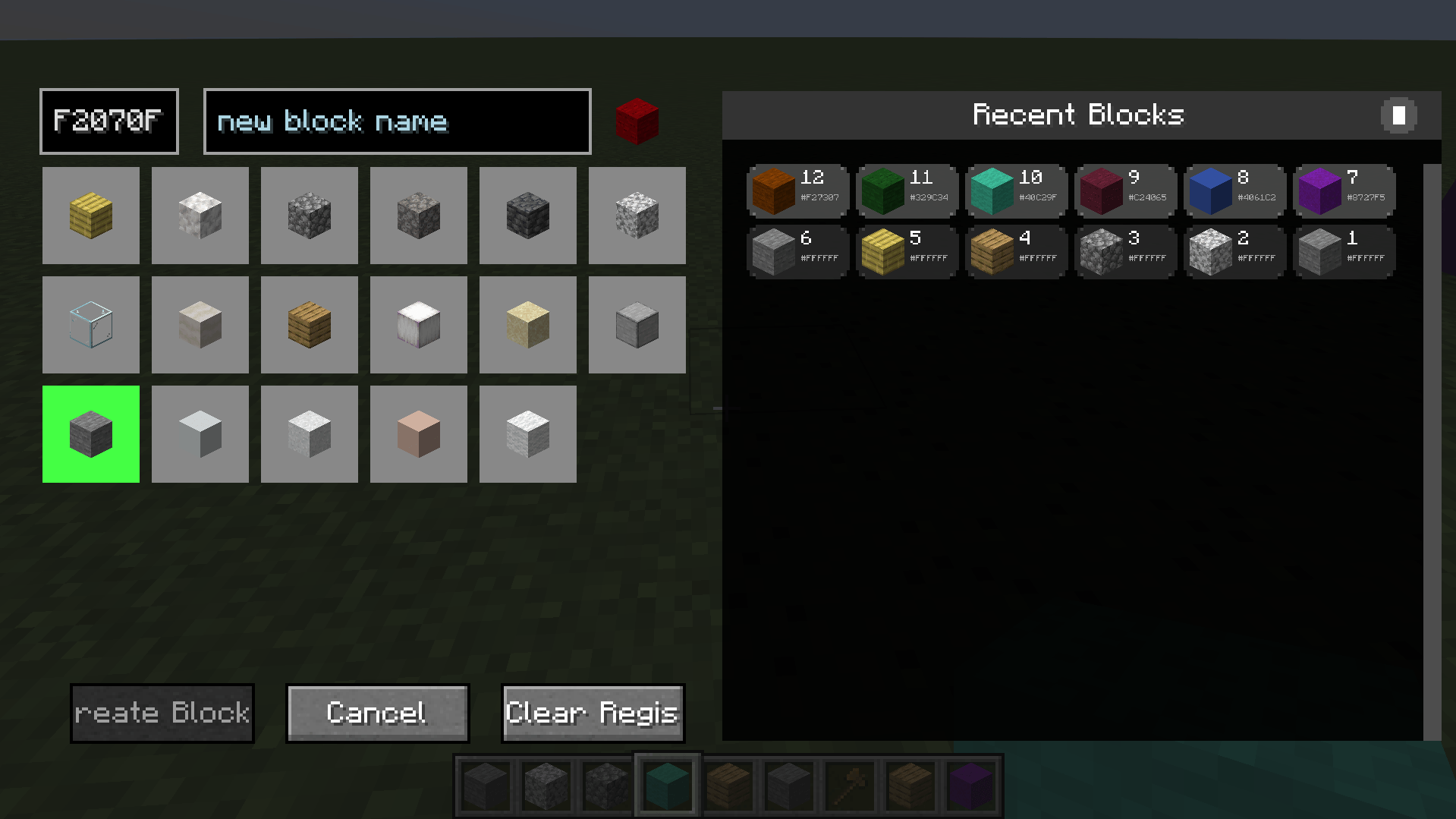
BlockEditor is a Minecraft 1.20.1 Forge mod that adds a GUI-based color picker for creating custom colored blocks that work with WorldEdit commands. Would love to hear from some of the users (if possible), leave a comment!

Community voices
Reviews
No reviews yet. Be the first to review this project!
Get it on
Available Platforms
About
Project Details
For authors
Embed Badge
If you're the author of this project, you can embed a live badge anywhere that supports HTML or Markdown. It updates automatically whenever ratings change.
Use HTML for any page that supports it, or Markdown for README files and Markdown-based descriptions.
Identifiers
Platform IDs
About
Description
BlockEditor — Custom Block Creator & Color Picker
Create, name, and use custom-colored blocks with an intuitive editor and seamless WorldEdit support. Built for builders, server admins, and map makers who want unlimited creative control in Minecraft 1.20.1.
What’s New in v1.0.3
- World-based pick block: middle-click any BlockEditor block in the world to equip it
- Smart matching: finds the exact block in your inventory (Color + OriginalBlock [+ CustomName])
- Server fallback: requests the exact item from the server if not found locally
- Clean distribution: installs with no pre-saved history or blocks
- Quality: small internal fixes and better messages
Core Features
Custom Block Creation
- Open the editor (default key: G) and pick from multiple base textures
- Enter any hex color (e.g., FF0000) with real-time validation
- Optional custom names for pro workflows and WorldEdit usage
- Blocks persist across world saves and servers
World-Based Pick Block (Middle-Click)
- Middle-click custom blocks in the world to instantly equip
- Exact inventory match on Color + OriginalBlock (and CustomName, if used)
- Fallback to server-side give when needed, with clear feedback
Recent Blocks & Quick Equip
- Visual history panel with your latest blocks
- Middle-click a history item to equip instantly
- Left-click to use as a template (pre-fills color/name)
WorldEdit Integration
- Use your custom names directly in commands
- Examples:
/bset be:wall/breplace stone be:roof- Great for large builds, palettes, and repeatable designs
Performance & Compatibility
- Minecraft: 1.20.1
- Mod Loader: Forge 47.3.0+
- Works in single-player and multiplayer (client + server compatible)
- Efficient NBT and rendering—no noticeable performance cost
- No bundled user data; clean install every time
Simple Workflow
- Press G to open the Block Editor
- Choose a base block type
- Enter a hex color (e.g., FF0000)
- Optionally give it a custom name (e.g., wall, roof, accent)
- Click Create Block and start building
Pro tip: Middle-click a custom block in the world to equip it instantly.
Commands
/be clear— clears all custom user blocks/be refresh— fixes any local color display issues nearby
Perfect For
- Creative builders and architects
- Server administrators and build teams
- WorldEdit power users
- Map makers and content creators
Technical Info
- Side: Client & Server
- License: MIT (open source)
- No external dependencies (WorldEdit optional but recommended)
Installation
- Place the JAR in your mods folder (CurseForge instance or manual install)
- Launch Minecraft with Forge 47.3.0+
- Keybind G is configurable in Controls
Screenshots
Gallery
-
 Screenshot 2025-10-24 235709.png Screenshot 2025-10-24 235709.png
Versions
Files
Relations
Project Relations
More like this
Similar Mods
Suggestions use data such as tags, dependencies, dependents, descriptions, titles, and more to rank how much they overlap with this mod.
On ModDex
Community snapshot
By the numbers
Statistics
 (opens in a new tab)
Get it on
Available Platforms
On ModDex
Community snapshot
By the numbers