
Community listing page, reviews here may not be monitored by the author.
BlueMap Sign Markers

No reviews yet
A Fabric plugin for BlueMap that creates markers from signs

Community voices
Reviews
No reviews yet. Be the first to review this project!
Get it on
Available Platforms
Compatibility
Supported Environments
Runs entirely on the server. Also works in singleplayer.
About
Project Details
For authors
Embed Badge
If you're the author of this project, you can embed a live badge anywhere that supports HTML or Markdown. It updates automatically whenever ratings change.
Use HTML for any page that supports it, or Markdown for README files and Markdown-based descriptions.
Identifiers
Platform IDs
About
Description
BlueMap Sign Markers
Overview
Fabric plugin for BlueMap that displays markers based on in-game signs
Installation
Place in your mods folder along with BlueMap.
Server-side only.
Usage
Place a sign or hanging sign with the following text on either the front or back:
[poi]
<short description>
A marker will be displayed on the map at the location of the sign with the text <short description>. The marker will
be removed from the map when the sign is broken.
Note that the prefixes can be configured in the configuration file.
Configuration
The mod will create a BMSM-Core.json file in the config/bluemapsignmarkers folder. This file contains the following
options:
markerGroups- a list of marker groups (described in detail below); default is a list with a single marker group configured for the[poi]prefix.
Marker Groups
A marker group is a collection of markers that can be toggled on and off in the BlueMap UI. Each marker group configuration contains the following options:
prefix- prefix that the sign must contain to be included in the marker group; required;matchType- the type of match to use when checking the first non-empty sign text line; optional; default isSTARTS_WITH(case-sensitive exact match);STARTS_WITH- line must start with the prefix;REGEX- line must match the regular expression (uses Java regex engine);
name- the name of the marker group; required;type- the type of marker to display; optional; default isPOIPOI- a single point marker per sign;LINE- signs sharing this group's prefix and the same first-line label become ordered points of one line marker (points ordered by placement time); requires at least 2 signs to appear;SHAPE- signs sharing this group's prefix and the same first-line label become ordered points of one filled polygon marker (points ordered by placement time, height taken from the tallest member); requires at least 3 signs to appear;EXTRUDE- sharesSHAPE's exact membership model (same prefix/label grouping, 3+ signs, points ordered by placement time), but renders the polygon extruded as a solid volume: the floor is taken from the lowest member's Y, the ceiling from the tallest member's Y (if all members share the same Y, the ceiling is bumped up by 1 block to avoid a zero-height volume);
icon- the icon path or URL to display for the marker; optional; default isnull(BlueMap default POI icon);POIonlyoffsetX- the x offset of the marker; optional; default is0(corresponds withanchor.xin BlueMap base configuration);POIonlyoffsetY- the y offset of the marker; optional; default is0(corresponds withanchor.yin BlueMap base configuration);POIonlydefaultHidden- If this is true, the marker-set will be hidden by default and can be enabled by the user; optional; default isfalseminDistance- the minimum distance from the camera at which the marker will be displayed; optional; default is0.0(floating point, double precision)maxDistance- the maximum distance from the camera at which the marker will be displayed; optional; default is10000000.0(floating point, double precision)lineWidth- the width in pixels of the line/shape/extrude border; optional; default is2;LINE/SHAPE/EXTRUDEonlylineColor- the hex color (with alpha) of the line/shape/extrude border, e.g.#FF0000FF; optional; default is#FF0000FF;LINE/SHAPE/EXTRUDEonlyfillColor- the hex color (with alpha) of a shape's or extrude volume's interior, e.g.#FF000033; optional; default is#FF000033(translucent red);SHAPE/EXTRUDEonlysorting- the marker-set's order in the map's layer menu (lower sorts first); optional; default is0toggleable- whether the marker-set can be hidden/shown by a player at all; optional; default istruedepthTest- whether terrain can occlude the marker (setfalseto keep an underground trail/region visible through terrain); optional; default istrue;LINE/SHAPE/EXTRUDEonlycssClasses- a list of CSS classes added to the marker element, for styling via BlueMap'scustom.css; optional; default is an empty list;POIonly
Setting a field on a group type it doesn't apply to (e.g. icon on a LINE/SHAPE/EXTRUDE group, fillColor on a
POI/LINE group, depthTest on a POI group, or cssClasses on a LINE/SHAPE/EXTRUDE group) is not an error;
the mod logs a warning and ignores the field.
Examples
{
  "markerGroups": [
    {
      "prefix": "[poi]",
      "name": "Points of Interest"
    },
    {
      "prefix": "[store]",
      "name": "Stores",
      "icon": "assets/store.png"
    },
    {
      "prefix": "\\[[vV][iI][lL][lL][aA][gG][eE]\\]",
      "matchType": "REGEX",
      "name": "Villages"
    },
    {
      "prefix": "[trail]",
      "name": "Trails",
      "type": "LINE",
      "lineWidth": 3,
      "lineColor": "#00A2FFFF"
    },
    {
      "prefix": "[region]",
      "name": "Regions",
      "type": "SHAPE",
      "lineWidth": 2,
      "lineColor": "#FFA500FF",
      "fillColor": "#FFA50040"
    },
    {
      "prefix": "[building]",
      "name": "Buildings",
      "type": "EXTRUDE",
      "lineWidth": 2,
      "lineColor": "#4682B4FF",
      "fillColor": "#4682B440"
    }
  ]
}
This example configuration creates 6 marker groups: one for [poi] signs, one for [store] signs, one for signs
where the prefix is a regex match for villages (e.g. [Village] or [VILLAGE]), one for [trail] signs, one for
[region] signs, and one for [building] signs.
Troubleshooting
- Editing a marker group's prefix (especially a
REGEXprefix) orphans existing signs. On servers running a version before this fix, changing a group's prefix text can make already-placed signs vanish from the map after/bluemap reload, and they won't come back on their own. Re-edit the sign's text (even re-typing the same text) or restart the server to fix it. Signs created or re-edited on a version that ships this fix self-heal automatically on/bluemap reload- no manual fix needed going forward. - Markers are hidden on maps whose
render-maskexcludes them. A sign's marker only shows up on a given BlueMap map if the sign's position is inside that map's ownrender-mask(configured inconfig/bluemap/maps/<id>.conf) - e.g. a nether-roof map withmin-y: 127won't show markers for signs placed below y=127. A map with norender-maskis unaffected. After upgrading to a version with this fix, run/bluemap reloadonce to sweep away any markers that were already showing on a map outside its render bounds - a plain server restart alone does not trigger this sweep.
Screenshots
Gallery
-
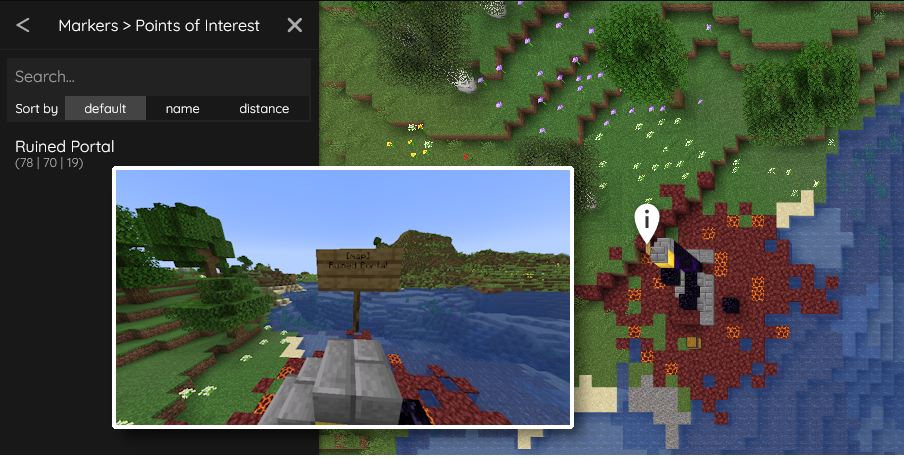 In-Game Sign Example A sign with the correct formatting on a ruined portal in-game and the result on the BlueMap UI.
Versions
Files
Relations
Project Relations
More like this
Similar Mods
Suggestions use data such as tags, dependencies, dependents, descriptions, titles, and more to rank how much they overlap with this mod.
On ModDex
Community snapshot
By the numbers
Statistics

 (opens in a new tab)
Get it on
Available Platforms
On ModDex
Community snapshot
By the numbers