Community listing page, reviews here may not be monitored by the author.
BoldTextFix

No reviews yet
Improve bold text in Minecraft with mask dilation, adjustable vanilla offset, and custom TTF/OTF bold fonts. A client-side Fabric mod.
Community voices
Reviews
No reviews yet. Be the first to review this project!
Get it on
Available Platforms
About
Project Details
For authors
Embed Badge
If you're the author of this project, you can embed a live badge anywhere that supports HTML or Markdown. It updates automatically whenever ratings change.
Use HTML for any page that supports it, or Markdown for README files and Markdown-based descriptions.
Identifiers
Platform IDs
Resources
External Links
About
Description
BoldTextFix is a client-side Fabric mod for Minecraft that improves the appearance of bold text. Keep the design of your font resource pack while adjusting its bold effect, or choose a separate local font for bold text. Regular text keeps its existing font.
Three bold rendering methods
Mask Dilation (default)
Expands glyph outlines evenly outward to make them bold. Generated bold glyphs do not receive vanilla's second offset bold pass, reducing the ghosting and duplicated edges that can appear with custom fonts.
Dilation strength is adjustable. Glyphs are generated only when bold text actually needs them, and both normal use and the preview save and reuse cached results.
Vanilla Offset
Retains Minecraft's native rightward offset method with adjustable strength, making it useful for comparing results or keeping a vanilla-style appearance. This method also works with Minecraft's default fonts.
Mask Dilation and Vanilla Offset each retain their own strength setting. For glyphs handled by either method, setting its strength to 0 disables synthetic bold and shows the font's original weight.
Custom Bold Font
Use your own TTF/OTF file for bold text, with independent controls for bold font size and clarity. No font resource pack is needed, and regular text keeps its existing font.
Choose a font file with a dedicated bold design to use its designed glyphs. Increasing Bold Font Clarity raises the sampling resolution, along with initial generation cost and memory and VRAM usage. Large font sizes may cause text to overlap; use the preview to compare and adjust.
Controls and preview
- Compare bold and regular text using the same editable preview text.
- Select or deselect fonts in the settings screen, or drag TTF/OTF files directly into it. Importing a new font does not automatically change your selection.
- View file sizes, character counts, and glyph counts. Files that may fail to load are highlighted.
- View Mask Dilation generation counts and elapsed time in a notification that can appear in any corner or be disabled.
- Toggle the mod from its settings screen, with seven included language options.
On-demand generation and local caching
Mask Dilation processes only the bold glyphs that are actually needed. It reuses results through memory and local disk caches, and valid disk cache entries remain available after restarting the game.
The default Limited mode slows down new glyph generation to help reduce stuttering during continuous generation. Full Speed adds no generation cooldown, completing work faster but concentrating more processing into a short period. Both modes produce the same bold effect, and the generation limit does not slow cache reads.
New glyphs still need to be generated. Changes to fonts or strength, invalid cache entries, or cleared caches may also require generation again.
Font fallback and compatibility handling
- Mask Dilation leaves Minecraft's default glyphs using their native bold rendering.
- When a custom bold font lacks a regular character, it falls back directly to Minecraft's default font and native bold.
- In Custom Bold Font mode, supported emoji and symbols use third-party glyphs from the current font chain first, the selected custom font second, and Minecraft's default fonts last. Third-party glyphs do not receive an additional offset bold pass.
- Includes text compatibility handling for Iris shaders, including sign text.
Installation and use
- Install Fabric Loader for your Minecraft version and place the matching BoldTextFix JAR in your client's mods folder. The server does not need the mod.
- Open the settings through Mod Menu, or assign the “Open bold text debug” keybind in Minecraft's controls. The keybind is unbound by default.
- To use a custom bold font, place a .ttf or .otf file in config/boldtextfix/boldfonts/, or drag it into the open settings screen. Each file can be up to 128 MiB. If a manually added file is not listed, click the refresh icon.
- Choose a rendering method and use the preview to adjust strength, size, or clarity.
The required Fabric API modules are bundled, so the full Fabric API mod does not need to be installed separately. Mod Menu is optional, and Placeholder API is not required. Supply your own font files; the mod does not download fonts.
Use a file that matches your Minecraft version. Supported versions are listed with each download.
Source and feedback
BoldTextFix is licensed under the MIT License. Third-party components retain their own licenses.
Source: https://github.com/Yecairen/BoldTextFix Issue tracker: https://github.com/Yecairen/BoldTextFix/issues
When reporting a problem, include your Minecraft and mod versions, related mods and font resource packs, and steps to reproduce it.
Screenshots
Gallery
-
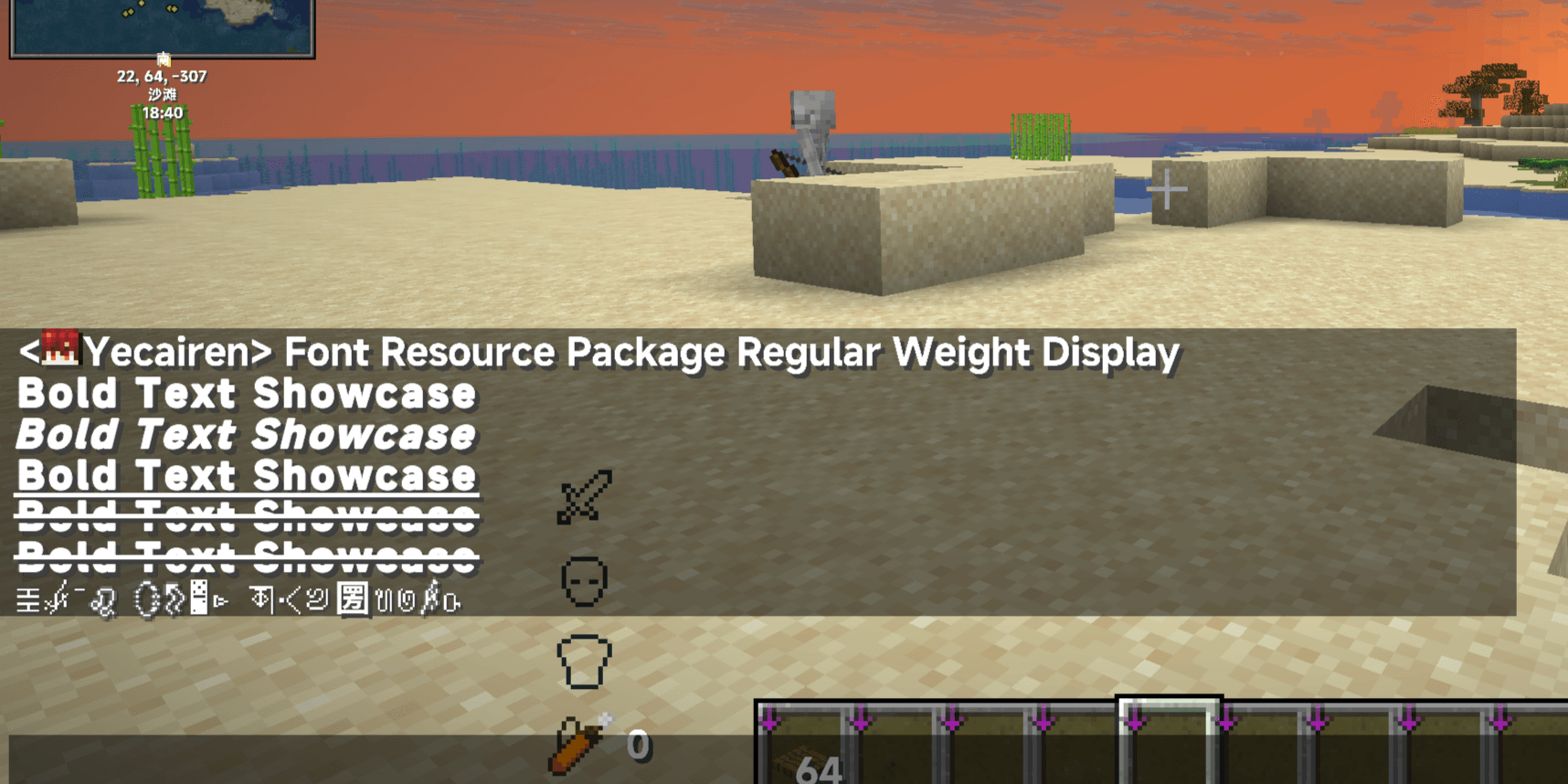 IMG_20260902_134138.png IMG_20260902_134138.png
Versions
Files
Relations
Project Relations
More like this
Similar Mods
Suggestions use data such as tags, dependencies, dependents, descriptions, titles, and more to rank how much they overlap with this mod.
On ModDex
Community snapshot
By the numbers
Statistics
Want to reach Minecraft players?
We're looking for a server hosting partner to feature here and other parts of the site. Interested? Send us a message!
Get in touchGet it on
Available Platforms
On ModDex
Community snapshot
By the numbers
Statistics
Resources