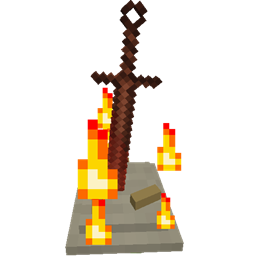
Community listing page, reviews here may not be monitored by the author.
Bonfires


No reviews yet
Easy to use teleportation between anywhere and across dimensions
Community voices
Reviews
No reviews yet. Be the first to review this project!
Get it on
Available Platforms
Compatibility
Supported Environments
Must be installed on both the client and the server.
About
Project Details
For authors
Embed Badge
If you're the author of this project, you can embed a live badge anywhere that supports HTML or Markdown. It updates automatically whenever ratings change.
Use HTML for any page that supports it, or Markdown for README files and Markdown-based descriptions.
Identifiers
Platform IDs
About
Description

Bonfires is now on Modrinth! I will still continue to upload on CurseForge too just giving another option :)
Just a heads up v1.2.18 will be the last 1.18.2, 1.19.2 and 1.19.4 version
Bonfires has now been ported to Fabric for 1.20.1 and 1.20.4, I will continue to support Forge and NeoForge. This was my first time using and developing for Fabric I hope it's alright >-<.
What the mod adds
Bonfires is a mod that brings bonfires from the Souls games to Minecraft. For those who have not played the Souls games, bonfires act like checkpoints which can be teleported to and will heal the player.
In this mod these bonfires can be created and named which then can be used to travel to any other bonfire in any dimension even mod dimensions. Using a bonfire will also set your spawn location like a bed.
It also adds the Estus Flask, which is essentially a multi use healing potion which is restored when using a bonfire.
The Coiled Sword, which is a component of bonfires, can be used as a sword which will set mobs on fire.
There are also 2 items which can be used to return to your spawn point, the Homeward Bone and the Coiled Sword Fragment.
New in 1.2: Weapons and tools can be reinforced to increase their damage, estus flasks can be reinforced to increase the amount healed
Getting started
In 1.0.2+ you can get started with the mod without the need of looking at anything else just get killed by a mob to unlock the first advancement, which will guide you to the everything else in the mod and unlocking recipes for the recipe book.
Blocks, Items, Features and Crafting Recipes
With v1.0.2+ you can see all these recipes inside the recipe book added in Minecraft 1.12
To create a bonfire you need 2 items. A Pile of Bone and Ash and a Coiled Sword.
The Pile of Bone and Ash can be crafted like so, you can leave the top row empty and use the bottom row instead
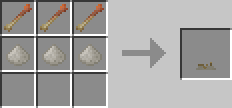
The items in the top are homeward bones. These are used to return to your spawn point but are consumed on use. Your spawn point is stored per dimension.
The items in the bottom are Piles of Ash which have a chance to drop from mobs when burnt to death.
Homeward Bones are crafted like so, this recipe is shapeless
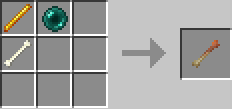
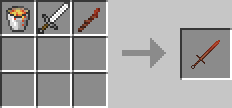
The Coiled Sword are crafted like so
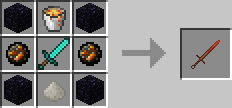
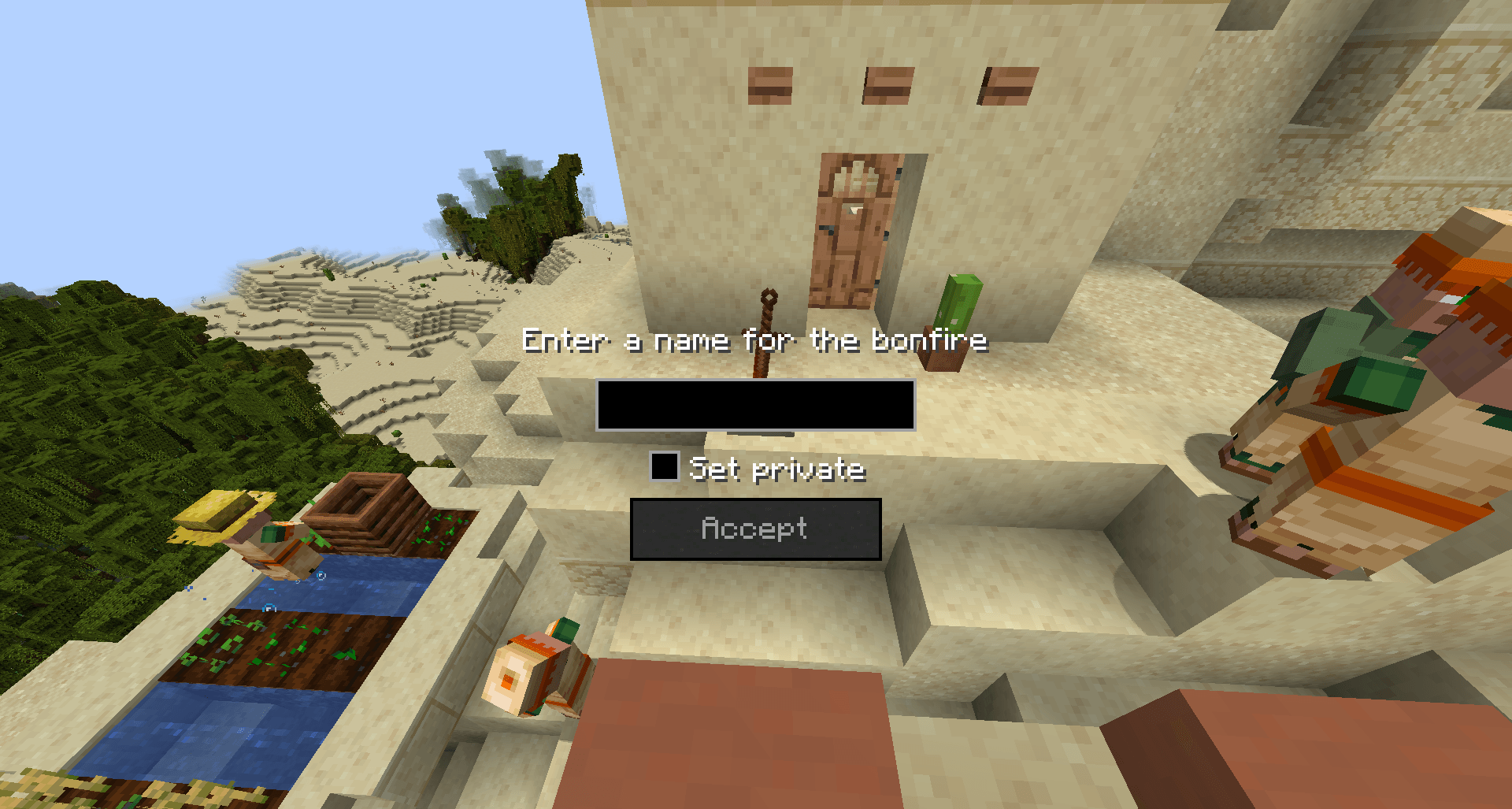
Once you have both place the Pile of Bone and Ash on the ground and then right click it with the Coiled Sword. This will place the coiled sword on the pile creating a bonfire. Now to light the bonfire you simply right click the bonfire which will then allow you to name the bonfire. When naming the bonfire there is also the option to set the bonfire as private which will hide the bonfire from other players so they can't travel to it but can travel from it.
However, since bonfires are like teleporters they are only really useful if you make 2 of them.
If you destroy a bonfire it will drop a Coiled Sword Fragment which acts just like the Homeward Bone but is not consumed. It can also be used to create a Coiled Sword for less materials, this recipe is shapeless.
The Estus Flask when crafted has 3 uses which can be increased using Estus Shards. To reinforce the Estus Flask simply right click while holding an Estus Shard with the Estus Flask in your inventory. Drinking the Estus Flask will heal 3 hearts.
The Estus Flask is crafted like so, this recipe is shapeless
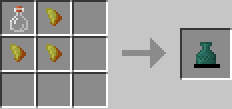
And Estus Shards are crafted like so, this recipe is shapeless
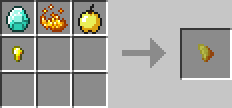
Lastly Ash Blocks are crafted like so, which act exactly like sand, this recipe is actually also shapeless but there's no way to tell that!
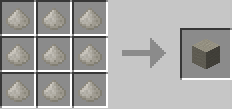
And of course a block will create 9 Piles of Ash, this recipe is shapeless
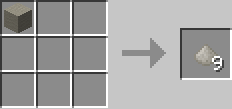
New in 1.2+:
Titanite materials have been added which are used for reinforcing tools/weapons in the reinforce GUI located in the Bonfire menu.
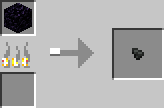
Titanite Shards are obtained by mining obsidian that has lava adjacent to it. In 1.2.3+ this no longer happens instead smelt Obsidian
Titanite Shards can be smelted back into obsidian. This has been removed in 1.2.3+
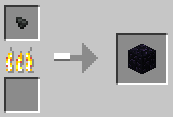
Large Titanite Shards are crafted like so, this recipe is shapeless
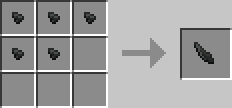
Titanite Chunks are crafted like so, this recipe is shapeless
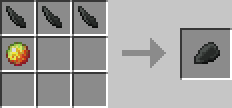
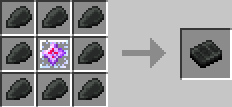
Titanite Slabs are crafted like so
To reinforce the Estus Flask an Undead Bone Shard is required which are obtained when a bonfire is destroyed by an explosion.
New in 1.2.3+
Titanite Shards no longer drop from obsidian adjacent to lava, the smelting recipe still remains.
The cheaper Coiled Sword recipe is now crafted like so
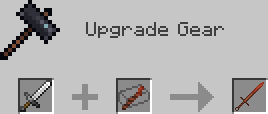
In 1.20+:
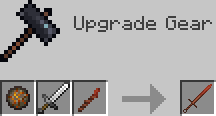
Titanite Chunks are now crafted like so
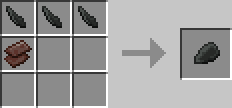
Titanite Shards are now smelted like so
Commands
There are currently 2 commands added by Bonfires both of which are admin commands
/bonfires <filter> [parameter]
This command is used to display the bonfires in the world based on the filters given to it.
Bonfires are displayed in the chat with the name, UUID, owner and position
The filters include:
- all - this filter takes no parameters, and will display every bonfire in the world. ex. /bonfires all
- dim - this filter requires the dimension ID as a parameter and will display every bonfire in the given dimension. ex. /bonfires dim minecraft:overworld
- name - this filter requires the name as a parameter and will display every bonfire that contains the given name in its name. ex. /bonfires name bonfire
- owner - this filter requires the owner as a parameter and will display every bonfire created by the given owner. ex. /bonfires owner Wehavecookies56
- radius - this filter requires the block radius as a parameter and will display every bonfire within the given radius of blocks. ex. /bonfires radius 10
/travel <UUID>
This command will teleport the user of the command to the bonfire with the given UUID
The UUID of a bonfire can be found either using the /bonfires command or by hovering over the name of the bonfire in the travel menu in the bonfire GUI
Configuration
If you have any ideas for more config options please suggest more that could be added.
The config file is simply named, in 1.2.2 and below, bonfires.cfg
In 1.2.3+ there are 2 config files bonfires-client.toml and bonfires-common.toml located in the config folder
In 1.2.9+ there is also bonfires-server.toml located in each world's serverconfig folder
Client config
Render Text Above Bonfires (Default: true)
This config option is quite self explanatory, simply if set to true it will display the name of the bonfire above the block when looked at otherwise if set to false it will not. In v1.0.2+ this option can be changed within Forge's config GUI without restarting the game.
Bonfire Dimension Tab Icons
This config option is used to set the icon for the tab for associated dimension ID.
For any dimension not included in this list the icon will be a filled map.
In 1.2.3+
The config option takes a list of strings which contain a pair of a dimension and an item separated by an =.
For example "minecraft:overworld=minecraft:grass_block" simply sets the tab for the overworld to a grass block
In 1.2.2 and below
By default it is set to:
S:"Bonfire dimension tab icons" <
        0=minecraft:grass
        -1=minecraft:netherrack
        1=minecraft:end_stone
>
It takes the dimension ID then the item name and as of v1.2.1 the metadata is supported
For example:
S:"Bonfire dimension tab icons" <
        0=minecraft:grass
        -1=minecraft:netherrack
        1=minecraft:end_stone
        2=bonfires:coiled_sword
        3=minecraft:stone,2
>
This will set the icon for the dimension with ID 2 to have the Coiled Sword from this mod as the icon for the tab, if the icon is not set or the item given doesn't exist the icon will be a map.
The icon for dimension 3 will be set to Stone with metadata 2 which is Polished Granite.
If the metadata isn't specified it will use 0.
New in 1.2.11:
Render Screenshots in GUI (Default: true)
Disable this to hide the Bonfire screenshots in the Bonfire GUI
Enable Automatic Screenshot on Creation (Default: true)
Disable this to stop taking screenshots when creating a Bonfire, screenshots can still be taken by clicking the screenshot button in the Bonfire GUI
Screenshot Wait Ticks (Default: 5, Range 1-100)
This will change how long it waits while taking a Bonfire screenshot, increase this value if the GUI is not hidden in the screenshot this should only be a problem if you have low performance.
Delete Screenshots on Destroyed (Default: true)
Whenever a Bonfire is destroyed the associated screenshot (if it exists) is deleted, disable this to stop that.
New in 1.2.15:
Hidden Dimensions in GUI (Default: empty)
Use this to hide dimensions from the Bonfire GUI, this does not disable using Bonfires in said dimension it just simply hides the tab in the GUI. This might be useful if you can't or won't create a Bonfire in that dimension.
Example: "Hidden Dimensions in GUI" = ["minecraft:the_end"]
Common config
Enable titanite shard drops from obsidian when adjacent to lava (Default: true)
In 1.2.3+ this option has been removed.
This config option should speak for itself, if true titanite shards will drop when obsidian is mined next to lava. If false titanite shards will be unobtainable this is useful for modpacks which may want to have their own method of obtaining them
Enable undead bone shard drops from blowing up a bonfire (Default: true)
This config option should speak for itself, if true undead bone shards will drop when a bonfire is destroyed by an explosion. If false undead bone shards will be unobtainable this is useful for modpacks which may want to have their own method of obtaining them
Enable weapon/tool reinforcing (Default: true)
Use this config option to completely disable weapon/tool reinforcing if you just want to have the bonfires only have teleportation capabilities
Reinforce item blacklist
This is used to disable certain items showing up in the reinforce menu.
By default the blacklist is empty
The list simply takes the item name like so
For example:
In 1.2.2 and below
S:"Reinforce item blacklist" <
        minecraft:wooden_sword
        minecraft:stone_sword
>
In 1.2.3+
"Reinforce item blacklist" = ["minecraft:wooden_sword", "minecraft:stone_sword"]
This will stop wooden swords and stone swords from being reinforced.
Server config
For those unfamiliar, server configs are located in the serverconfig folder for each save/world they can be placed in the defaultconfigs folder to copy automatically to new worlds.
New in 1.2.9:
Set how much the Estus Flask heals by default (Default: 6)
Set this value to change how many hearts the Estus Flask heals at its base level, 1 is equal to half a heart
Set the amount to increase Estus Flask healing per level (Default: 1)
Set this value to change how much each reinforcement level increases the amount of hearts healed with the Estus Flask
Set the amount to increase damage for reinforced tools per level (Default: 0.5)
Set this value to change how much each reinforcement level increases the damage tools deal
Known issues
Only when on a server in creative mode there is a forge/minecraft bug that causes the reinforce data to be lost when opening the creative inventory. This does not apply for 1.2.7+
All the known issues are located here, if you do come accross one please report it here
Please make sure before reporting an issue that you are using the latest version and that it has not already been reported.
Can I use this in a modpack?
Of course! I would prefer if you credited me however, it is not required.
Translate this mod
Speak another language? Want to contribute something to the mod? You can add translation files here. Use the en_us.lang file as a base as that will always be the most up to date language file.
Planned Features
- A system to share private bonfires through the UUID of the bonfire.
- Add souls to which will work similarly to Dark Souls however souls will be spent on using the bonfire as a balancing feature.
- Add primal bonfires, one way cheaper bonfires which are assigned a bonfire to travel to when right clicked.
- Potentially more things from the Souls games, combat features are unlikely to be added as this is more of a utility focused mod.
Big thanks to
- Prophecy_Wrecker for creating new, better and amazing textures for everything in the mod!
- FromSoftware and Bandai Namco for Dark Souls
Just a heads up v1.2.18 will be the last 1.18.2, 1.19.2 and 1.19.4 version
Bonfires has now been ported to Fabric for 1.20.1 and 1.20.4, I will continue to support NeoForge. This was my first time using and developing for Fabric I hope it's alright >_<
What the mod adds
Bonfires is a mod that brings bonfires from the Souls games to Minecraft. For those who have not played the Souls games, bonfires act like checkpoints which can be teleported to and will heal the player.
In this mod these bonfires can be created and named which then can be used to travel to any other bonfire in any dimension even mod dimensions. Using a bonfire will also set your spawn location like a bed.
It also adds the Estus Flask, which is essentially a multi use healing potion which is restored when using a bonfire.
The Coiled Sword, which is a component of bonfires, can be used as a sword which will set mobs on fire.
There are also 2 items which can be used to return to your spawn point, the Homeward Bone and the Coiled Sword Fragment.
New in 1.2: Weapons and tools can be reinforced to increase their damage, estus flasks can be reinforced to increase the amount healed
Getting started
In 1.0.2+ you can get started with the mod without the need of looking at anything else just get killed by a mob to unlock the first advancement, which will guide you to the everything else in the mod and unlocking recipes for the recipe book.
Blocks, Items, Features and Crafting Recipes
With v1.0.2+ you can see all these recipes inside the recipe book added in Minecraft 1.12
To create a bonfire you need 2 items. A Pile of Bone and Ash and a Coiled Sword.
The Pile of Bone and Ash can be crafted like so, you can leave the top row empty and use the bottom row instead
The items in the top are homeward bones. These are used to return to your spawn point but are consumed on use. Your spawn point is stored per dimension.
The items in the bottom are Piles of Ash which have a chance to drop from mobs when burnt to death.
Homeward Bones are crafted like so, this recipe is shapeless
The Coiled Sword are crafted like so
Once you have both place the Pile of Bone and Ash on the ground and then right click it with the Coiled Sword. This will place the coiled sword on the pile creating a bonfire. Now to light the bonfire you simply right click the bonfire which will then allow you to name the bonfire. When naming the bonfire there is also the option to set the bonfire as private which will hide the bonfire from other players so they can't travel to it but can travel from it.
However, since bonfires are like teleporters they are only really useful if you make 2 of them.
If you destroy a bonfire it will drop a Coiled Sword Fragment which acts just like the Homeward Bone but is not consumed. It can also be used to create a Coiled Sword for less materials, this recipe is shapeless (This recipe is replaced by a smithing recipe in 1.2.3+).
The Estus Flask when crafted has 3 uses which can be increased using Estus Shards. To reinforce the Estus Flask simply right click while holding an Estus Shard with the Estus Flask in your inventory. Drinking the Estus Flask will heal 3 hearts.
The Estus Flask is crafted like so, this recipe is shapeless
And Estus Shards are crafted like so, this recipe is shapeless
Lastly Ash Blocks are crafted like so, which act exactly like sand, this recipe is actually also shapeless but there's no way to tell that!
And of course a block will create 9 Piles of Ash, this recipe is shapeless
New in 1.2+:
Titanite materials have been added which are used for reinforcing tools/weapons in the reinforce GUI located in the Bonfire menu.
Titanite Shards are obtained by mining obsidian that has lava adjacent to it. In 1.2.3+ this no longer happens instead smelt Obsidian.
Titanite Shards can be smelted back into obsidian. This has been removed in 1.2.3+
Large Titanite Shards are crafted like so, this recipe is shapeless
Titanite Chunks are crafted like so, this recipe is shapeless
Titanite Slabs are crafted like so
To reinforce the Estus Flask an Undead Bone Shard is required which are obtained when a bonfire is destroyed by an explosion.
New in 1.2.3+
Titanite Shards no longer drop from obsidian adjacent to lava, the smelting recipe still remains.
The cheaper Coiled Sword recipe is now crafted like so
In 1.20+:
Titanite Chunks are now crafted like so
Titanite Shards are now smelted like so
Commands
There are currently 2 commands added by Bonfires both of which are admin commands
/bonfires [parameter]
This command is used to display the bonfires in the world based on the filters given to it.
Bonfires are displayed in the chat with the name, UUID, owner and position
The filters include:
- all - this filter takes no parameters, and will display every bonfire in the world. ex. /bonfires all
- dim - this filter requires the dimension ID as a parameter and will display every bonfire in the given dimension. ex. /bonfires dim minecraft:overworld
- name - this filter requires the name as a parameter and will display every bonfire that contains the given name in its name. ex. /bonfires name bonfire
- owner - this filter requires the owner as a parameter and will display every bonfire created by the given owner. ex. /bonfires owner Wehavecookies56
- radius - this filter requires the block radius as a parameter and will display every bonfire within the given radius of blocks. ex. /bonfires radius 10
/travel <UUID>
This command will teleport the user of the command to the bonfire with the given UUID
The UUID of a bonfire can be found either using the /bonfires command or by hovering over the name of the bonfire in the travel menu in the bonfire GUI
Configuration
If you have any ideas for more config options please suggest more that could be added.
The config file is simply named, in 1.2.2 and below, bonfires.cfg
In 1.2.3+ there are 2 config files bonfires-client.toml and bonfires-common.toml located in the config folder
In 1.2.9+ there is also bonfires-server.toml located in each world's serverconfig folder
Client config
Render Text Above Bonfires (Default: true)
This config option is quite self explanatory, simply if set to true it will display the name of the bonfire above the block when looked at otherwise if set to false it will not. In v1.0.2+ this option can be changed within Forge's config GUI without restarting the game.
Bonfire Dimension Tab Icons
This config option is used to set the icon for the tab for associated dimension ID.
For any dimension not included in this list the icon will be a filled map.
In 1.2.3+
The config option takes a list of strings which contain a pair of a dimension and an item separated by an =.
For example "minecraft:overworld=minecraft:grass_block" simply sets the tab for the overworld to a grass block
In 1.2.2 and below
By default it is set to:
S:"Bonfire dimension tab icons" < 0=minecraft:grass -1=minecraft:netherrack 1=minecraft:end_stone > It takes the dimension ID then the item name and as of v1.2.1 the metadata is supported
For example:
S:"Bonfire dimension tab icons" < 0=minecraft:grass -1=minecraft:netherrack 1=minecraft:end_stone 2=bonfires:coiled_sword 3=minecraft:stone,2 > This will set the icon for the dimension with ID 2 to have the Coiled Sword from this mod as the icon for the tab, if the icon is not set or the item given doesn't exist the icon will be a map.
The icon for dimension 3 will be set to Stone with metadata 2 which is Polished Granite.
If the metadata isn't specified it will use 0.
New in 1.2.11:
All the config options below are related to the new screenshot system where in the travel menu Bonfire screenshots are displayed, when creating a Bonfire a screenshot will be taken and saved in the bonfires folder located in your Minecraft instance folder these screenshots are not sent to other players in multiplayer. Screenshots can be taken for Bonfires without a screenshot in the travel menu. When a Bonfire is destroyed the screenshot is deleted.
Render Screenshots in GUI (Default: true)
Disable this to hide the Bonfire screenshots in the Bonfire GUI
Enable Automatic Screenshot on Creation (Default: true)
Disable this to stop taking screenshots when creating a Bonfire, screenshots can still be taken by clicking the screenshot button in the Bonfire GUI
Screenshot Wait Ticks (Default: 5, Range 1-100)
This will change how long it waits while taking a Bonfire screenshot, increase this value if the GUI is not hidden in the screenshot this should only be a problem if you have low performance.
Delete Screenshots on Destroyed (Default: true)
Whenever a Bonfire is destroyed the associated screenshot (if it exists) is deleted, disable this to stop that.
New in 1.2.15:
Hidden Dimensions in GUI (Default: empty)
Use this to hide dimensions from the Bonfire GUI, this does not disable using Bonfires in said dimension it just simply hides the tab in the GUI. This might be useful if you can't or won't create a Bonfire in that dimension.
Example: "Hidden Dimensions in GUI" = ["minecraft:the_end"]
Common config
Enable titanite shard drops from obsidian when adjacent to lava (Default: true)
In 1.2.3+ this option has been removed.
This config option should speak for itself, if true titanite shards will drop when obsidian is mined next to lava. If false titanite shards will be unobtainable this is useful for modpacks which may want to have their own method of obtaining them
Enable undead bone shard drops from blowing up a bonfire (Default: true)
This config option should speak for itself, if true undead bone shards will drop when a bonfire is destroyed by an explosion. If false undead bone shards will be unobtainable this is useful for modpacks which may want to have their own method of obtaining them
Enable weapon/tool reinforcing (Default: true)
Use this config option to completely disable weapon/tool reinforcing if you just want to have the bonfires only have teleportation capabilities
Reinforce item blacklist
This is used to disable certain items showing up in the reinforce menu.
By default the blacklist is empty
The list simply takes the item name like so
For example:
In 1.2.2 and below
S:"Reinforce item blacklist" < minecraft:wooden_sword minecraft:stone_sword >
In 1.2.3+ "Reinforce item blacklist" = ["minecraft:wooden_sword", "minecraft:stone_sword"]
This will stop wooden swords and stone swords from being reinforced.
Server config
For those unfamiliar, server configs are located in the serverconfig folder for each save/world they can be placed in the defaultconfigs folder to copy automatically to new worlds.
New in 1.2.9:
Set how much the Estus Flask heals by default (Default: 6)
Set this value to change how many hearts the Estus Flask heals at its base level, 1 is equal to half a heart
Set the amount to increase Estus Flask healing per level (Default: 1)
Set this value to change how much each reinforcement level increases the amount of hearts healed with the Estus Flask
Set the amount to increase damage for reinforced tools per level (Default: 0.5)
Set this value to change how much each reinforcement level increases the damage tools deal
Known issues
Only when on a server in creative mode there is a forge/minecraft bug that causes the reinforce data to be lost when opening the creative inventory. This does not apply for 1.2.7+
All the known issues are located here, if you do come accross one please report it here
Please make sure before reporting an issue that you are using the latest version and that it has not already been reported.
Can I use this in a modpack?
Of course! I would prefer if you credited me, however, it is not required.
Translate this mod
Speak another language? Want to contribute something to the mod? You can add translation files here. Use the en_us.json file as a base as that will always be the most up to date language file.
Planned Features
- A system to share private bonfires through the UUID of the bonfire.
- Add souls to which will work similarly to Dark Souls however souls will be spent on using the bonfire as a balancing feature.
- Add primal bonfires, one way cheaper bonfires which are assigned a bonfire to travel to when right clicked.
- Potentially more things from the Souls games, combat features are unlikely to be added as this is more of a utility focused mod.
Big thanks to
- Prophecy_Wrecker for creating new, better and amazing textures for everything in the mod!
- FromSoftware and Bandai Namco for Dark Souls
Screenshots
Gallery
-
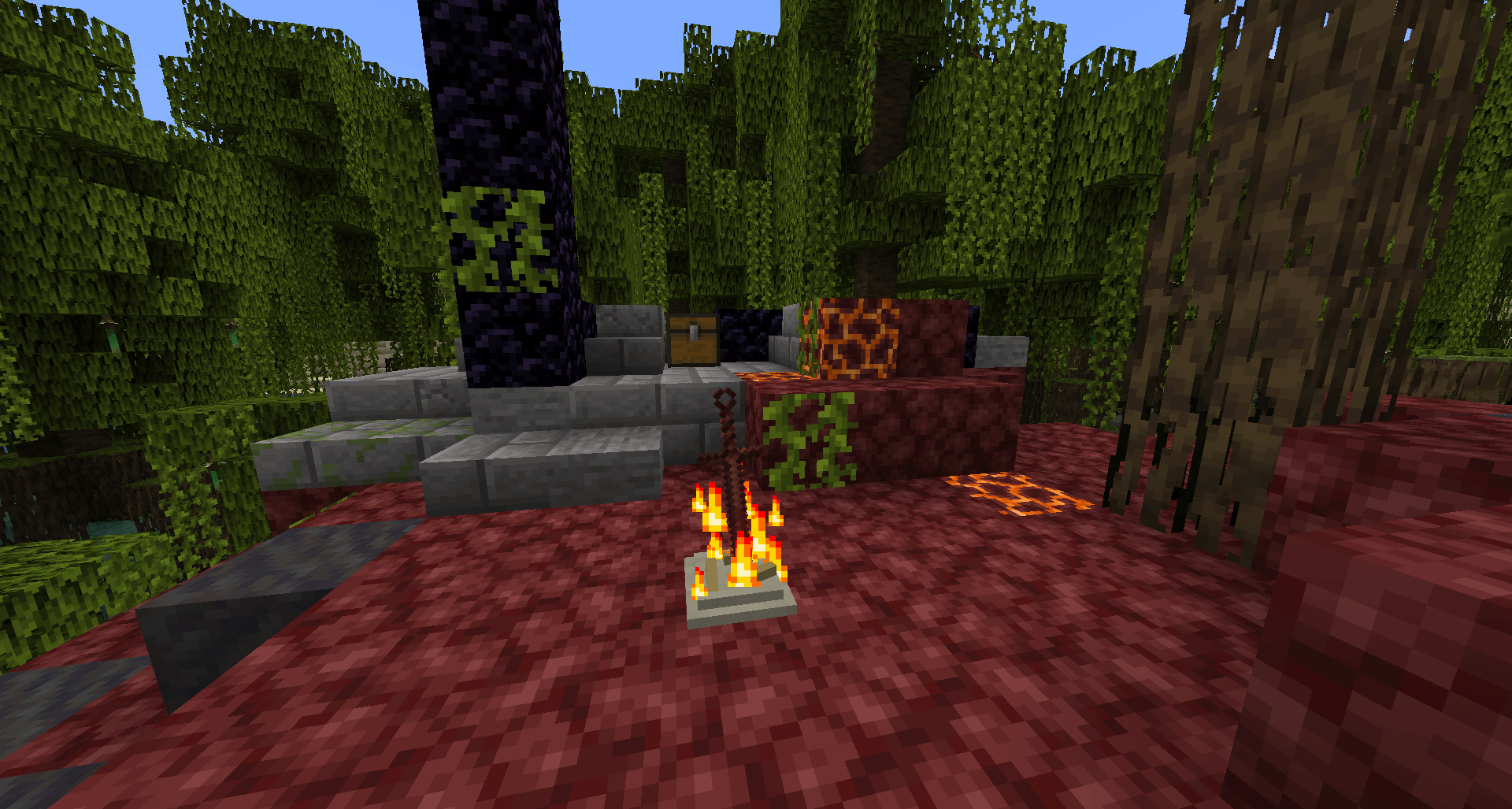 Lit Bonfire Lit Bonfire
 -
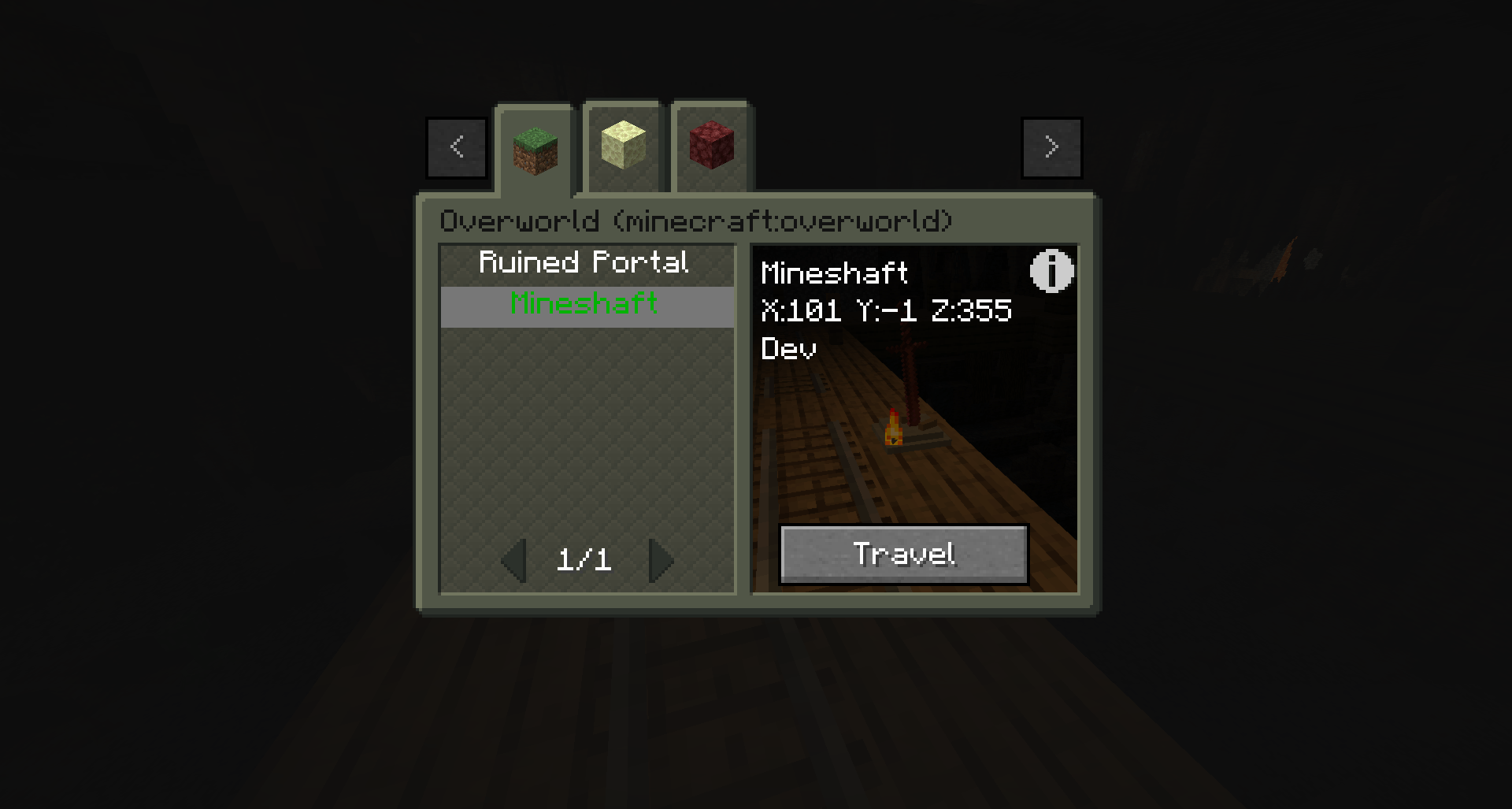 2e5db96cf45d518e234893b188447076c837ea77.png 2e5db96cf45d518e234893b188447076c837ea77.png
 -
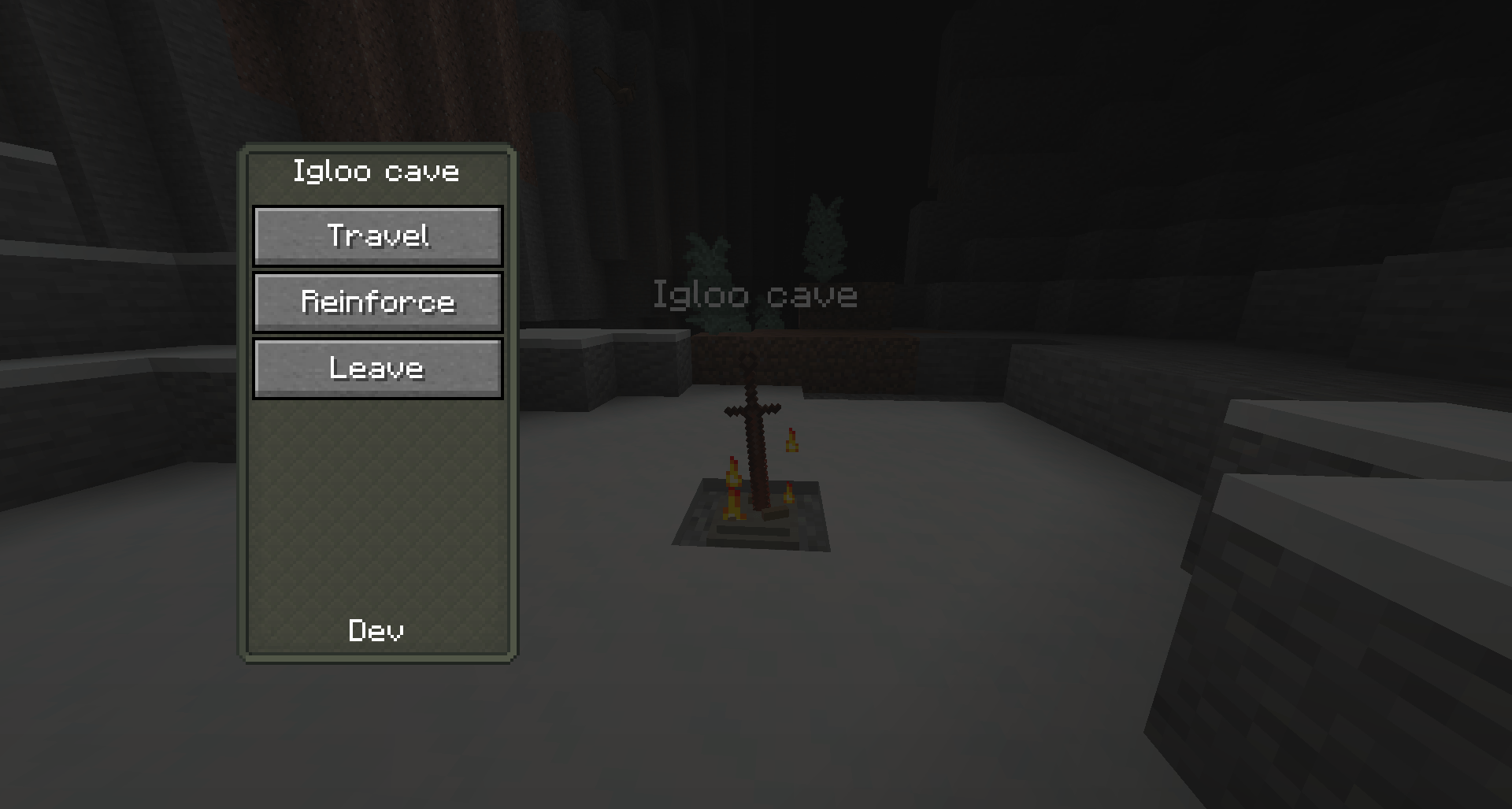 3cfe770c0071a0cef1b5740c00e6fa179bcd1d16.png 3cfe770c0071a0cef1b5740c00e6fa179bcd1d16.png
 -
 5eaca485f2bae123dded859d0ecf0515da562faf.png 5eaca485f2bae123dded859d0ecf0515da562faf.png
 -
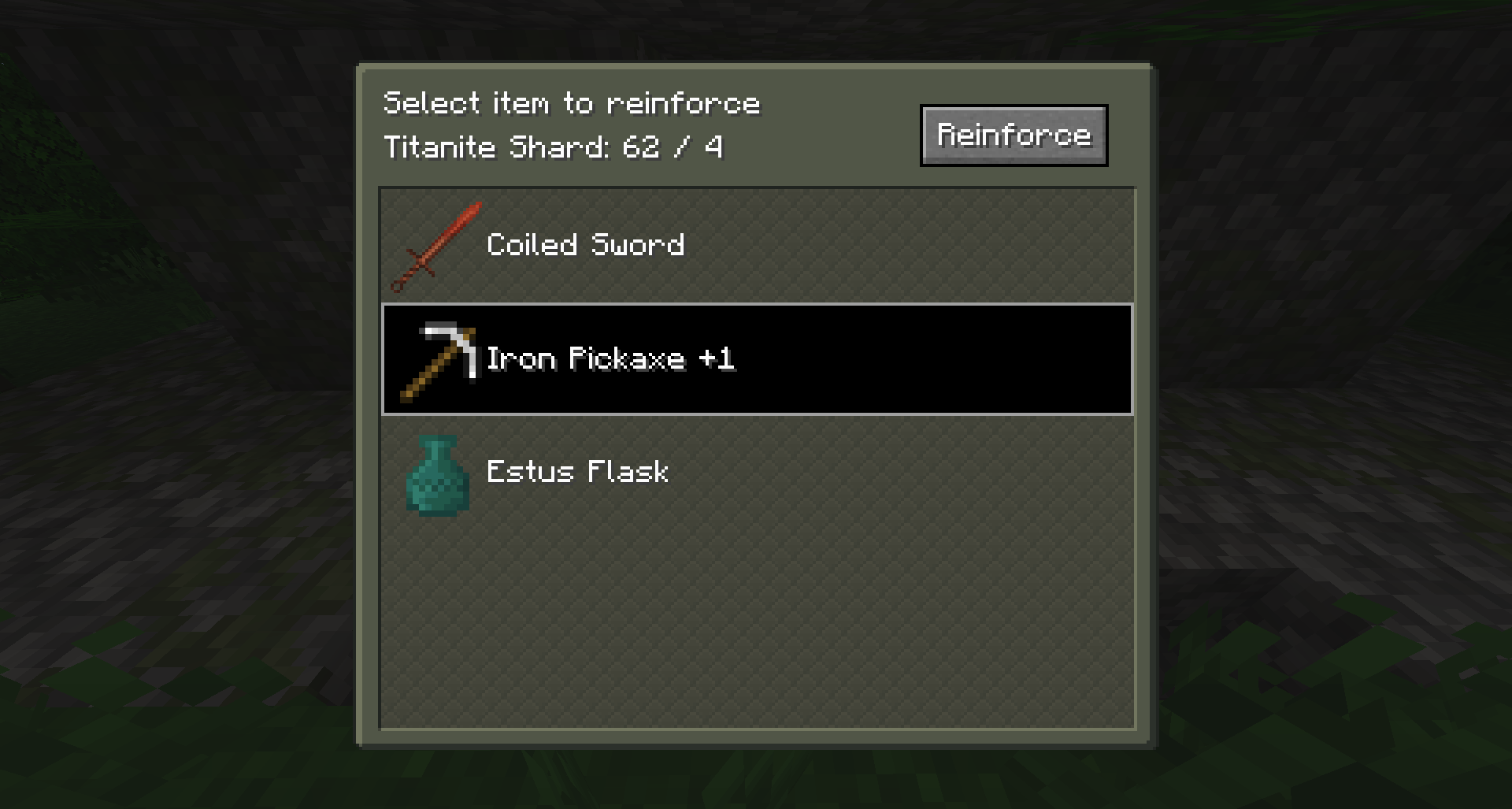 Reinforcing items Reinforcing items
-
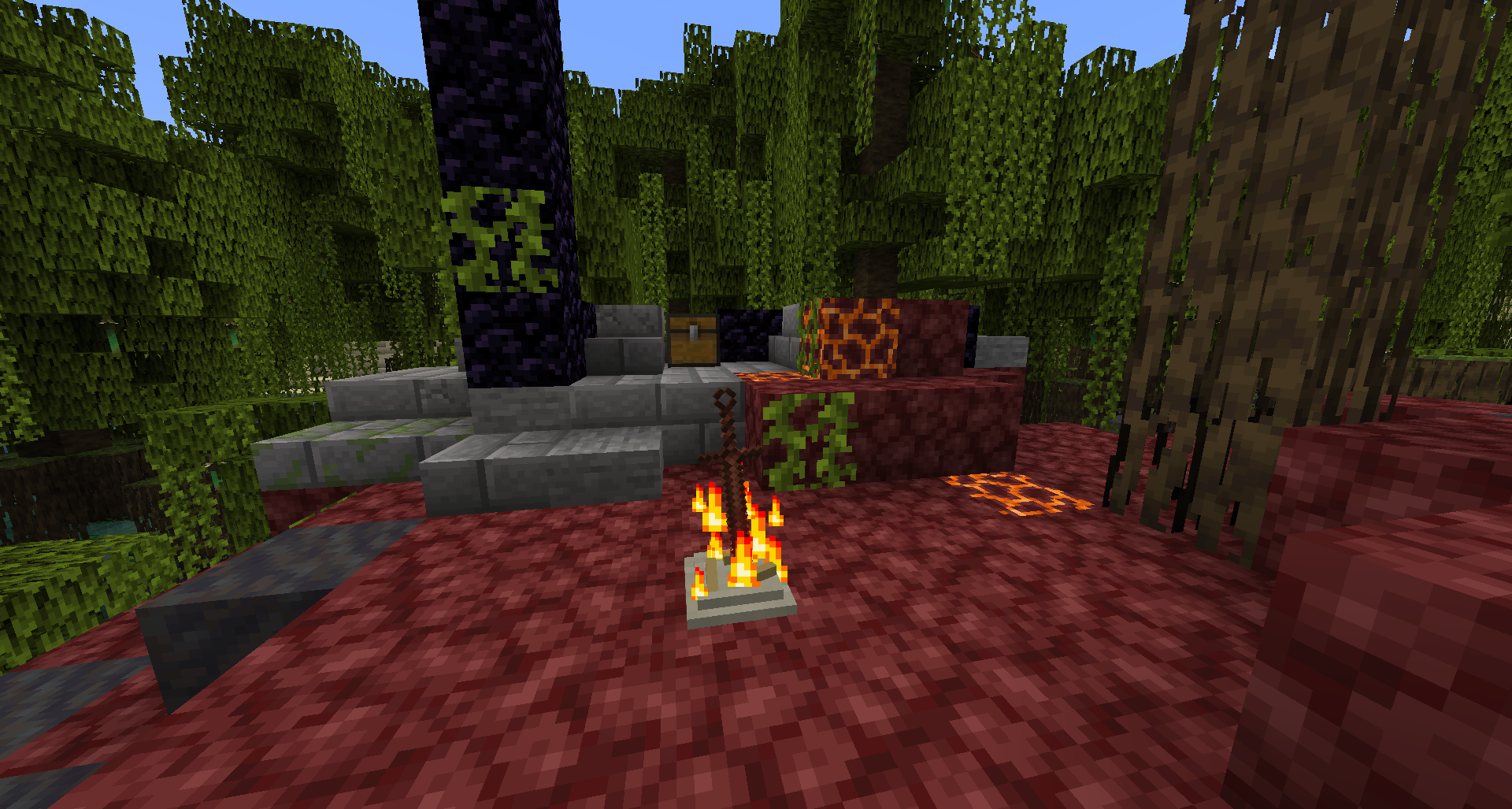 Lit Bonfire
 -
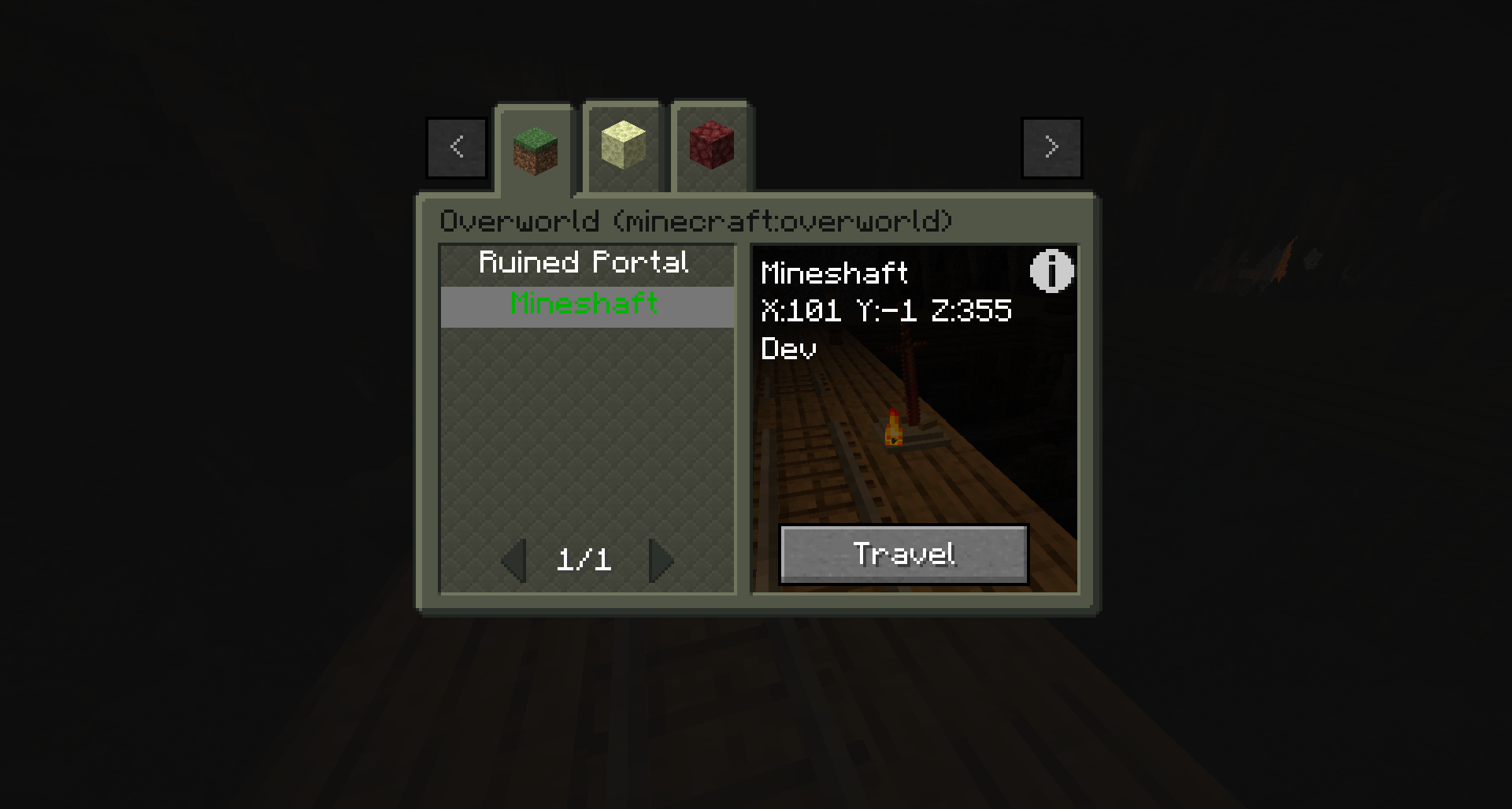 Travel menu
 -
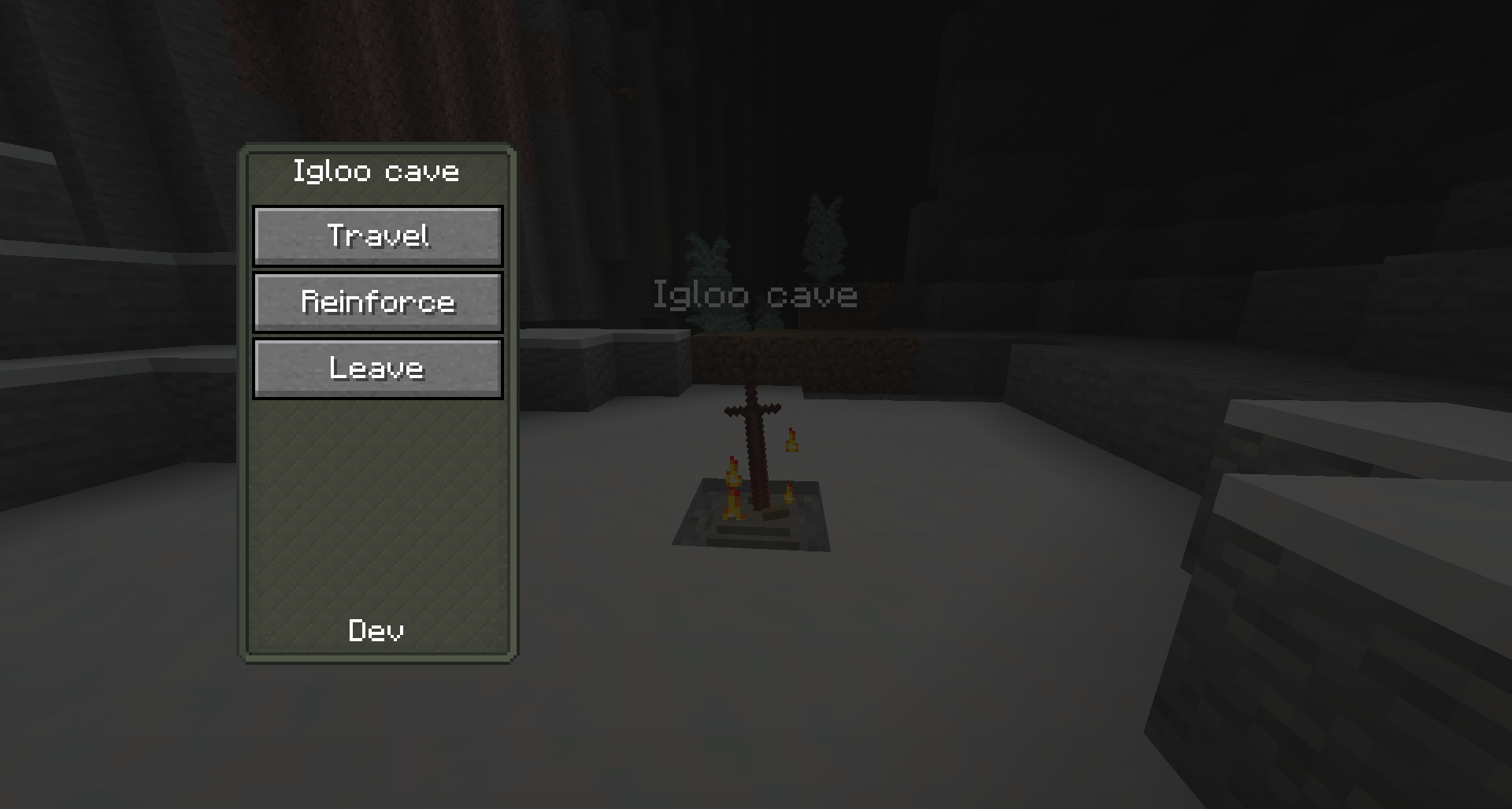 Bonfire menu
 -
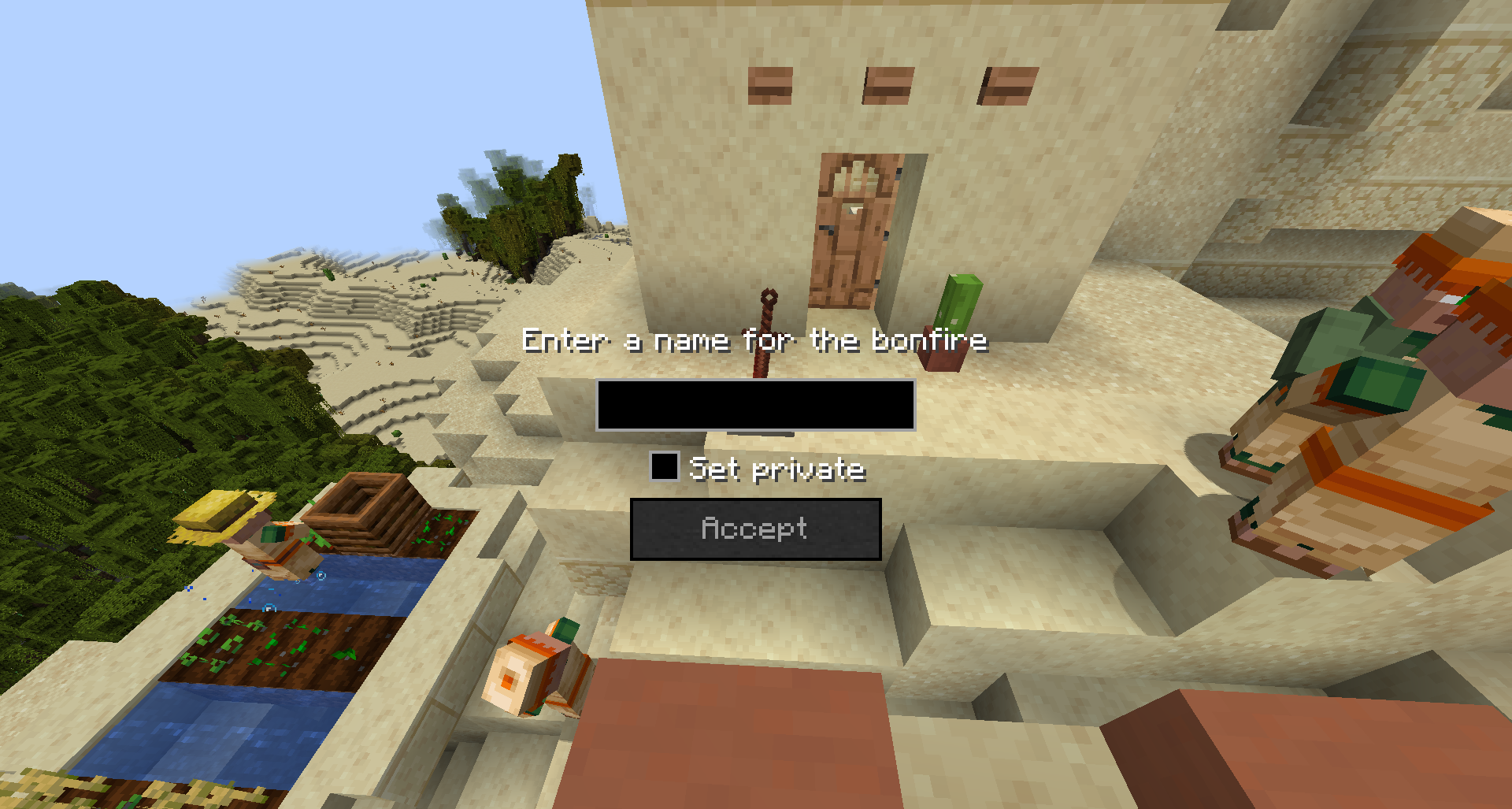 Creating a Bonfire
 -
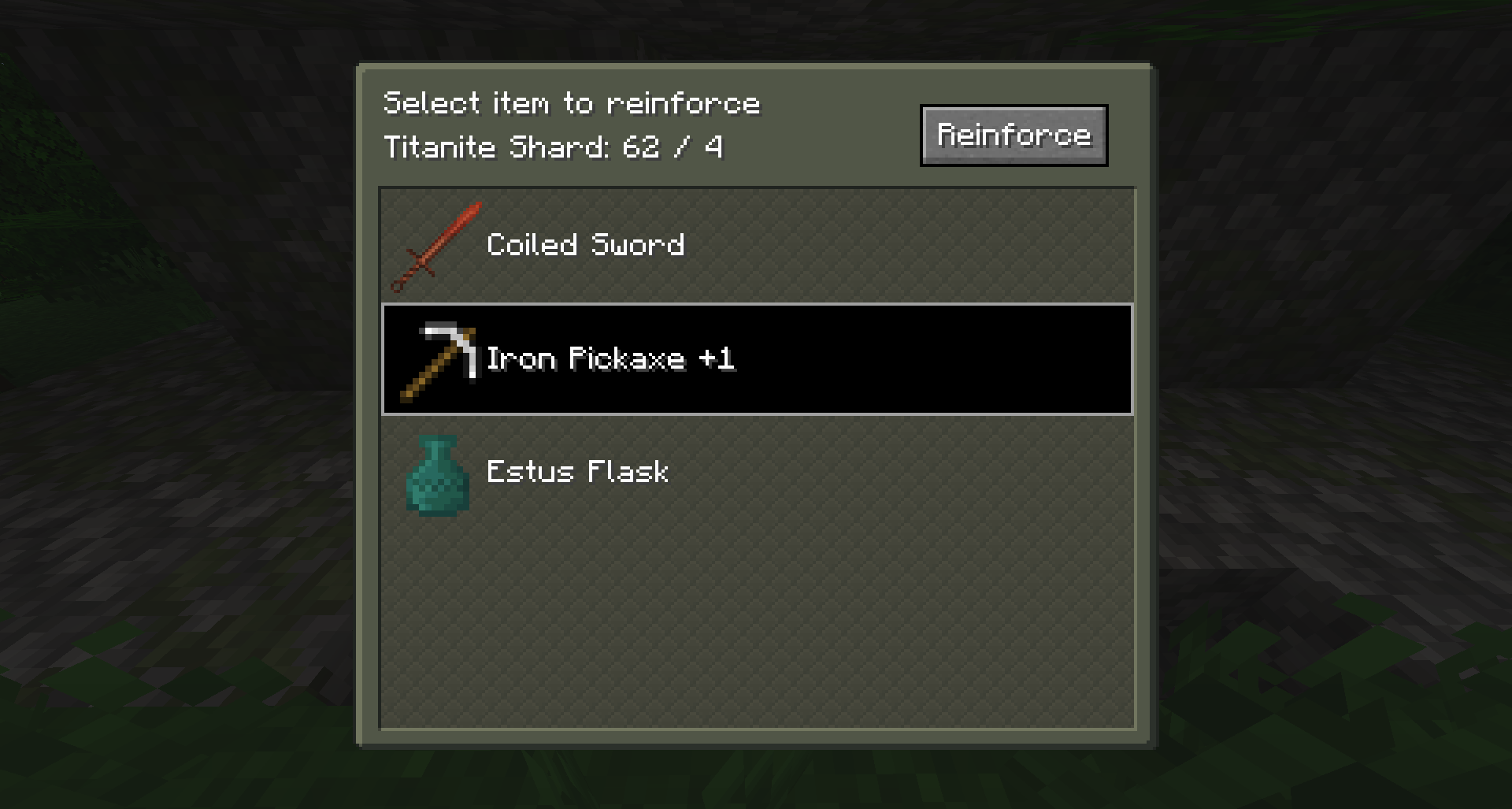 Reinforcing items
Versions
Files
Relations
Project Relations
More like this
Similar Mods
Suggestions use data such as tags, dependencies, dependents, descriptions, titles, and more to rank how much they overlap with this mod.
On ModDex
Community snapshot
By the numbers
Statistics
Want to reach Minecraft players?
We're looking for a server hosting partner to feature here and other parts of the site. Interested? Send us a message!
Get in touchGet it on
Available Platforms
On ModDex
Community snapshot
By the numbers