
Community listing page, reviews may not be monitored by the author.
Bossbar


No reviews yet
Health bars for bosses or entities: easy, performance-friendly, feature-rich.

Community voices
Reviews
No reviews yet. Be the first to review this project!
Get it on
Available Platforms
Compatibility
Supported Environments
Runs entirely on the server. Also works in singleplayer.
About
Project Details
For authors
Embed Badge
If you're the author of this project, you can embed a live badge anywhere that supports HTML or Markdown. It updates automatically whenever ratings change.
Use HTML for any page that supports it, or Markdown for README files and Markdown-based descriptions.
Identifiers
Platform IDs
Resources
External Links
About
Description
Bossbar
Enhancing Minecraft's bossbar functionality by properly extending it to entities. No more complicated command block setup, lag-inducing detection logic, and cheap attempts at recreating the real deal. This is the real deal now.
✅ Features
- Entity bossbars take the name, health and max health of its entity.
- Range can be specified for entity bossbars, meaning it's only visible to local players.
- Default bossbars can be configured (see Configuration)
- Thicken fog & darken skies with the extended functionality given to entity bossbars.
- Server-side, meaning clients don't need to download it to connect.
- Easy to use with the
/bossbarcommand, swap out a bossbar id with a target selector, and done! - Optimized to a lagless extend, compared to Minecraft's bulky command code.
⚙️ Configuration
Configuration can be found in config\bossbar.json.
default:<entity_type>: resource_locationrange: integer
Set the entity bossbar's range. Defaults to64. Any player outside of this range won't see the entity bossbar.darken_sky: bool
Set if entity bossbar darkens the sky. Defaults tofalse.thicken_fog: bool
Set if entity bossbar thickens the fog. Defaults tofalse.color:(blue|green|pink|purple|red|white|yellow)
Set the entity bossbar's bar color. Defaults topurple.style:(notched_6|notched_10|notched_12|notched_20|progress)
Set the entity bossbar's visual amount of segments. Defaults toprogress.
📖 Syntax
bossbar set <target> (visible|range|darken_sky|thicken_fog|color|style)... visible <visible>
Set the entity bossbar's visibility. Defaults tofalsefor every entity, disabling their bossbar.... range <range>
Set the entity bossbar's range. Defaults to64. Any player outside of this range won't see the entity bossbar.... darken_sky <darken_sky>
Set if entity bossbar darkens the sky. Defaults tofalse.... thicken_fog <thicken_fog>
Set if entity bossbar thickens the fog. Defaults tofalse.... color (blue|green|pink|purple|red|white|yellow)
Set the entity bossbar's bar color. Defaults topurple.... style (notched_6|notched_10|notched_12|notched_20|progress)
Set the entity bossbar's visual amount of segments. Defaults toprogress.
📦 Arguments
<target>: entity- Specifies the entity whose bossbar is to change.
Must be a player name, a target selector or a UUID.
- Specifies the entity whose bossbar is to change.
<visible>: bool- Specifies the bossbar's visibility.
Must be eithertrueorfalse.
- Specifies the bossbar's visibility.
<range>: integer- Specifies the bossbar's range.
Must be a 32-bit integer number between0and2147483647(inclusive).
- Specifies the bossbar's range.
<darken_sky>: bool- Specifies if the bossbar darkens the sky.
Must be eithertrueorfalse.
- Specifies if the bossbar darkens the sky.
<thicken_fog>: bool- Specifies if the bossbar thickens the fog.
Must be eithertrueorfalse.
- Specifies if the bossbar thickens the fog.
Bossbar
Enhancing Minecraft's bossbar functionality by properly extending it to entities. No more complicated command block setup, lag-inducing detection logic, and cheap attempts at recreating the real deal. This is the real deal now.
✅ Features
- Entity bossbars take the name, health and max health of its entity.
- Range can be specified for entity bossbars, meaning it's only visible to local players.
- Default bossbars can be configured (see Configuration)
- Thicken fog & darken skies with the extended functionality given to entity bossbars.
- Server-side, meaning clients don't need to download it to connect.
- Easy to use with the
/bossbarcommand, swap out a bossbar id with a target selector, and done! - Optimized to a lagless extend, compared to Minecraft's bulky command code.
⚙️ Configuration
Configuration can be found in config\bossbar.json.
default:<entity_type>: resource_locationrange: integer
Set the entity bossbar's range. Defaults to64. Any player outside of this range won't see the entity bossbar.darken_sky: bool
Set if entity bossbar darkens the sky. Defaults tofalse.thicken_fog: bool
Set if entity bossbar thickens the fog. Defaults tofalse.color:(blue|green|pink|purple|red|white|yellow)
Set the entity bossbar's bar color. Defaults topurple.style:(notched_6|notched_10|notched_12|notched_20|progress)
Set the entity bossbar's visual amount of segments. Defaults toprogress.
register_before_vanilla: bool
Register the command extension before vanilla, attempting to parse the bossbar argument as an entity before a server bossbar id. Defaults tofalse.
📖 Syntax
bossbar set <target> (visible|range|darken_sky|thicken_fog|color|style)... visible <visible>
Set the entity bossbar's visibility. Defaults tofalsefor every entity, disabling their bossbar.... range <range>
Set the entity bossbar's range. Defaults to64. Any player outside of this range won't see the entity bossbar.... darken_sky <darken_sky>
Set if entity bossbar darkens the sky. Defaults tofalse.... thicken_fog <thicken_fog>
Set if entity bossbar thickens the fog. Defaults tofalse.... color (blue|green|pink|purple|red|white|yellow)
Set the entity bossbar's bar color. Defaults topurple.... style (notched_6|notched_10|notched_12|notched_20|progress)
Set the entity bossbar's visual amount of segments. Defaults toprogress.
📦 Arguments
<target>: entity- Specifies the entity whose bossbar is to change.
Must be a player name, a target selector or a UUID.
<visible>: bool- Specifies the bossbar's visibility.
Must be eithertrueorfalse.
- Specifies the bossbar's visibility.
<range>: integer- Specifies the bossbar's range.
Must be a 32-bit integer number between0and2147483647(inclusive).
- Specifies the bossbar's range.
<darken_sky>: bool- Specifies if the bossbar darkens the sky.
Must be eithertrueorfalse.
- Specifies if the bossbar darkens the sky.
<thicken_fog>: bool- Specifies if the bossbar thickens the fog.
Must be eithertrueorfalse.
- Specifies if the bossbar thickens the fog.
- Specifies the entity whose bossbar is to change.
Screenshots
Gallery
-
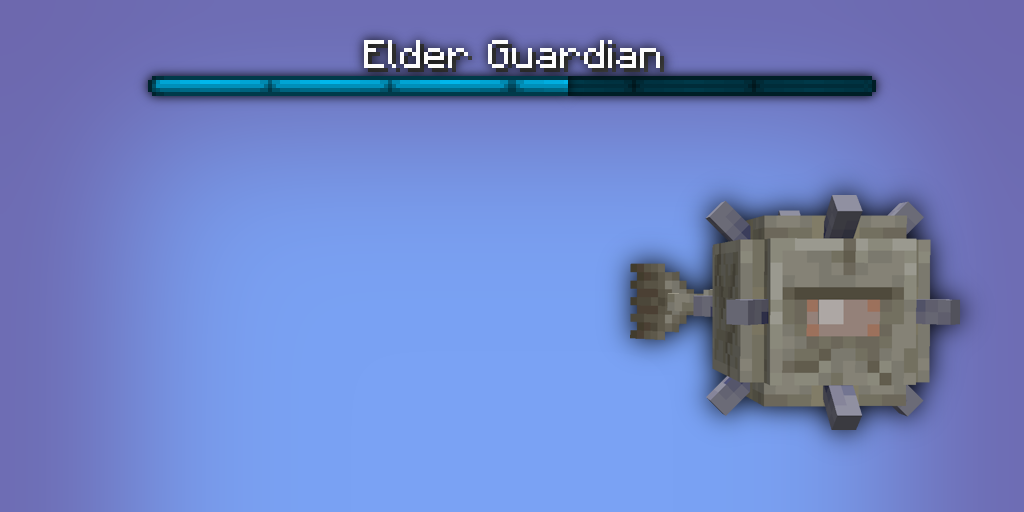 Elder Guardian Bossbar
Versions
Files
Relations
Project Relations
More like this
Similar Mods
Suggestions use data such as tags, dependencies, dependents, descriptions, titles, and more to rank how much they overlap with this mod.
On ModDex
Community snapshot
By the numbers
Statistics
 (opens in a new tab)
Get it on
Available Platforms
On ModDex
Community snapshot
By the numbers
Statistics
Resources