
Community listing page, reviews here may not be monitored by the author.
Breakable Blocks

No reviews yet
Breakable blocks is a configurable, high-performance server-side Fabric mod for Minecraft that lets server owners make normally unbreakable or restricted blocks mineable, assign exact break durations, etc.
Community voices
Reviews
No reviews yet. Be the first to review this project!
Get it on
Available Platforms
Compatibility
Supported Environments
Runs entirely on the server. Also works in singleplayer.
About
Project Details
For authors
Embed Badge
If you're the author of this project, you can embed a live badge anywhere that supports HTML or Markdown. It updates automatically whenever ratings change.
Use HTML for any page that supports it, or Markdown for README files and Markdown-based descriptions.
Identifiers
Platform IDs
Resources
External Links
About
Description
Breakable blocks
Breakable blocks is a configurable, high-performance server-side Fabric mod for Minecraft 1.21.x, 26.1.x, and 26.2.x. It lets server owners make normally unbreakable or restricted blocks mineable, assign exact break durations, require specific tools and tiers, create custom drops, preserve supported block entity data, and protect selected blocks from explosions.
Everything is controlled through one human-readable JSON5 file on the server. Players can join with completely vanilla clients; no client mod, resource pack, or custom registry synchronization is required.
Supported Versions
| Minecraft | Java | Fabric Loader | Status |
|---|---|---|---|
| 1.21.x | 21 | 0.19.3+ | Full support |
| 26.1.x | 25 | 0.19.3+ | Full support |
| 26.2.x | 25 | 0.19.3+ | Full support |
Fabric API is required. Breakableblocks only needs to be installed on the server.
Purpose & Function
Breakableblocks replaces hard-coded block restrictions with server-controlled rules. Each configured block can use vanilla mining or a custom server-authoritative mining session. Custom sessions track progress every server tick, display the normal cracking animation, verify that the player remains nearby, and cancel safely when the player stops mining, disconnects, changes dimension, or the block changes.
- Make Unbreakable Blocks Breakable: Configure bedrock, barriers, command blocks, portal blocks, spawners, vaults, reinforced deepslate, or any registered block ID.
- Exact Mining Durations: Set a fixed number of server ticks for each block. At the standard tick rate,
20 ticks = 1 second. - Tool & Tier Requirements: Require pickaxes, axes, shovels, hoes, material tiers, and Silk Touch before mining can begin.
- Custom Drop Control: Choose the dropped item and amount independently from the original block's vanilla loot table.
- Block Entity Preservation: Preserve supported block entity data when configured blocks are dropped, including spawner-style and other data-bearing blocks.
- Explosion Protection: Prevent configured blocks from being removed by explosions without altering every block's global blast resistance.
- Operator-Only Rules: Restrict sensitive blocks such as command blocks to server operators.
- Live Configuration Reloading: Apply file changes without restarting the server or disconnecting players.
Key Features
| Feature | Description |
|---|---|
| Server-Side Only | Vanilla clients can connect normally. No client installation or synchronization packet is required. |
| Per-Block Rules | Every namespaced block ID receives its own independent mining, requirement, drop, and explosion settings. |
| Tick-Accurate Mining | Custom mining advances on the server tick loop and renders standard block-breaking progress. |
| Requirement Checks | Supports tool type, material tier, Silk Touch, and operator-only checks. |
| Controlled Drops | Replaces vanilla drops with a configured item and count for custom mining sessions. |
| Data-Aware Drops | Can attach supported block entity data to the resulting item stack. |
| Explosion Resistance | Removes protected positions from an explosion before block destruction occurs. |
| Atomic Reloads | Valid configuration entries replace the active runtime map without requiring a restart. |
| JSON5 Configuration | Supports comments, trailing commas, and readable formatting. |
| Integration Callbacks | Exposes server-side break, placement, and explosion callbacks for protection integrations. |
Enhance your server setup! Check out my other server-side mods over at : Fabric Server Essentials
Installation
- Install the matching Fabric Loader for your Minecraft server.
- Install the matching version of Fabric API.
- Place the Breakableblocks JAR in the server's
modsdirectory. - Start the server once to generate
config/block-configuration.json5. - Edit the generated rules and run
/blockconfiguration reload.
The mod is not required in any connecting player's client-side mods directory.
Commands & Examples
| Command | Description | Example |
|---|---|---|
/blockconfiguration reload |
Reloads and validates block-configuration.json5. |
/blockconfiguration reload |
/blockconfiguration validate |
Reports how many valid, enabled entries are active. | /blockconfiguration validate |
/blockconfiguration list |
Lists every active block rule and its mining mode. | /blockconfiguration list |
/blockconfiguration inspect <block> |
Displays the active settings for one exact block ID. | /blockconfiguration inspect minecraft:bedrock |
Block identifiers must include their namespace, such as minecraft:bedrock or yourmod:custom_block.
Configuration File
Breakableblocks creates the following file on first server start:
config/block-configuration.json5
Each top-level key is a namespaced block identifier:
{
    // Mine bedrock in 30 seconds with a Netherite pickaxe.
    "minecraft:bedrock": {
        "enabled": true,
        "miningMode": "FIXED_TICKS",
        "fixedTicks": 600,
        "requiredTool": "pickaxe",
        "requiredTier": "netherite",
        "requireSilkTouch": false,
        "dropItem": "minecraft:bedrock",
        "dropCount": 1,
        "preserveBlockEntity": false,
        "explosionResistant": true,
        "protectionBehavior": "NORMAL"
    },

    // Only operators may mine this command block.
    "minecraft:command_block": {
        "enabled": true,
        "miningMode": "FIXED_TICKS",
        "fixedTicks": 100,
        "requiredTool": "pickaxe",
        "requiredTier": "netherite",
        "dropItem": "minecraft:command_block",
        "dropCount": 1,
        "explosionResistant": true,
        "protectionBehavior": "OPERATOR_ONLY"
    },

    // Preserve supported data when dropping a trial spawner.
    "minecraft:trial_spawner": {
        "enabled": true,
        "miningMode": "FIXED_TICKS",
        "fixedTicks": 300,
        "requiredTool": "pickaxe",
        "requiredTier": "netherite",
        "dropItem": "minecraft:trial_spawner",
        "dropCount": 1,
        "preserveBlockEntity": true,
        "explosionResistant": true
    }
}
Configuration Reference
| Field | Type | Default | Description |
|---|---|---|---|
enabled |
Boolean | true |
Enables or disables this block entry. Disabled entries are not loaded. |
miningMode |
String | VANILLA |
VANILLA uses normal breaking. FIXED_TICKS uses the configured server duration. |
fixedTicks |
Integer | 0 |
Required duration for FIXED_TICKS. Must be greater than zero. |
requiredTool |
String | "" |
Optional tool requirement: pickaxe, axe, shovel, or hoe. |
requiredTier |
String | "" |
Optional minimum tier: wood, stone, gold, iron, diamond, or netherite. |
requireSilkTouch |
Boolean | false |
Requires Silk Touch on the held tool. |
dropItem |
String | "" |
Namespaced item ID dropped after a successful custom break. Empty means no configured drop. |
dropCount |
Integer | 1 |
Number of configured items to drop. Valid range: 0-2304. |
preserveBlockEntity |
Boolean | false |
Copies supported block entity data to the configured drop. |
explosionResistant |
Boolean | true |
Prevents explosions from destroying the configured block. |
protectionBehavior |
String | NORMAL |
Use OPERATOR_ONLY to restrict custom mining to server operators. |
dropItem,dropCount, and block entity preservation apply to custom mining sessions. A block usingVANILLAmining continues through Minecraft's normal loot behavior.
Usage Walkthrough
1. Start the server once:
The default configuration is generated at config/block-configuration.json5.
2. Add or edit a block rule:
"minecraft:obsidian": {
    "enabled": true,
    "miningMode": "FIXED_TICKS",
    "fixedTicks": 40,
    "requiredTool": "pickaxe",
    "requiredTier": "diamond",
    "dropItem": "minecraft:obsidian",
    "dropCount": 1,
    "explosionResistant": true
}
3. Reload without restarting:
/blockconfiguration reload
4. Confirm the active rule:
/blockconfiguration inspect minecraft:obsidian
The example makes obsidian take exactly 40 ticks, or approximately 2 seconds, while requiring a Diamond-tier pickaxe.
Default Rules
The generated starter configuration includes examples for blocks such as:
- Bedrock
- End Portal Frames
- End Gateways
- Reinforced Deepslate
- Barriers
- Command Blocks
- Spawners and Trial Spawners
- Vaults
Every default can be changed, disabled, or removed. Modded blocks can be configured using their registered namespace and block ID.
Server-Side Behavior
Custom mining sessions are validated entirely by the server:
- The target block must still match the block that started the session.
- The player must remain alive, connected, in the same dimension, and within eight blocks.
- Releasing or aborting the mining action cancels the session.
- Changing targets clears the previous cracking animation.
- Drops are spawned by the server only after the configured duration completes.
- Explosion-protected positions are filtered before destruction.
This keeps vanilla clients synchronized while preventing client-side mining speed changes from bypassing server rules.
Important Notes
- Fabric API is required on the server.
- No client mod is required. Installing it client-side is optional and provides no additional gameplay features.
- Configuration changes require
/blockconfiguration reloador a server restart. - Invalid entries are skipped and reported in the server log; the previous valid configuration remains active if the file cannot be parsed.
- Block and item IDs must use the full
namespace:pathformat. fixedTicksis based on server ticks. Heavy lag can make real-world completion time longer.- Preserved block entity data depends on the block and Minecraft version. Test data-bearing blocks before deploying them on a production server.
- Back up worlds and configuration files before changing rules for operator blocks, portals, or other progression-sensitive blocks.
Screenshots
Gallery
-
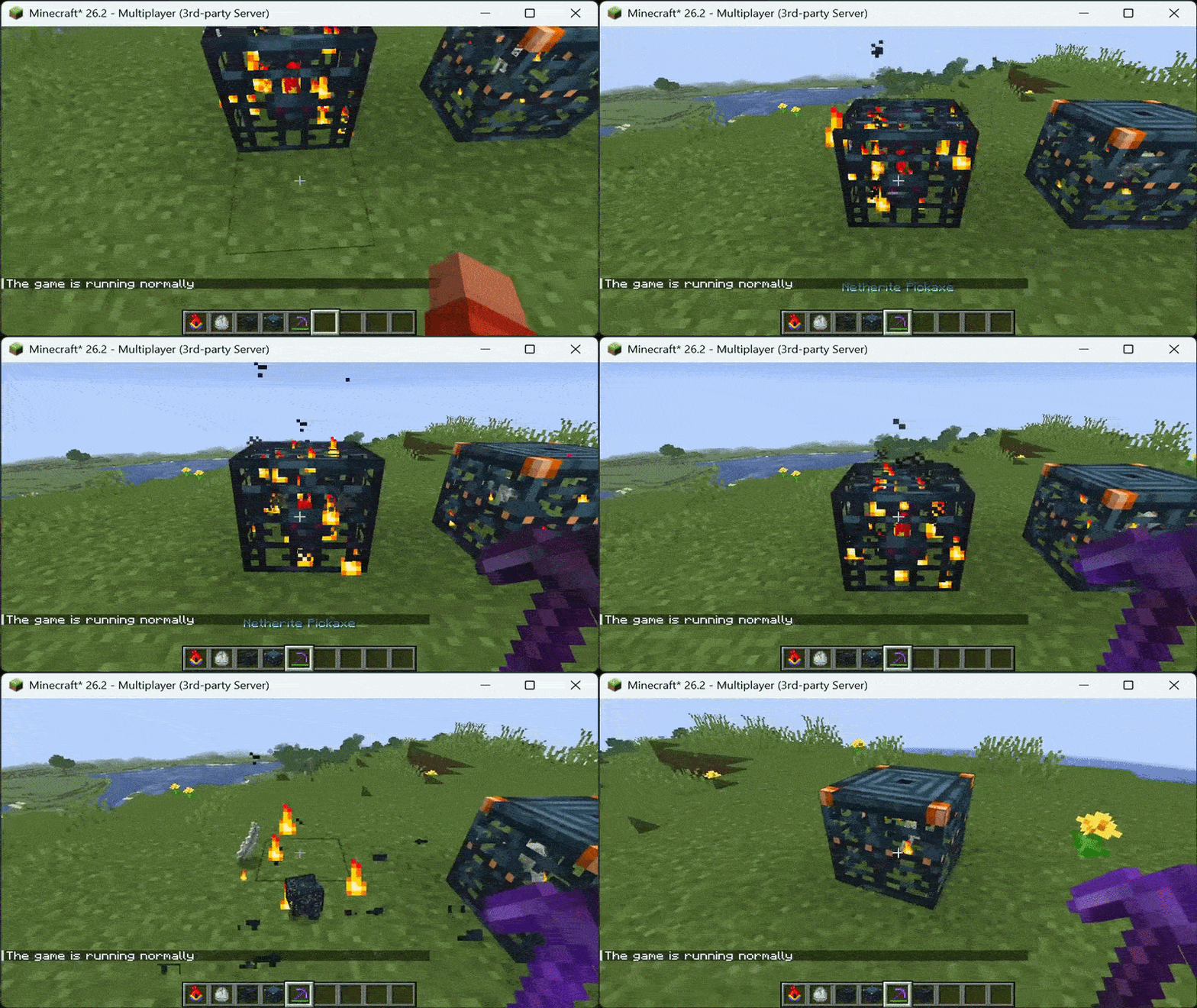 Example Spawner Mining 👾
Versions
Files
Relations
Project Relations
More like this
Similar Mods
Suggestions use data such as tags, dependencies, dependents, descriptions, titles, and more to rank how much they overlap with this mod.
On ModDex
Community snapshot
By the numbers
Statistics

Want to reach Minecraft players?
We're looking for a server hosting partner to feature here and other parts of the site. Interested? Send us a message!
Get in touchGet it on
Available Platforms
On ModDex
Community snapshot
By the numbers
Statistics
Resources