
Builderdash
No reviews yet
Building-Related Party Minigames - Server Side Only
Features small, self-contained games within Minecraft.
Fabric is a mod loader for versions 1.14+ of Minecraft, particularly popular for client side and optimization mods.
Community voices
Reviews
Click once to include, again to exclude, again to clear
No reviews yet. Be the first to review this project!
Get it on
Available Platforms
 Modrinth
Compatibility
Supported Environments
About
Project Details
For authors
Embed Badge
If you're the author of this project, you can embed a live badge anywhere that supports HTML or Markdown. It updates automatically whenever ratings change.
Use HTML for any page that supports it, or Markdown for README files and Markdown-based descriptions.
Identifiers
Platform IDs
About
Description

Building-related party minigames for Minecraft, using Plasmid API on Fabric
Server Side Only! Vanilla clients can join any server or LAN-hosting-client with this mod installed.
Minigames
Versus
- Open a game of Versus with
/builderdash versus! - In this mode, pairs of players will compete to see who can build a better version of their prompt.
- During the building round, each player will have to build one prompt, and then another.
- During the voting round, pairs of players that received the same prompt will have their builds displayed side by side. The entire party can then vote for which build they like better.
/builderdash versus doublewill start a double-length game, where there are two successive building-and-voting rounds with two prompts each per player./builderdash versus fastwill start a fast game, where building time is reduced by more than half. Players may have to sacrifice the quality of their builds./builderdash versus double fastwill start a double-length fast game.- Adding custom prompts:
- Compile a list of prompts separated by commas. EX:
A day at the beach, A walk in the park, Your favorite food - Run one of the following commands (in a command block to allow high character counts):
/builderdash versus addwords My,Prompt,List,Etcto add your words to the built-in list/builderdash versus setwords My,Prompt,List,Etcto replace the built-in list (and existing words) with your custom list/builderdash versus resetwordswill reset the word list to default
- Run the game through
/builderdash versus. NOTE: Running the game through/game openwill not apply custom prompts. - Custom prompts are saved in each world. Other players can add their own custom prompts through these commands.
- Compile a list of prompts separated by commas. EX:
Pictionary
- Open a game of Pictionary with
/builderdash pictionary! - In this mode, each round will have one player build a prompt while the rest guess.
- Quicker guesses earn more points for both the guessers and builder.
- A hint will appear to guessers showing the letter count, slowly revealing a few letters from the prompt.
- As players guess, the time available for remaining players and the builder will diminish.
/builderdash pictionary doublewill start a double-length game, where each player has two chances to build.- Adding custom prompt words:
- Compile a list of words separated by commas. EX:
Apple, Banana, PearorApple,Banana,Pear- Word lists made for the game skribbl.io should work automatically, no reformatting needed!
- If you want words to have aliases, specify them like such (optional):
Hamburger=Burger,French Fries=Fries=Chips. The first alias will be used as the hint, although players can guess any of them. - Run one of the following commands (in a command block to allow high character counts):
/builderdash pictionary addwords My,Word,List,Etcto add your words to the built-in list/builderdash pictionary setwords My,Word,List,Etcto replace the built-in list (and existing words) with your custom list/builderdash pictionary resetwordswill reset the word list to default
- Run the game through
/builderdash pictionary. NOTE: Running the game through/game openwill not apply custom words. - Custom words are saved in each world. Other players can add their own custom words through these commands.
- Compile a list of words separated by commas. EX:
Telephone
- Open a game of Telephone with
/builderdash telephone! - In this mode, players try to communicate prompts through a prompt and a series of builds and guesses.
- The first round asks players to come up with an original prompt.
- The second round will shuffle the prompts among the players, and each player has to build the prompt they receive.
- The builds are then shuffled and distributed in the third round, where players now have to guess the prompt from the build.
- This process repeats for as many players are in the game, unless playing in
doublemode. - Once finished, each original prompter gets to present their "gallery", to see how their prompt was (mis)interpreted through the builds and guesses.
/builderdash telephone doublewill start a double-length game, where there are double as many rounds as there usually would be. This means that players might re-encounter their original prompt./builderdash telephone fastwill start a fast game, where building time is reduced by more than half. It's less likely that a prompt will be able to survive a game like this./builderdash telephone double fastwill start a double-length fast game. This might be the most fun way to play a double-length game.- Disconnected from a game of Telephone? Rejoin it with
/game join builderdash:telephone(game name might be different in fast/double mode). If you were originally in the game, you will be let back in and can resume where you left off.
Permissions
Install LuckPerms or another implementation of the fabric-permissions-api to edit individual Builderdash permissions.
builderdash.any.open: Permission to open any minigame with/builderdash.builderdash.<game>.open: Permission to open a specific minigame.<game>can beversus,pictionary, ortelephone.builderdash.any.edit: Permission to edit any minigame with a word list using/builderdash <game> <addwords/setwords/etc>.builderdash.<game>.edit: Permission to edit a specific minigame's word list using/builderdash <game> <addwords/setwords/etc>.<game>can beversusorpictionary.builderdash.toolbox: Permission to use Builderdash Toolbox outside of minigames.
Tips and Tricks
/builderdashand all sub-commands can be substituted with/bd, provided no other mod adds a command with that name.- Example:
/bd versus,/bd telephone fast double
/builderdash toolboxopens up a menu with various world-editing items. This includes fill tools, shape tools, brushes, and undo/redo tools. All of these tools are designed to be compatible with Builderdash minigames.- Shortcut:
/bd toolbox
- Shortcut:
- Example:
Screenshots
Gallery
-
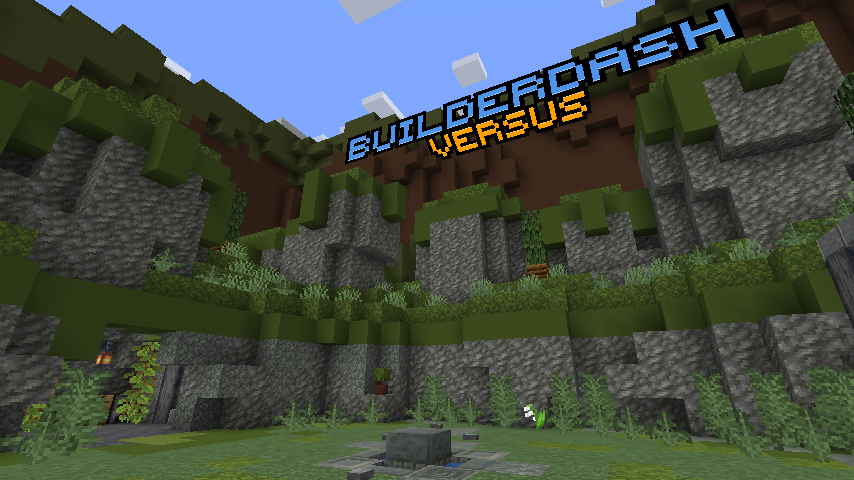 The Lobby The Builderdash lobby, in Versus mode.
Versions
Files
Relations
Project Relations
More like this
Similar Mods
Suggestions use data such as tags, dependencies, dependents, descriptions, titles, and more to rank how much they overlap with this mod.
On ModDex
Community snapshot
By the numbers
Statistics

Want to reach Minecraft players?
We're looking for a server hosting partner to feature here and other parts of the site. Interested? Send us a message!
Get in touchGet it on
Available Platforms
On ModDex
Community snapshot
By the numbers