Community listing page, reviews may not be monitored by the author.
Buildprint - Schematics & Printer (Litematica Alternative)


No reviews yet
Load any schematic as a ghost in your world, see what's missing, and build it with easy place or the printer. Opens .litematic, .schem, .schematic, .nbt and Axiom .bp. A client-side alternative to Litematica.

Community voices
Reviews
No reviews yet. Be the first to review this project!
Get it on
Available Platforms
Compatibility
Supported Environments
Runs entirely on the client. Works on vanilla servers.
About
Project Details
For authors
Embed Badge
If you're the author of this project, you can embed a live badge anywhere that supports HTML or Markdown. It updates automatically whenever ratings change.
Use HTML for any page that supports it, or Markdown for README files and Markdown-based descriptions.
Identifiers
Platform IDs
About
Description


Load a schematic, put it where you want it, and build it.
A see-through ghost of the build shows every block, what's missing and what to gather.


Press G, pick Place, click the ground, and the build lands on it.
With Move, drag the arrows to slide it and the arcs to turn it. Your player stays put while the camera flies.


Missing, wrong and turned blocks each get their own color.
The material list counts what you still need to bring, most first, and Gather keeps it on screen while you go out for it.


Easy place: right-click the ghost and the right block goes down, facing the right way.
The printer: it places the missing blocks around you while you move.
From your boxes: both take blocks out of the bundles you carry. With "Take from carried boxes"
on, they take blocks out of shulker boxes and backpacks too. On a server with nothing for it,
BuildPrint sets the shulker box down next to you, takes the blocks out and breaks it again. Where a
server offers a quicker way (VoxelSprout Policy, Take It Out, Quick Shulker, AxShulkers and others),
that one is used.


On servers: easy place, placing in mid-air, the printer and taking from boxes are off by default. Many servers count them as cheating, so check the rules first.

Two to four times Litematica's frame rate in side-by-side tests.
Three big builds showed up in 2.4 seconds, against 43 seconds in Litematica. It opens your .litematic files and brings over your placements.

Features side by side
| BuildPrint | Litematica | |
|---|---|---|
Opens .litematic files | ✅ | ✅ |
| Easy place | ✅ | ✅ |
| Material list | ✅ | ✅ |
| Shows what goes inside containers | ✅ Also fills them from your inventory | ✅ |
| Printer | ✅ Built in | Add-ons by other developers |
| Build together in sync sessions | ✅ Nothing to install on the server | Syncmatica add-on, on the server and every client |
| Easy break (breaks only wrong and extra blocks) | ✅ | ❌ |
| Swap materials from the material list | ✅ | ❌ |
| Marketplace in game | ✅ | ❌ |
| 3D preview while picking a file | ✅ | ❌ |
| Builds only show in the world you placed them in, on servers with several worlds | ✅ | ❌ |
Axiom .bp blueprints | ✅ | ❌ |
| Paste a build in creative | ✅ Also on servers without operator status, through VoxelSprout Policy | ✅ Needs operator commands on a server |
| Fill or replace an area with one block | ❌ | ✅ |
| Schematic projects (saved versions of a build) | ❌ | ✅ |
Compared with Litematica 0.29.1 on Minecraft 26.3, September 2026.
Frame rate in four tests
The frame rate Minecraft's F3 screen showed, with the same builds from the same spot. Higher is better.
| Test | BuildPrint | Litematica |
|---|---|---|
| Venice district, 568k blocks | 258 fps | 121 fps |
| 3 big builds in a row, 1M blocks | 272 fps | 90 fps |
| 24 builds side by side, 640k blocks | 229 fps | 95 fps |
| 10 big builds in one spot, 3.6M blocks | 199 fps | 47 fps |
How this was tested
- MacBook Pro, Apple M4 Max, 36 GB, macOS. Minecraft 26.3 with Fabric, no other performance mods. BuildPrint 0.1.11, Litematica 0.29.1 with MaLiLib 0.30.2.
- One game with both mods installed. Each test loaded the same builds into BuildPrint, then into Litematica, in the same world and from the same spot. Only one mod had builds loaded at a time. The order was BuildPrint, Litematica, Litematica, BuildPrint, so heat affects both the same.
- 1920 × 1080, render distance 24, VSync and the frame rate cap off, a flat world. Both mods on default settings, except BuildPrint's lag guard, which was off: it lowers detail when the frame rate drops.
- Real player builds, loaded one at a time. Each test waited until the mod had finished building its meshes, recorded 10 seconds, then took the screenshot with the F3 screen on.
One machine, one run. Your numbers will be different.

- Auto align: a build that is partly standing? It finds where and lines the ghost up.
- Layer view: one layer at a time, and easy place and the printer stay in it.
- Containers: chests and hoppers show the items they need, and fill from your inventory.
- Swap materials: build it out of something else, from the material list.
- Paste in creative: in one go, with undo. Also on servers, through VoxelSprout Policy, Axiom or WorldEdit.
- Save your own: click what you want with Magic select, or draw a box, and save it as a
.litematic. Any size, also past your render distance. - Marketplace: community builds in the menu, placed in one click. No account needed.
- Build together: share a session code and everyone sees the same builds. Nothing on the server.
- Shader packs: the ghost shows under Iris packs such as Complementary, BSL and Photon.
See them in action
!A half-built house with its ghost off to the side, then lined up on the house
!The layer view building a tower up layer by layer
!An item sorter's hoppers and chests showing the items they need, then being filled
!The same house in different materials
!A house shown as a ghost, pasted into the world, undone and pasted again

Can I use it on any server?
Yes, it only runs on your client. Whether easy place and the printer are allowed is up to the server.
Can I keep using my Litematica files?
Yes. It opens and saves .litematic, and offers to bring over your placements. Your files aren't changed.
Which versions and loaders?
Minecraft 26.1 to 26.3 and 1.21.1 to 1.21.11, on Fabric (with Fabric API) and NeoForge.
Do I need an account?
No. Only to vote on or publish builds on the marketplace.
More answers in the FAQ and the wiki. Something broken? /buildprint report in game, or the Discord.
Keys
| Key | Action |
|---|---|
| B | Open the BuildPrint menu (old: M, up to 0.1.25) |
| N | Turn easy place on or off |
| G | Open the editor (old: B, up to 0.1.25) |
| K | Show only the block in your hand |
| J | Open the materials list of the build you're in |
| . / , | Layer view up / down |
| not set | Turn the layer view on or off |
| not set (hold) | Show what goes inside a container that already matched |
| Pick Block (middle click) | On a ghost: take its block into your hand |
| not set | Pick only the ghost's block |
| not set | Turn easy break on or off |
| not set | Turn the printer on or off |
| not set | Switch between what's left to place, wrong blocks and extra blocks |
| not set | Status panel: auto, full, compact or hidden |
| not set | Show or hide all builds |
| not set | Show or hide the build you're in |
| T | Jump to the search field in a list (the chat key, so it follows yours) |
Change them in Options → Controls, under BuildPrint, or in the walkthrough (/buildprint onboarding).
In the editor
| Key | Tool |
|---|---|
| 1 / 2 / 3 / 4 | Select · Magic select · Resize · Save |
| 5 / 6 / 7 / 8 | Place · Move · Auto align · Paste (where pasting works) |
| Q / E or Alt + wheel | Previous / next tool |
| Wheel | Works on the tool in your hand: the toolbar says what it does |
| Wheel sideways, or Shift + wheel on a Mac | Moves left or right of where you face |
| Middle click | The side across from the lit one (Select, Resize) |
| Ctrl + wheel | Camera speed |
| Alt (hold) | Place freely instead of landing on the ground |
| N | Make the next box a new region |
| [ / ] | Previous / next region |
| P / R | Turn around the block you aim at / back to the middle (Move) |
| C | Switch between the free camera and editing from where you stand |
| Delete | Delete the selected region |
| Ctrl + Z | Undo the selection |
| H | Show or hide the controls |
Requirements and compatibility
- Minecraft 26.1, 26.2 or 26.3 (NeoForge: 26.1.2 and up), or 1.21.1 to 1.21.11 (NeoForge: 1.21.1, 1.21.3, 1.21.4, 1.21.5, 1.21.8, 1.21.10 and 1.21.11).
- Fabric: Fabric Loader 0.16+ and Fabric API. Mod Menu is optional.
- NeoForge: nothing else.
- Client-side only. Works with Sodium and Iris. With Sorted, the material list counts what's in your chests. With Bobby, saves reach the chunks it remembers.
- In English, Dutch, German, French, Russian, Ukrainian and Polish (the Russian translation by a member of the community, the Ukrainian one by Winord).
- For mod developers: an API for editor tools, loaded builds and formats, on the wiki.
Modpacks and videos: use BuildPrint in any modpack and show it in any video, monetized or not. No need to ask.
More from VoxelSprout


Bugs, ideas and early builds: Discord · Enjoying the mods? Support on Ko-fi


Load a schematic, put it where you want it, and build it.
A see-through ghost of the build shows every block, what's missing and what to gather.


Press G, pick Place, click the ground, and the build lands on it.
With Move, drag the arrows to slide it and the arcs to turn it. Your player stays put while the camera flies.

Missing, wrong and turned blocks each get their own color.
The material list counts what you still need to bring, most first, and Gather keeps it on screen while you go out for it.

Easy place: right-click the ghost and the right block goes down, facing the right way.
The printer: it places the missing blocks around you while you move.
From your boxes: both take blocks out of the bundles you carry. With "Take from carried boxes"
on, they take blocks out of shulker boxes and backpacks too. On a server with nothing for it,
BuildPrint sets the shulker box down next to you, takes the blocks out and breaks it again. Where a
server offers a quicker way (VoxelSprout Policy, Take It Out, Quick Shulker, AxShulkers and others),
that one is used.
On servers: easy place, placing in mid-air, the printer and taking from boxes are off by default. Many servers count them as cheating, so check the rules first.

Two to four times Litematica's frame rate in side-by-side tests.
Three big builds showed up in 2.4 seconds, against 43 seconds in Litematica. It opens your .litematic files and brings over your placements.
Features side by side
| BuildPrint | Litematica | |
|---|---|---|
Opens .litematic files |
✅ | ✅ |
| Easy place | ✅ | ✅ |
| Material list | ✅ | ✅ |
| Shows what goes inside containers | ✅ Also fills them from your inventory | ✅ |
| Printer | ✅ Built in | Add-ons by other developers |
| Build together in sync sessions | ✅ Nothing to install on the server | Syncmatica add-on, on the server and every client |
| Easy break (breaks only wrong and extra blocks) | ✅ | ❌ |
| Swap materials from the material list | ✅ | ❌ |
| Marketplace in game | ✅ | ❌ |
| 3D preview while picking a file | ✅ | ❌ |
| Builds only show in the world you placed them in, on servers with several worlds | ✅ | ❌ |
Axiom .bp blueprints |
✅ | ❌ |
| Paste a build in creative | ✅ Also on servers without operator status, through VoxelSprout Policy | ✅ Needs operator commands on a server |
| Fill or replace an area with one block | ❌ | ✅ |
| Schematic projects (saved versions of a build) | ❌ | ✅ |
Compared with Litematica 0.29.1 on Minecraft 26.3, September 2026.
Frame rate in four tests
The frame rate Minecraft's F3 screen showed, with the same builds from the same spot. Higher is better.
| Test | BuildPrint | Litematica |
|---|---|---|
| Venice district, 568k blocks | 258 fps | 121 fps |
| 3 big builds in a row, 1M blocks | 272 fps | 90 fps |
| 24 builds side by side, 640k blocks | 229 fps | 95 fps |
| 10 big builds in one spot, 3.6M blocks | 199 fps | 47 fps |
How this was tested
- MacBook Pro, Apple M4 Max, 36 GB, macOS. Minecraft 26.3 with Fabric, no other performance mods. BuildPrint 0.1.11, Litematica 0.29.1 with MaLiLib 0.30.2.
- One game with both mods installed. Each test loaded the same builds into BuildPrint, then into Litematica, in the same world and from the same spot. Only one mod had builds loaded at a time. The order was BuildPrint, Litematica, Litematica, BuildPrint, so heat affects both the same.
- 1920 × 1080, render distance 24, VSync and the frame rate cap off, a flat world. Both mods on default settings, except BuildPrint's lag guard, which was off: it lowers detail when the frame rate drops.
- Real player builds, loaded one at a time. Each test waited until the mod had finished building its meshes, recorded 10 seconds, then took the screenshot with the F3 screen on.
One machine, one run. Your numbers will be different.

- Auto align: a build that is partly standing? It finds where and lines the ghost up.
- Layer view: one layer at a time, and easy place and the printer stay in it.
- Containers: chests and hoppers show the items they need, and fill from your inventory.
- Swap materials: build it out of something else, from the material list.
- Paste in creative: in one go, with undo. Also on servers, through VoxelSprout Policy, Axiom or WorldEdit.
- Save your own: click what you want with Magic select, or draw a box, and save it as a
.litematic. Any size, also past your render distance. - Marketplace: community builds in the menu, placed in one click. No account needed.
- Build together: share a session code and everyone sees the same builds. Nothing on the server.
- Shader packs: the ghost shows under Iris packs such as Complementary, BSL and Photon.
See them in action


Can I use it on any server?
Yes, it only runs on your client. Whether easy place and the printer are allowed is up to the server.
Can I keep using my Litematica files?
Yes. It opens and saves .litematic, and offers to bring over your placements. Your files aren't changed.
Which versions and loaders?
Minecraft 26.1 to 26.3 and 1.21.1 to 1.21.11, on Fabric (with Fabric API) and NeoForge.
Do I need an account?
No. Only to vote on or publish builds on the marketplace.
More answers in the FAQ and the wiki. Something broken? /buildprint report in game, or the Discord.
Keys
| Key | Action |
|---|---|
| B | Open the BuildPrint menu (old: M, up to 0.1.25) |
| N | Turn easy place on or off |
| G | Open the editor (old: B, up to 0.1.25) |
| K | Show only the block in your hand |
| J | Open the materials list of the build you're in |
| . / , | Layer view up / down |
| not set | Turn the layer view on or off |
| not set (hold) | Show what goes inside a container that already matched |
| Pick Block (middle click) | On a ghost: take its block into your hand |
| not set | Pick only the ghost's block |
| not set | Turn easy break on or off |
| not set | Turn the printer on or off |
| not set | Switch between what's left to place, wrong blocks and extra blocks |
| not set | Status panel: auto, full, compact or hidden |
| not set | Show or hide all builds |
| not set | Show or hide the build you're in |
| T | Jump to the search field in a list (the chat key, so it follows yours) |
Change them in Options → Controls, under BuildPrint, or in the walkthrough (/buildprint onboarding).
In the editor
| Key | Tool |
|---|---|
| 1 / 2 / 3 / 4 | Select · Magic select · Resize · Save |
| 5 / 6 / 7 / 8 | Place · Move · Auto align · Paste (where pasting works) |
| Q / E or Alt + wheel | Previous / next tool |
| Wheel | Works on the tool in your hand: the toolbar says what it does |
| Wheel sideways, or Shift + wheel on a Mac | Moves left or right of where you face |
| Middle click | The side across from the lit one (Select, Resize) |
| Ctrl + wheel | Camera speed |
| Alt (hold) | Place freely instead of landing on the ground |
| N | Make the next box a new region |
| [ / ] | Previous / next region |
| P / R | Turn around the block you aim at / back to the middle (Move) |
| C | Switch between the free camera and editing from where you stand |
| Delete | Delete the selected region |
| Ctrl + Z | Undo the selection |
| H | Show or hide the controls |
Requirements and compatibility
- Minecraft 26.1, 26.2 or 26.3 (NeoForge: 26.1.2 and up), or 1.21.1 to 1.21.11 (NeoForge: 1.21.1, 1.21.3, 1.21.4, 1.21.5, 1.21.8, 1.21.10 and 1.21.11).
- Fabric: Fabric Loader 0.16+ and Fabric API. Mod Menu is optional.
- NeoForge: nothing else.
- Client-side only. Works with Sodium and Iris. With Sorted, the material list counts what's in your chests. With Bobby, saves reach the chunks it remembers.
- In English, Dutch, German, French, Russian, Ukrainian and Polish (the Russian translation by a member of the community, the Ukrainian one by Winord).
- For mod developers: an API for editor tools, loaded builds and formats, on the wiki.
Modpacks and videos: use BuildPrint in any modpack and show it in any video, monetized or not. No need to ask.
More from VoxelSprout


Bugs, ideas and early builds: Discord · Enjoying the mods? Support on Ko-fi
Screenshots
Gallery
-
 The ghost, with real blocks The ghost, with real blocks
-
 Missing, wrong, turned and extra blocks Missing, wrong, turned and extra blocks
-
 Gathering the materials Gathering the materials
-
 Auto align: the ghost lined up on a half-built house Auto align: the ghost lined up on a half-built house
-
 Easy place Easy place
-
 The printer building a house The printer building a house
-
 Layer view Layer view
-
 Paste in creative: pasted, undone and pasted again Paste in creative: pasted, undone and pasted again
-
 Swapping materials Swapping materials
-
 What goes inside containers, shown and filled What goes inside containers, shown and filled
-
 The editor: Magic select, the selection box, the gizmo that moves and turns The editor: Magic select, the selection box, the gizmo that moves and turns
-
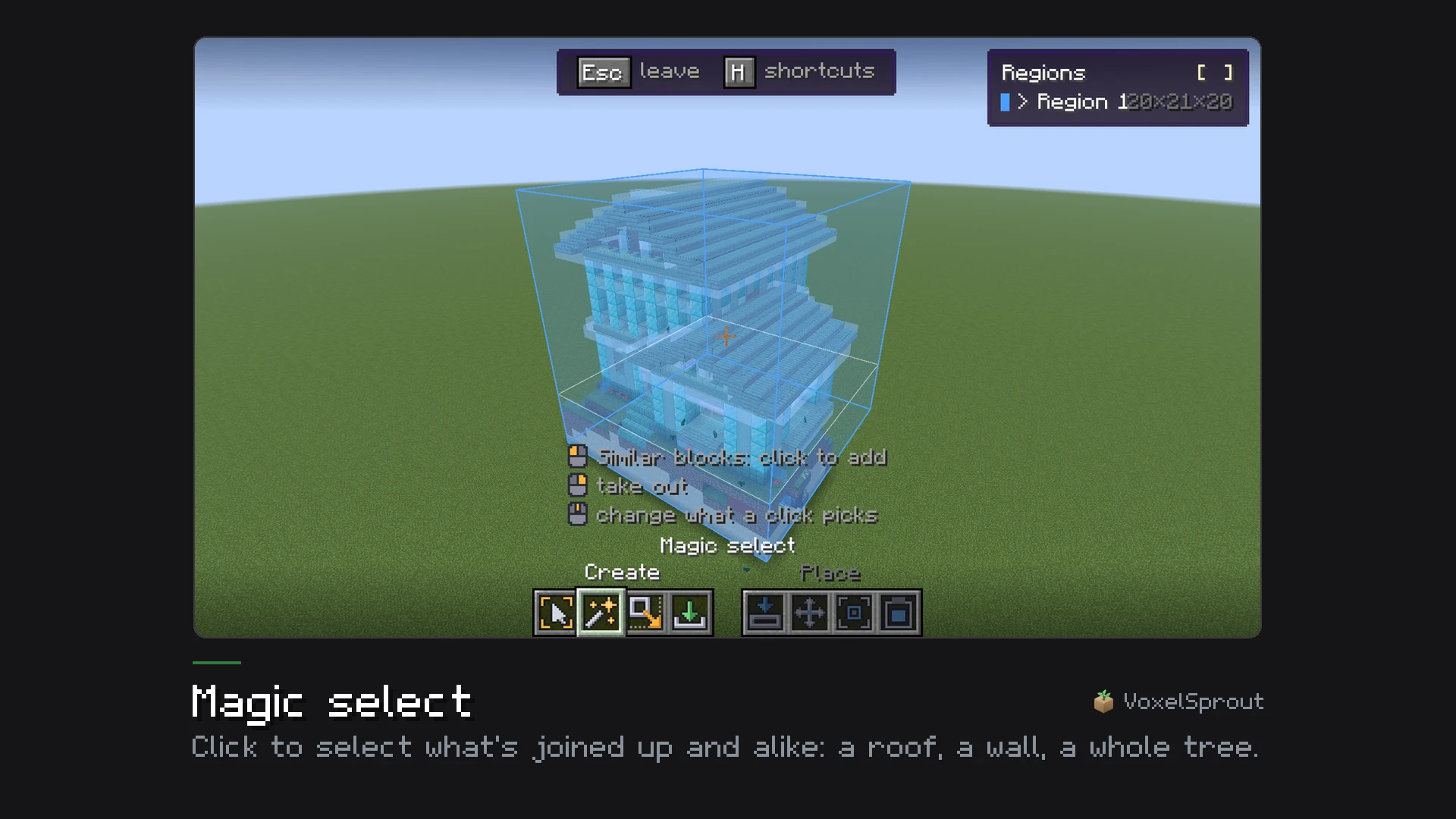 Magic select Magic select
-
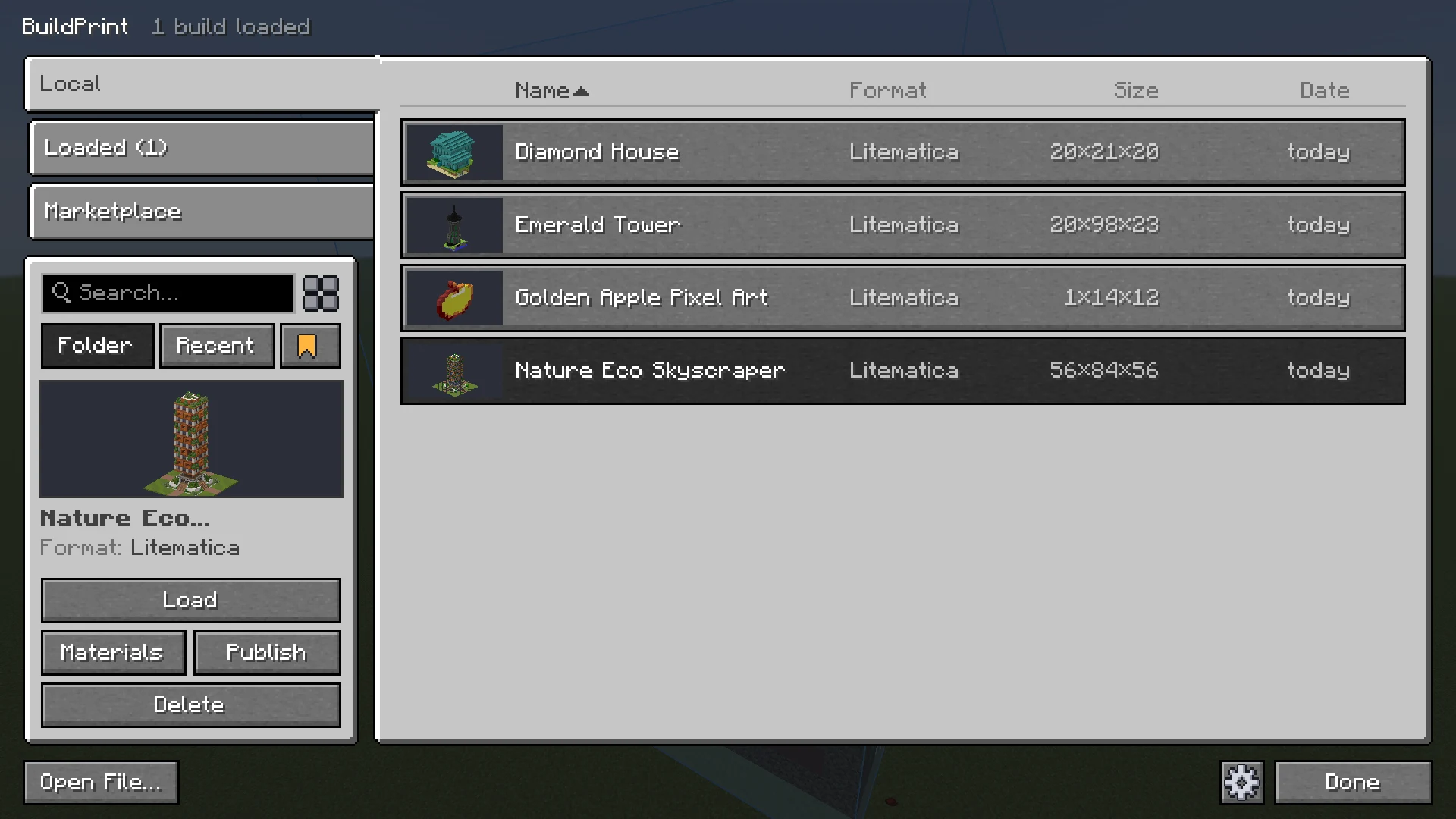 Your schematics, with a 3D preview Your schematics, with a 3D preview
-
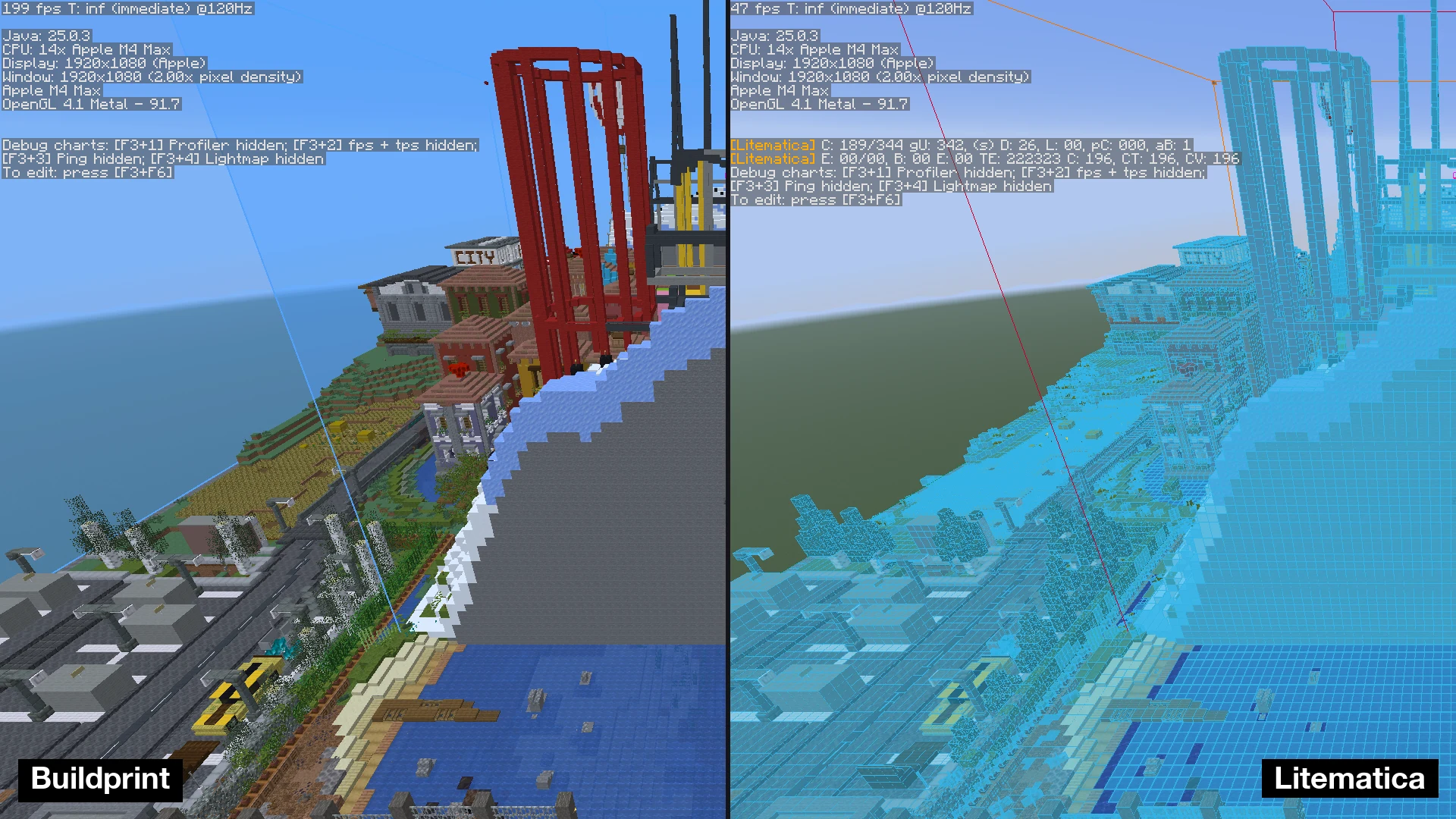 Frame rate: 10 big builds in one spot Frame rate: 10 big builds in one spot
-
 The first-start walkthrough, with live scenes of each feature The first-start walkthrough, with live scenes of each feature
-
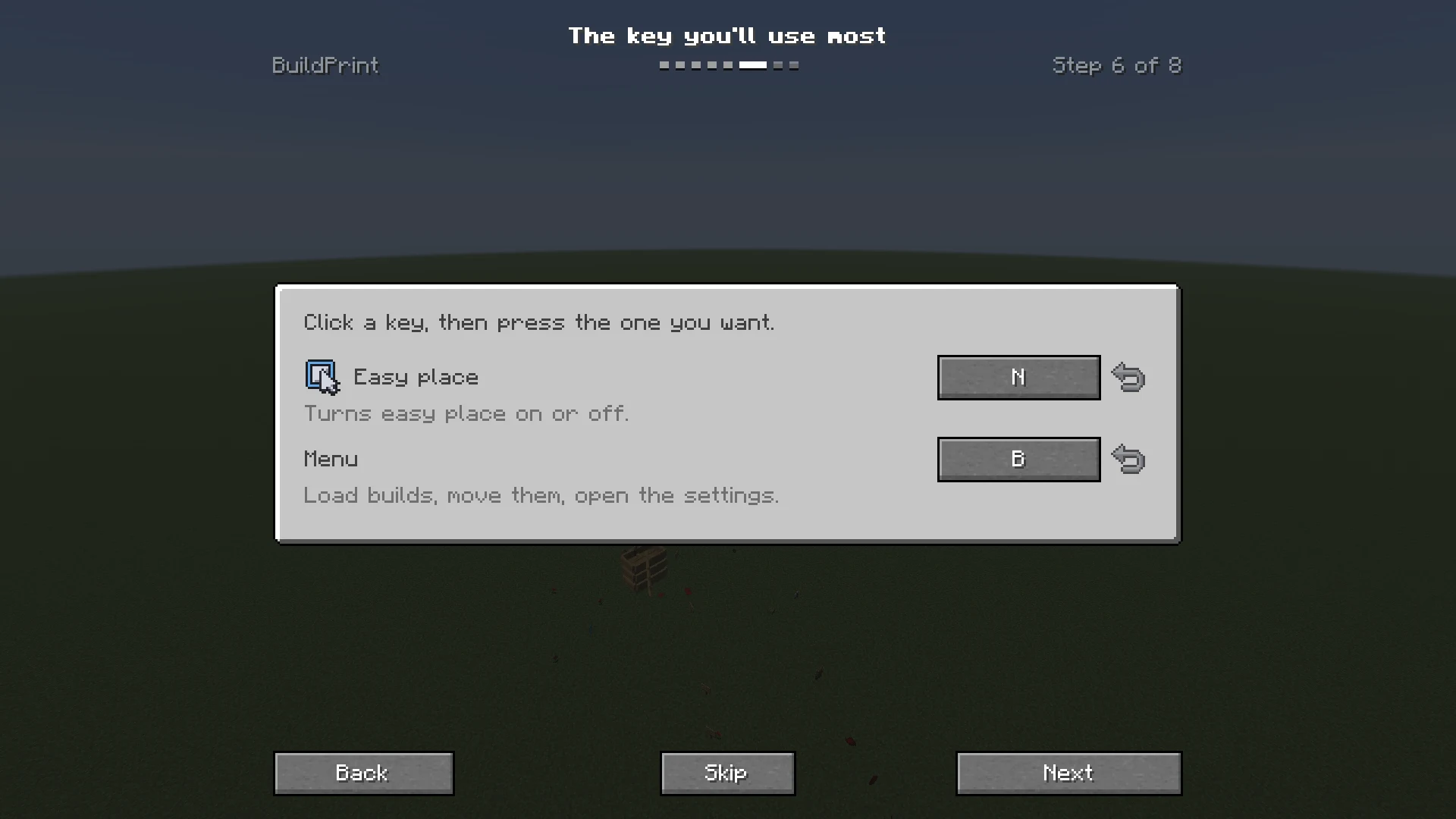 Setting shortcuts in the walkthrough Setting shortcuts in the walkthrough
-
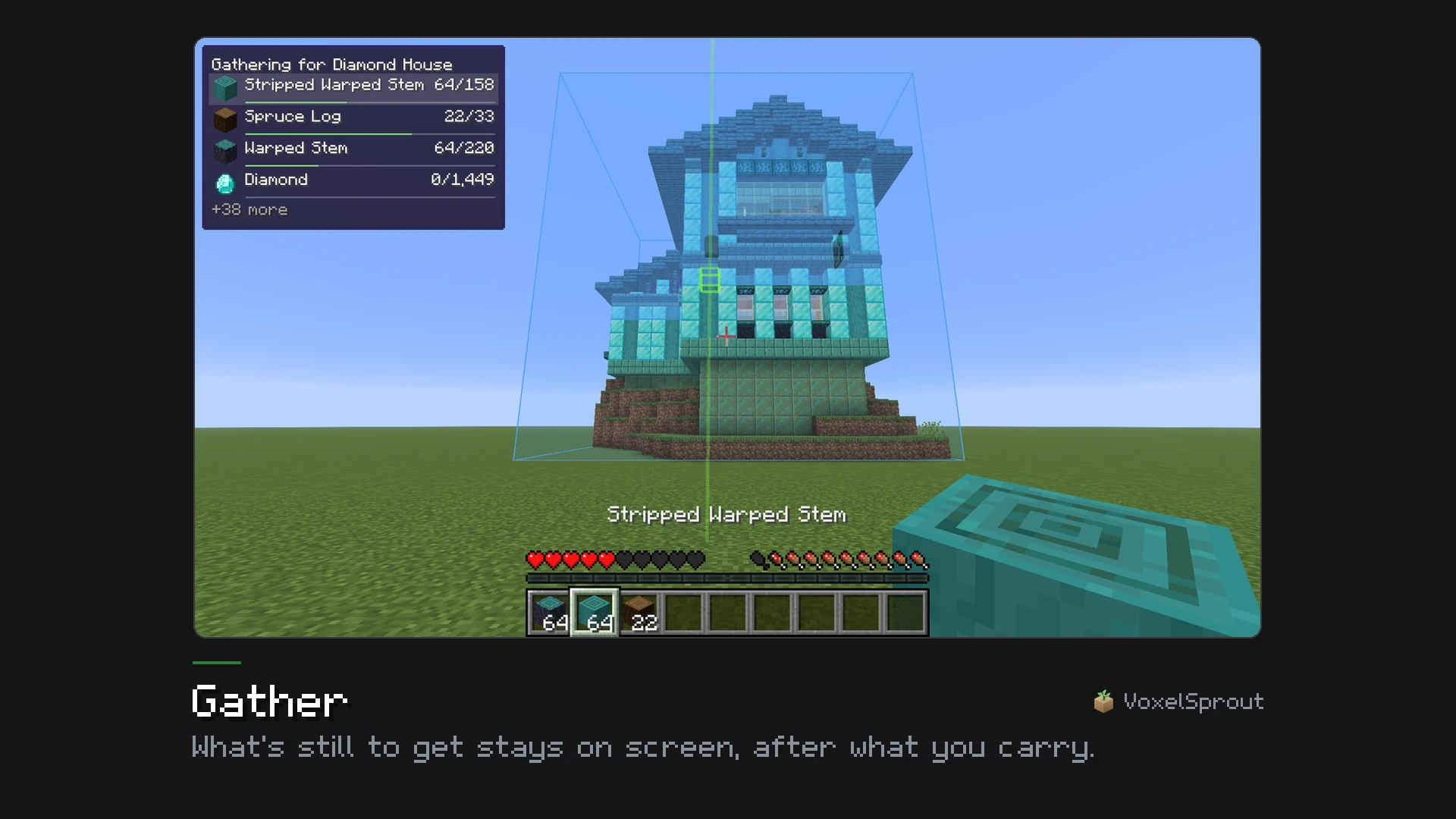 Gather: what's still to get, on screen Gather: what's still to get, on screen
-
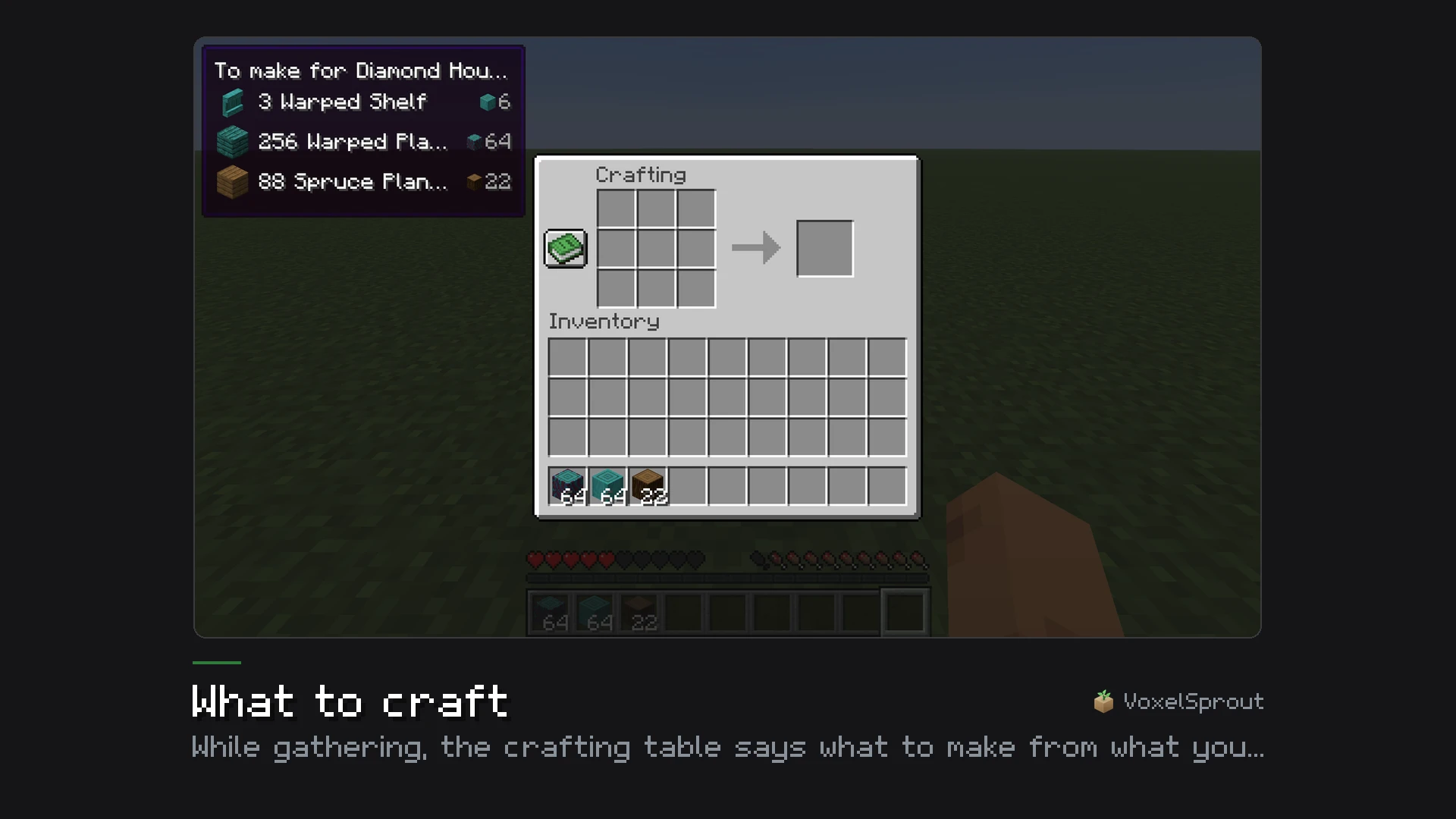 What to craft, at the crafting table What to craft, at the crafting table
-
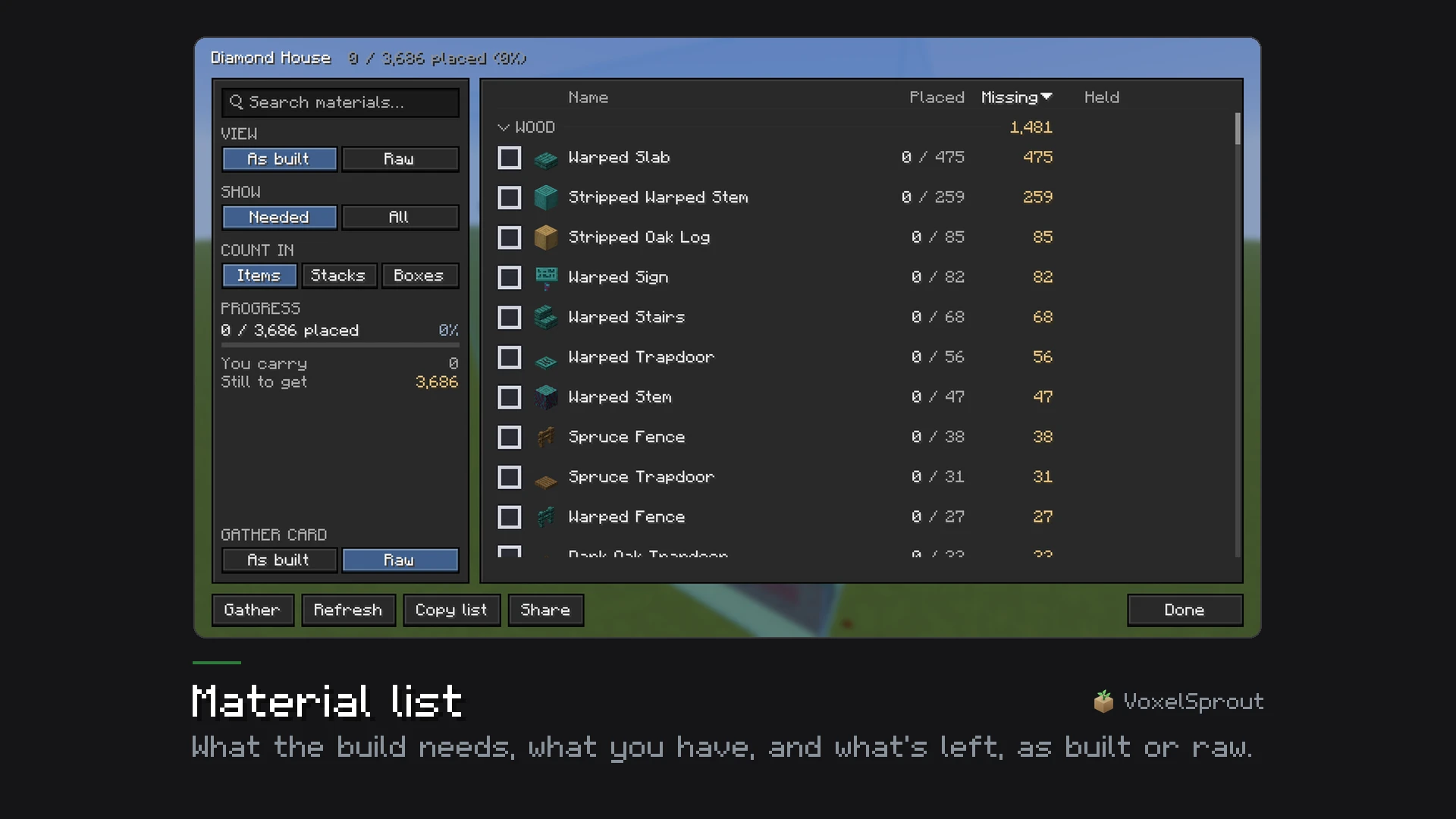 The material list The material list
-
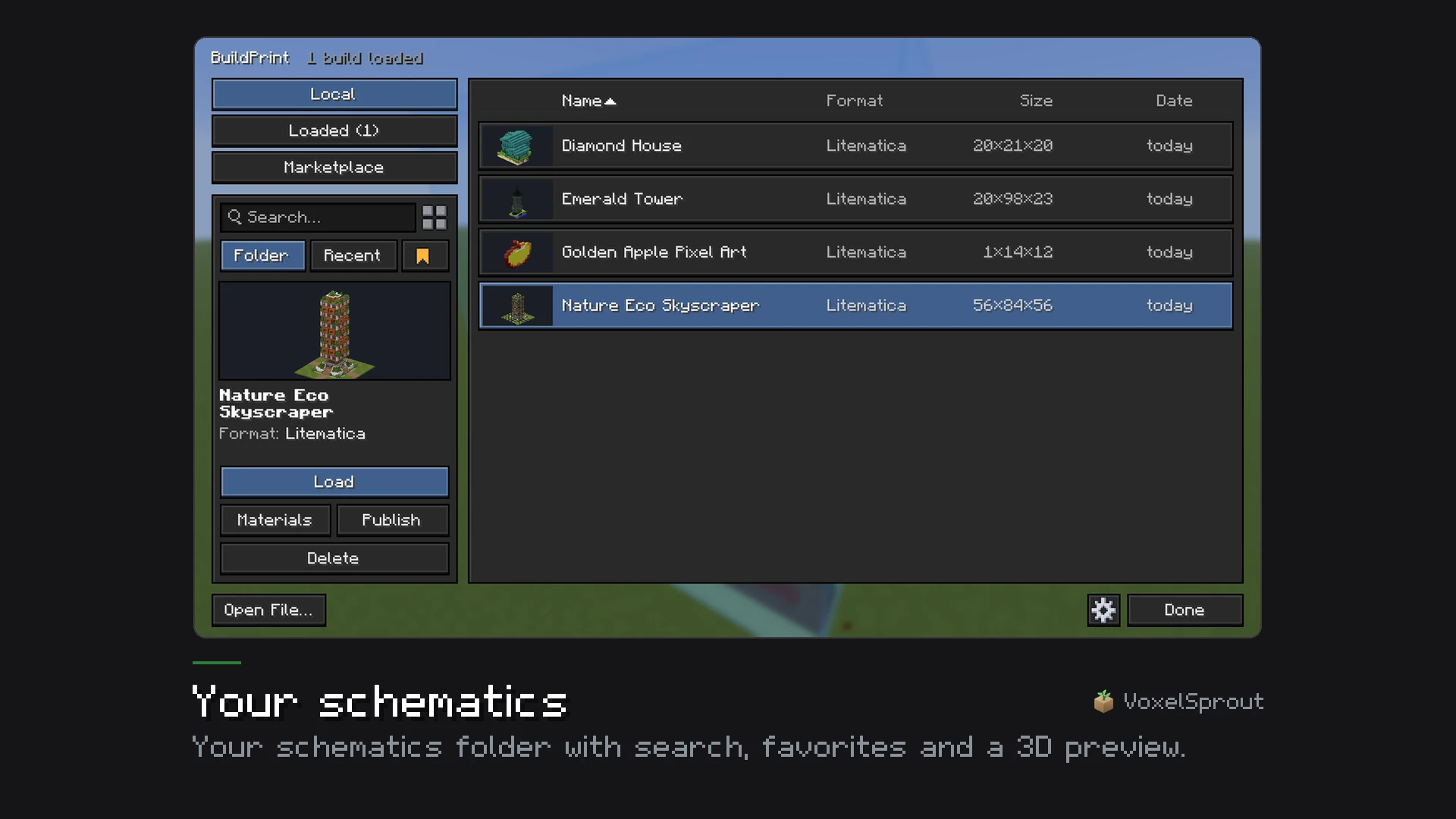 Your schematics Your schematics
-
 Frame rate: 3 big builds in a row
-
 Frame rate: 24 builds side by side
-
The ghost, with real blocks
-
Missing, wrong, turned and extra blocks
-
Gathering the materials
-
Auto align: the ghost lined up on a half-built house
-
Easy place
-
The printer building a house
-
Layer view
-
Paste in creative: pasted, undone and pasted again
-
Swapping materials
-
What goes inside containers, shown and filled
-
The editor: Magic select, the selection box, the gizmo that moves and turns
-
 Magic select
-
Your schematics, with a 3D preview
-
Frame rate: 10 big builds in one spot
-
 The first-start walkthrough, with live scenes of each feature
-
 Setting shortcuts in the walkthrough
-
 Gather: what's still to get, on screen
-
 What to craft, at the crafting table
-
 The material list
-
 Your schematics
-
 The marketplace in game
-
 Container contents
-
 Paste
-
 Settings and presets
-
 The Minecraft look and the VoxelSprout look
-
 Frame rate: Venice district
Versions
Files
Relations
Project Relations
More like this
Similar Mods
Suggestions use data such as tags, dependencies, dependents, descriptions, titles, and more to rank how much they overlap with this mod.
On ModDex
Community snapshot
By the numbers
Statistics

Get it on
Available Platforms
On ModDex
Community snapshot
By the numbers