

Community listing page, reviews here may not be monitored by the author.
Bundle Upgrade


No reviews yet
Unlock the full potential of bundles with powerful inventory interactions and navigation.
Community voices
Reviews
No reviews yet. Be the first to review this project!
Get it on
Available Platforms
Compatibility
Supported Environments
Must be installed on both the client and the server.
About
Project Details
For authors
Embed Badge
If you're the author of this project, you can embed a live badge anywhere that supports HTML or Markdown. It updates automatically whenever ratings change.
Use HTML for any page that supports it, or Markdown for README files and Markdown-based descriptions.
Identifiers
Platform IDs
About
Description









Bundle Upgrade enhances Minecraft's vanilla bundles with a variety of quality of life improvements that make managing stored items faster, easier, and more intuitive. 🎒
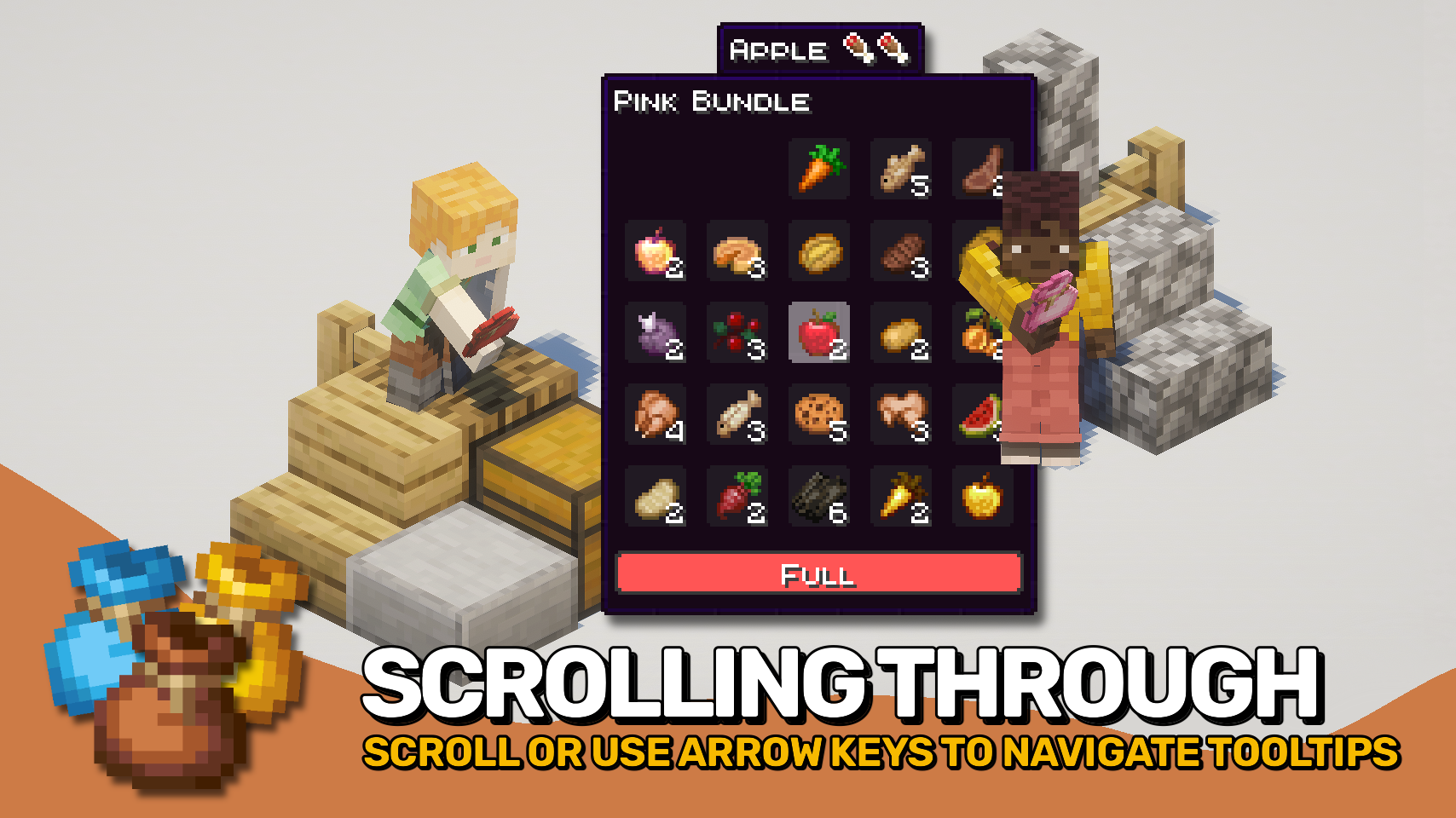
Vanilla bundles already support inventory interactions, but accessing large bundles quickly can become cumbersome. This mod removes the limit on visible contents, allowing every stored item to be viewed directly in the bundle tooltip. Browse through items using the mouse wheel or keyboard arrow keys, then extract exactly what you need without rearranging the rest. 🎯
The mod builds upon Minecraft's existing bundle interface rather than replacing it, preserving the familiar vanilla experience while adding more powerful navigation, improved visibility, and additional inventory management features. ✨
Unlike simple tooltip enhancements, this is not a client only mod. It adds real inventory interactions and must be installed on both the client and server. If you only want improved bundle previews, check out Bundles Beyond by 7410. 💡
Using shulker boxes too? Check out Easy Shulker Boxes, which adds the same intuitive inventory interactions to portable storage containers! 📦

- 📦 Enhanced Bundle Interactions: Build upon Minecraft's vanilla bundle mechanics with additional inventory management capabilities.
- 🔍 View Every Stored Item: See all contents directly in bundle tooltips instead of being limited by the vanilla display size.
- 🎯 Select Any Stored Item: Use the scroll wheel or keyboard arrow keys to choose exactly which stored item you want to interact with.
- 📝 Selected Item Details: Instantly see additional information about the currently selected item while browsing bundle contents.
- ↔️ Fast Item Transfer: Quickly insert and extract items using intuitive inventory interactions.
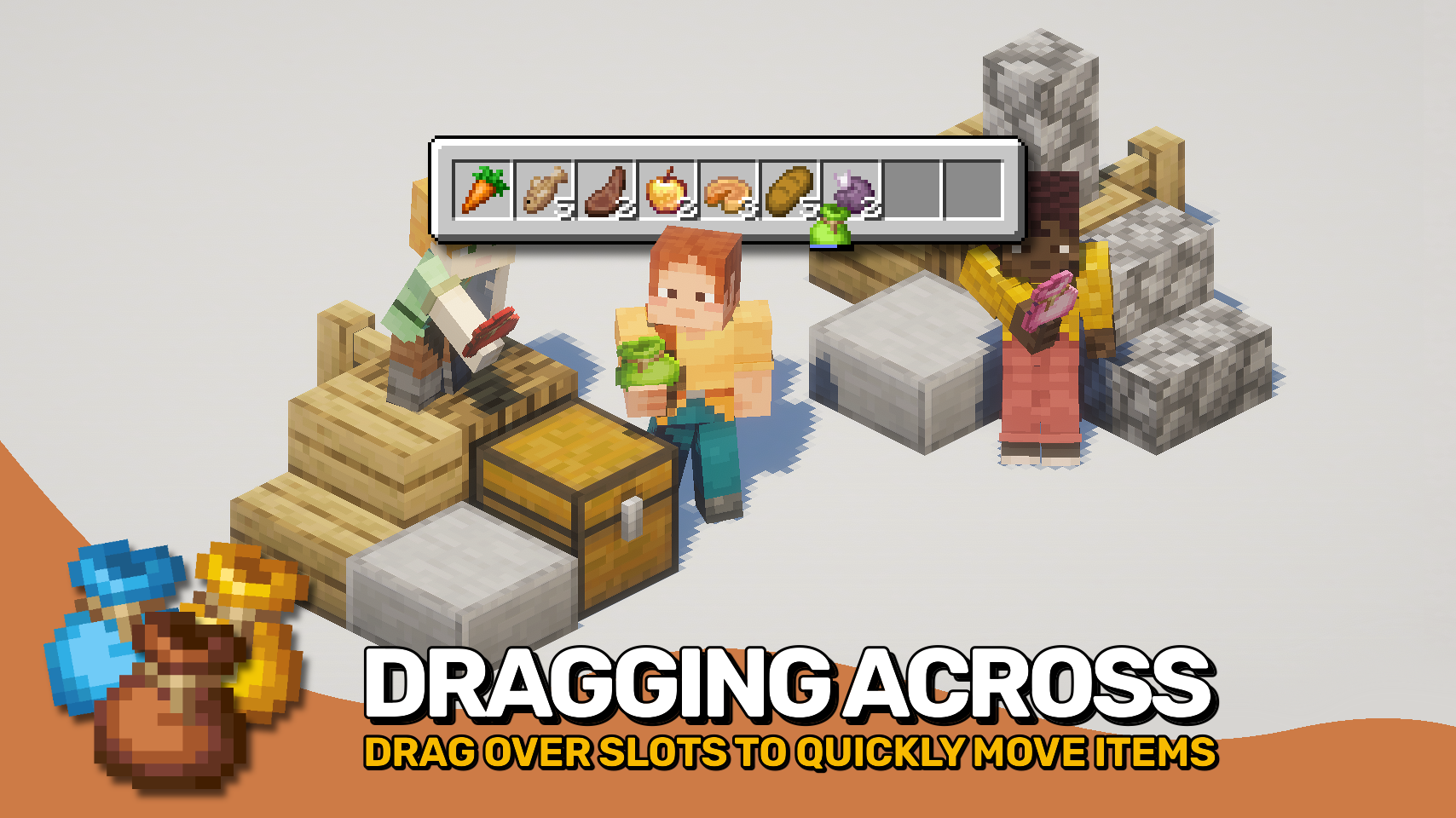
- 🖱️ Drag Across Multiple Slots: Click and drag across inventory slots to insert or extract items in bulk for much faster inventory management.
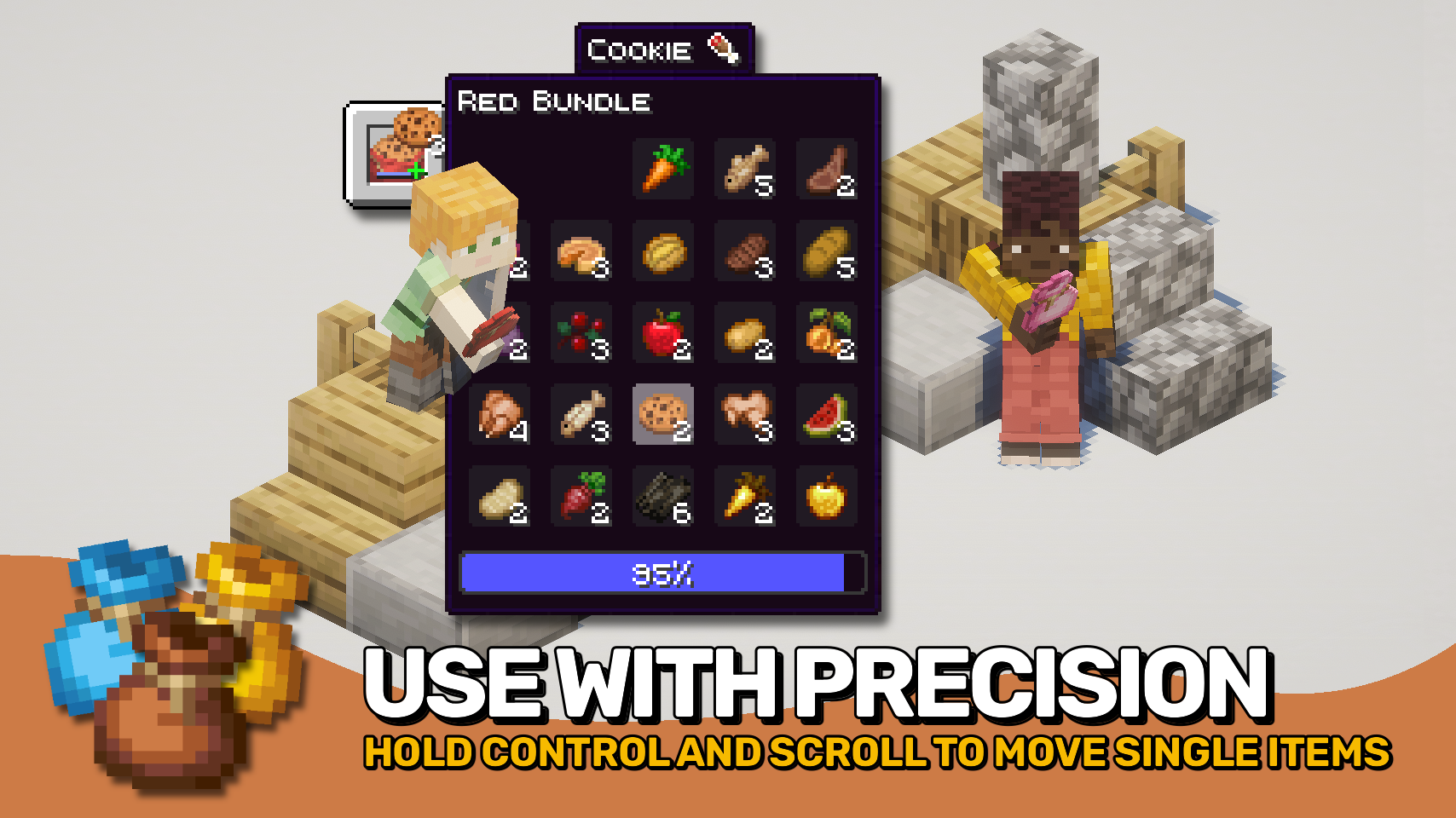
- 🎚️ Precise Item Movement: Hold
Control(Commandon Mac) to move individual items instead of full stacks and precisely control transfer amounts. - 📊 Improved Fill Indicators: Enhanced bundle capacity indicators help you monitor storage usage at a glance.
- 💡 Smart Compatibility Indicators: Visual hints show whether held items can be inserted and whether matching items are already present inside.
- ⚙️ Highly Configurable: Customize interactions, controls, tooltip behavior, and visual features to match your preferred playstyle.


⏩ INSTALLATION REQUIRED ON CLIENT & REQUIRED ON SERVER
⏩ REQUIRES PUZZLES LIB TO BE INSTALLED (FABRIC & NEOFORGE)
⏩ REQUIRES FABRIC API TO BE INSTALLED (FABRIC)
⏩ REQUIRES FORGE CONFIG API PORT TO BE INSTALLED (FABRIC)

If available for a mod, configuration is possible directly from in-game using the mod menu (requires Mod Menu by Prospector to be installed on Fabric).
For manual configuration using an external text editor all files are found at .minecraft/config, named as MOD_ID-client.toml, MOD_ID-common.toml, or MOD_ID-server.toml, depending on the type of config. Not all types might exist for a mod, if any at all.
 |
 |
|
 |
 |
|
 |
 |
|
 |
 |
|
 |
 |
|

© 2026 @heyitsfuzs. All rights reserved. This page was last edited on 11 September 2026, at 06:44 (UTC).
Bundle Upgrade enhances Minecraft's vanilla bundles with a variety of quality of life improvements that make managing stored items faster, easier, and more intuitive. 🎒
Vanilla bundles already support inventory interactions, but accessing large bundles quickly can become cumbersome. This mod removes the limit on visible contents, allowing every stored item to be viewed directly in the bundle tooltip. Browse through items using the mouse wheel or keyboard arrow keys, then extract exactly what you need without rearranging the rest. 🎯
The mod builds upon Minecraft's existing bundle interface rather than replacing it, preserving the familiar vanilla experience while adding more powerful navigation, improved visibility, and additional inventory management features. ✨
Unlike simple tooltip enhancements, this is not a client only mod. It adds real inventory interactions and must be installed on both the client and server. If you only want improved bundle previews, check out Bundles Beyond by 7410. 💡
Using shulker boxes too? Check out Easy Shulker Boxes, which adds the same intuitive inventory interactions to portable storage containers! 📦
- 📦 Enhanced Bundle Interactions: Build upon Minecraft's vanilla bundle mechanics with additional inventory management capabilities.
- 🔍 View Every Stored Item: See all contents directly in bundle tooltips instead of being limited by the vanilla display size.
- 🎯 Select Any Stored Item: Use the scroll wheel or keyboard arrow keys to choose exactly which stored item you want to interact with.
- 📝 Selected Item Details: Instantly see additional information about the currently selected item while browsing bundle contents.
- ↔️ Fast Item Transfer: Quickly insert and extract items using intuitive inventory interactions.
- 🖱️ Drag Across Multiple Slots: Click and drag across inventory slots to insert or extract items in bulk for much faster inventory management.
- 🎚️ Precise Item Movement: Hold
Control(Commandon Mac) to move individual items instead of full stacks and precisely control transfer amounts. - 📊 Improved Fill Indicators: Enhanced bundle capacity indicators help you monitor storage usage at a glance.
- 💡 Smart Compatibility Indicators: Visual hints show whether held items can be inserted and whether matching items are already present inside.
- ⚙️ Highly Configurable: Customize interactions, controls, tooltip behavior, and visual features to match your preferred playstyle.
⏩ INSTALLATION REQUIRED ON CLIENT & REQUIRED ON SERVER
⏩ REQUIRES PUZZLES LIB TO BE INSTALLED (FABRIC & NEOFORGE)
⏩ REQUIRES FABRIC API TO BE INSTALLED (FABRIC)
⏩ REQUIRES FORGE CONFIG API PORT TO BE INSTALLED (FABRIC)
If available for a mod, configuration is possible directly from in-game using the mod menu (requires Mod Menu by Prospector to be installed on Fabric).
For manual configuration using an external text editor all files are found at .minecraft/config, named as MOD_ID-client.toml, MOD_ID-common.toml, or MOD_ID-server.toml, depending on the type of config. Not all types might exist for a mod, if any at all.
 |
|
|
 |
 |
|
|
|
|
 |
 |
|
 |
 |
© 2026 @heyitsfuzs. All rights reserved. This page was last edited on 11 September 2026, at 06:44 (UTC).
Screenshots
Gallery
Versions
Files
Relations
Project Relations
More like this
Similar Mods
Suggestions use data such as tags, dependencies, dependents, descriptions, titles, and more to rank how much they overlap with this mod.
On ModDex
Community snapshot
By the numbers
Statistics
Want to reach Minecraft players?
We're looking for a server hosting partner to feature here and other parts of the site. Interested? Send us a message!
Get in touchGet it on
Available Platforms
On ModDex
Community snapshot
By the numbers