
Community listing page, reviews here may not be monitored by the author.
Bundles!

No reviews yet
Pack your stuff and go on an adventure with the new bundles!
Community voices
Reviews
No reviews yet. Be the first to review this project!
Get it on
Available Platforms
About
Project Details
For authors
Embed Badge
If you're the author of this project, you can embed a live badge anywhere that supports HTML or Markdown. It updates automatically whenever ratings change.
Use HTML for any page that supports it, or Markdown for README files and Markdown-based descriptions.
Identifiers
Platform IDs
About
Description
BUNDLES!
During Minecraft Live 2020 Mojang announced that in 1.17 a new item will be introduced to the game: the Bundle!
This is like an early game version of the Shulker Box, allowing you to save some inventory space.
⚙ How to get a Bundle?
Getting a Bundle is really easy, as it doesn't require too many materials. All you need is just 5 pieces of Rabbit Hide and 2 Strings to create a Bundle!

🤔 How does it work?
Select the Bundle from your inventory, then left click on a stack to put it inside the Bundle.
But be careful, as you can't put a full stack of items inside the Bundle! Infact you can only put half the maximum stack of
an item inside the Bundle, unless is a non stackable item. When you are done, left click the Bundle on an empty slot in your Inventory.
If you want to take out the Items from the Bundle, right click it and all Items inside the Bundle will be added to your Inventory.
...or you can just watch this video to see the mod in action!
Select the Bundle from your inventory, then right-click on a stack to put it inside the Bundle, or right click with the stack on the Bundle to put inside if there's space available.
If you want to take out the Items from the Bundle, right click it in inventory to take out one Item from the Bundle (from last to the first one), or right click it outside the inventory to drop all the Bundle Items on the ground.
The functionality has been ported to mimic the latest 1.17 snapshots, where Bundle were originally developed, so you can check the Minecraft Wiki to see how a Bundle works.
Also featured in Boodlyneck's Mods of the Week serie!
👀 Can I put anything inside the Bundle?
No, there are certain blocks/items that you can't put inside a Bundle.
Which blocks or items you ask? Well, you can decide them! By default, the mod comes with two tags,
bundle_ignored_blocks and bundle_ignored_items. These two tags contains all the blocks and the items that can't
be put inside a Bundle. By default, you can't put another Bundle, a Chest, a Trapped Chest, an Ender Chest and
any Shulker Box inside a Bundle. But if you wish you can always modify those tags to allow those blocks to be
put inside the Bundle and create some black holes! Or even do the opposite and add other blocks or items
that you don't want to be put inside the Bundle. Just make sure you put the right thing in the right tag (so blocks
inside the bundle_ignored_blocks tag and items inside the bundle_ignored_items tag). The only limit is
your creativity!
🛍 How many items can fit inside a Bundle?
You can put up to 64 items (or a full stack) inside a Bundle, but remember that certain Items, like Tools or Ender Pearls, will take more space than normal blocks inside a Bundle.
😁 Conclusion
Minecraft 1.17 has been one of the greatest update of all time, full of many new content we asked for so long! This mod aims to introduce the Bundle mechanic in 1.16.5, however note that all of this is based purely on what can be done in such version, as something is really hard or practically impossible to do (like the Tooltip for example), so there might be some aspects that may change or differ entirely from what is inside this mod. Also consider that the Bundle itself is still in development in Vanilla Minecraft, so things might actually change in the future. If that is the case I will update the mod to match such changes.
That being said, I hope you enjoy it! Let me know if there are any issues on the issue tracker, have a nice day! 😁
PS: Check out Iron Bundles too!
Screenshots
Gallery
-
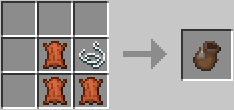 How to craft a Bundle How to craft a Bundle
Versions
Files
Relations
Project Relations
More like this
Similar Mods
Suggestions use data such as tags, dependencies, dependents, descriptions, titles, and more to rank how much they overlap with this mod.
On ModDex
Community snapshot
By the numbers
Statistics
Want to reach Minecraft players?
We're looking for a server hosting partner to feature here and other parts of the site. Interested? Send us a message!
Get in touchGet it on
Available Platforms
On ModDex
Community snapshot
By the numbers