Community listing page, reviews here may not be monitored by the author.
Cashshop


No reviews yet
A cashshop used for modpack to sell items, armor or other think using copper, silver and gold currency.

Community voices
Reviews
No reviews yet. Be the first to review this project!
Get it on
Available Platforms
Compatibility
Supported Environments
Runs entirely on the server. Also works in singleplayer.
About
Project Details
For authors
Embed Badge
If you're the author of this project, you can embed a live badge anywhere that supports HTML or Markdown. It updates automatically whenever ratings change.
Use HTML for any page that supports it, or Markdown for README files and Markdown-based descriptions.
Identifiers
Platform IDs
About
Description
CashShop is a Forge mod for Minecraft 1.20.1 made for modpack creators who want to build a configurable in-game item shop using KubeJS.
Create your own shop tabs, sell vanilla or modded items, configure prices and discounts, and use the built-in Copper, Silver, and Gold currency system.
Features
- Configure the entire shop through KubeJS startup scripts.
- Create custom shop tabs with translated names and item icons.
- Sell vanilla and modded items.
- Support for items with custom NBT data.
- Configure how many items are received per purchase.
- Built-in Copper, Silver, and Gold currency system.
- Configure prices using Gold, Silver, and Copper values.
- Add percentage discounts from 0% to 100%.
- Support free shop items.
- Purchase confirmation window for paid items.
- Automatic pagination with 12 products per page.
- Persistent player currency balance.
- Physical Copper, Silver, and Gold Coin items automatically convert into stored currency.
- Optional shop chat messages.
- JEI-aware shop GUI integration.
- Open the shop with the configurable I keybind by default.
KubeJS Example
Put your scripts in:
kubejs/startup_scripts/
Example:
CashshopJSEvents.register(event => {
    event.createTab(0, 'tab.cashshop.blocks', 'minecraft:grass_block')
    event.createTab(1, 'tab.cashshop.items', 'minecraft:diamond')

    // itemId, tabId, count, gold, silver, copper, discount
    event.addItem('minecraft:grass_block', 0, 16, 0, 0, 25, 0)
    event.addItem('minecraft:diamond', 1, 1, 0, 5, 0, 0)
    event.addItem('minecraft:netherite_ingot', 1, 1, 1, 50, 0, 20)
})
NBT Items
Custom NBT items can also be sold:
CashshopJSEvents.register(event => {
    event.createTab(0, 'tab.cashshop.special', 'minecraft:enchanted_book')

    event.addItemByNBT(
        'minecraft:enchanted_book',
        '{StoredEnchantments:[{id:"minecraft:sharpness",lvl:5s}]}',
        0,
        1, 0, 0,
        0
    )
})
Currency
CashShop uses the following conversion system:
100 Copper = 1 Silver
100 Silver = 1 Gold
1 Gold = 10,000 Copper
The mod also includes physical currency items:
cashshop:copper_item
cashshop:silver_item
cashshop:gold_item
Picking up these coins, or having them detected in your inventory, automatically converts them into your stored CashShop balance.
Discounts
The final argument of addItem and addItemByNBT is the discount percentage.
event.addItem('minecraft:diamond', 0, 1, 0, 10, 0, 25)
This gives the Diamond a 25% discount.
Use 0 for no discount or 100 to make the item free.
Commands
Set your currency:
/shop_set_currency <gold> <silver> <copper>
Add currency:
/shop_add_currency <gold> <silver> <copper>
Disable Chat Messages
Shop messages can be disabled from KubeJS:
CashshopJSEvents.register(event => {
    event.disableChatLog()
})
Required Dependencies
- Minecraft Forge 47+
- KubeJS 2001.6.5-build.16+
- ApocalypseLib 1.1.5+
Optional Integrations
- JEI
CashShop is designed for modpacks that need a simple customizable store without hardcoding the available products into the mod itself. Configure the shop through KubeJS, choose your own economy, and let players purchase the items you decide to offer.
It allows modpackers to create a cash shop using KubeJS only, without any configuration files:.
(I would have liked to use the Grand Fantasia UI instead of the Minecraft one, but it’s too large :'D)
- To open the shop, press I (by default), you can change the key inside the key menu.
- You can use the command /shop_set_currency (gold) (silver) (copper) or /shop_add_currency (gold) (silver) (copper), no need to specify a player, it's for yourself (require creative or more).
- Additionally you can give the coins from this mod, they will convert to the cash shop currency inside the inventory or picked up from the floor if you make a entity drop it.
Warning:
The cash shop GUI is less large with the version 0.0.2 but still a bit big for a 800x600 screen size.
Mod supported:
JEI: Curseforge Enables the JEI UI to adapt to the shop UI size.
Check this for commands and examples of scripts: KubeJS Commands
Screenshots
Gallery
-
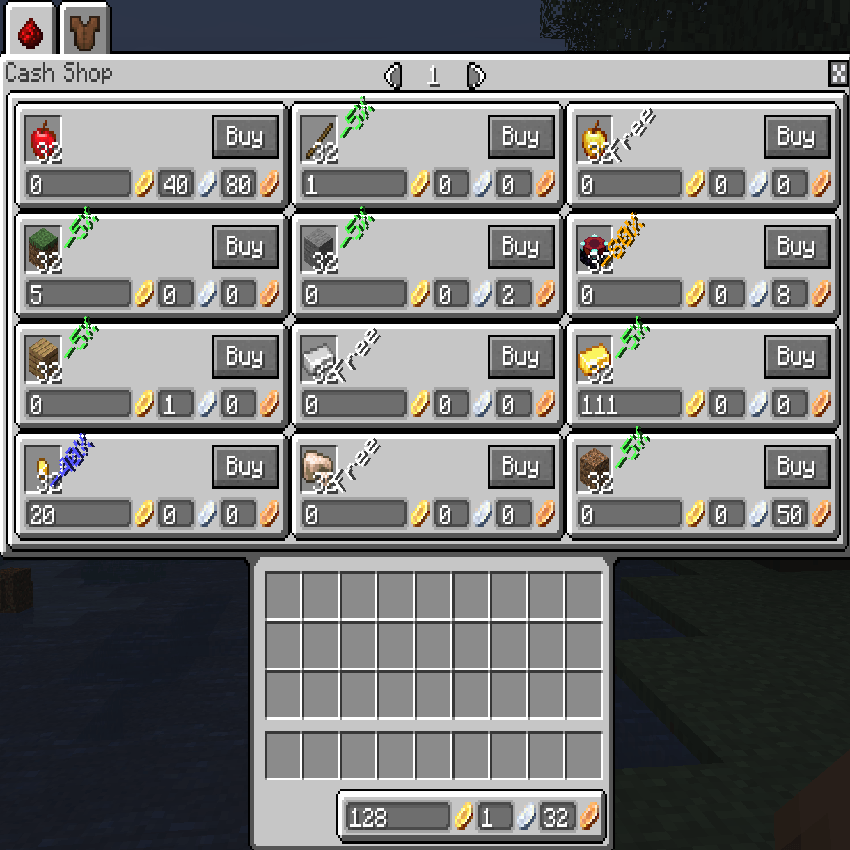 Cashshop
-
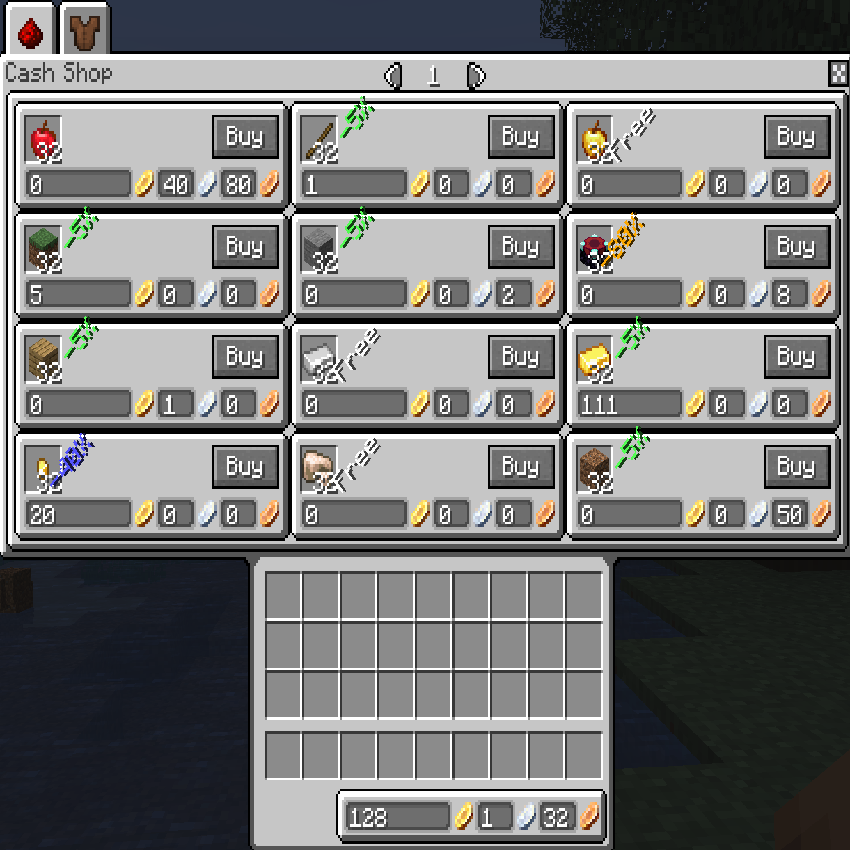 Shop UI
Versions
Files
Relations
Project Relations
More like this
Similar Mods
Suggestions use data such as tags, dependencies, dependents, descriptions, titles, and more to rank how much they overlap with this mod.
On ModDex
Community snapshot
By the numbers
Statistics
 (opens in a new tab)
Get it on
Available Platforms
On ModDex
Community snapshot
By the numbers