Community listing page, reviews here may not be monitored by the author.
Cat Companions+


No reviews yet
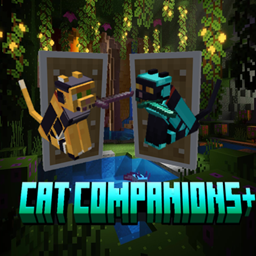
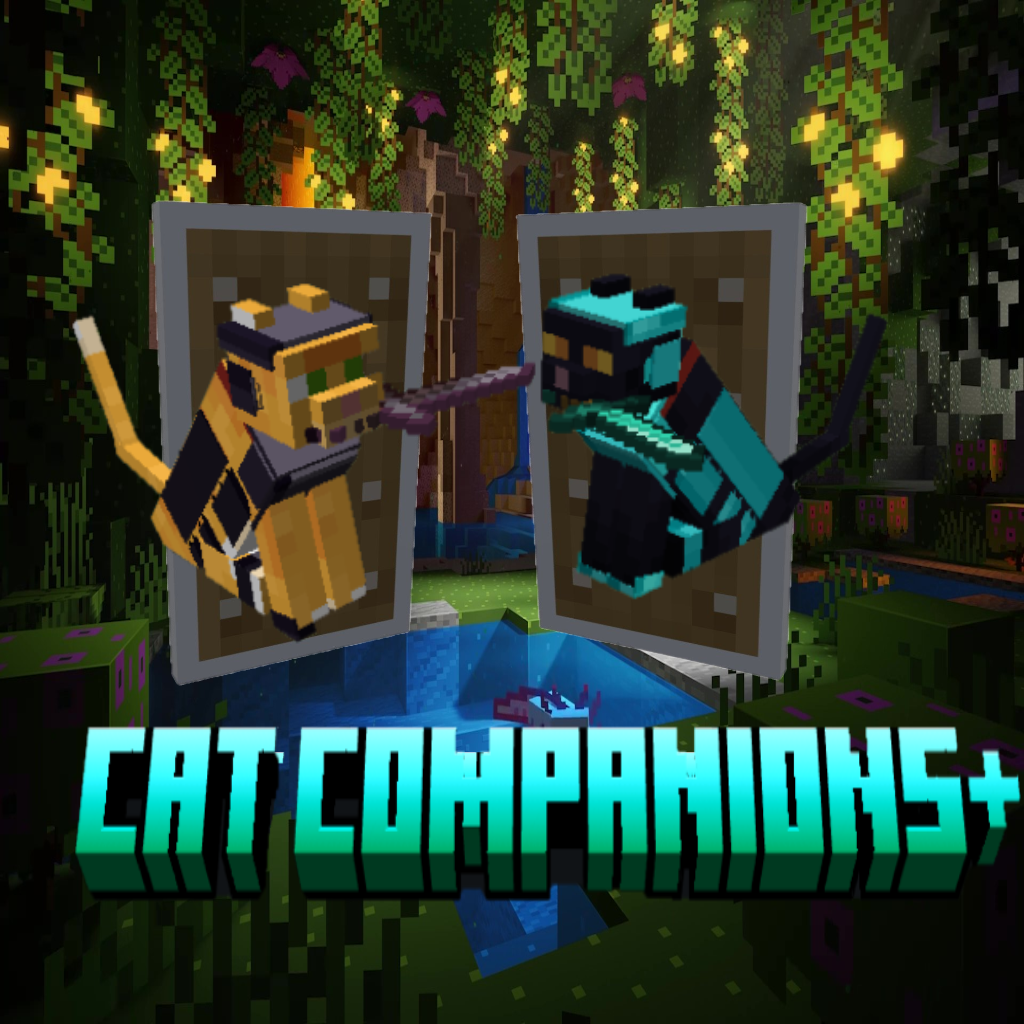
Cat Companions+ expands Minecraft’s tameable cats into useful adventuring companions. Cats can be equipped with custom armor and weapons, allowing them to fight alongside their owner while keeping the familiar behavior and personality of vanilla cats.
Community voices
Reviews
No reviews yet. Be the first to review this project!
Get it on
Available Platforms
Compatibility
Supported Environments
Must be installed on both the client and the server.
About
Project Details
For authors
Embed Badge
If you're the author of this project, you can embed a live badge anywhere that supports HTML or Markdown. It updates automatically whenever ratings change.
Use HTML for any page that supports it, or Markdown for README files and Markdown-based descriptions.
Identifiers
Platform IDs
Resources
External Links
About
Description
Cat Companions+
Cat Companions+ gives Minecraft cats a much larger role after taming them.
Instead of existing primarily as decorative pets, tamed cats can become true combat companions that can be equipped, commanded, protected, and managed individually.
The goal is to expand cats in a way that still feels natural within Minecraft. Cats retain their familiar tameable behavior, ownership, sitting and wandering mechanics while gaining equipment, combat, behavior, and companion-management features.
Features
Cat Companion Management
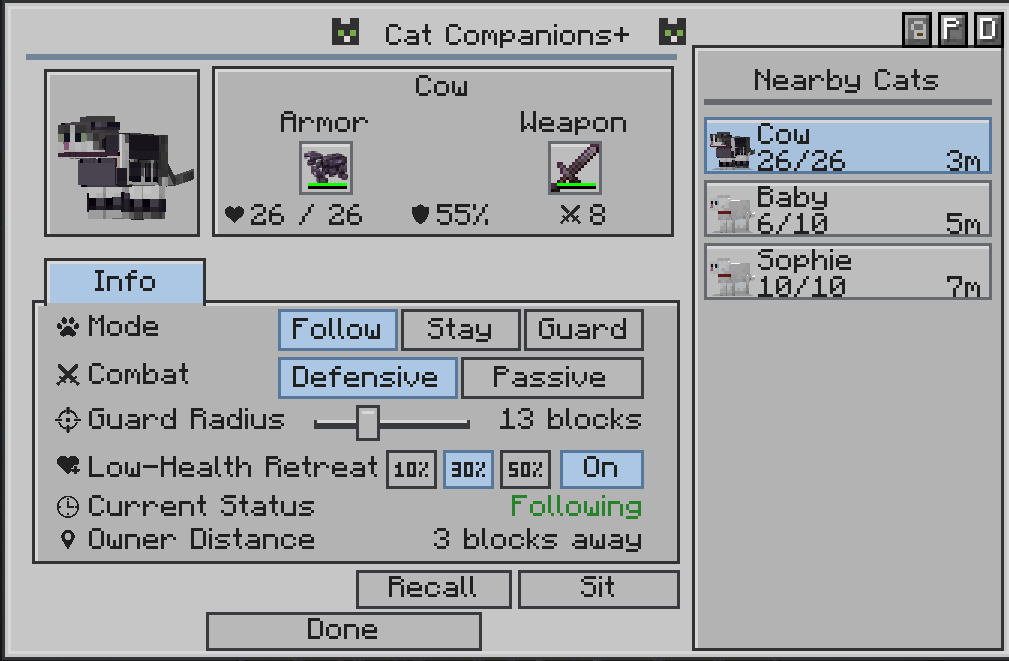
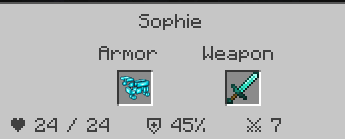
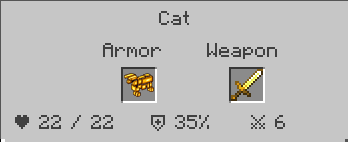
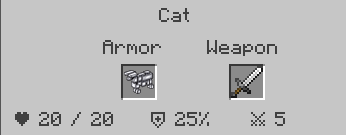
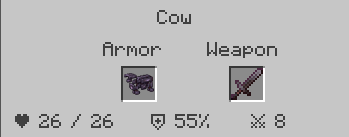
Owned cats have a dedicated companion menu for managing their equipment, behavior, and settings.
Shift + Right-Click a tamed cat, or use Control + C to open its companion menu.
The menu shows:
- Cat name
- Cat appearance
- Current and maximum health
- Damage
- Damage reduction
- Equipped armor
- Equipped weapon
- Current behavior
- Owner distance
- Guard status
- Retreat settings
- Nearby companion cats
You can also select other nearby owned cats directly from the same menu without having to close it.
Cat Behavior Modes
Cats can now be given different behavior modes depending on how you want them to act.
Follow
The cat follows you normally and helps defend you when necessary.
Stay
The cat remains around its assigned location instead of following you everywhere.
Guard
The cat protects an assigned area and actively looks for hostile threats within that area, even when you haven't attacked anything yourself.
Defensive
The cat will defend itself and its owner when threatened.
Passive
The cat will not engage in combat.
Behavior settings are saved individually for each cat.
Guard Area
Guard mode allows a cat to protect a specific area.
A guarding cat will:
- Patrol around its assigned area
- Look for nearby hostile creatures
- Attack threats without requiring the player to attack first
- Pursue threats within its allowed range
- Return to its guard area afterward
Guard areas make cats useful for protecting bases, farms, villages, entrances, and other locations.
Companion Combat
Cats can actively participate in combat alongside their owner.
Cats are capable of:
- Surrounding enemies instead of stacking in one location
- Moving around targets while fighting
- Choosing safer attack positions
- Repositioning after attacks
- Performing short pounces when appropriate
- Avoiding dangerous attack paths
- Working together when multiple companion cats are present
Cats remain support companions rather than replacing the player's own combat ability.
Low-Health Retreat
Cats can be configured to retreat when their health becomes low.
Retreat can be turned On or Off, with three available health thresholds:
- 10%
- 30%
- 50%
When retreating, the cat stops pursuing enemies and attempts to move toward a safer location.
The cat can retreat toward:
- Its owner when following
- Its assigned location when staying
- Its guard area when guarding
Cats also avoid immediately returning to combat until they have recovered enough health.
Hazard Avoidance
Companion cats are much more careful around dangerous terrain.
They attempt to avoid hazards such as:
- Lava
- Fire
- Soul fire
- Campfires
- Cactus
- Magma
- Powder snow
- Dangerous falls
- Other recognized dangerous paths
This helps prevent companion cats from needlessly killing themselves while following or fighting.
Recall
Recall calls a companion back to its owner.
When recalled, the cat:
- Returns safely to the player
- Switches to Follow
- Stops sitting
- Resumes normal companion behavior
Recall also checks the destination so the cat isn't intentionally placed inside dangerous terrain or another unsafe location.
Sit & Stand
Cats can still be manually told to sit or stand.
Sit temporarily stops the cat from moving, fighting, patrolling, or pursuing enemies.
Stand allows the cat to resume its previously selected behavior.
Sitting does not erase the cat's saved behavior settings.
Multiple Companion Cats
The companion menu can display multiple cats owned by the player.
Each cat can be selected individually to view its:
- Appearance
- Health
- Equipment
- Distance
- Behavior
- Current status
Cats also use improved positioning during combat so several companions are less likely to occupy exactly the same space around an enemy.
Cat Companion Inventory
Owned cats have their own equipment interface for managing companion gear.
The inventory provides dedicated places for:
- Cat armor
- Weapons
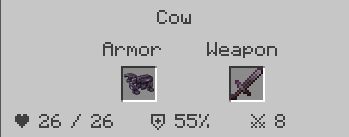
The menu also displays important information about the selected cat, including its name, health, damage reduction, damage, equipment, and current behavior.
The companion inventory is separate from normal vanilla cat interaction so normal sit/stand behavior remains available.
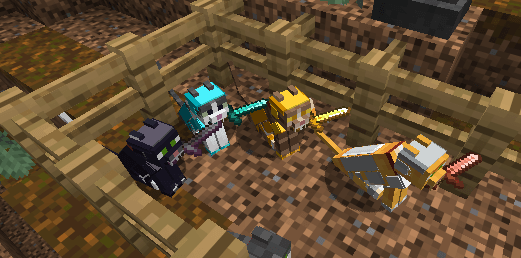
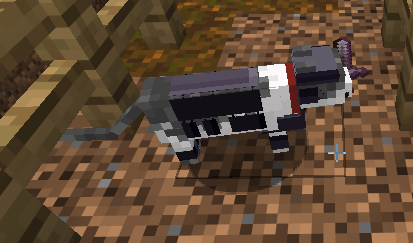
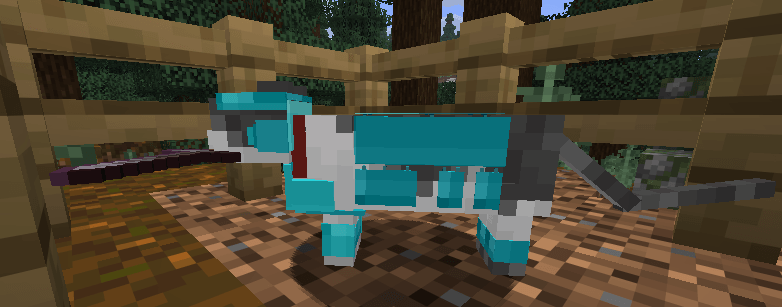
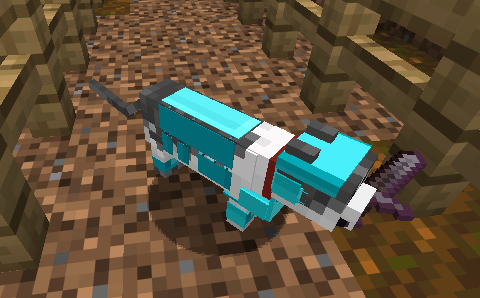
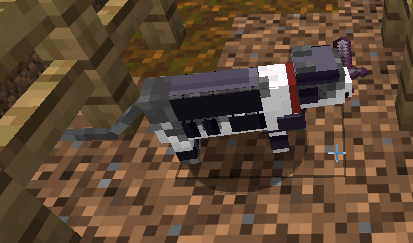
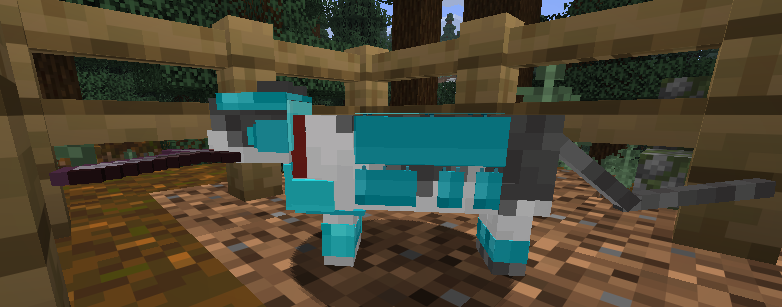
Custom Cat Armor
Cats can wear specially modeled armor designed specifically around the Minecraft cat body.
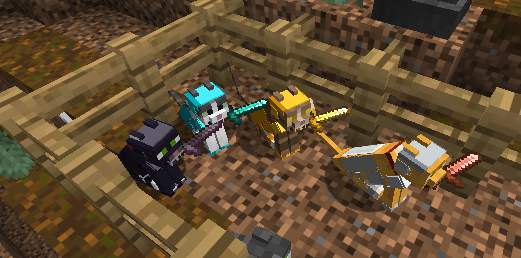
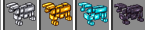
Current armor tiers include:
- Iron Cat Armor
- Gold Cat Armor
- Diamond Cat Armor
- Netherite Cat Armor
Armor is visibly rendered on the cat rather than simply existing as an invisible stat bonus.
Each material uses the same fitted armor design with its own appropriate material appearance.
Visible Weapons
Cat Companions can carry weapons visibly in their mouths.
Rather than simply increasing damage invisibly, the equipped weapon becomes part of the companion's appearance and combat progression.
Persistent Equipment & Settings
Each cat keeps its own equipment and companion settings.
This includes:
- Armor
- Weapon
- Behavior mode
- Guard location
- Stay location
- Retreat settings
These settings remain associated with the individual cat through normal world saves and reloads.
Vanilla-Friendly Design
Cat Companions+ builds on Minecraft's existing cat system rather than replacing it with an entirely different pet system.
Cats retain familiar mechanics such as:
- Taming
- Ownership
- Sitting and standing
- Normal movement
- Cat variants
- Existing vanilla cat behavior where appropriate
The additional companion features are layered on top of the familiar Minecraft cat.
Minecraft-Style Design
The armor, equipment, combat system, and interface are designed to remain visually compatible with Minecraft rather than turning cats into heavily over-designed RPG characters.
The focus is on:
- Recognizable vanilla cats
- Useful companion behavior
- Lightweight equipment progression
- Visible gear
- Simple controls
- Individual companion management
Supported Versions
Cat Companions+ is being developed for Fabric.
Supported project versions are:
- Minecraft Fabric 1.20.1
- Minecraft Fabric 1.21.1
- Minecraft Fabric 26.2
- Minecraft Forge 1.20.1
- Minecraft Forge 1.21.1
- Minecraft Forge 26.2
Each Minecraft version uses its own separate mod file. Players should install the file specifically made for their Minecraft version.
Cat Companions+ does not currently support Quilt or NeoForge.
Required Dependencies
Fabric
- Fabric Loader
- Fabric API
Forge
- None
Optional:
- None currently
Client / Server
Cat Companions+ is required on both the client and server.
The server controls companion equipment, behavior, combat, health, damage reduction, weapon damage, and persistence.
The client provides the companion menu, equipment display, armor rendering, weapon rendering, and other visual features.
Description
Cat Companions+ gives Minecraft cats a much larger role after taming them.
Instead of existing primarily as decorative pets, tamed cats can be outfitted for adventure with custom cat armor and weapons, allowing them to accompany and help defend their owner during exploration and combat.
The goal is to expand cats in a way that still feels natural within Minecraft. Cats retain their familiar tameable behavior, ownership, sitting and wandering mechanics, while gaining a lightweight equipment and combat system built specifically for them. Features Cat Companion Inventory
Owned cats have their own equipment interface for managing companion gear.
Cat Inventory GUI is accessed by holding Shift and Right-Clicking your cat.
The inventory provides dedicated places for equipment such as:
Cat armor
Weapons

This menu also details your cats name (if given a tametag), Current/Max Health, Damage Reduction Percentage, and Damage
The companion inventory is separate from normal vanilla cat interaction so normal sit/stand behavior remains available. Custom Cat Armor
Cats can wear specially modeled armor designed specifically around the Minecraft cat body.
Current armor tiers include:
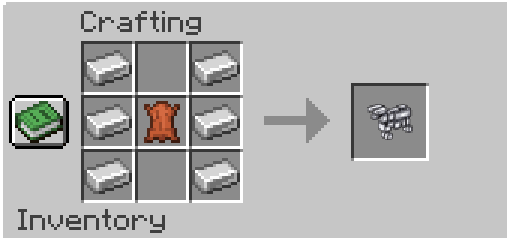
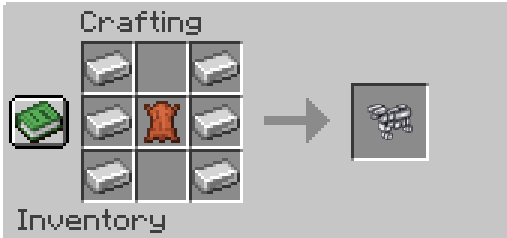
Iron Cat Armor
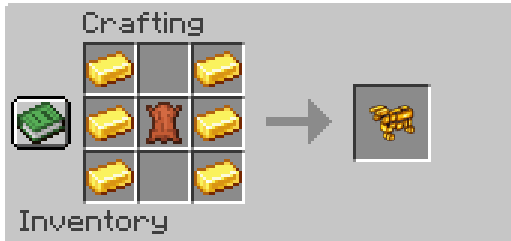
Gold Cat Armor
Diamond Cat Armor
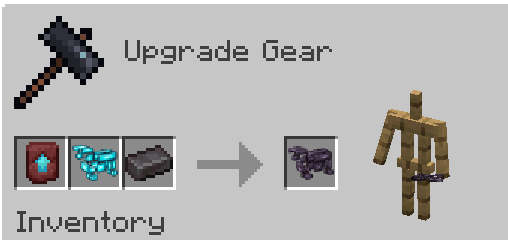
Netherite Cat Armor
Armor is visibly rendered on the cat rather than simply existing as an invisible stat bonus.
The armor follows the cat's body while it:
stands
walks
runs
sits
turns its head
fights
Each material uses the same fitted armor design with its own appropriate material appearance.
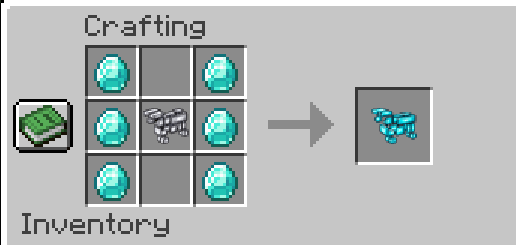
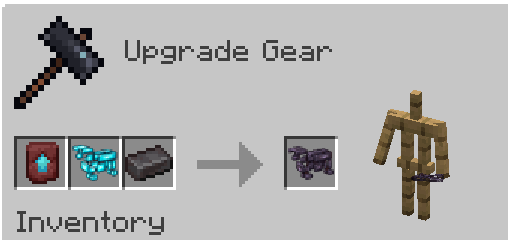
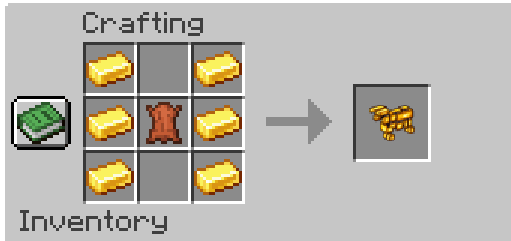
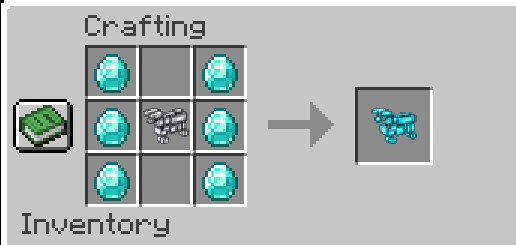
Crafting costs: Armor Cost Iron 6 iron ingots + 1 leather Gold 6 gold ingots + 1 leather Diamond 6 diamonds + 1 iron cat armor Netherite Smithing: diamond cat armor + netherite upgrade template + netherite ingot Visible Weapons
Cat Companions can carry weapons visibly in their mouth.
Rather than simply increasing damage invisibly, the equipped weapon becomes part of the companion's appearance and combat progression.
Weapon tier determines the cat's attack strength.
Current intended damage progression is: Equipment Damage No weapon 2 Wooden 3 Stone 4 Copper 4 Iron 5 Gold 6 Diamond 7 Netherite 8
This keeps an unarmed companion relatively weak while allowing a properly equipped cat to become increasingly useful during progression. Combat Companions
Equipped cats can help their owner in combat.
The system is designed around cats being support companions, rather than replacing the player's own combat ability.
Better equipment provides:
increased survivability
improved attack damage
visible progression
another reason to bring a favorite cat while adventuring
Vanilla-Friendly Cat Behavior
Cat Companions+ builds on Minecraft's existing cat system rather than replacing it with an entirely different pet system.
Cats retain familiar mechanics such as:
taming
ownership
sitting and standing
normal movement
following their existing vanilla behavior where appropriate
The additional companion features are layered on top of those mechanics. Persistent Equipment
A cat's companion equipment is intended to remain associated with that cat across normal world saves and reloads.
Armor and weapons aren't merely temporary visual effects—they are part of the individual companion. Minecraft-Style Design
The armor, equipment and interface are designed to remain visually compatible with Minecraft rather than turning cats into heavily over-designed RPG characters.
The focus is on:
recognizable vanilla cats
lightweight equipment progression
practical combat utility
visible gear
straightforward controls
Supported Versions
Cat Companions+ is being developed for Fabric.
Supported project versions are:
Minecraft Fabric 1.20.1
Minecraft Fabric 1.21.1
Minecraft Fabric 26.2
Each Minecraft version uses its own separate mod file. Players should install the file specifically made for their Minecraft version.
Cat Companions+ does not support Forge or NeoForge unless separate versions are created in the future.
Required Dependencies:
Fabric Loader
Fabric API
Optional:
None currently
Client/server:
Needed on both client and server.
Server controls cat equipment, combat, health, damage reduction, weapon damage, and persistence.
Client is needed for the cat inventory screen, armor rendering, and visible mouth-held weapons.
Screenshots
Gallery
-
 Screenshot 2026-08-19 120653.png Screenshot 2026-08-19 120653.png
 -
 Cat_Companions_CurseForge_Preview_under_2MB.gif Cat_Companions_CurseForge_Preview_under_2MB.gif
 -
 Screenshot 2026-08-19 110500.png Screenshot 2026-08-19 110500.png
 -
 Screenshot 2026-08-19 110518.png Screenshot 2026-08-19 110518.png
 -
 Screenshot 2026-08-19 110524.png Screenshot 2026-08-19 110524.png
 -
 Screenshot 2026-08-31 074909.png Screenshot 2026-08-31 074909.png
 -
 Screenshot 2026-08-19 120524.png Screenshot 2026-08-19 120524.png
 -
 Screenshot 2026-08-19 120536.png Screenshot 2026-08-19 120536.png
 -
 Screenshot 2026-08-19 120544.png Screenshot 2026-08-19 120544.png
 -
 Screenshot 2026-08-19 120553.png Screenshot 2026-08-19 120553.png
 -
 Screenshot 2026-08-20 110426.png Screenshot 2026-08-20 110426.png
 -
 Screenshot 2026-08-20 110435.png Screenshot 2026-08-20 110435.png
 -
 Screenshot 2026-08-20 110443.png Screenshot 2026-08-20 110443.png
 -
 Screenshot 2026-08-20 110516.png Screenshot 2026-08-20 110516.png
Versions
Files
Relations
Project Relations
More like this
Similar Mods
Suggestions use data such as tags, dependencies, dependents, descriptions, titles, and more to rank how much they overlap with this mod.
On ModDex
Community snapshot
By the numbers
Statistics
Want to reach Minecraft players?
We're looking for a server hosting partner to feature here and other parts of the site. Interested? Send us a message!
Get in touchGet it on
Available Platforms
On ModDex
Community snapshot
By the numbers
Statistics
Resources