
CClaims
No reviews yet
Server-Side Container Claim Mod
Features systems for better item storage and organization.
Fabric is a mod loader for versions 1.14+ of Minecraft, particularly popular for client side and optimization mods.
Community voices
Reviews
Click once to include, again to exclude, again to clear
No reviews yet. Be the first to review this project!
Get it on
Available Platforms
 Modrinth
Compatibility
Supported Environments
About
Project Details
For authors
Embed Badge
If you're the author of this project, you can embed a live badge anywhere that supports HTML or Markdown. It updates automatically whenever ratings change.
Use HTML for any page that supports it, or Markdown for README files and Markdown-based descriptions.
Identifiers
Platform IDs
About
Description
CClaims: A container claim mod for fabric
Claims is a Fabric server-side mod to claim and protect container blocks (e.g. Chest, Barrels and Hoppers).
This mod provides the /cclaim command to work with the claims.
Permissions can be managed by LuckPerms or any other mod implementing the fabric-permissions-api.
Features:
- Supported Container Blocks: Chests, Copper Chests, Barrels, Hoppers, Shelfs, Brewing Stands and Beacons
- Prevents usage and destruction of claimed blocks by other players (except admin mode players)
- Prevents destruction by explosions, headless pistons (aka. the bedrock breaking method) or the Ender dragon
- Players can add ("trust") players to their claims.
- Claims can trust registered groups that can be managed dynamically by players
Note: Claimed hoppers will push items into unclaimed containers. Therefore, you should not have claimed hoppers facing an unclaimed block (including normal non-container blocks that cannot be claimed).
Commands
/cclaim claim: Claims the container the player is facing/cclaim unclaim: Unclaims the container the player is facing/cclaim trust <player>: Trusts a player to use the claimed container. Trusted players can only use the container, but neither destroy the block nor manage the claim./cclaim untrust <player>: Untrusts a player from a claimed container/cclaim trust group <group>: Trusts a group to use the claimed container./cclaim untrust group <group>: Untrusts a group to use the claimed container./cclaim info: Shows the current claim status of the container the player is facing/cclaim adminmode: Toggles if the player is in admin mode. The mod treats players in admin mode like they own every claim./cclaim list [<dimension>] [all]: Lists the coordinates of all container claims in a dimension (defaults to the overworld). By default, the list is paginated, but this can be turned off by adding "all" as an argument./cclaim group create <group>: Creates a new group. The group name is limited to lowercase letter, numbers and underscores and has to be between 3 and 16 characters long./cclaim group delete <group>: Deleted a group./cclaim group join <group> <player>: Adds a player to the group./cclaim group leave <group> <player>: Removes a member from the group./cclaim group info <group>: Shows the name, owner and members of the group./cclaim group list: Lists all groups the player is a member of./cclaim group transfer <group> <player>: Changes the owner of a group.
Permissions
cclaim.adminmode: Required to use/cclaim adminmode. By default, it requires OP Level 3cclaim.list: Required to use/cclaim list. By default, it requires OP Level 2cclaim.info.admin: Allows to get all data using/cclaim infoon claims owned by other players and additionally shows the timestamp of claim creation. By default, it requires OP Level 2cclaim.group.create: Allows players to create groups. By default, all players have can do this.cclaim.group.admin: Allows to use group commands on groups that the player does not own. By default, it requires OP Level 3cclaim.group.transfer: Allows to change the owner of a group. By default, it requires OP Level 3
Storage
The claim data is stored in the NBT data of the block entities.
Additional metadata is stored as NBT in world/dimensions/minecraft/{overworld,the_nether,the_end}/data/cclaims/claims.dat and world/data/cclaims/groups.dat.
License
This project is licensed under the GNU Lesser General Public License version 3 only.
Screenshots
Gallery
-
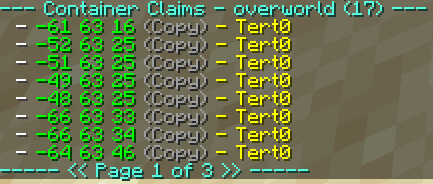 /cclaim list
 -
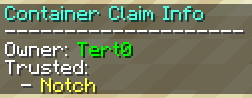 /cclaim info
Versions
Files
Relations
Project Relations
More like this
Similar Mods
Suggestions use data such as tags, dependencies, dependents, descriptions, titles, and more to rank how much they overlap with this mod.
On ModDex
Community snapshot
By the numbers
Statistics

Want to reach Minecraft players?
We're looking for a server hosting partner to feature here and other parts of the site. Interested? Send us a message!
Get in touchGet it on
Available Platforms
On ModDex
Community snapshot
By the numbers