
Community listing page, reviews here may not be monitored by the author.
Cell⁴


No reviews yet
One cell. Infinite resources. Any filter you need.
Community voices
Reviews
Filters
Click once to include, again to exclude, again to clear
No reviews yet. Be the first to review this project!
Get it on
Available Platforms
Compatibility
Supported Environments
Must be installed on both the client and the server.
About
Project Details
For authors
Embed Badge
If you're the author of this project, you can embed a live badge anywhere that supports HTML or Markdown. It updates automatically whenever ratings change.
Use HTML for any page that supports it, or Markdown for README files and Markdown-based descriptions.
Identifiers
Platform IDs
About
Description
Cell⁴ is an AE2 addon designed for modpack development. It adds three types of Infinity Cells that can be bound to specific items via NBT or data components, allowing infinite extraction from the ME network. Inserted matching items are silently discarded, consuming no actual storage.
Supported versions: 1.20.1 (Forge), 1.21.1 (NeoForge), 26.1.2 (NeoForge)
Infinity Cell Types
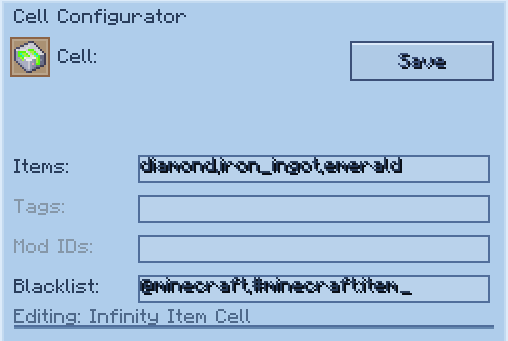
- Infinity Item Cell — bind specific items/fluids
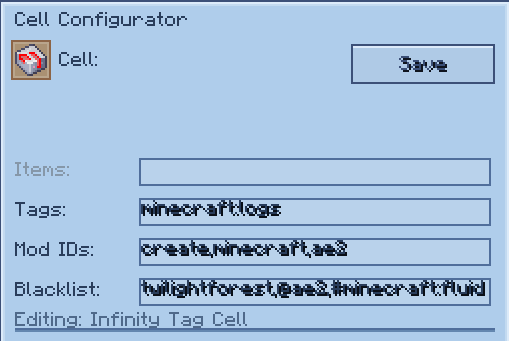
- Infinity Tag Cell — bind all items matching tags and/or from specified mods
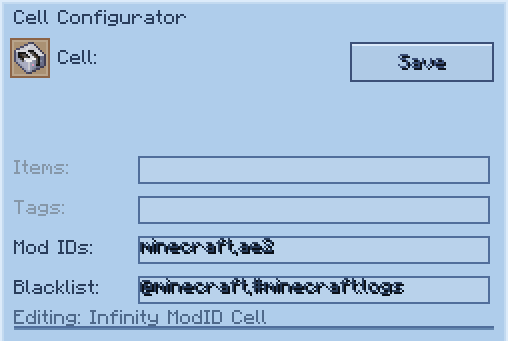
- Infinity ModID Cell — bind all items from a mod
Cell Configurator
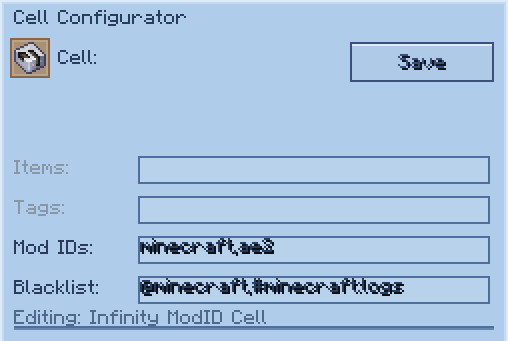
The Cell Configurator is an in-game tool for editing cell data visually. Right-click while holding it to open the configuration GUI, then place a cell into the slot.
- Editable fields change based on the cell type placed in the slot.
- Inactive fields are shown in gray and cannot be edited.
- Separate multiple values with commas (e.g.
minecraft:diamond,minecraft:oak_log). - In the blacklist field, prefix tags with
#(e.g.#minecraft:birch_logs) and mod IDs with@(e.g.@mekanism). - Press Tab to cycle between editable fields.
- Press Enter to save changes.
- Click Save to apply changes, Reset to revert, or Clear to erase all fields.
| Cell Type | Editable Fields |
|---|---|
| Item Cell | cell4item, cell4blacklist |
| Tag Cell | cell4tag, cell4modid, cell4blacklist |
| ModID Cell | cell4modid, cell4blacklist |
Preview
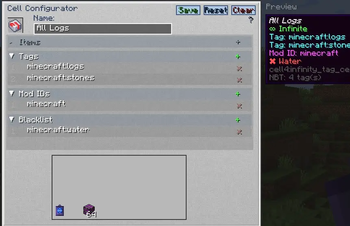
The right side of the GUI displays a Preview panel showing the cell's tooltip as it would appear in your inventory. If a custom name is set in the name field, the preview updates in real time with the new name shown in italic style.
Data Keys
| Key | Target | Example |
|---|---|---|
cell4item |
Specific items/fluids | "minecraft:diamond" |
cell4tag |
Tag | "minecraft:logs" |
cell4modid |
Mod ID (Tag Cell also supports this) | "mekanism" |
cell4blacklist |
Exclude items/tags/mods (optional) | See below |
cell4name |
Custom display name (optional) | "My Diamond Cell" |
1.20.1 stores these keys as raw NBT (
{...}). 1.21.1 & 26.1.2 store them inside data components ([custom_data={...}]).
Command Examples
1.21.1 & 26.1.2 use [custom_data={...}] syntax; 1.20.1 uses {...} syntax. Tag namespace: c: in 1.21.1/26.1.2, forge: in 1.20.1.
Single Value
# 1.21.1 / 26.1.2
/give @p cell4:infinity_item_cell[custom_data={cell4item:"minecraft:diamond"}]
/give @p cell4:infinity_tag_cell[custom_data={cell4tag:"minecraft:logs"}]
/give @p cell4:infinity_modid_cell[custom_data={cell4modid:"mekanism"}]

# 1.20.1
/give @p cell4:infinity_item_cell{cell4item:"minecraft:diamond"}
/give @p cell4:infinity_tag_cell{cell4tag:"minecraft:logs"}
/give @p cell4:infinity_modid_cell{cell4modid:"mekanism"}
Multiple Values
# 1.21.1 / 26.1.2
/give @p cell4:infinity_item_cell[custom_data={cell4item:["minecraft:diamond","minecraft:oak_log"]}]
/give @p cell4:infinity_tag_cell[custom_data={cell4tag:["minecraft:logs","c:ingots/iron"]}]
/give @p cell4:infinity_modid_cell[custom_data={cell4modid:["mekanism","thermal"]}]

# 1.20.1
/give @p cell4:infinity_item_cell{cell4item:["minecraft:diamond","minecraft:oak_log"]}
/give @p cell4:infinity_tag_cell{cell4tag:["minecraft:logs","forge:ingots/iron"]}
/give @p cell4:infinity_modid_cell{cell4modid:["mekanism","thermal"]}
Tag Cell with Mod ID Filter
The Infinity Tag Cell supports both cell4tag and cell4modid simultaneously:
# 1.21.1 / 26.1.2
/give @p cell4:infinity_tag_cell[custom_data={cell4tag:"minecraft:logs",cell4modid:"mekanism"}]
/give @p cell4:infinity_tag_cell[custom_data={cell4tag:["minecraft:logs","c:ingots/iron"],cell4modid:["mekanism","thermal"]}]

# 1.20.1
/give @p cell4:infinity_tag_cell{cell4tag:"minecraft:logs",cell4modid:"mekanism"}
/give @p cell4:infinity_tag_cell{cell4tag:["minecraft:logs","forge:ingots/iron"],cell4modid:["mekanism","thermal"]}
Blacklist
Blacklist entries support three types:
- Item — plain identifier (e.g.
minecraft:birch_log) - Tag — prefixed with
#(e.g.#minecraft:birch_logs) - Mod ID — prefixed with
@(e.g.@mekanism)
# 1.21.1 / 26.1.2
/give @p cell4:infinity_tag_cell[custom_data={cell4tag:"minecraft:logs",cell4blacklist:"minecraft:birch_log"}]
/give @p cell4:infinity_modid_cell[custom_data={cell4modid:"mekanism",cell4blacklist:["mekanism:steel_ingot","#c:ingots/steel","@thermal"]}]

# 1.20.1
/give @p cell4:infinity_tag_cell{cell4tag:"minecraft:logs",cell4blacklist:"minecraft:birch_log"}
/give @p cell4:infinity_modid_cell{cell4modid:"mekanism",cell4blacklist:["mekanism:steel_ingot","#forge:ingots/steel","@thermal"]}
Blacklisted items are shown in the cell tooltip with a ✖ marker.
Cell⁴
Infinite ME Storage Cells for Applied Energistics 2
Cell⁴ is an AE2 addon designed for modpack development. It adds three types of Infinity Cells that can be bound to specific items via NBT or data components, allowing infinite extraction from the ME network. Inserted matching items are silently discarded, consuming no actual storage.
Supported versions: 1.20.1 (Forge), 1.21.1 (NeoForge), 26.1.2 (NeoForge)
Infinity Cell Types
- Infinity Item Cell — bind specific items/fluids
- Infinity Tag Cell — bind all items matching tags and/or from specified mods
- Infinity ModID Cell — bind all items from a mod
Cell Configurator
The Cell Configurator is an in-game tool for editing cell data visually. Right-click while holding it to open the configuration GUI, then place a cell into the slot.
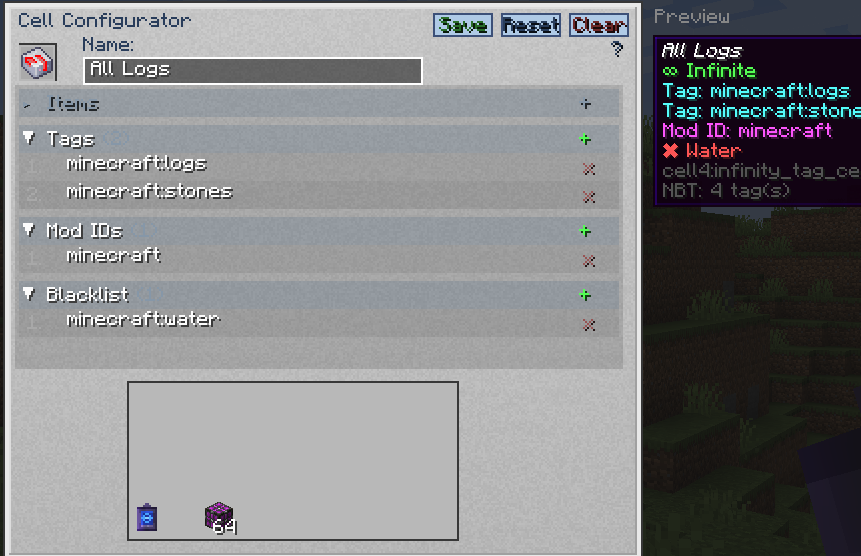
- Editable fields change based on the cell type placed in the slot.
- Inactive fields are shown in gray and cannot be edited.
- Separate multiple values with commas (e.g.
minecraft:diamond,minecraft:oak_log). - In the blacklist field, prefix tags with
#(e.g.#minecraft:birch_logs) and mod IDs with@(e.g.@mekanism). - Press Tab to cycle between editable fields.
- Press Enter to save changes.
- Click Save to apply changes, Reset to revert, or Clear to erase all fields.
| Cell Type | Editable Fields |
|---|---|
| Item Cell | cell4item, cell4blacklist |
| Tag Cell | cell4tag, cell4modid, cell4blacklist |
| ModID Cell | cell4modid, cell4blacklist |
Preview
The right side of the GUI displays a Preview panel showing the cell's tooltip as it would appear in your inventory. If a custom name is set in the name field, the preview updates in real time with the new name shown in italic style.
Data Keys
| Key | Target | Example |
|---|---|---|
cell4item |
Specific items/fluids | "minecraft:diamond" |
cell4tag |
Tag | "minecraft:logs" |
cell4modid |
Mod ID (Tag Cell also supports this) | "mekanism" |
cell4blacklist |
Exclude items/tags/mods (optional) | See below |
cell4name |
Custom display name (optional) | "My Diamond Cell" |
1.20.1 stores these keys as raw NBT (
{...}). 1.21.1 & 26.1.2 store them inside data components ([custom_data={...}]).
Command Examples
1.21.1 & 26.1.2 use [custom_data={...}] syntax; 1.20.1 uses {...} syntax. Tag namespace: c: in 1.21.1/26.1.2, forge: in 1.20.1.
Single Value
# 1.21.1 / 26.1.2
/give @p cell4:infinity_item_cell[custom_data={cell4item:"minecraft:diamond"}]
/give @p cell4:infinity_tag_cell[custom_data={cell4tag:"minecraft:logs"}]
/give @p cell4:infinity_modid_cell[custom_data={cell4modid:"mekanism"}]

# 1.20.1
/give @p cell4:infinity_item_cell{cell4item:"minecraft:diamond"}
/give @p cell4:infinity_tag_cell{cell4tag:"minecraft:logs"}
/give @p cell4:infinity_modid_cell{cell4modid:"mekanism"}
Multiple Values
# 1.21.1 / 26.1.2
/give @p cell4:infinity_item_cell[custom_data={cell4item:["minecraft:diamond","minecraft:oak_log"]}]
/give @p cell4:infinity_tag_cell[custom_data={cell4tag:["minecraft:logs","c:ingots/iron"]}]
/give @p cell4:infinity_modid_cell[custom_data={cell4modid:["mekanism","thermal"]}]

# 1.20.1
/give @p cell4:infinity_item_cell{cell4item:["minecraft:diamond","minecraft:oak_log"]}
/give @p cell4:infinity_tag_cell{cell4tag:["minecraft:logs","forge:ingots/iron"]}
/give @p cell4:infinity_modid_cell{cell4modid:["mekanism","thermal"]}
Tag Cell with Mod ID Filter
The Infinity Tag Cell supports both cell4tag and cell4modid simultaneously:
# 1.21.1 / 26.1.2
/give @p cell4:infinity_tag_cell[custom_data={cell4tag:"minecraft:logs",cell4modid:"mekanism"}]
/give @p cell4:infinity_tag_cell[custom_data={cell4tag:["minecraft:logs","c:ingots/iron"],cell4modid:["mekanism","thermal"]}]

# 1.20.1
/give @p cell4:infinity_tag_cell{cell4tag:"minecraft:logs",cell4modid:"mekanism"}
/give @p cell4:infinity_tag_cell{cell4tag:["minecraft:logs","forge:ingots/iron"],cell4modid:["mekanism","thermal"]}
Blacklist
Blacklist entries support three types:
- Item — plain identifier (e.g.
minecraft:birch_log) - Tag — prefixed with
#(e.g.#minecraft:birch_logs) - Mod ID — prefixed with
@(e.g.@mekanism)
# 1.21.1 / 26.1.2
/give @p cell4:infinity_tag_cell[custom_data={cell4tag:"minecraft:logs",cell4blacklist:"minecraft:birch_log"}]
/give @p cell4:infinity_modid_cell[custom_data={cell4modid:"mekanism",cell4blacklist:["mekanism:steel_ingot","#c:ingots/steel","@thermal"]}]

# 1.20.1
/give @p cell4:infinity_tag_cell{cell4tag:"minecraft:logs",cell4blacklist:"minecraft:birch_log"}
/give @p cell4:infinity_modid_cell{cell4modid:"mekanism",cell4blacklist:["mekanism:steel_ingot","#forge:ingots/steel","@thermal"]}
Blacklisted items are shown in the cell tooltip with a ✖ marker.
Screenshots
Gallery
-
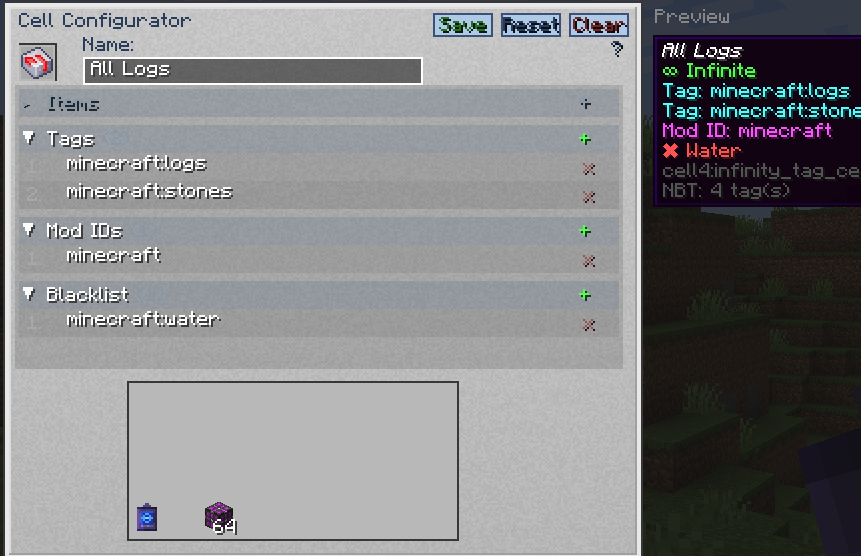 593549846-2bb4407f-0538-4f53-848b-cac729f8e4cd.png v1.0.3+ Cell Example(tagCell)
 -
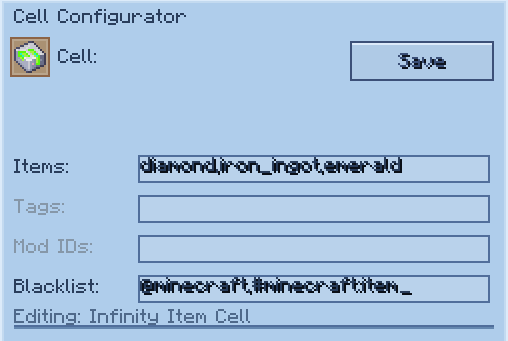 1eff39df2caf0f8e1717c95d67d37d7cac196deb.png v1.0.2 ItemCell
 -
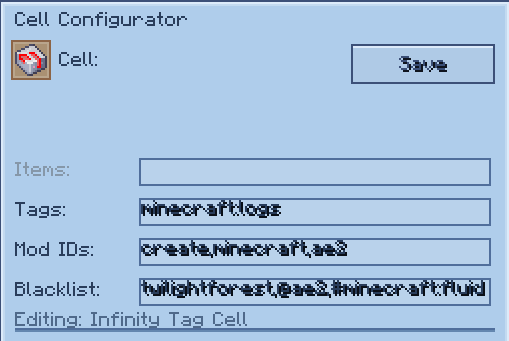 27d05006c99403603786d211c6ee138aee09466a.png v1.0.2 TagCell
 -
 e7a7dc620b122c1de22e7d4dd17579cea5540c26.png v1.0.2 ModCell
-
 1.0.2
1.0.2 -
 1.0.2
1.0.2 -
 1.0.3+
 -
 1.0.2
1.0.2
Versions
Files
Relations
Project Relations
More like this
Similar Mods
Suggestions use data such as tags, dependencies, dependents, descriptions, titles, and more to rank how much they overlap with this mod.
On ModDex
Community snapshot
By the numbers
Statistics
Want to reach Minecraft players?
We're looking for a server hosting partner to feature here and other parts of the site. Interested? Send us a message!
Get in touchGet it on
Available Platforms
On ModDex
Community snapshot
By the numbers