Community listing page, reviews here may not be monitored by the author.
Cerv Dark Theme


No reviews yet
Makes the red Mojang loading screen dark - with fully customisable colors, bar, logo tint, and fade durations.
Community voices
Reviews
No reviews yet. Be the first to review this project!
Get it on
Available Platforms
Compatibility
Supported Environments
Runs entirely on the client. Works on vanilla servers.
About
Project Details
For authors
Embed Badge
If you're the author of this project, you can embed a live badge anywhere that supports HTML or Markdown. It updates automatically whenever ratings change.
Use HTML for any page that supports it, or Markdown for README files and Markdown-based descriptions.
Identifiers
Platform IDs
About
Description
CervDarkTheme
Dark mode for the Minecraft loading screen — fully customizable colors, client-side only.
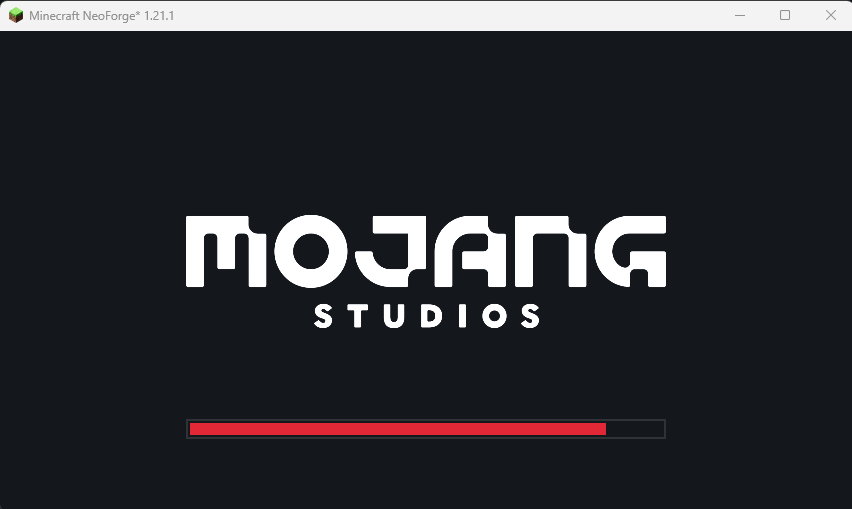
Tired of the bright red Mojang loading screen burning your eyes every launch? CervDarkTheme turns it dark by default and lets you restyle every part of it — background, progress bar, and even the Mojang logo tint — to match your setup.
✅ Client-side only — safe on any server, no server install needed
✅ Works out of the box — dark theme applied instantly, no config required
✅ In-game color picker — no file editing needed
✨ Features
- 🌑 Dark by default — deep dark background (
#14181C) instead of vanilla red (#EF323D) - 🎨 Full color customization with an in-game color picker:
- Background
- Progress bar fill
- Bar background (unfilled part)
- Bar border
- Mojang Studios logo tint
- ⏱️ Adjustable fade-in / fade-out durations — make the loading screen snappier
- 🪟 NeoForge early loading window handled automatically — no manual
fml.tomlediting
🚀 Quick Start
- Install the mod (requires Fzzy Config)
- Launch the game — the loading screen is dark right away
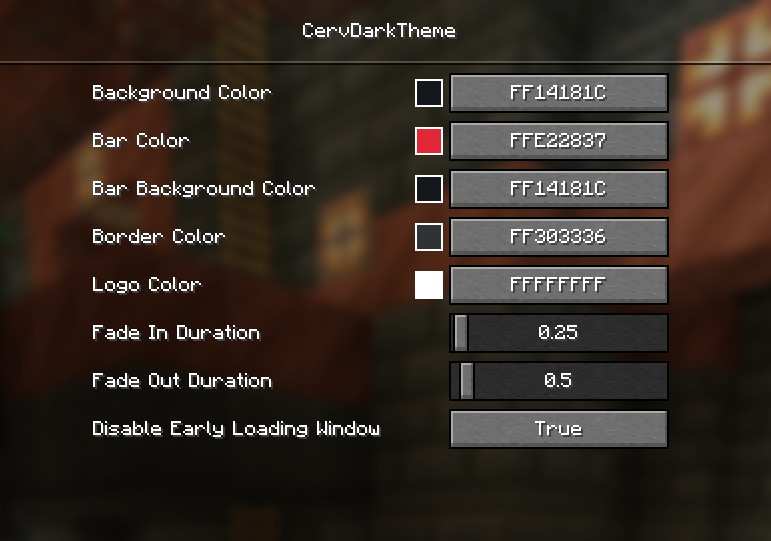
- Want different colors? Open Mods → CervDarkTheme → Config and pick your own
⚙️ Configuration
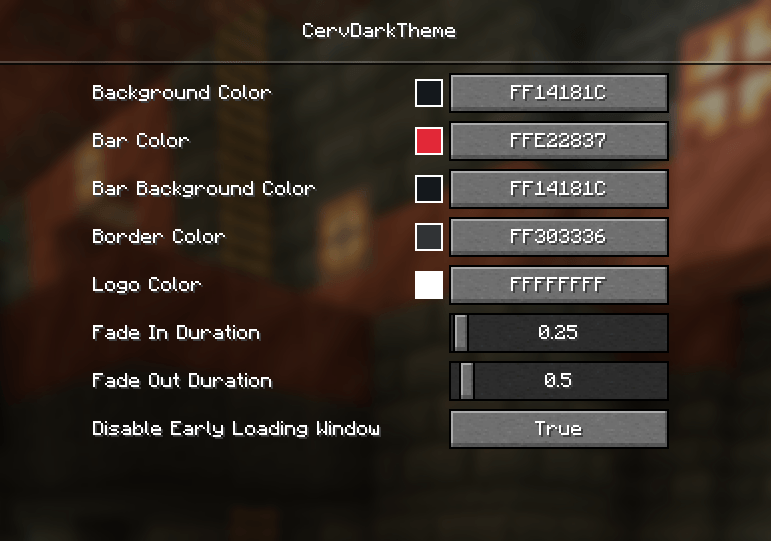
Use the in-game config GUI (Mods → CervDarkTheme → Config, powered by Fzzy Config), or edit config/cervdarktheme/config.toml directly.
| Setting | Default |
|---|---|
| Background Color | #14181C |
| Bar Color | #E22837 |
| Bar Background Color | #14181C |
| Border Color | #303336 |
| Logo Color | #FFFFFF |
| Fade In Duration | 0.25s |
| Fade Out Duration | 0.5s |
❓ FAQ
Why is the early loading window still red on first launch?
NeoForge shows its own red-themed early loading window. CervDarkTheme automatically sets earlyWindowControl = false in config/fml.toml for you — but the loader reads that file before mods load, so the change applies from the second launch onward. You can opt out via the "Disable Early Loading Window" config option.
Do I need to install anything on the server?
No. CervDarkTheme is 100% client-side — join any server freely.
Are there any dependencies?
Yes, Fzzy Config is required for the config GUI.
CervDarkTheme
Tired of the bright red Mojang loading screen burning your eyes every launch? CervDarkTheme turns it dark - and lets you restyle every part of it to match your setup.
✨ Features
- 🌑 Dark by default - deep dark background (
#14181C) instead of vanilla red (#EF323D) - 🎨 Full color customisation with an in-game color picker:
- Background
- Progress bar fill
- Bar background (unfilled part)
- Bar border
- Mojang Studios logo tint
- ⏱️ Adjustable fade-in / fade-out durations - make the loading screen snappier
- 🖥️ Client-side only - safe to use on any server, no server install needed
⚙️ Configuration
Open the config GUI in-game via Mods → CervDarkTheme → Config (powered by
Fzzy Config), or edit
config/cervdarktheme/config.toml directly.
| Setting | Default |
|---|---|
| Background Color | #14181C |
| Bar Color | #E22837 |
| Bar Background Color | #14181C |
| Border Color | #303336 |
| Logo Color | #FFFFFF |
| Fade In Duration | 0.25s |
| Fade Out Duration | 0.5s |
Early loading window handled automatically
NeoForge normally shows its own red-themed early loading window. CervDarkTheme
automatically sets earlyWindowControl = false in config/fml.toml for you -
no manual editing needed. The change applies from the second launch onward
(the loader reads that file before mods load). You can opt out via the
"Disable Early Loading Window" config option.
Screenshots
Gallery
-
 Screenshot 2026-07-22 225344.png Screenshot 2026-07-22 225344.png
 -
 Screenshot 2026-07-22 225256.png Screenshot 2026-07-22 225256.png
Versions
Files
Relations
Project Relations
More like this
Similar Mods
Suggestions use data such as tags, dependencies, dependents, descriptions, titles, and more to rank how much they overlap with this mod.
On ModDex
Community snapshot
By the numbers
Statistics
Want to reach Minecraft players?
We're looking for a server hosting partner to feature here and other parts of the site. Interested? Send us a message!
Get in touchGet it on
Available Platforms
On ModDex
Community snapshot
By the numbers