
Community listing page, reviews here may not be monitored by the author.
Changed Cosmetic Patch

No reviews yet
A small client side configurable appearance for Changed mod. Formerly known as "Changed AP bean fix".
Community voices
Reviews
No reviews yet. Be the first to review this project!
Get it on
Available Platforms
Compatibility
Supported Environments
Runs entirely on the client. Works on vanilla servers.
About
Project Details
For authors
Embed Badge
If you're the author of this project, you can embed a live badge anywhere that supports HTML or Markdown. It updates automatically whenever ratings change.
Use HTML for any page that supports it, or Markdown for README files and Markdown-based descriptions.
Identifiers
Platform IDs
Resources
External Links
About
Description
About this mod
This is a simple client side cosmetic fix for the Changed mod. It automatically apply the default patches to the base mod as well as other addons if supported and installed. Version 1.0.0 and 1.0.1 is only fixes for Changed Addon Plus, but I change my mind and try to make this mod apply changes to the base as well.
Environment
This is a client side ONLY mod! Will CRASH dedicated server if installed.
Requirements
Required mod Changed
Configuration
In the config directory, there should be a config file named "changed_cosmetic_patch-client.toml". You can keep the default settings or edit them yourself by using your prefered external text editor.
Paw Beans
For the right and left arms, the config format is "Offset X, Offset Y, Offset Z, Rotation X, Rotation Y, Rotation Z".
Example: "-0.9,-0.5,-1.0,0.0,90.0,0.0".
For an ignored entity, the config format is "form_id", "another_form_id".
Example: "changed_addon:form_experiment009", "changed_addon:form_experiment_10".
Another use of this is to disable some of the form that my mod cannot fixed right away.
Emissive Texture
Apply glowing to some spefific textures or models
glow_roomba_eyestrue(boolean): Enable glows to Changed's Roomba eyes, make it stand out in the dark and glowing if using Shader.always_glowfalse(boolean): By default, my mod will turn off glows if the Roomba's charge level reached 0.0. You can turn off this behaviour by turn to true to making it always glows.roomba_charger_glowtrue(boolean): Make the Roomba Charger light up a bit when chargining. Light level 7, and client side, should not affect spawning.
Note
This is my first ever mod that publish, something will be wrong and I will try to fix it. Sorry if Im also bad at English and make confusion. Thanks for understanding.
Screenshots
Gallery
-
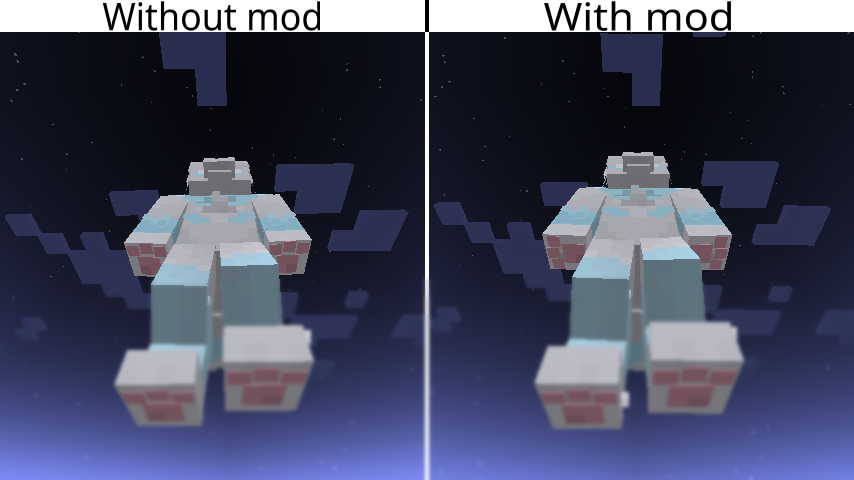 Examples of the paw beans changes. Image on the left side show the unmodified bean parts for the arms and are now facing toward the camera. While on the right side, the mod modify the bean parts for the arms are now facing way from the body.
Versions
Files
Relations
Project Relations
More like this
Similar Mods
Suggestions use data such as tags, dependencies, dependents, descriptions, titles, and more to rank how much they overlap with this mod.
On ModDex
Community snapshot
By the numbers
Statistics

Want to reach Minecraft players?
We're looking for a server hosting partner to feature here and other parts of the site. Interested? Send us a message!
Get in touchGet it on
Available Platforms
On ModDex
Community snapshot
By the numbers
Statistics
Resources