
Community listing page, reviews here may not be monitored by the author.
Chat Bubbles

No reviews yet
A vanilla-friendly chat bubbles mod with great performance for Fabric
Community voices
Reviews
No reviews yet. Be the first to review this project!
Get it on
Available Platforms
Compatibility
Supported Environments
Runs entirely on the client. Works on vanilla servers.
About
Project Details
For authors
Embed Badge
If you're the author of this project, you can embed a live badge anywhere that supports HTML or Markdown. It updates automatically whenever ratings change.
Use HTML for any page that supports it, or Markdown for README files and Markdown-based descriptions.
Identifiers
Platform IDs
About
Description
Chat Bubbles
A simple, vanilla-style client-side mod that displays chat messages as floating text bubbles above players' heads.
Features
- Vanilla-looking design - Clean floating text that matches Minecraft's aesthetic
- Smooth animations - Bubbles fade in, gently float upward, and fade out
- Fully client-side - No server-side requirements
- Highly customizable - Easy-to-use config screen via Mod Menu
- Lightweight - Minimal performance impact
Requirements
- Fabric API (required)
- Cloth Config (required for configuration)
- Mod Menu (required for in-game config screen)
Configuration
Access the config screen through Mod Menu (Mods → Chat Bubbles → Config button) or edit config/chat-bubbles.json directly.
Available Options
Appearance:
- Show Player Name (default: false) - Include player name with the message
- Text Color (default: white) - Color picker for text
- Text Scale (default: 0.025) - Size of the text
- Background Color (default: black) - Color picker for background
- Background Transparency (default: 85%) - How transparent the background is
Animation:
- Bubble Height (default: 0.75 blocks) - Starting height above player's head
- Upward Speed (default: 0.1 blocks/sec) - How fast bubbles float upward
- Display Duration (default: 3000ms) - How long bubbles stay visible
- Fade In Duration (default: 200ms) - Fade-in animation speed
- Fade Out Duration (default: 1000ms) - Fade-out animation speed
Performance:
- Max Distance (default: 64 blocks) - Maximum render distance for bubbles
Usage
Simply install the mod and chat bubbles will appear automatically when players send chat messages. The default settings are designed to be subtle and vanilla-friendly, with a mostly-transparent background and slow upward drift.
Screenshots
Gallery
-
 Default chat bubbles
 -
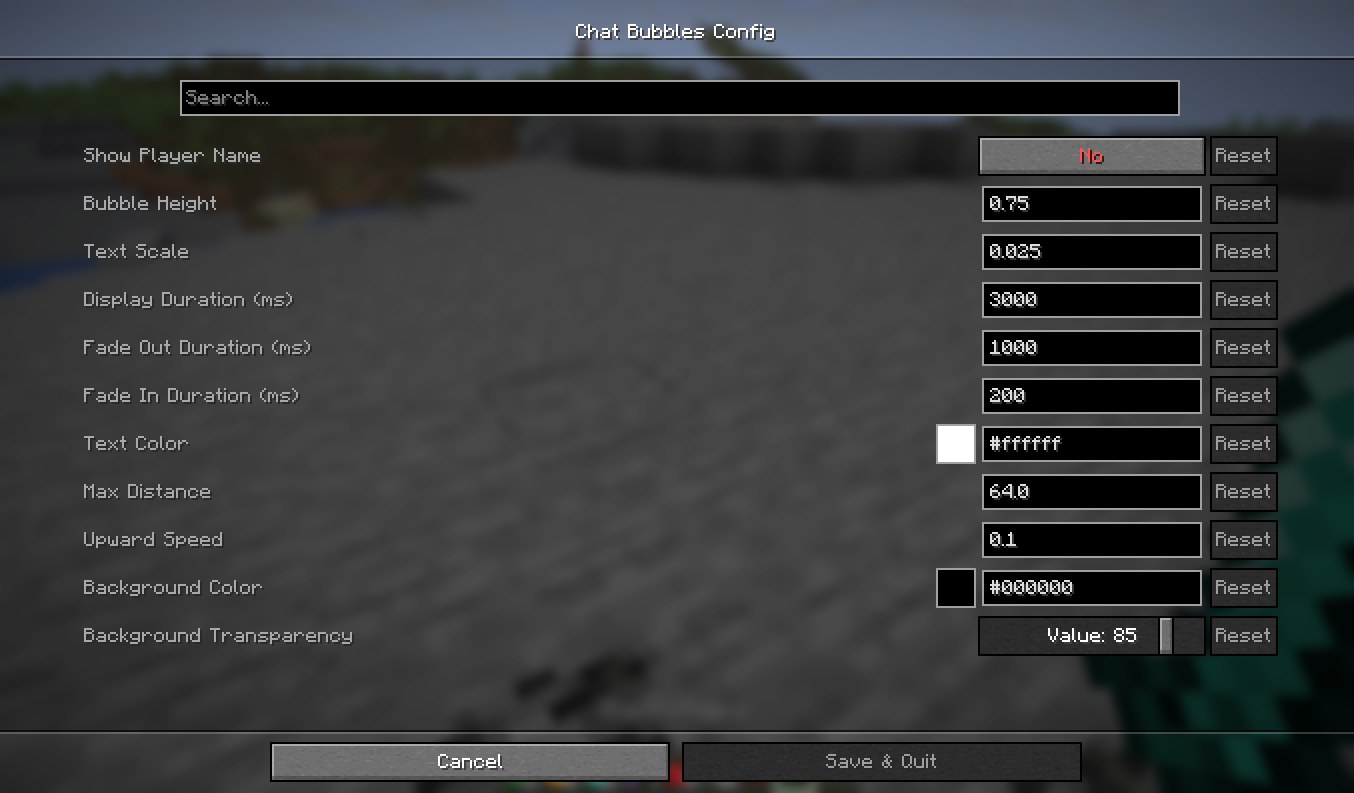 Settings page
Versions
Files
Relations
Project Relations
More like this
Similar Mods
Suggestions use data such as tags, dependencies, dependents, descriptions, titles, and more to rank how much they overlap with this mod.
On ModDex
Community snapshot
By the numbers
Statistics

Want to reach Minecraft players?
We're looking for a server hosting partner to feature here and other parts of the site. Interested? Send us a message!
Get in touchGet it on
Available Platforms
On ModDex
Community snapshot
By the numbers