Community listing page, reviews here may not be monitored by the author.
Chat Colors


No reviews yet
Allows the use of colours/formatting in chat, item names, and everywhere else that allows you to type.
Community voices
Reviews
No reviews yet. Be the first to review this project!
Get it on
Available Platforms
Compatibility
Supported Environments
Must be installed on both the client and the server.
About
Project Details
For authors
Embed Badge
If you're the author of this project, you can embed a live badge anywhere that supports HTML or Markdown. It updates automatically whenever ratings change.
Use HTML for any page that supports it, or Markdown for README files and Markdown-based descriptions.
Identifiers
Platform IDs
About
Description
Chat Colours
Overhauls the game's 13 year old text formatting syntax.
Markdown-like syntax
This mod allows you to use markdown-like syntax to format your text in minecraft:
*italic text* -> italic text
**bold text** -> bold text
***bold + italic*** -> bold + italic
__underline__ -> underline
~~strikethrough~~ -> strikethrough
this **is** bold -> this is bold
this __*is* multiple things__ -> this is multiple things
The terminating set of symbols is optional, e.g. **hello will still be bold.
If you put a star at the start of the name of an item in an anvil, it will cancel out the italic
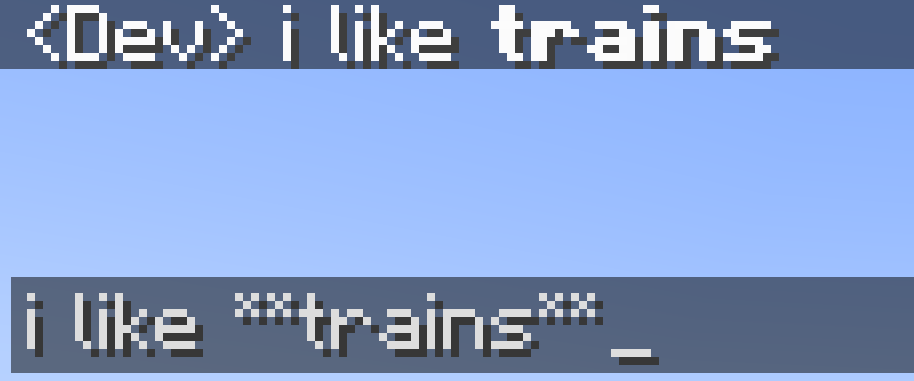
Hex codes/custom colours
This mod allows you to colour your text with custom colours:
[#ff0000]red text-> red text
[#ff00FF]pink text-> pink text**[#00ff00]bold green text**or[#00ff00]**bold green text**-> bold green text
The codes are case-insensitive.
Extended format syntax
This feature has been replaced by new syntax, but still works.
The mod allows you to use named colours instead of the normal single letters.
The names are white, black, blue, green, aqua (or cyan), red, purple, gray and yellow.
The names are case-insensitive.
To use the dark version of the colour (except white and black), put "d", "dark" or "deep" before or after the name. You can optionaly use a space or underscore between the name and the prefix/suffix. For example, §[dark_blue], §[deepblue], §[blue d], §[dblue] all make dark blue text
§[gold], the name MCWiki gives the colour, can also be used for dark yellow.
Bold, underline, italics, etc
You can also use:
§[s]for strikeout text,§[b]for bold text,§[o]for obfuscated text,§[u]for underlined text,- and
§[r]for §r (reset)
Multiple style options
Format options can be chained without needing multiple §s. For example, §[red][u][i]text will show red, bold, underlined text. You need to put the colour before the bold and underline. This is because the colour code resets the style to be coloured, but not italic, bold, etc. This is a minecraft thing, and also applies to vanilla formatting codes.
Use on servers
If you want to use this mod on a server, this mod will have to be installed on it, or the server must otherwise allow you to send '§' in chat, or the server will automatically kick you when you use formatting.
Chat Colours
Overhauls the game's 14 year old text formatting syntax.
Markdown-like syntax
This mod allows you to use markdown-like syntax to format your text in minecraft:
*italic text* -> italic text
**bold text** -> bold text
***bold + italic*** -> bold + italic
__underline__ -> underline
~~strikethrough~~ -> strikethrough
this **is** bold -> this is bold
this __*is* multiple things__ -> this is multiple things
The terminating set of symbols is optional, e.g. **hello will still be
bold.
If you put a star at the start of the name of an item in an anvil, it will cancel out the italic
Hex codes/custom colours
This mod allows you to colour your text with custom colours:
[#ff0000]red text -> red text
 [#ff00FF]pink text -> pink text
**[#00ff00]bold green text** or [#00ff00]**bold green text**-> bold green text
The codes are case-insensitive.
Extended format syntax
This feature has been replaced by new syntax, but still works.
The mod allows you to use named colours instead of the normal single letters.
The names are white, black, blue, green, aqua (or cyan), red, purple, gray and yellow.
The names are case-insensitive.
To use the dark version of the colour (except white and black), put "d",
"dark" or "deep" before or after the name. You can optionaly use a space
or underscore between the name and the prefix/suffix. For example,
§[dark_blue], §[deepblue], §[blue d], §[dblue] all make dark
blue text
§[gold], the name MCWiki gives the colour, can also be used for dark
yellow.
Bold, underline, italics, etc
You can also use:
§[s]for strikeout text,§[b]for bold text,§[o]for obfuscated text,§[u]for underlined text,- and
§[r]for §r (reset)
Multiple style options
Format options can be chained without needing multiple §s. For
example, §[red][u][i]text will show red, bold, underlined text. You
need to put the colour before the bold and underline. This is because
the colour code resets the style to be coloured, but not italic, bold,
etc. This is a minecraft thing, and also applies to vanilla formatting
codes.
Use on servers
If you want to use this mod on a server, this mod will have to be installed on it, or the server must otherwise allow you to send '§' in chat, or the server will automatically kick you when you use formatting.
Screenshots
Gallery
-
Example
Versions
Files
Relations
Project Relations
More like this
Similar Mods
Suggestions use data such as tags, dependencies, dependents, descriptions, titles, and more to rank how much they overlap with this mod.
On ModDex
Community snapshot
By the numbers
Statistics
Want to reach Minecraft players?
We're looking for a server hosting partner to feature here and other parts of the site. Interested? Send us a message!
Get in touchGet it on
Available Platforms
On ModDex
Community snapshot
By the numbers