Chat Filtering

No reviews yet
Prevents players from using blacklisted words.
Neoforge is a fork of the Minecraft Forge available for versions 1.20.1+ of Minecraft. Many Forge mods are compatible with Neoforge and vice versa.
Community voices
Reviews
Click once to include, again to exclude, again to clear
No reviews yet. Be the first to review this project!
Get it on
Available Platforms
 Modrinth
Compatibility
Supported Environments
Must be installed on both the client and the server.
About
Project Details
For authors
Embed Badge
If you're the author of this project, you can embed a live badge anywhere that supports HTML or Markdown. It updates automatically whenever ratings change.
Use HTML for any page that supports it, or Markdown for README files and Markdown-based descriptions.
Identifiers
Platform IDs
Resources
External Links
About
Description
Chat Filtering
Chat Filtering is a Minecraft mod that allows server owners to prevent players from using inappropriate or unwanted words or sentences.
Configuration
After installation, a config file will have generated at config/Chat Filter/chat-filter.toml. There you will find all the configuration there is available.
How it works
The mod has 3 different filters:
- Messages sent in chat
- Commands executed (
/say,/me,/tell,/msg) - Items renamed in an anvil
In first two cases, upon detecting a blacklisted word, the message in chat will not be sent or the command will not be executed, and the player will be notified. In the last case, the item's name will also be renamed to Inappropiate Name.
If in the config player punishment is enabled the player will receive a warning, and upon surpassing the customizable maximum amount of warnings, the player is punished according to one of the 3 available ways you can choose from in the config:
- The player is temporarily muted for a configurable amount of time
- The player is kicked
- The player is banned
The filter detects if the player is trying to camouflage the bad word, like adding spaces or punctuation in between and will still detect it, but it does not detect letter replacement, for example by numbers like in this example: h3llo instead of hello. Who configures the config must blacklist these mutated words as well.

Chat Filtering


Chat Filtering is a Minecraft mod that allows server owners to prevent players from using inappropriate or unwanted words or sentences.
Configuration
After installation, a config file will have generated at config/Chat Filter/chat-filter.toml. There you will find all the configuration there is available.
How it works
The mod has 3 different filters:
- Messages sent in chat
- Commands executed (
/say,/me,/tell,/msg) - Items renamed in an anvil
In first two cases, upon detecting a blacklisted word, the message in chat will not be sent or the command will not be executed, and the player will be notified. In the last case, the item's name will also be renamed to Inappropiate Name.
If in the config player punishment is enabled the player will receive a warning, and upon surpassing the customizable maximum amount of warnings, the player is punished according to one of the 3 available ways you can choose from in the config:
- The player is temporarily muted for a configurable amount of time
- The player is kicked
- The player is banned
The filter detects if the player is trying to camouflage the bad word, like adding spaces or punctuation in between and will still detect it, but it does not detect letter replacement, for example by numbers like in this example: h3llo instead of hello. Who configures the config must blacklist these mutated words as well.
Screenshots
Gallery
-
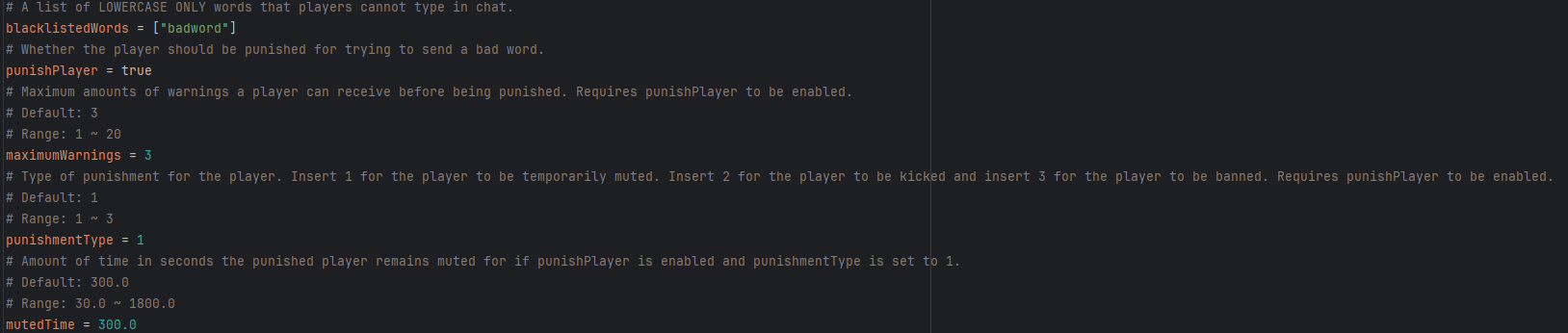 Example Configuration Example of how the mod config can be customized.
Versions
Files
Relations
Project Relations
More like this
Similar Mods
Suggestions use data such as tags, dependencies, dependents, descriptions, titles, and more to rank how much they overlap with this mod.
On ModDex
Community snapshot
By the numbers
Statistics
Want to reach Minecraft players?
We're looking for a server hosting partner to feature here and other parts of the site. Interested? Send us a message!
Get in touchGet it on
Available Platforms
Modrinth
On ModDex
Community snapshot
By the numbers
Statistics
Resources