Community listing page, reviews here may not be monitored by the author.
Chat Reworked


No reviews yet
Enhances Minecraft's chat with modern features inspired by messaging apps.

Community voices
Reviews
No reviews yet. Be the first to review this project!
Get it on
Available Platforms
Compatibility
Supported Environments
Must be installed on both the client and the server.
About
Project Details
For authors
Embed Badge
If you're the author of this project, you can embed a live badge anywhere that supports HTML or Markdown. It updates automatically whenever ratings change.
Use HTML for any page that supports it, or Markdown for README files and Markdown-based descriptions.
Identifiers
Platform IDs
Resources
External Links
About
Description
Chat Reworked overhauls Minecraft's basic chat system, bringing it closer to modern messaging platforms. It adds multiple new features including:
- A context menu for message manipulation featuring
- Replying
- Editing
- Deletion
- +Some others
- Basic Markdown
- Viewable Image Attachments
- A new emoji system with a dedicated picker
- Configurable player message format
- @ mentioning
- Clickable links in chat
- MORE!
However, despite all of the new additions the mod still aims to stay true to Minecraft's simple nature - with a lot of the features being configurable.
Dependencies
This mod requires Balm!
How to
Open the context menu on a message
Right click the message in chat and a menu will come up beside where you clicked.
Add images
Just drag and drop a png/jpeg file onto the Minecraft window when the chat typing screen is open.
Apply Markdown
*text* - Italics
**text** - Bold
***text*** - Italics and bold
_ _text_ _ (but without the spaces) - Underline
CurseForge replaces it with HTML code if I remove the spaces :(
~~text~~ - Strikethrough
||text|| - Spoiler
Browse and select emojis
Open the small emoji icon at the end of the chat screen typing area (or press CTRL+E) and then search for emojis at the top and select one by clicking it. You can also use emoji shortcodes to quickly add any supported emoji by typing :name_of_the_emoji:.
Configuration
The Chat Reworked config system uses JSON5 files that can be found in <minecraft instance>/config/chatreworked-common.json5 / chatreworked-client.json5.
You can also edit the configs in-game, but you must install Cloth Config API!
Many aspects of the mod can be changed through the config files. If you are hosting a large server with this mod it is recommended that you adjust the image configuration in the common config file to limit server RAM used on player image storage.
Compatibility
This mod currently has explicitly added compatibility to work with:
- Chat Heads
- Raised
- Mod Menu
- Catalogue (the config button)
- Simple Discord Link
- Localized Chat and Proximity Chat
- Chat Impressive Animation and Chat Animation [Smooth Chat]
- Voice Messages
- LuckPerms
However it might not work with some other mods that modify chat's rendering.
The mod should be installed on both the client and the server.
I have only published this mod on Modrinth and CurseForge, so if you find it on another source then I'd recommend that you do not download it there!!!
You can report any problems you encounter with the mod in my Discord server's #chat-reworked-support channel. You can join here.
Chat Reworked overhauls Minecraft's basic chat system, bringing it closer to modern messaging platforms.
It adds multiple new features including:
- A context menu for message manipulation featuring
- Replying
- Editing
- Deletion
- +Some others
- Basic Markdown
- Viewable Image Attachments
- A new emoji system with a dedicated picker
- Configurable player message format
- @ mentioning
- Clickable links in chat
- MORE!
However, despite all of the new additions the mod still aims to stay true to Minecraft's simple nature - with a lot of the features being configurable.
Dependencies
This mod requires Balm!
How to
Open the context menu on a message
Right click the message in chat and a menu will come up beside where you clicked.
Add images
Just drag and drop a PNG/JPEG file onto the Minecraft window when the chat typing screen is open.
Apply Markdown
*text* - Italics
**text** - Bold
***text*** - Italics and bold
__text__ - Underline
~~text~~ - Strikethrough
text
- Spoiler
Browse and select emojis
Open the small emoji icon at the end of the chat screen typing area (or press CTRL+E) and then search for emojis at the top and select one by clicking it. You can also use emoji shortcodes to quickly add any supported emoji by typing :name_of_the_emoji:.
Configuration
The Chat Reworked config system uses JSON5 files that can be found in <minecraft instance>/config/chatreworked-common.json5 / chatreworked-client.json5.
You can also edit the configs in-game, but you must install Cloth Config API!
Many aspects of the mod can be changed through the config files. If you are hosting a large server with this mod it is recommended that you adjust the image configuration in the common config file to limit server RAM used on player image storage.
Compatibility
This mod currently has explicitly added compatibility to work with:
- Chat Heads
- Raised
- Mod Menu
- Catalogue (the config button)
- Simple Discord Link
- Localized Chat and Proximity Chat
- Chat Impressive Animation and Chat Animation [Smooth Chat]
- Voice Messages
- LuckPerms
However it might not work with some other mods that modify chat's rendering.
The mod should be installed on both the client and the server.
I have only published this mod on Modrinth and CurseForge, so if you find it on another source then I'd recommend that you do not download it there!!!
You can report any problems you encounter with the mod in my Discord server's #chat-reworked-support channel. You can join here.
Screenshots
Gallery
-
 Example of some features of the mod
 -
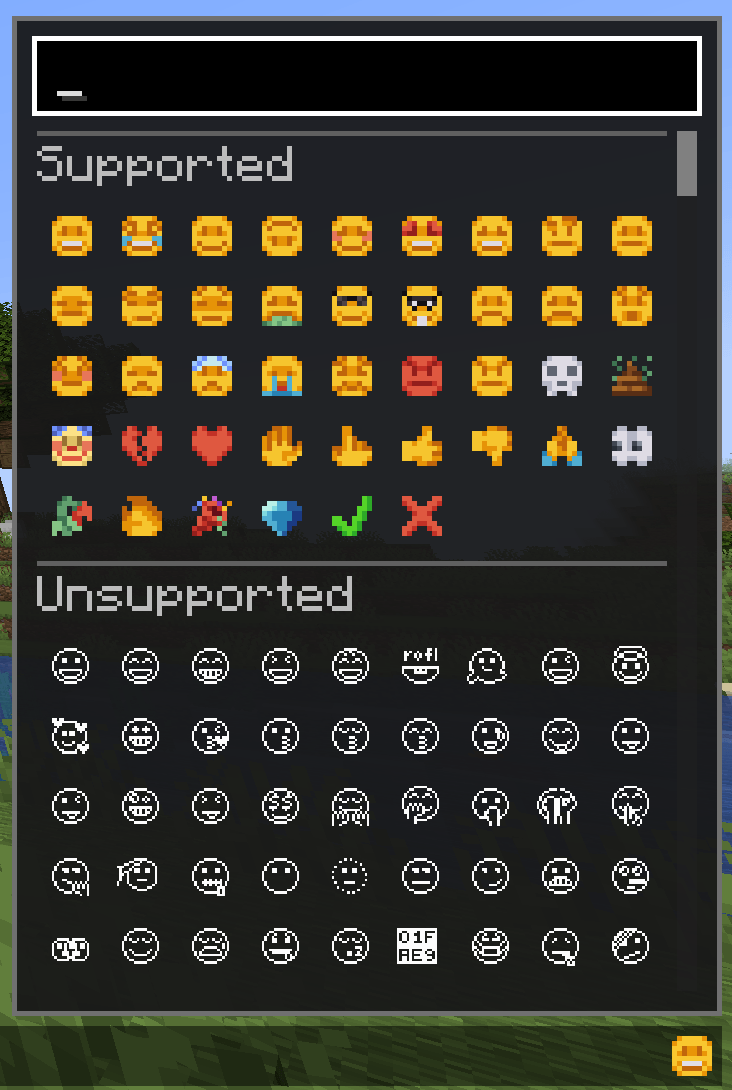 Emoji Picker
 -
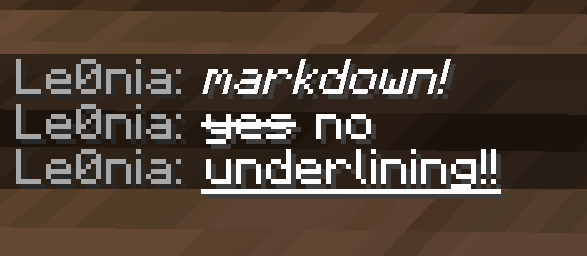 Some of the Markdown you can apply
 -
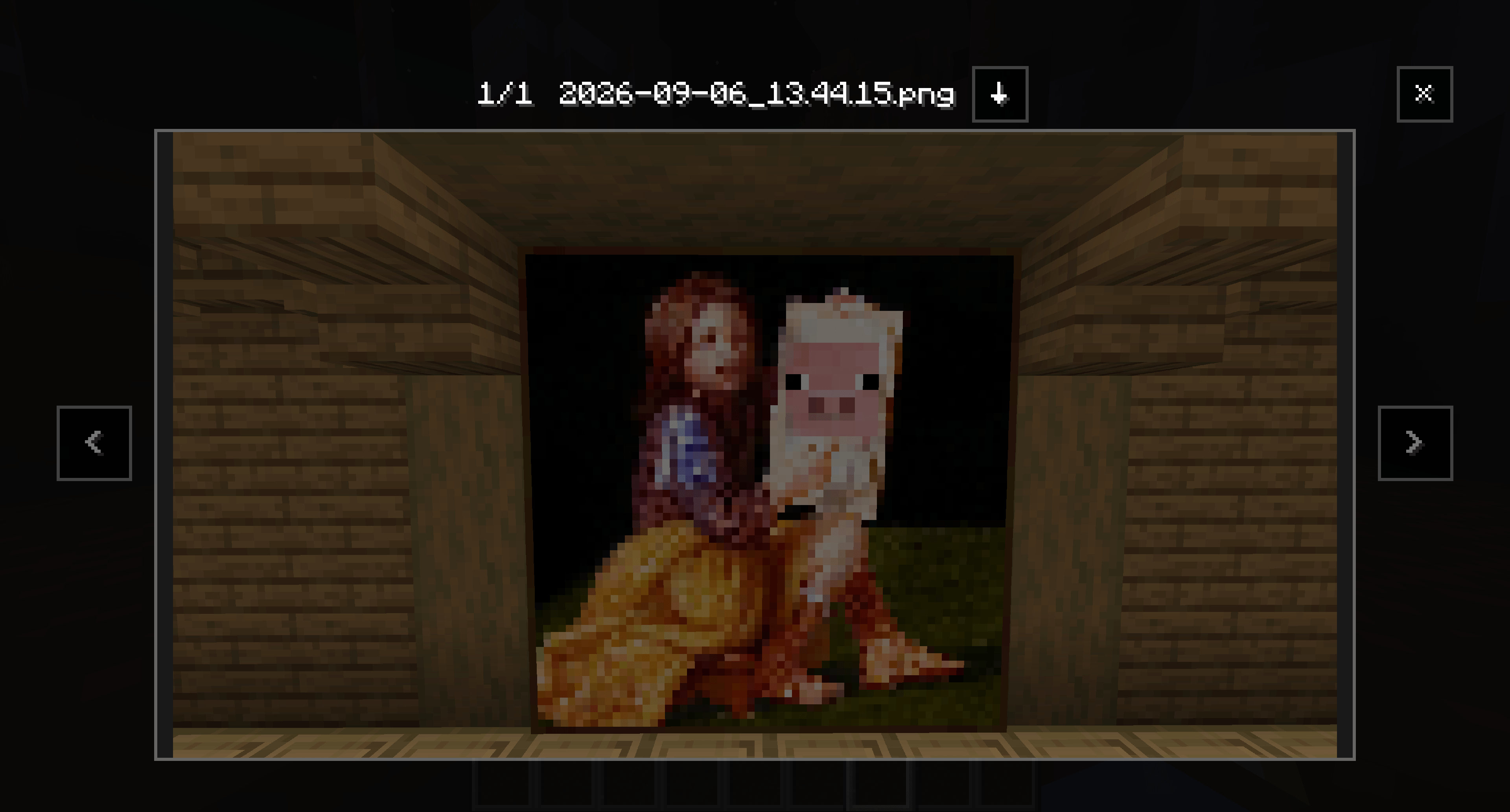 Image Viewer screen
-
 Examples of some features from the mod
 -
 Emoji Picker
 -
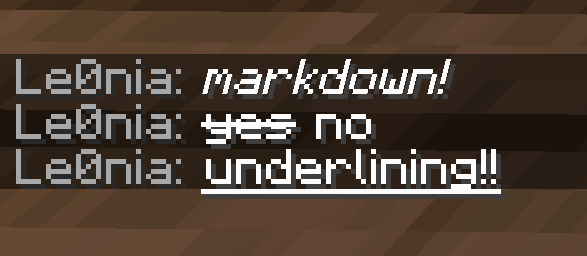 Some of the markdown you can apply
 -
 Image viewer
Versions
Files
Relations
Project Relations
More like this
Similar Mods
Suggestions use data such as tags, dependencies, dependents, descriptions, titles, and more to rank how much they overlap with this mod.
On ModDex
Community snapshot
By the numbers
Statistics
 (opens in a new tab)
Get it on
Available Platforms
On ModDex
Community snapshot
By the numbers
Statistics
Resources