Community listing page, reviews may not be monitored by the author.


Community voices
Reviews
No reviews yet. Be the first to review this project!
Get it on
Available Platforms
About
Project Details
For authors
Embed Badge
If you're the author of this project, you can embed a live badge anywhere that supports HTML or Markdown. It updates automatically whenever ratings change.
Use HTML for any page that supports it, or Markdown for README files and Markdown-based descriptions.
Identifiers
Platform IDs
About
Description
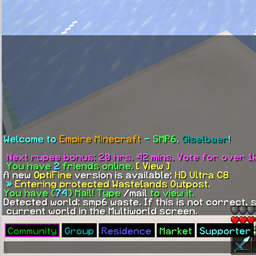
This mod lets you take control of the chat channels your server offers, by showing them which one is active, and allowing you to switch channels even while typing in chat.
While you're playing, it shows the active channel name at the left bottom of the screen (where the chat input line goes), and when you start typing, it shows a row of buttons that let you switch chat channels, highlighting the active one. This is how it looks to me:

Here, whatever I type gets sent to LukeLantern. Of course I know this as I've just been chatting with him, but often enough, after a conversation, I forget I'm still in that channel, and when I want to write something in community chat a while later, it gets sent to Luke anyway. This UI reminds me I'm still talking to Luke, and lets me just press the Community button to redirect what I'm saying.
Your server may offer different channels (this example is from play.emc.gs), so you can configure which channels you have, how to detect channel switches, and which commands to use to switch channels.
Please note: this mod does *not* add chat channels to your multiplayer world. It's intended to improve your control over existing channels your server gives to you.
Configuration
If you're playing on Empire Minecraft (emc.gs), the mod will work for you right out of the box. If you're playing somewhere else where chat commands and responses are different, you'll need to change the configuration to match your server. For each chat channel, you need to know the command to enter it, and the message the server sends you when you enter.
Create a file named chatcontrol-channels.txt in your config folder. If you don't, the mod will create it itself the first time you run it. Then, configure your channels like by line, like this:
§2Community;/chat c;Chat focus set to channel Community
Each line consists of three columns, separated by semicolons (;) :
- the channel name you want to display - this can include formatting codes, in the example, "Community" will be shown in green
- the command the server needs to enter this chat channel
- the string the server sends back when you enter that channel. No formatting codes here, even if the server sends them!
You can omit the second column if there's no specific command to enter that channel, but that means you won't have the clickable button.
If you have message channels to PM to people (not using /msg or /r, instead, temporarily sending all chat to someone), you can include their name in the channel name. For example, EMC sends "Started private conversation with DavisAtDavis" when I enter a conversation with him. To grab his name, I use "Started private conversation with (.*)" in the third column, and add a fourth one that has just the text string "usetext" in it. This will grab the name from the server message, and append it to the channel name.
Using with uchat
I was asked if the mod could be made to work with the server-side plugin uchat, which features a discord connection. Yes it can! This is an example for a configuration that has the three default uchat channels (Local, Global, Admin) and another channel named Discord. As explained above, put this into the chatcontrol-channels.txt file in your config folder:
§2Global;/ch global;\[uChat\] Now you are in the channel Global.
§eLocal;/ch local;\[uChat\] Now you are in the channel Local.
§bAdmin;/ch admin;\[uChat\] Now you are in the channel Admin.
§3Discord;/ch discord;\[uChat\] Now you are in the channel Discord.
The default message includes a [uchat] at the beginning of the line, and because [ and ] are special characters, they need to be escaped with a backslash (\). The color codes at the start of each line are optional but make the UI look better, and correspond to the chat channel's colors.
Screenshots
Gallery
Versions
Files
Relations
Project Relations
More like this
Similar Mods
Suggestions use data such as tags, dependencies, dependents, descriptions, titles, and more to rank how much they overlap with this mod.
On ModDex
Community snapshot
By the numbers
Statistics
 (opens in a new tab)
Get it on
Available Platforms
On ModDex
Community snapshot
By the numbers