
Community listing page, reviews here may not be monitored by the author.
ChatFlex


No reviews yet
Enhance your server's communication with flexible chat channels and user-defined settings.
Community voices
Reviews
No reviews yet. Be the first to review this project!
Get it on
Available Platforms
Compatibility
Supported Environments
Runs entirely on the server. Also works in singleplayer.
About
Project Details
For authors
Embed Badge
If you're the author of this project, you can embed a live badge anywhere that supports HTML or Markdown. It updates automatically whenever ratings change.
Use HTML for any page that supports it, or Markdown for README files and Markdown-based descriptions.
Identifiers
Platform IDs
Resources
External Links
About
Description
ChatFlex
Overview
This mod introduces a customizable chat system, allowing server owners to create and manage multiple chat channels with specific settings. The mod can operate with or without the LuckPerms mod, providing flexibility in permissions management.
Key Features
Custom Chat Channels: Define multiple chat channels with unique settings, including:
- ID: Unique identifier for each channel.
- Name: Display name of the channel.
- Format: Customizable message format for the channel.
- Prefix: Character(s) used to identify the channel when sending messages.
- Range: The distance (in blocks) that the channel is active. Use
-1for global channels. - Permissions: Control access to channels using LuckPerms or OP-level checks.
- Cooldown: Time in seconds that players must wait before sending another message in the channel.
- Default Channel: Specify a default channel for messages that do not match any prefix.
LuckPerms Integration:
- If LuckPerms is available, the mod will use it to manage permissions for each channel.
- If LuckPerms is not found, the mod defaults to OP-level permission checks.
Configuration
Channels are configured in a JSON file located at config/chatflex/channels.json. The mod will create a default configuration if the file does not exist.
Example Channel Configuration
    [
        {
            "id": "global",
            "name": "Global",
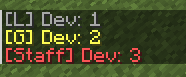
            "format": "§e[G] ${prefix}${player}: ${message}",
            "prefix": "!",
            "range": -1,
            "permission": "",
            "write_permission": "",
            "read_permission": "",
            "priority": 0,
            "cooldown": 0,
            "enabled": true,
            "default_channel": true,
            "worlds": []
        },
        {
            "id": "local",
            "name": "Local",
            "format": "§7[L] ${prefix}${player}: ${message}",
            "prefix": "",
            "range": 100,
            "permission": "",
            "write_permission": "",
            "read_permission": "",
            "priority": 0,
            "cooldown": 0,
            "enabled": true,
            "default_channel": true,
            "worlds": []
        }
    ]
Usage
- To use a specific channel, simply type the prefix followed by your message. For example:
!Hello everyone!for the global chat.Hello local players!for the local chat (if no prefix is specified, it defaults to local).

ChatFlex
Overview
This mod introduces a customizable chat system, allowing server owners to create and manage multiple chat channels with specific settings. The mod can operate with or without the LuckPerms mod, providing flexibility in permissions management.
Key Features
-
Custom Chat Channels: Define multiple chat channels with unique settings, including:
- ID: Unique identifier for each channel.
- Name: Display name of the channel.
- Format: Customizable message format for the channel.
- Prefix: Character(s) used to identify the channel when sending messages.
- Range: The distance (in blocks) that the channel is active. Use
-1for global channels. - Permissions: Control access to channels using LuckPerms or OP-level checks.
- Cooldown: Time in seconds that players must wait before sending another message in the channel.
- Default Channel: Specify a default channel for messages that do not match any prefix.
-
LuckPerms Integration:
- If LuckPerms is available, the mod will use it to manage permissions for each channel.
- If LuckPerms is not found, the mod defaults to OP-level permission checks.
Configuration
Channels are configured in a JSON file located at config/chatflex/channels.json. The mod will create a default configuration if the file does not exist.
Example Channel Configuration
    [
        {
            "id": "global",
            "name": "Global",
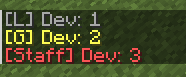
            "format": "§e[G] ${prefix}${player}: ${message}",
            "prefix": "!",
            "range": -1,
            "permission": "",
            "write_permission": "",
            "read_permission": "",
            "priority": 0,
            "cooldown": 0,
            "enabled": true,
            "default_channel": true,
            "worlds": []
        },
        {
            "id": "local",
            "name": "Local",
            "format": "§7[L] ${prefix}${player}: ${message}",
            "prefix": "",
            "range": 100,
            "permission": "",
            "write_permission": "",
            "read_permission": "",
            "priority": 0,
            "cooldown": 0,
            "enabled": true,
            "default_channel": true,
            "worlds": []
        }
    ]
Usage
- To use a specific channel, simply type the prefix followed by your message. For example:
!Hello everyone!for the global chat.Hello local players!for the local chat (if no prefix is specified, it defaults to local).
Screenshots
Gallery
-
 Q3T2Gs3.png Q3T2Gs3.png
Versions
Files
Relations
Project Relations
More like this
Similar Mods
Suggestions use data such as tags, dependencies, dependents, descriptions, titles, and more to rank how much they overlap with this mod.
On ModDex
Community snapshot
By the numbers
Statistics
Want to reach Minecraft players?
We're looking for a server hosting partner to feature here and other parts of the site. Interested? Send us a message!
Get in touchGet it on
Available Platforms
On ModDex
Community snapshot
By the numbers
Statistics
Resources