
Chat Screen
No reviews yet
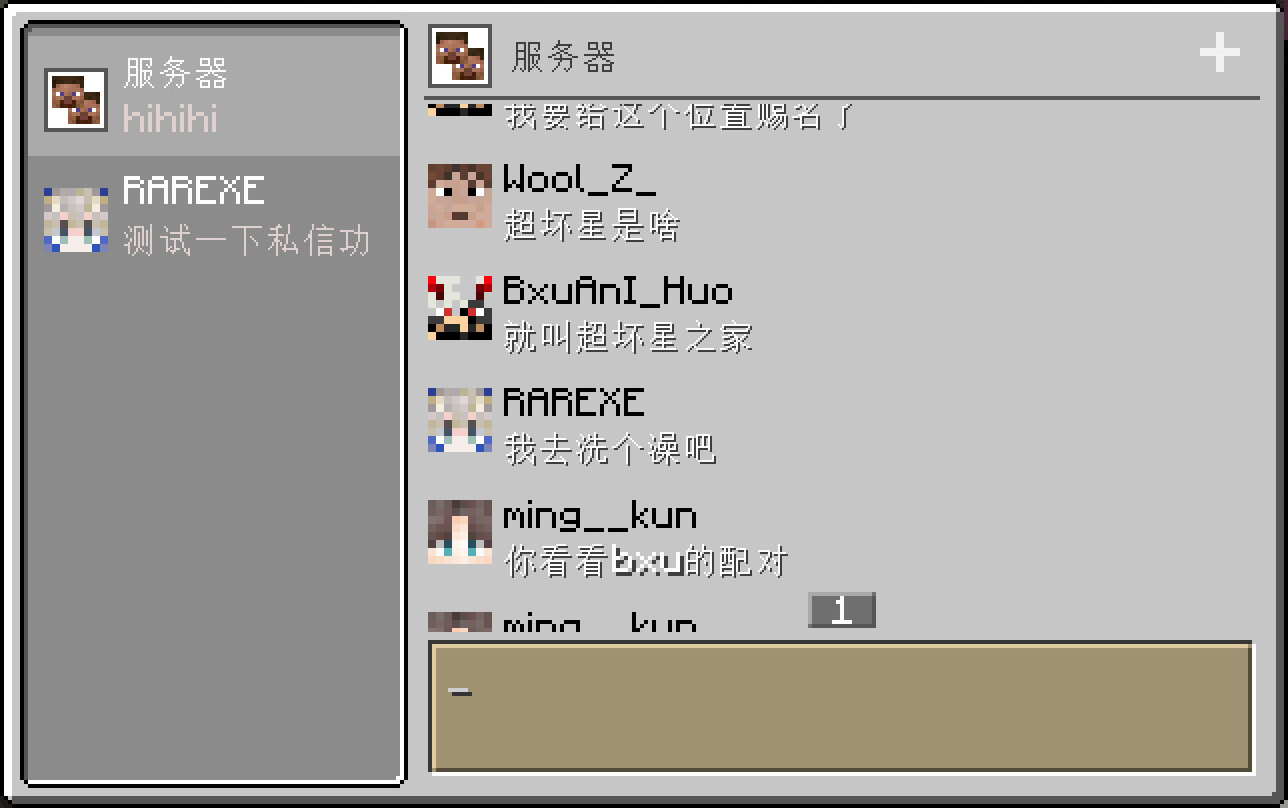
A modern chat screen in Minecraft
Forge is a popular mod loader for versions 1.1+ of Minecraft.
Neoforge is a fork of the Minecraft Forge available for versions 1.20.1+ of Minecraft. Many Forge mods are compatible with Neoforge and vice versa.
Fabric is a mod loader for versions 1.14+ of Minecraft, particularly popular for client side and optimization mods.
Community voices
Reviews
Click once to include, again to exclude, again to clear
No reviews yet. Be the first to review this project!
Get it on
Available Platforms
 Modrinth
Compatibility
Supported Environments
About
Project Details
For authors
Embed Badge
If you're the author of this project, you can embed a live badge anywhere that supports HTML or Markdown. It updates automatically whenever ratings change.
Use HTML for any page that supports it, or Markdown for README files and Markdown-based descriptions.
Identifiers
Platform IDs
About
Description
Chat Screen
This mod add a modern chat screen to Minecraft. The new chat screen is specifically designed for chatting of players.
This mod is client-side only and has no effect on the server-side.

Use chat screen
The chat screen is only available in Multiplayer worlds.
When the client connected to a server (including integrated servers, just like the vanilla social interactions screen), you can open the chat screen with C key (defaulted).
Server chat
You can always use the Server chat to send or receive chat message of the server. When you send a message through this chat, the client will send this message to the server like you type it in vanilla chat hud.
Team chat
You can use the Team chat when you are joined to a team. When you send a message through this chat, the client will send a /teammsg(the same as /tm) command to the server.
Personal chat
You can use a personal chat of any online player. When you send a message through this chat, the client will send a /msg(the same as /tell or /w) command to the server.
FAQ
- Unable to receive messages (of one or all types) through the chat screen.
This may be due to the server using a custom format to sent clients chat messages. Some plugins, such as CMI, can change that format.
If so, the chat screen cannot be used normally on this server unless you can persuade the admin to disable that custom format.
- Unable to send messages (of one or all types) through the chat screen.
This may be due to the server disabling some commands of sending message, like /msg, /teammsg and so on.
If so, the chat screen cannot send that kind of message normally on this server unless you can persuade the admin to reenable those commands.
Screenshots
Gallery
-
 Chat Screen
Versions
Files
Relations
Project Relations
More like this
Similar Mods
Suggestions use data such as tags, dependencies, dependents, descriptions, titles, and more to rank how much they overlap with this mod.
On ModDex
Community snapshot
By the numbers
Statistics

Want to reach Minecraft players?
We're looking for a server hosting partner to feature here and other parts of the site. Interested? Send us a message!
Get in touchGet it on
Available Platforms
On ModDex
Community snapshot
By the numbers