
ChatTabs Reloaded
No reviews yet
Adds customizable tabs to the Minecraft chat UI with filters, notifications, profiles and more!
Neoforge is a fork of the Minecraft Forge available for versions 1.20.1+ of Minecraft. Many Forge mods are compatible with Neoforge and vice versa.
Community voices
Reviews
Click once to include, again to exclude, again to clear
No reviews yet. Be the first to review this project!
Get it on
Available Platforms
 Modrinth
Compatibility
Supported Environments
About
Project Details
For authors
Embed Badge
If you're the author of this project, you can embed a live badge anywhere that supports HTML or Markdown. It updates automatically whenever ratings change.
Use HTML for any page that supports it, or Markdown for README files and Markdown-based descriptions.
Identifiers
Platform IDs
Resources
External Links
About
Description
ChatTabs Reloaded
A modern Minecraft mod that adds tabbed chat organization. Filter messages into separate tabs per server, with per-tab send modifiers, color rules, and drag-and-drop management.
Features
- Chat tabs — messages are filtered into separate tabs based on regex rules
- Per-server profiles — different tab sets for different servers, configured in
config/chattabs-profiles.json - Send modifiers — auto-prepend/suffix when chatting from a specific tab (e.g.
!for global chat) - Drag & drop — reorder tabs by dragging
- Unread counter — shows number of unread messages per tab
- Fade animation — tabs fade when chat closes
- Right-click context menu — create, edit, delete, reorder tabs
- Tab editor — in-game screen to configure name, filter regex, hex color, send modifier
- Server profile detection — automatically loads and notifies about profile changes
- Config export/import — share your configurations with friends
- In-game commands —
/chattabs(alias/ct) - NeoForge config screen — accessible from Mods menu
Commands
| Command | Description | Example |
|---|---|---|
/chattabs help |
Show command list | /ct help |
/chattabs reload |
Reload config from disk | /ct reload |
/chattabs save |
Save current config | /ct save |
/chattabs list |
List all tabs | /ct list |
/chattabs select <name> |
Switch to a tab | /ct select Global |
/chattabs tab add <name> |
Create a new tab | /ct tab add Private |
/chattabs tab remove <name> |
Delete a tab | /ct tab remove Private |
/chattabs toggle <feature> |
Toggle features | /ct toggle unreadcounter |
/chattabs filter <tab> <regex> |
Set tab filter | /ct filter Private ^\\[PRIVATE\\] |
/chattabs profile list |
List server profiles | /ct profile list |
/chattabs profile current |
Show active profile | /ct profile current |
/chattabs profile gui |
Open profile editor | /ct profile gui |
/chattabs export [file] |
Export config | /ct export my-config.json |
/chattabs import <file> |
Import config | /ct import my-config.json |
/ct is a shorthand alias for /chattabs.
Examples
Filter by prefix
Tab: Global
Filter: ^\[GLOBAL\]
Matches messages starting with [GLOBAL]
Filter by sender (case-insensitive)
Tab: Friends
Filter: (?i)(alice|bob|charlie).*:
Matches chat from friends (case-insensitive)
Filter private messages
Tab: Private
Filter: ^From .* whispers:
Matches whisper format from most servers
Complex regex with multiple conditions
Tab: Spam Filter (inverse)
Filter: ^(?!.*\b(spam|ignore|trash)\b).*$
Matches messages that do NOT contain spam keywords
Configuration
config/chattabs.json
Main mod settings: enabled state, tab colors, chat dimensions, animation toggle.
config/chattabs-profiles.json
Per-server tab profiles. Structure:
{
  "profiles": [
    {
      "serverIp": "mc.hypixel.net",
      "name": "Hypixel",
      "tabs": [
        {
          "id": "all",
          "name": "All",
          "visibleByDefault": true,
          "filter": { "regex": ".*", "hexColor": 16777215 },
          "sendModifier": { "prefix": "", "suffix": "" }
        }
      ]
    }
  ],
  "defaultProfile": {
    "name": "Default",
    "tabs": [ ... ]
  }
}
profiles[]— list of server-specific tab sets (matched by IP suffix)defaultProfile— fallback tabs when no server matches- Each tab supports:
id,name,visibleByDefault,filter(regex + hexColor),sendModifier(prefix + suffix)
Sharing Configurations
- Use
/ct export myconfig.jsonto save your setup - Share the
myconfig.jsonfile with others - They can import with
/ct import myconfig.json
Regex Filter Guide
Basic patterns
.*— match everything (catch-all)^text— starts with texttext$— ends with text[abc]— any single character: a, b, or c\d+— one or more digits
Common server filters
Hypixel levels:    ^(\[[\dMVP]+\])?
Minotar names:     ^<\w+>
Generic channels:  ^\[\w+\]
Whispers:          ^(From|To) .*:
Modifiers
(?i)— case-insensitive mode(?-i)— case-sensitive mode\b— word boundary\s— whitespace\S— non-whitespace
Languages
- English (default), Russian, Spanish, Chinese (Simplified)
Screenshots
Gallery
-
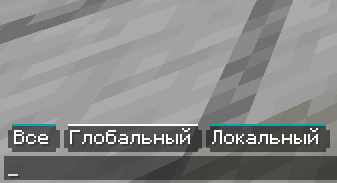 New tabs design
 -
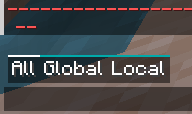 This is how chat tabs look like
Versions
Files
Relations
Project Relations
More like this
Similar Mods
Suggestions use data such as tags, dependencies, dependents, descriptions, titles, and more to rank how much they overlap with this mod.
On ModDex
Community snapshot
By the numbers
Statistics

Want to reach Minecraft players?
We're looking for a server hosting partner to feature here and other parts of the site. Interested? Send us a message!
Get in touchGet it on
Available Platforms
On ModDex
Community snapshot
By the numbers
Statistics
Resources