
cheat alert
No reviews yet
client-side anti-cheat alert mod for minecraft pvp.
Forge is a popular mod loader for versions 1.1+ of Minecraft.
Community voices
Reviews
Click once to include, again to exclude, again to clear
No reviews yet. Be the first to review this project!
Get it on
Available Platforms
 Modrinth
Compatibility
Supported Environments
About
Project Details
For authors
Embed Badge
If you're the author of this project, you can embed a live badge anywhere that supports HTML or Markdown. It updates automatically whenever ratings change.
Use HTML for any page that supports it, or Markdown for README files and Markdown-based descriptions.
Identifiers
Platform IDs
Resources
External Links
About
Description
PISAN AntiCheat Alerts is a client-side Minecraft Forge 1.8.9 mod built for detection, review, and live alerting. It monitors nearby players and evaluates suspicious combat and movement patterns using a VL-based system, then displays clear red on-screen alerts and chat warnings when a check becomes suspicious enough to matter.
The mod includes multiple detection checks for combat and movement behavior, including silent aim, silent aura, killaura-style patterns, reach-like hits, speed, noslow, autoblock, scaffold, and other unstable movement signatures. It also keeps a visible alert log that can be opened with F12, so detected events can be reviewed later without leaving the game.
A built-in detection profile lets you switch between aggressive and more legit-safe behavior. Aggressive profiles flag suspicious actions earlier but can increase false positives, while safer profiles are more conservative. This project is intended for client-side alerting and analysis, not server-side punishment or automatic banning.
How to use: Install the mod in your Forge 1.8.9 client, join a world or server, and keep the mod enabled while playing. When a suspicious player is detected, the mod will show a red alert on screen and send a chat warning. Press F12 to open or close the alert history panel. While the panel is open, use the left arrow key to switch to a more aggressive detection profile or the right arrow key to switch to a more legit-safe profile. The active profile affects how early the checks warn and how strict the detection becomes.
Screenshots
Gallery
-
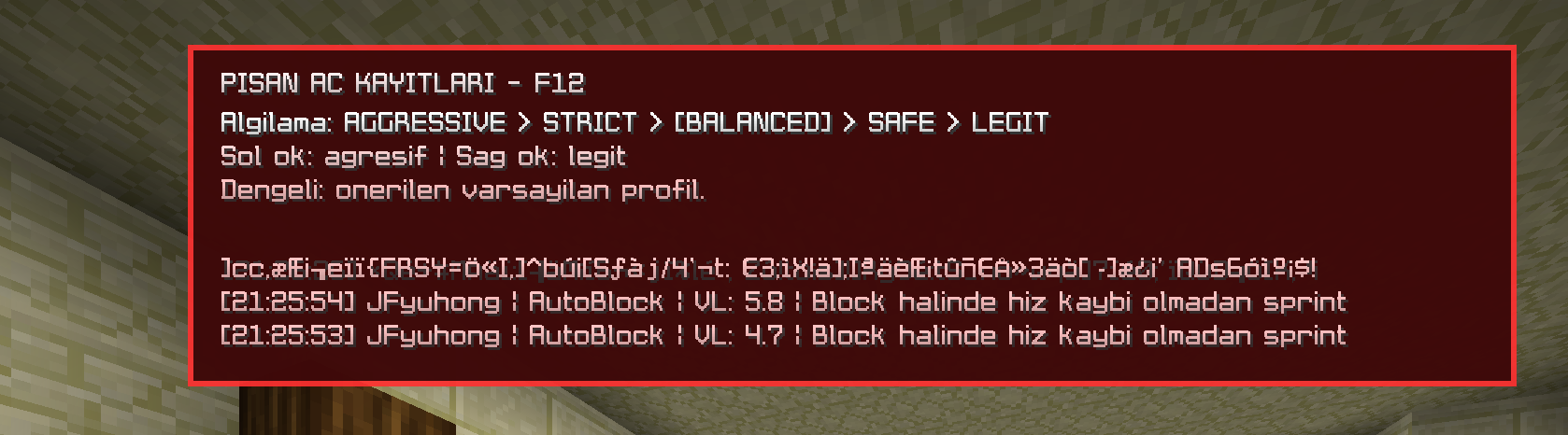 menu bind : f12
Versions
Files
Relations
Project Relations
More like this
Similar Mods
Suggestions use data such as tags, dependencies, dependents, descriptions, titles, and more to rank how much they overlap with this mod.
On ModDex
Community snapshot
By the numbers
Statistics

Want to reach Minecraft players?
We're looking for a server hosting partner to feature here and other parts of the site. Interested? Send us a message!
Get in touchGet it on
Available Platforms
On ModDex
Community snapshot
By the numbers
Statistics
Resources