
Community listing page, reviews here may not be monitored by the author.
ChestProtection

No reviews yet
Locks chests or creates a trading chest!
Community voices
Reviews
No reviews yet. Be the first to review this project!
Get it on
Available Platforms
Compatibility
Supported Environments
Runs entirely on the server. Also works in singleplayer.
About
Project Details
For authors
Embed Badge
If you're the author of this project, you can embed a live badge anywhere that supports HTML or Markdown. It updates automatically whenever ratings change.
Use HTML for any page that supports it, or Markdown for README files and Markdown-based descriptions.
Identifiers
Platform IDs
Resources
External Links
About
Description
New 2.X.X versions are incompatible with 1.X.X versions!
CHEST PROTECTION
Just finished rewriting of this mod to allow for new features! These include Authorisation, config file, improved ui, and lots of small tweaks to improve the mod
Easy to use server side mod for fabric that implements locking chests as well as creating shops within them
Locking
Sign a book “LOCK”, put it in the first slot of a chest. It is now locked! Only you can open it. This protects against:
- explosions, eg. TNT, end crystals
- Wither break mechanics
- Placing chests next to it to move the book out of the first slot
- Breaking
- hoppers
Selling
Sign the book “SELL”, put it in the first slot of the chest. The same protections exist as locking. When you open the chest it will prompt you to put some items in the left and right hand middle slot.
You can configure the amount of that item by clicking the paper next to it and inputting a count.
When you put items in some green wool will appear. These let you choose what data you want to keep with the item. For example buying swords, but you don’t care about its damage or enchantments or name. So click those pieces of wool so they turn red then click confirm.
Another example is selling shulker. But you don’t care what colour box it is so click the green wool called Item so it turns red then close the chest. This now means that it will only match on the components selected and not the item type itself. This is important as it lets you sell containers of other items
Authorisation
If you right click a book you will be able to configure the shop or lock. You can search for players and then authorise them. This gives them the same privileges as the owner, eg. accessing profits or opening a locked chest.
Enjoy, any problems create a issue request on the GitHub page.
I’ll slowly update this project to newer versions when I have the time
Screenshots
Gallery
-
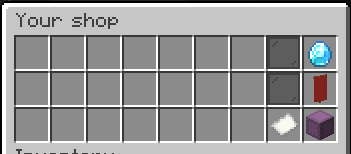 Shop Homepage
 -
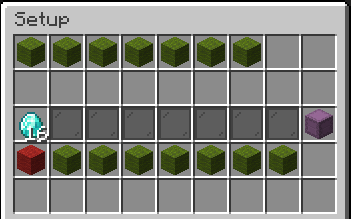 Setup page Setting up a trade 16 diamonds for 1 shulker box, with the Item component deselected so any colour shulker box can be traded
Versions
Files
Relations
Project Relations
More like this
Similar Mods
Suggestions use data such as tags, dependencies, dependents, descriptions, titles, and more to rank how much they overlap with this mod.
On ModDex
Community snapshot
By the numbers
Statistics

Want to reach Minecraft players?
We're looking for a server hosting partner to feature here and other parts of the site. Interested? Send us a message!
Get in touchGet it on
Available Platforms
On ModDex
Community snapshot
By the numbers
Statistics
Resources