
Community listing page, reviews here may not be monitored by the author.
Chronos Rewards

No reviews yet
Playtime and daily rewards that you can customize
Community voices
Reviews
No reviews yet. Be the first to review this project!
Get it on
Available Platforms
Compatibility
Supported Environments
Runs entirely on the server. Also works in singleplayer.
About
Project Details
For authors
Embed Badge
If you're the author of this project, you can embed a live badge anywhere that supports HTML or Markdown. It updates automatically whenever ratings change.
Use HTML for any page that supports it, or Markdown for README files and Markdown-based descriptions.
Identifiers
Platform IDs
Resources
External Links
About
Description
ChronosRewards
ChronosRewards is a server-side Fabric mod that adds daily login streak rewards and playtime milestone rewards for multiplayer servers. Everything runs on the server, so vanilla clients can join and use the reward menu without installing any client-side mods.
There are no dependencies besides Fabric Loader. The mod does not require Fabric API.
What the mod does
When a player joins the server, the mod records the login time and counts playtime while the player is online. Players open a chest-style reward menu with a chat command. Each reward in the menu shows whether it can be claimed, is already claimed, or is still locked. Claiming a reward runs the server commands configured for it, for example giving items.
Daily streak rewards unlock based on consecutive days played. A streak increases when the player returns inside the configured time window and resets when the player stays away longer than the maximum window.
Playtime rewards unlock based on total time played on the server, measured in game ticks (20 ticks equal one second).
Reward progress and claims are saved automatically and persist across server restarts.
Requirements
- A Fabric server with Fabric Loader installed.
- Java 21 or newer for the 1.21.x version of the mod.
- Java 25 or newer for the 26.1.x, 26.2.x, and 26.3 versions of the mod.
- No client-side installation is needed. Players with a vanilla client can use the mod.
Download the mod file that matches your server's Minecraft version. Each download page lists the supported Minecraft versions.
Installation
- Download the ChronosRewards file built for your server's Minecraft version.
- Place the
.jarfile into themodsfolder of your server. - Start the server once. The configuration file is generated automatically at
config/chronos-rewards.json. - Stop the server, edit the configuration file to define your rewards, then start the server again.
- Players open the menu in-game with the configured command (default
/rewards).
To update the configuration while the server is running, edit the file and restart the server or reload configuration so the new values take effect.
Commands
| Command | Who can use it | Description |
|---|---|---|
/rewards |
Any player | Opens the reward menu for the player running the command. The command name is configurable; if you change the command option in the configuration, players use that name instead. |
There are no operator-only commands. Reward commands defined in the configuration run from the server console when a player claims a reward.
Configuration
The configuration file is config/chronos-rewards.json. It is created with default values on the first server start. Both standard JSON and HOCON-like syntax with comments are accepted.
Main settings
| Option | Type | Default | Description |
|---|---|---|---|
command |
string | "rewards" |
Chat command that opens the reward menu, without the leading slash. |
autosave_interval_ticks |
integer | 1200 |
How often player data is saved automatically, in game ticks. 20 ticks equal one second, so 1200 ticks equal one minute. |
menu.title |
string | "Chronos Rewards" |
Title shown at the top of the reward menu. |
menu.rows |
integer | 3 |
Menu height. Use 3 for a 27-slot menu or 6 for a 54-slot menu. |
streak.minimum_window_millis |
long | 72000000 |
Minimum time in milliseconds between daily streak claims. The default of 72000000 equals 20 hours and prevents claiming twice in one day. |
streak.maximum_window_millis |
long | 172800000 |
Maximum time in milliseconds before a streak resets. The default of 172800000 equals 48 hours. Returning within the window extends the streak; returning later resets it to day one. |
Reward entries
Each object in the rewards array defines one reward slot in the menu.
| Option | Type | Description |
|---|---|---|
id |
string | Unique identifier for the reward, used to track claims. |
type |
string | "daily" for streak-based rewards or "playtime" for time-based rewards. |
slot |
integer | Menu slot index starting at 0. For a 3-row menu the valid range is 0 to 26; for a 6-row menu it is 0 to 53. |
required_streak |
integer | Required consecutive days. Only used when type is "daily". |
required_ticks |
long | Required playtime in game ticks. Only used when type is "playtime". 72000 ticks equal one hour. |
title |
string | Display name of the reward in the menu. Formatting codes are supported. |
item |
string | Item used as the menu icon, for example "minecraft:emerald". If empty or invalid, a fallback icon is shown. The icon changes automatically with reward state unless the reward is claimable, in which case the configured item is shown. |
lore |
string array | Description lines shown under the title. Supports the placeholders listed below. |
commands |
string array | Server commands executed when the reward is claimed. Supports the placeholders listed below. |
Lore placeholders
These placeholders can be used in lore lines:
| Placeholder | Description |
|---|---|
{status} |
Short state text: ready to claim, already claimed, or what is still missing. |
{streak} |
Current daily streak in days. |
{playtime} |
Current playtime formatted as hours, minutes, and seconds. |
{required} |
Required amount for this reward, formatted the same way as the progress value. |
{remaining} |
Remaining amount needed to unlock this reward. |
Command placeholders
These placeholders can be used in commands entries:
| Placeholder | Description |
|---|---|
{player} |
Name of the player claiming the reward. |
{uuid} |
UUID of the player claiming the reward. |
{streak} |
Current daily streak of the player. |
{playtime_ticks} |
Total playtime of the player in game ticks. |
Example configuration
{
  "command": "rewards",
  "autosave_interval_ticks": 1200,
  "menu": {
    "title": "Chronos Rewards",
    "rows": 3
  },
  "streak": {
    "minimum_window_millis": 72000000,
    "maximum_window_millis": 172800000
  },
  "rewards": [
    {
      "id": "daily_1",
      "type": "daily",
      "slot": 10,
      "required_streak": 1,
      "title": "Daily Streak: Day 1",
      "item": "minecraft:emerald",
      "lore": ["Current streak: {streak} day(s)", "{status}"],
      "commands": ["give {player} emerald 1"]
    },
    {
      "id": "daily_7",
      "type": "daily",
      "slot": 12,
      "required_streak": 7,
      "title": "Daily Streak: Day 7",
      "item": "minecraft:diamond",
      "lore": ["Current streak: {streak} day(s)", "{status}"],
      "commands": ["give {player} diamond 1"]
    },
    {
      "id": "playtime_1h",
      "type": "playtime",
      "slot": 14,
      "required_ticks": 72000,
      "title": "Playtime: 1 Hour",
      "item": "minecraft:clock",
      "lore": ["Played: {playtime}", "{status}"],
      "commands": ["give {player} gold_ingot 2"]
    }
  ]
}
Menu appearance
Empty menu slots are filled with a neutral glass pane so the menu looks complete. Each reward shows its title in bold with a color matching its state: green for claimable, gold for claimed, red for locked. Below the configured description lines, every reward shows a separator, a colored status line, and a progress line such as Progress: 1h 5m / 3h 0m or Streak: 2 / 7 days. Claimable rewards glow with an enchantment glint and show a "Click to claim" hint.
Technical notes
- The 1.21.x build uses Yarn mappings and stores player data as JSON files written asynchronously on virtual threads.
- The 26.1.x, 26.2.x, and 26.3 builds use official Mojang mappings and store player data with the vanilla saved-data system.
- Adapting to Minecraft 26.2 and 26.3: colored items such as stained glass panes were grouped into color collections, so the menu background now resolves the gray pane variant through the new collection API. No other mod behavior changed.
- Fabric Loader remaps the mod at runtime, so each build supports the Minecraft version family listed on its download page.
License
Copyright (c) 2026 TOPG-V. All Rights Reserved.
Screenshots
Gallery
-
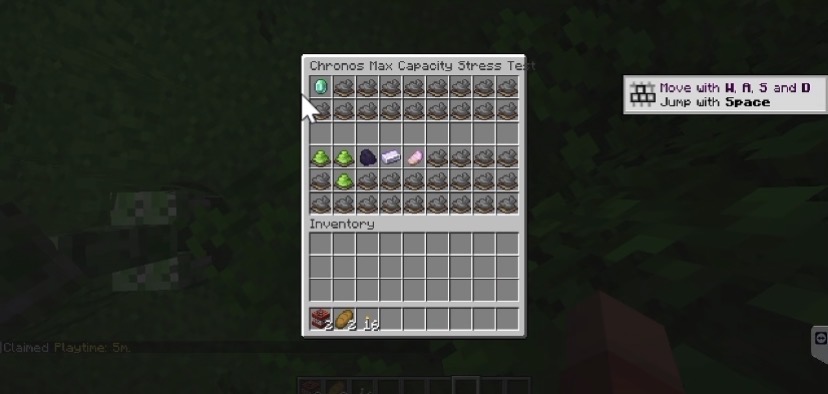 GUI This is how it looks on a max-Capacity test
Versions
Files
Relations
Project Relations
More like this
Similar Mods
Suggestions use data such as tags, dependencies, dependents, descriptions, titles, and more to rank how much they overlap with this mod.
On ModDex
Community snapshot
By the numbers
Statistics

Want to reach Minecraft players?
We're looking for a server hosting partner to feature here and other parts of the site. Interested? Send us a message!
Get in touchGet it on
Available Platforms
On ModDex
Community snapshot
By the numbers
Statistics
Resources