Community listing page, reviews here may not be monitored by the author.
ChunkMap


No reviews yet
A tool to make chunk loading & generation visible

Community voices
Reviews
No reviews yet. Be the first to review this project!
Get it on
Available Platforms
Compatibility
Supported Environments
Runs entirely on the server. Also works in singleplayer.
About
Project Details
For authors
Embed Badge
If you're the author of this project, you can embed a live badge anywhere that supports HTML or Markdown. It updates automatically whenever ratings change.
Use HTML for any page that supports it, or Markdown for README files and Markdown-based descriptions.
Identifiers
Platform IDs
About
Description
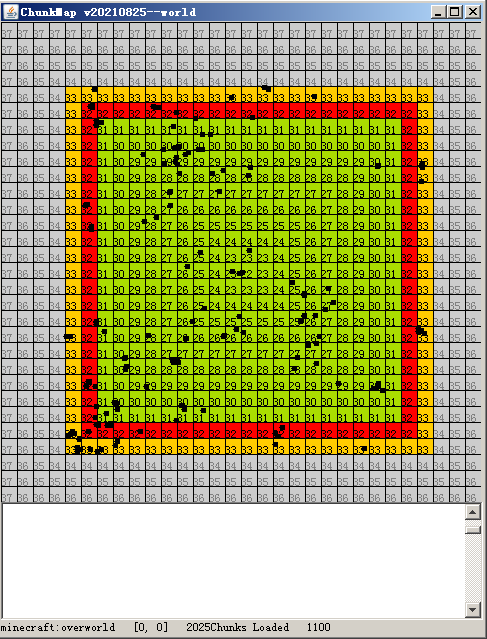
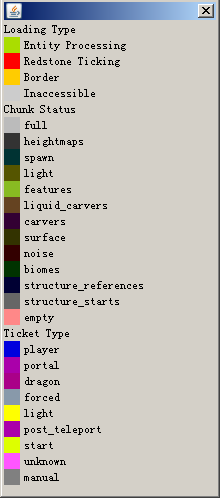
In the map, a chunk is displayed as a quad with a color which provides some information.
Github:https://github.com/lovexyn0827/chunkmap
Basic Operations
L : Switch to chunk loading viewer mode.
G : Switch to chunk generation viewer mode.
T : Switch to ticket vierer mode.
E : Toggle the entity overlay.
W,A,S and D : Move the center of the map.If one of these keys are pressed while the Alt key is down,the center of the map will be moved to 16 instead of 1 chunks away.
M : Open a dialog where you can move the center of the map to a given chunkpos.
0 : Move to the Nether
1 : Move to the Overworld.
2 : Move to the End.
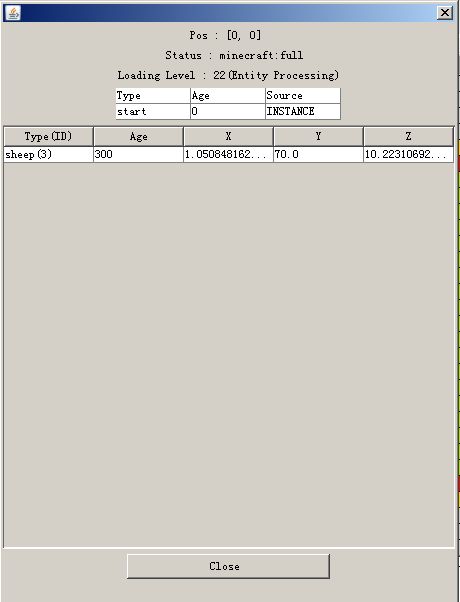
Double click a chunk : Get more information about the chunk,or load the chunk to a given level (31,or entity processing bydefault).
Known Problems:
The MSPT it uses up may be too high(about 12).
If you want to interact with the window of the map,it is necessary to open the game to the LAN (Maybe it can never be fixed).
The manually loaded chunks may fail to be unloaded beacuse of the synchornization of the ticket list.
ChunkMap
In the map, a chunk is displayed as a quad with a color which provides some information.
Basic Operations
-
L : Switch to chunk loading viewer mode.
-
G : Switch to chunk generation viewer mode.
-
T : Switch to ticket vierer mode.
-
E : Toggle the entity overlay.
-
W,A,S and D : Move the center of the map.If one of these keys are pressed while the Alt key is down,the center of the map will be moved to 16 instead of 1 chunks away.
-
M : Open a dialog where you can move the center of the map to a given chunkpos.
-
H : Help.
-
0 : Move to the Nether
-
1 : Move to the Overworld.
-
2 : Move to the End.
-
Double click a chunk : Get more information about the chunk,or load the chunk to a given level (31,or entity processing bydefault).
Known Problems
-
The MSPT it uses up may be too high(about 12).
-
If you want to interact with the window of the map,it is necessary to open the game to the LAN (Maybe it can never be fixed).
-
The manually loaded chunks may fail to be unloaded beacuse of a problem related to the synchornization of the ticket list.
Screenshots
Gallery
-
 Map
Map -
 Help
Help -
 Chunk info
Versions
Files
Relations
Project Relations
More like this
Similar Mods
Suggestions use data such as tags, dependencies, dependents, descriptions, titles, and more to rank how much they overlap with this mod.
On ModDex
Community snapshot
By the numbers
Statistics
 (opens in a new tab)
Get it on
Available Platforms
On ModDex
Community snapshot
By the numbers