
Community listing page, reviews here may not be monitored by the author.


Community voices
Reviews
No reviews yet. Be the first to review this project!
Get it on
Available Platforms
Compatibility
Supported Environments
Runs entirely on the client. Works on vanilla servers.
About
Project Details
For authors
Embed Badge
If you're the author of this project, you can embed a live badge anywhere that supports HTML or Markdown. It updates automatically whenever ratings change.
Use HTML for any page that supports it, or Markdown for README files and Markdown-based descriptions.
Identifiers
Platform IDs
Resources
External Links
About
Description
Ck7 - Conatus
A performance mod for Minecraft Forge 1.20.1 that cuts server and client overhead by scaling down work the player can't perceive — mob AI, particles, chunk-load spikes, and render resolution — instead of just capping settings globally. Every module has its own toggle and can be tuned or turned off independently from a single in-game config screen.
Built for large multiplayer worlds, villager halls, mob farms, and lower-end/integrated-GPU hardware.
Requirements
- Minecraft 1.20.1
- Forge 47.4.20 or newer
- Optional: Cloth Config — enables the
in-game config screen (
Mods → Ck7 - Conatus → Config). The mod works fine without it; you just edit the.tomlfiles inconfig/directly instead.
Works on client, server, and singleplayer. Server-side modules (Mob AI Freeze, Villager Throttling, Ultra Load's server-side effects) don't require the mod on the client to function, but installing it everywhere gets you the client-side modules too (Particle Priority, Resolution Scale) and the config GUI.
Features
🧟 Mob AI Freeze
Freezes hostile mob AI (pathfinding, target selection, goal selector) outside a configurable radius around each player, using the same mechanism map-makers use for "NoAI" statues — no hacks, fully reversible, mobs resume normally the moment a player gets close again.
- Configurable freeze radius (default 48 blocks)
- Optional line-of-sight requirement, so mobs behind walls freeze even inside the radius — with an "always active" buffer radius so a zombie banging on your door never freezes mid-fight
- Spawn grace period so freshly spawned mobs get a chance to disperse before freezing (avoids entity-cramming deaths at dense spawners)
- Whitelist/blacklist by entity type or by mod ID, so you can exclude mods with their own AI management or entities with special mechanics (Warden is excluded by default)
- Passive mobs are managed too by default (with line-of-sight easing) since profiling showed they cost roughly 2x an already-frozen hostile
🧑🌾 Villager Throttling
The same freeze mechanism, purpose-built for villager halls: freezes pathfinding, POI/job lookups, and Brain activity outside a configurable radius (default 32 blocks). Villagers unfreeze instantly the moment a player right-clicks them, so trading and restocking always feel responsive. Optional support for Wandering Traders.
✨ Particle Priority
Replaces vanilla's single global particle setting with smart, per-category prioritization instead of an all-or-nothing cutoff:
- Combat, interaction/crafting, redstone, and ambient particles each get their own visibility radius
- Ambient particles (rain, drip, spores, portal, etc.) respect the camera's view cone beyond a "close" radius, so things right next to you never vanish unnaturally
- Particles near your last block-break/place/use/attack action get a temporary priority boost, so the feedback you're actively looking for is never the particle that gets dropped
- Fully configurable particle-ID-to-category lists
📉 Resolution Scale
Renders the 3D world at a lower (or higher) resolution and stretches it to fill the screen — compatible with Sodium/Embeddium. Great for squeezing extra FPS out of integrated GPUs and lower-end hardware.
- Scale from 0.25x to 2.0x (below 1.0 = more FPS, more pixelated; above 1.0 = supersampling, sharper but more expensive)
- Linear or nearest-neighbor filtering
- Changes apply instantly when you save in the config screen — no restart, no rejoining the world
- Disabled by default; it's a newer module, so test it on your own setup before leaving it on
🚨 Ultra Load (panic mode)
Automatically detects heavy chunk-loading bursts (flying/sprinting through new terrain, big teleports, elytra flight) and temporarily shuts down everything that doesn't help chunks appear faster, freeing up CPU for world generation/meshing and GPU for terrain rendering. Everything restores automatically once the load settles, after a short cooldown so it doesn't flicker on and off.
Every effect has its own toggle, grouped by aggressiveness:
- Tier 1 (safe): freeze all mob AI, pause natural spawns, pause random ticks (crop/grass growth, fire spread), hide particles, hide entity rendering
- Tier 2 (aggressive): fully freeze non-player entity ticking (not just AI — movement/physics too), pause block entity ticking (hoppers, furnaces, spawners)
- Tier 3 (experimental): pause scheduled ticks (redstone, fluid flow — nothing is lost, pending ticks just queue up and resume), temporarily reduce entity render distance, temporarily cap framerate (frees CPU for chunk generation on the render thread)
A configurable safe radius around every player exempts anything nearby from the entity-affecting effects, so nothing freezes or vanishes mid-fight right next to you.
🎛️ Master toggle & live config
One switch turns every module off at once, cleanly (each module's existing safe-shutdown logic runs, so nothing gets left in a frozen/broken state). All config changes made through the in-game screen take effect immediately — no restart or config-file watcher delay.
⚙️ In-game config GUI
With Cloth Config installed, every option above is editable from Mods → Ck7 - Conatus → Config —
no digging through .toml files. Full tooltips on every option.
🌐 Translations
Available in English, Spanish, and Portuguese (Brazil), covering the config screen and all in-mod messages.
⚠️ Sodium/Embeddium heads-up
If Sodium, Embeddium, or Rubidium is detected, players get a one-time in-chat notice the first time they join a world (dismissible, with a "don't show again" option in the config screen).
Compatibility notes
- Works alongside Sodium/Embeddium/Rubidium; the Resolution Scale module specifically accounts for their rendering pipeline.
- The Resolution Scale module's core swap-the-render-target mechanism follows the approach pioneered by RenderScale by Zolo101; credit where due.
- No known incompatibilities with other AI/optimization mods, but if you run something else that also manages mob AI, use the mod-ID blacklist in Mob AI Freeze to avoid the two fighting over the same entities.
Configuration
All config files live in config/ck7infinite-*.toml (edit directly, or use the in-game GUI):
| File | Module |
|---|---|
ck7infinite-general.toml |
Master toggle |
ck7infinite-mobfreeze.toml |
Mob AI Freeze |
ck7infinite-villagerthrottle.toml |
Villager Throttling |
ck7infinite-particlepriority.toml |
Particle Priority |
ck7infinite-resscale.toml |
Resolution Scale |
ck7infinite-ultraload.toml |
Ultra Load |
License
All Rights Reserved.
Ck7 - Conatus (mod id: ck7infinite) Minecraft Forge 1.20.1 · Version 2.2.0
WHAT IT IS
Ck7 - Conatus is a performance/optimization mod for Minecraft Forge 1.20.1. It targets the two biggest real-world FPS/TPS killers on modest hardware (especially laptops with integrated graphics): server tick cost from mob and villager AI, and client render cost from particles and resolution. It does not touch world generation, gameplay balance, or add any new items/blocks/mechanics — every module is a background optimization that can be tuned or switched off independently.
It ships as six independent modules, each with its own config file, plus one master switch that disables all of them at once. If the optional mod Cloth Config is installed, all settings are also editable from a normal in-game GUI (Mods menu -> Ck7 - Conatus -> Config); without it, the mod still works exactly the same, just configured by hand via the .toml files. The GUI and all in-game chat messages are translated into English, Spanish, and Brazilian Portuguese.
- MOB AI FREEZE
Server-side. Freezes the AI (pathfinding and goal selector — the systems that decide what a mob does and how it walks toward it) of hostile mobs once they are farther than a configurable radius from every player. Frozen mobs stop thinking and pathing but are not removed, hidden, or despawned — they simply stand still until a player gets close again.
- Freeze radius (default 48 blocks), independent of vanilla's own simulation distance setting.
- Optional line-of-sight requirement: a mob inside the radius but fully blocked from view by terrain (e.g. in a cave under the player) also freezes, unless it's within a smaller "always active" inner radius — this stops mob-farm spawner towers from softlocking while still freezing AI for mobs the player genuinely can't see or reach.
- Configurable re-evaluation interval (how often distance is rechecked per mob) to trade reaction speed for CPU overhead.
- VILLAGER THROTTLING
Server-side. The same idea as Mob AI Freeze, but specifically for Villagers (and optionally Wandering Traders) — their pathfinding, POI lookup (bed/job-site searching) and "brain" activity are frozen outside a configurable radius around each player. This is aimed at large villager halls/trading rooms, which are one of the worst tick-cost offenders in a base once villager counts climb into the dozens.
- Throttle radius (default 32 blocks).
- Villagers unfreeze instantly on right-click interaction (so trading never feels laggy) even if still outside the radius, instead of waiting for the next scheduled re-check.
- Configurable re-evaluation interval, same trade-off as Mob AI Freeze.
- PARTICLE PRIORITY
Client-side, purely visual/local to each player. Instead of an all-or-nothing particle slider, particles are bucketed by what they mean gameplay-wise and each bucket gets its own always-show radius:
- Combat particles (default 48 blocks) — hit sparks, crit effects, etc.
- Interaction/crafting particles (default 24 blocks) — enchanting, brewing, smithing, etc.
- Redstone particles (default 24 blocks) — redstone dust/repeaters.
- Ambient particles (default 16 blocks, with an 8-block "close" radius that always shows regardless of view angle) — rain, dripping, spore clouds, portal particles, and similar decorative effects.
Beyond each radius, ambient particles are further culled by whether they're inside the player's view cone, so particles behind the camera or far off-screen never get spent frame time. Gameplay-relevant particle categories (combat, interaction, redstone) are never culled by view angle — only by distance — so nothing gameplay-important is ever hidden just because the player isn't looking at it.
- ULTRA LOAD ("panic mode")
A chunk-loading-focused panic mode. When the game detects that chunks are being generated/loaded faster than a configurable threshold (default 8 chunks/second — i.e. a player flying, sprinting with elytra, or exploring new terrain quickly), it temporarily disables everything that doesn't help chunks actually appear on screen: mob AI, mob spawning, random block ticks, particle spawning, and entity rendering. This frees CPU (for the world generation/chunk meshing threads) and GPU (for terrain rendering) exactly when it's needed most.
Once chunk-loading load drops back below the threshold, everything is restored after a short cooldown (default 40 ticks / 2 seconds) to avoid flickering on/off during brief pauses. A "safe radius" around each player (default 20 blocks) exempts anything that would affect entities close to the player — so a mob standing right next to you doesn't vanish or freeze mid-fight and then snap back once the panic mode ends. Every individual sacrifice (freeze all mobs, disable spawning, disable particles, hide entities, etc.) has its own on/off toggle.
- ESCALA DE RESOLUCION (Resolution Scale)
Client-side GPU render-resolution scaler, in the spirit of the standalone mod RenderScale. Renders the actual 3D world (terrain, entities, water, weather — not the HUD/GUI, which always stays at native resolution and stays sharp) to an internal framebuffer at a scaled-down (or scaled-up) size, then stretches that to fill the real screen. This trades visual sharpness of the world for GPU headroom — useful on integrated GPUs where the bottleneck is pixel fill-rate.
- Scale range 0.25x to 2.0x (below 1.0 = lower resolution, better performance, more pixelated; above 1.0 = supersampling, sharper, worse performance; 1.0 = native resolution, no effect/no cost).
- Choice of linear or nearest-neighbor filtering for the final upscale/downscale stretch.
- Changes apply live and instantly on save — no need to toggle the module off/on or leave and rejoin the world.
- Includes a texture LOD-bias compensation so blocks and water don't look artificially blurry at reduced scale, and a fix that keeps the glowing-entity outline effect (from the Glowing status effect / spectral arrows) correctly aligned with the scaled world instead of drifting off-position.
- Detects the standalone mod RenderScale if it's also installed and warns the player by chat: both mods swap the game's render target independently without coordinating with each other, so running both active at once (at a scale other than 1.0) will corrupt the frame. The mod recommends removing RenderScale or leaving it at 1.0x while Escala de Resolucion is in use. This warning can be dismissed permanently from the config screen.
- SODIUM/EMBEDDIUM COMPATIBILITY WARNING
Not a performance module — a one-time chat warning. If Sodium, Embeddium, or Rubidium is detected installed alongside Ck7 - Conatus, the player is warned about a known issue on integrated graphics where those mods' "Use Fog Occlusion" option can cause chunks to fail to render until the player walks directly on top of them, and is told where in the options menu to disable it. Shown once per session unless permanently dismissed from the config screen.
MASTER SWITCH & GENERAL BEHAVIOR
- A single master toggle (Mods -> Ck7 - Conatus -> Config -> General) disables all six modules at once without touching each module's own individual toggle — useful for quick A/B comparisons against vanilla behavior without losing per-module settings.
- Every module can also be toggled independently; a module only runs if BOTH the master switch AND its own toggle are enabled.
- All optimizations are reversible/non-destructive: nothing is deleted, despawned, or permanently altered — mobs, villagers, and particles that are "frozen" or "culled" simply resume normal behavior the moment the relevant condition (distance, chunk load, interaction) changes again.
Screenshots
Gallery
-
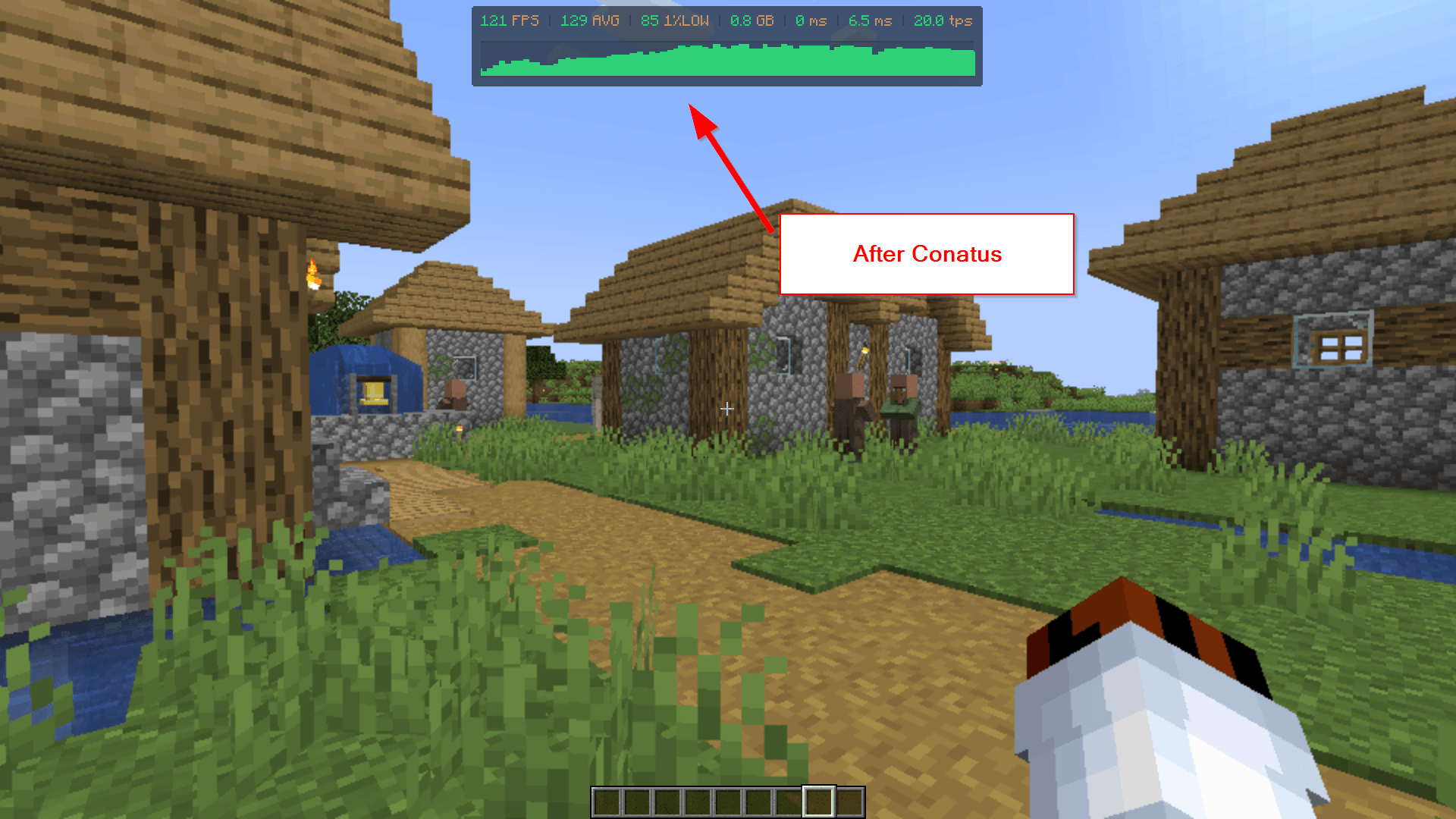 2026-07-16 15_57_42-Clipboard.png 2026-07-16 15_57_42-Clipboard.png
 -
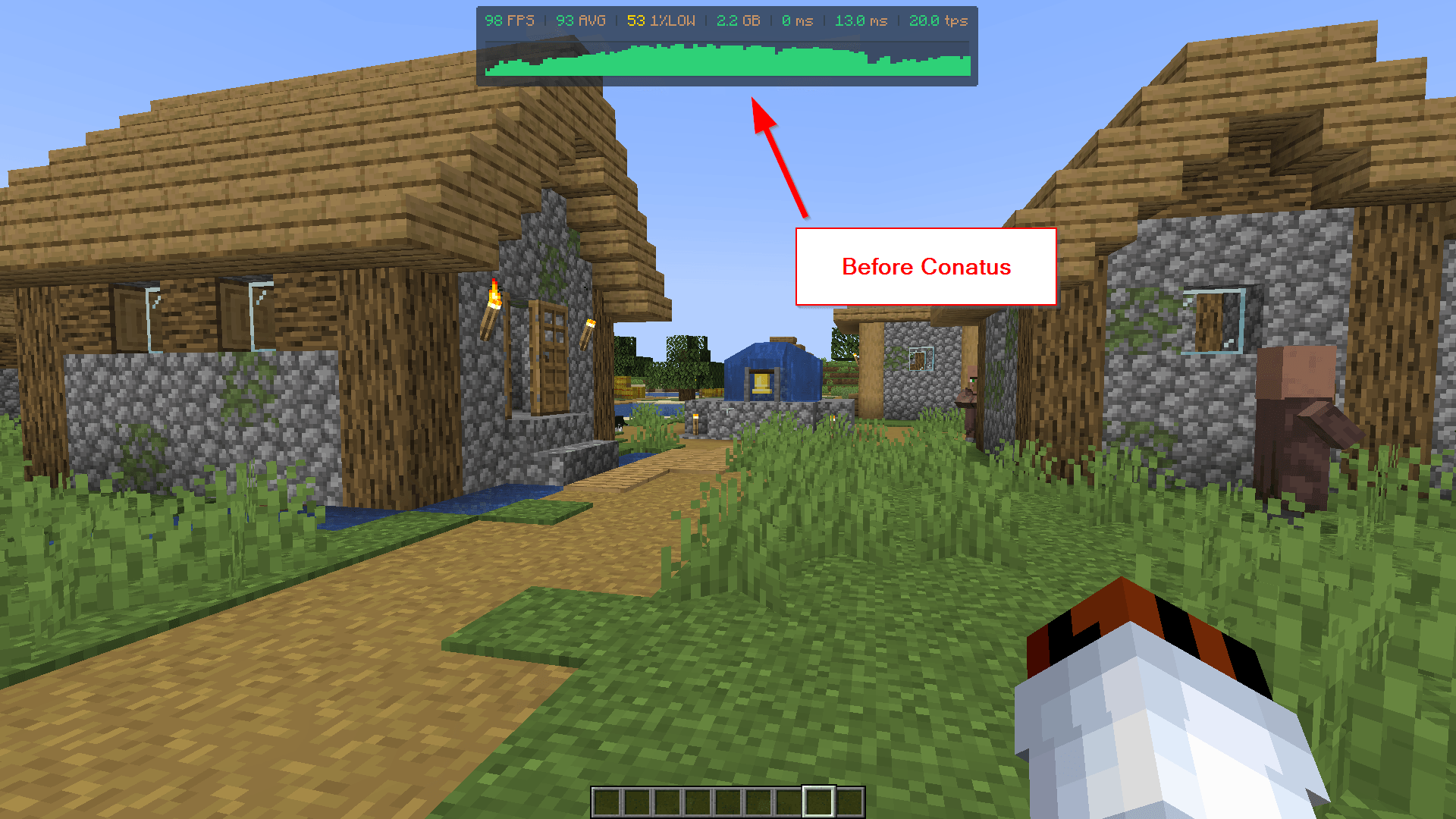 2026-07-16 15_55_31-Clipboard.png 2026-07-16 15_55_31-Clipboard.png
-
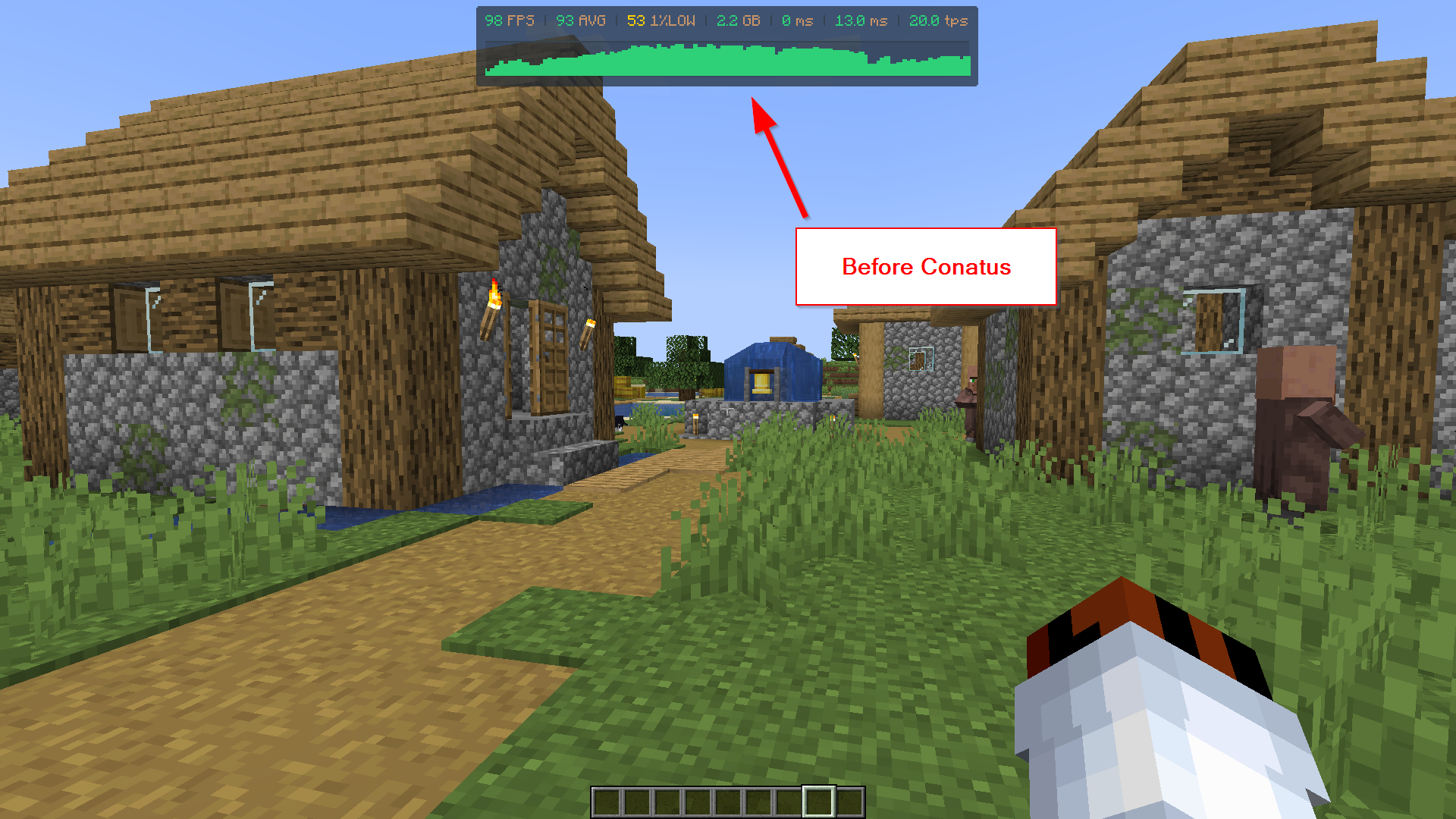 Before
 -
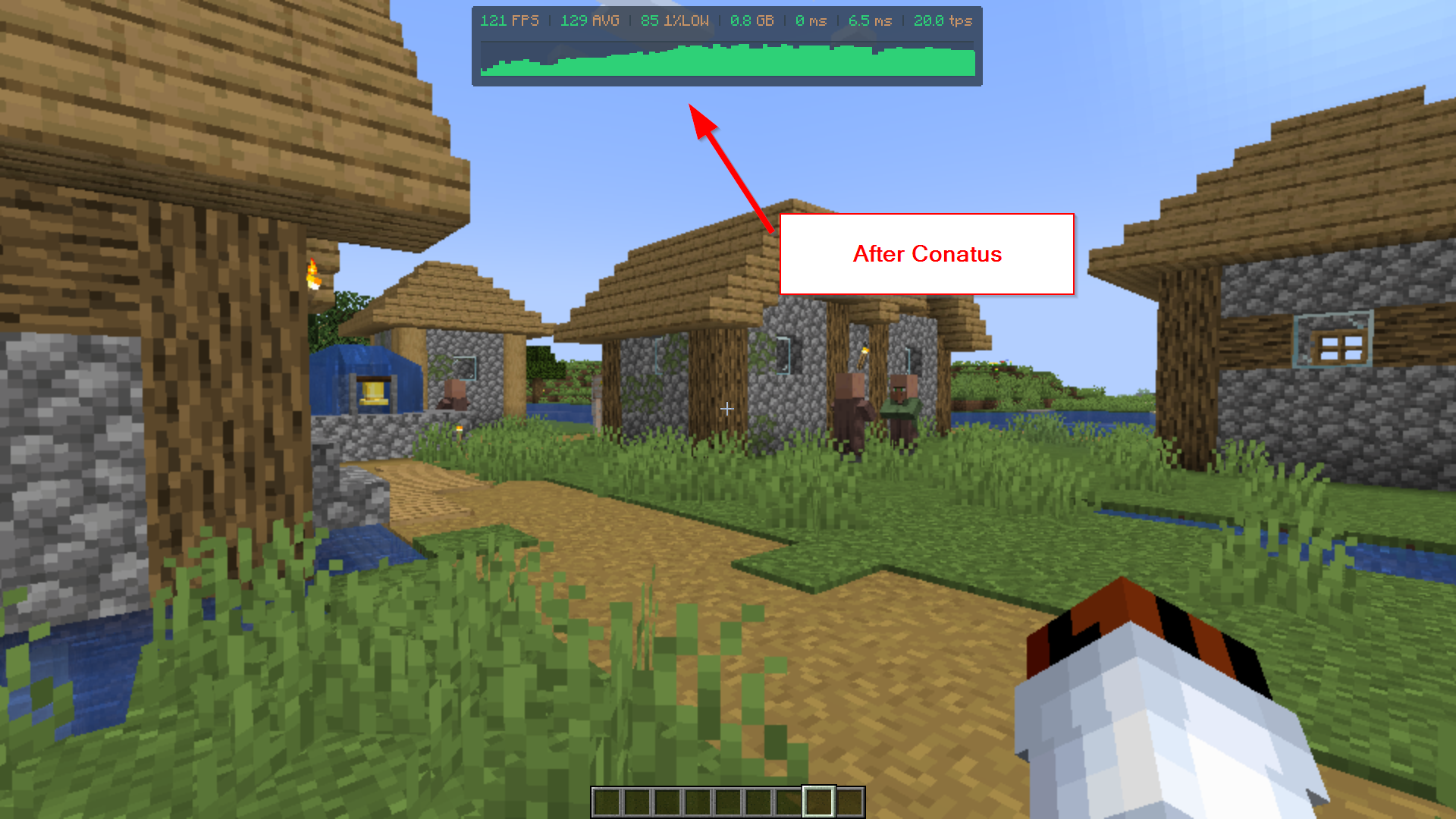 After
After
Versions
Files
Relations
Project Relations
More like this
Similar Mods
Suggestions use data such as tags, dependencies, dependents, descriptions, titles, and more to rank how much they overlap with this mod.
On ModDex
Community snapshot
By the numbers
Statistics
Want to reach Minecraft players?
We're looking for a server hosting partner to feature here and other parts of the site. Interested? Send us a message!
Get in touchGet it on
Available Platforms
On ModDex
Community snapshot
By the numbers
Statistics
Resources