
CloudTweak
No reviews yet
Adds a clean in-game PC overlay for Cobblemon with bulk selection, sorting, filtering, and priority-based Pokémon management.
Fabric is a mod loader for versions 1.14+ of Minecraft, particularly popular for client side and optimization mods.
Community voices
Reviews
Click once to include, again to exclude, again to clear
No reviews yet. Be the first to review this project!
Get it on
Available Platforms
 Modrinth
Compatibility
Supported Environments
About
Project Details
For authors
Embed Badge
If you're the author of this project, you can embed a live badge anywhere that supports HTML or Markdown. It updates automatically whenever ratings change.
Use HTML for any page that supports it, or Markdown for README files and Markdown-based descriptions.
Identifiers
Platform IDs
Resources
External Links
About
Description
CloudTweak
CloudTweak is a Cobblemon quality-of-life add-on that helps make large PC boxes easier to manage.
It adds a clean overlay inside the Cobblemon PC with tools for searching, selecting, moving, sorting, releasing, highlighting, and setting up Pasture breeding pairs.
Features
PC Management
- Search through your PC boxes
- Select multiple Pokémon at once
- Shift-click to select a range
- Move selected Pokémon to another box
- Release selected Pokémon with a confirmation popup
- Helps protect special Pokémon from bulk release:
- Shiny Pokémon
- Legendary Pokémon
- Mythical Pokémon
- Ultra Beasts
- Highlight important Pokémon:
- Shiny Pokémon
- 100% IV Pokémon
- Shiny + 100% IV Pokémon
- Saves your settings after restarting the game
Sorting
- Sort Pokémon inside a custom box range
- Sort by:
- Name
- Pokédex number
- Level
- IV percentage
- Put important Pokémon first with priority filters:
- Shiny Pokémon
- Legendary Pokémon
- Mythical Pokémon
- Ultra Beasts
Pasture Mode
- Switch between PC Sort Mode and Pasture Mode
- Create breeding pairs directly from the PC
- Paired Pokémon show a P# label
- Pair Assist helps find matching partners
- Supports:
- Same species pairs
- Shared egg group pairs
- Ditto pairs
- Optional 100% IV Pair Filter
- Shows a red ! when a Pokémon cannot be paired
- Auto Pasture can help send queued pairs
- If a pair returns to your PC after relogging or pasture changes, CloudTweak can help bring that pair back into the queue
- Clean Cobblemon-style Pasture UI
How To Use
Sorting Pokémon
- Open the Cobblemon PC.
- Use PC Sort Mode.
- Select the Pokémon or box range you want to organize.
- Choose a sort option.
- Press Sort Range.
Moving Pokémon
- Select the Pokémon you want to move.
- Press Move.
- Go to the target box.
- Press Place.
Releasing Pokémon
- Select the Pokémon you want to release.
- Press Release.
- Confirm the release popup.
Special Pokémon such as Shiny, Legendary, Mythical, and Ultra Beast Pokémon are skipped for safer bulk release.
Creating Pasture Pairs
- Open the Cobblemon PC.
- Switch to Pasture Mode.
- Click two compatible Pokémon to create a pair.
- The pair will show a P# label.
- Use Auto Pasture if you want queued pairs to be sent more easily.
Pair Assist
- Turn Pair Assist ON.
- Click the Pokémon you want to pair.
- CloudTweak will show matching partners in a temporary PC view.
- Click the partner you want to use.
100% IV Pair Filter
- Open Pair Option.
- Turn 100% IV ON.
- Pair Assist will only show 100% IV partners from the available matches.
Purpose
CloudTweak is made for players with large Cobblemon PC collections who want an easier way to organize, sort, manage, and breed Pokémon without going box by box manually.
Screenshots
Gallery
-
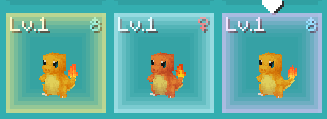 PC box highlight Custom highlight (option: change color) - Yellow = Shiny - Blue = Perfect IV - Purple = Shiny + Perfect IV
 -
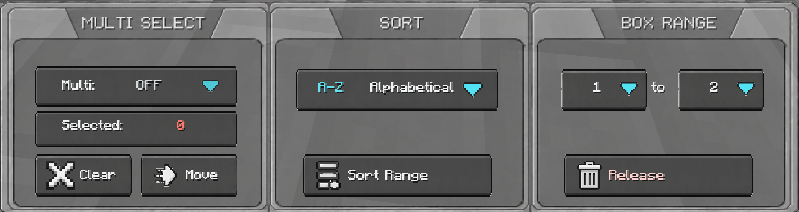 PC manager GUI Feature - Multi-select feature (Move/Place/Release pokemon) - Sorting feature - PC box range selector
 -
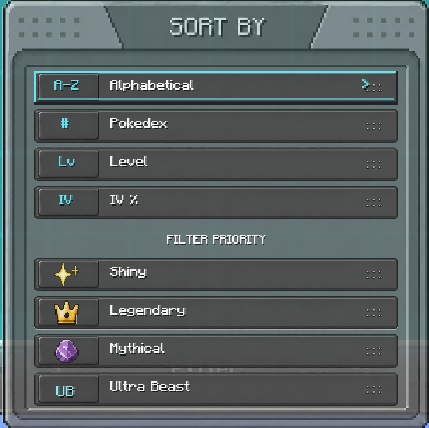 Sorting and Filter option Main Sorter: - A-Z - Pokedex - Level - IV % Filter (combines with the main sorting feature) - Shiny (+4 Priority) - Legendary (+3 Priority) - Mystical (+2 Priority) - Ultra Beast (+1 Priority)
 -
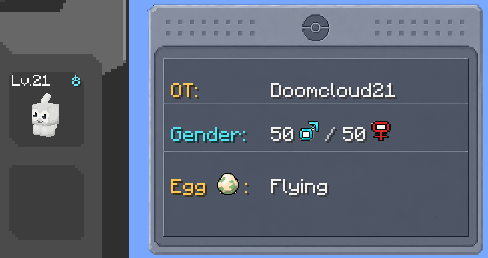 pokemon information display Displays pokemon OT, Gender ratio from egg hatching, and Egg Group.
Versions
Files
Relations
Project Relations
More like this
Similar Mods
Suggestions use data such as tags, dependencies, dependents, descriptions, titles, and more to rank how much they overlap with this mod.
On ModDex
Community snapshot
By the numbers
Statistics

Want to reach Minecraft players?
We're looking for a server hosting partner to feature here and other parts of the site. Interested? Send us a message!
Get in touchGet it on
Available Platforms
On ModDex
Community snapshot
By the numbers
Statistics
Resources