
CM's ALL
No reviews yet
Chain-harvest ores, trees, and terrain — MineAll, CutAll, and DigAll in one mod — without ever breaking your own builds. Player-placed blocks are skipped automatically, and everything is configurable from an in-game GUI.
Forge is a popular mod loader for versions 1.1+ of Minecraft.
Neoforge is a fork of the Minecraft Forge available for versions 1.20.1+ of Minecraft. Many Forge mods are compatible with Neoforge and vice versa.
Fabric is a mod loader for versions 1.14+ of Minecraft, particularly popular for client side and optimization mods.
Community voices
Reviews
Click once to include, again to exclude, again to clear
No reviews yet. Be the first to review this project!
Get it on
Available Platforms
 Modrinth
Compatibility
Supported Environments
About
Project Details
For authors
Embed Badge
If you're the author of this project, you can embed a live badge anywhere that supports HTML or Markdown. It updates automatically whenever ratings change.
Use HTML for any page that supports it, or Markdown for README files and Markdown-based descriptions.
Identifiers
Platform IDs
Resources
External Links
About
Description
CM'sALL
A customizable chain-harvesting mod featuring built-in block protection to safeguard your builds.
CM'sALL integrates three essential chain-harvesting functions into a single mod while addressing a common issue: accidental destruction of player structures. By tracking player-placed blocks, it ensures that your wooden cabins, stone walls, and custom pathways remain untouched during bulk harvesting.
Supported Versions
| Minecraft | Loaders | Architectury API |
|---|---|---|
| 1.21.1 | NeoForge, Fabric | 13.0.8 |
| 1.21 | NeoForge, Fabric | 13.0.8 |
| 1.20.1 | Forge, Fabric | 9.2.14 |
| 1.16.5 | Forge, Fabric | 1.32.68 |
| 1.12.2 | Forge | — (standalone, not required) |
Each Minecraft version and loader ships as its own jar (e.g. cmsall-forge-1.0.0+1.20.1.jar, cmsall-fabric-1.0.0+1.20.1.jar). Install only the single jar that matches your Minecraft version and loader.
Dependencies
- Architectury API — required on every version except 1.12.2, at the version shown per Minecraft version in the table above (9.2.14 for 1.20.1; 13.0.8 for 1.21 / 1.21.1; 1.32.68 for 1.16.5). Any compatible newer build for that Minecraft version also works.
- Fabric API — required by the Fabric jars.
- ModMenu — optional, Fabric only. Adds the in-game config button to the mod list (see Configuration). Without it, the mod still works; you just configure it from the pause menu or via commands.
Features
- Three Functions in One Mod
- MineAll: Vein-mines connected ores of the exact same type (e.g. harvesting coal won't accidentally trigger adjacent iron ores).
- CutAll: Fells entire trees and nether huge fungi. Overworld giant mushrooms can be added to the list if desired. Leaf chain-breaking can be optionally enabled.
- DigAll: Clears connected soft terrain blocks (dirt, sand, gravel, clay, etc.) within range — mixed terrain chains together.
- Build Protection (Player-Placed Block Tracking)
Tracks the coordinates of blocks placed by players and automatically skips them during chain-harvests. (Enabled by default for
CutAll; configurable per function.) - Denylist Certain blocks are never chain-broken regardless of the lists — spawners and end-portal frames by default, and you can add your own.
- In-Game GUI Configuration All features and server rules can be configured through an in-game menu — no manual JSON or TOML editing required. See Configuration.
- Per-Player Activation Modes Players can individually choose how to trigger the mod: Hold (Sneak), Toggle, Always On, or Sneak-Invert.
- Auto-Replant Optionally replants saplings automatically from the dropped items right after a tree is felled (configurable per player).
- Flexible Drop Management Options to send drops directly to the player's inventory, gather them at the break origin, or automatically despawn configured bulk junk blocks (like cobblestone or dirt).
- Tool Durability & Safety Includes a configurable durability consumption multiplier. The chain automatically stops before the tool's durability hits zero to prevent breakage.
- Server-Authoritative & Claim Mod Compatible Server configurations sync to clients and cannot be overridden by individual users. It fires standard break events to respect land-claim and protection mods.
Configuration
CM'sALL can be configured entirely in-game — no config files to edit by hand.
From the pause menu (anywhere):
- Press Esc to open the pause menu.
- Click the iron pickaxe icon located next to the Advancements button.
- Adjust your activation mode, toggles, or server-wide limits (OP only) instantly.
From the mod list (title screen):
- Open Mods → CM'sALL → Config to access your client settings (activation mode, replant, protection). Server settings aren't shown here because they belong to a world.
- On Forge / NeoForge this button is built in. On Fabric it requires ModMenu to be installed.
Key Bindings & Utilities
- Toggle Keybind: Unbound by default to prevent conflicts. You can bind
CM'sALL: Toggleunder Options → Controls to quickly flip the mod on and off without opening menus. - Player-specific preferences (activation mode, replant toggle, protection) are saved on the server per player UUID.
Technical Specifications & Performance
- Chain Caps: Each harvest is limited by
globalMaxBlocks(Default: 256, Max: 8192) to keep chains bounded. - TPS Protection (
perTickBudget): By default (0), the entire chain is processed within a single tick. For high-population servers, setting this value above0splits the workload across multiple ticks (e.g. breaking N blocks per tick), preventing server lag and TPS drops. - Tracking Limits: Per-function world-wide tracking caps (
trackCutMaxdefault 16384;trackMineMax/trackDigMaxdefault 4096). When a cap is reached, older records are evicted using a FIFO (First-In, First-Out) policy.
Commands
All functions can also be managed via the /cmsall command structure.
For All Players
/cmsall status— Displays your current settings./cmsall mode <hold|toggle|always|sneak_invert>— Changes your activation mode./cmsall toggle— Toggles your chain-harvesting capability./cmsall replant <true|false>— Toggles auto-replanting for yourself./cmsall protect <true|false>— Toggles skipping your own placed blocks.
For Operators (requires permission level ≥ editPermissionLevel, default 3)
/cmsall enable <true|false>— Master switch for the mod./cmsall reload— Reloads the server configuration file (config/cmsall-server.json)./cmsall <mine|cut|dig> <block|tool> <add|remove> <id>— Adds or removes block/tool definitions (supports modded IDs)./cmsall track <enable|max|overflow|reset|status>— Manages placed-block tracking.
Note: Resource IDs entered without a namespace default to minecraft:.
Known Limitations (Forge / NeoForge)
To ensure strict compatibility with protection, claim, and logging mods, CM'sALL fires a standard BlockEvent.BreakEvent for every single block destroyed in a chain under the Forge/NeoForge environment. Consequently, other mods tracking break events (such as quest lines, anti-cheats, or tool-XP mods) will process individual events per block. Fabric handles this via its harvest query API and does not emit duplicate events.
For Developers (API)
CM'sALL exposes a small, loader-agnostic API so other mods that move blocks (custom pistons, conveyors, and similar block-moving mods) can keep CM'sALL's player-placed protection following those blocks. Vanilla pistons are handled automatically — this is only for custom, non-piston movers. Call it on the server thread.
Class: cmsall.api.CmsAllTracking
Recommended pattern — bracket the move, then relocate only the blocks that actually landed, after moving. If the move fails partway, the un-moved source blocks keep their protection:
import cmsall.api.CmsAllTracking;

CmsAllTracking.beginMove();
try {
    // ... your mod performs its actual setBlock moves here ...
    CmsAllTracking.relocate(level, landedFromTo); // only blocks that landed; Map<BlockPos, BlockPos>: source -> destination
} finally {
    CmsAllTracking.endMove();
}
The bracket is re-entrant — nesting beginMove()/endMove() (e.g. helpers that each bracket a move) is safe. You may skip the bracket and relocate before clearing the source only if the move is a single step that cannot fail.
relocate(ServerLevel, BlockPos from, BlockPos to)— move one record; returns how many were tracked there (0 or 1).relocate(ServerLevel, Map<BlockPos, BlockPos>)— bulk move (two-phase; safe for shifting/overlapping sets); returns how many records were carried.beginMove()/endMove()— suppress record removal during the move; always pair them via try/finally.
Available on every version and loader. (On 1.12.2 the API works for custom movers, but vanilla pistons are not auto-hooked.)
Partial failures. Relocating first and then failing leaves the still-present source block protected by nothing: CM'sALL's orphan sweep removes the now-bogus destination record (its stored block id no longer matches the block there), but it cannot re-create a record for an unrecorded source block. So relocate-after-landing is the fail-safe order; relocate-first is safe only when the move cannot fail.
Soft dependency. Referencing these methods when CM'sALL is not installed risks NoClassDefFoundError. The robust idiom is to isolate every CM'sALL reference in one dedicated integration class and touch it only when CM'sALL is present — class linking/verification can load referenced types before your guard line runs (e.g. when a type appears in a method signature or field), so "this code path doesn't execute" is not always enough. A presence check around an isolated reference, or a compileOnly dependency, both work.
Supported Languages
CM'sALL's in-game GUI, configuration menu, and command feedback automatically follow your Minecraft client's language setting — no extra setup required. Please note that there may be mistranslations.
39 languages supported:
- 🇺🇸 English
- 🇯🇵 Japanese
- 🇰🇷 Korean
- 🇨🇳 Chinese (Simplified)
- 🇹🇼 Chinese (Traditional)
- 🇩🇪 German
- 🇫🇷 French
- 🇪🇸 Spanish (Spain)
- 🇲🇽 Spanish (Mexico)
- 🇧🇷 Portuguese (Brazil)
- 🇵🇹 Portuguese (Portugal)
- 🇮🇹 Italian
- 🇳🇱 Dutch
- 🇵🇱 Polish
- 🇷🇺 Russian
- 🇺🇦 Ukrainian
- 🇹🇷 Turkish
- 🇸🇪 Swedish
- 🇳🇴 Norwegian
- 🇩🇰 Danish
- 🇫🇮 Finnish
- 🇮🇸 Icelandic
- 🇭🇺 Hungarian
- 🇨🇿 Czech
- 🇸🇰 Slovak
- 🇷🇴 Romanian
- 🇧🇬 Bulgarian
- 🇭🇷 Croatian
- 🇸🇮 Slovenian
- 🇷🇸 Serbian
- 🇬🇷 Greek
- 🇮🇩 Indonesian
- 🇲🇾 Malay
- 🇻🇳 Vietnamese
- 🇹🇭 Thai
- 🇮🇳 Hindi
- 🇮🇱 Hebrew
- 🇸🇦 Arabic
- 🇪🇸 Catalan
- 🇱🇹 Lithuanian
License
This project is licensed under the MIT License — © 2026 G.Vael.
Screenshots
Gallery
-
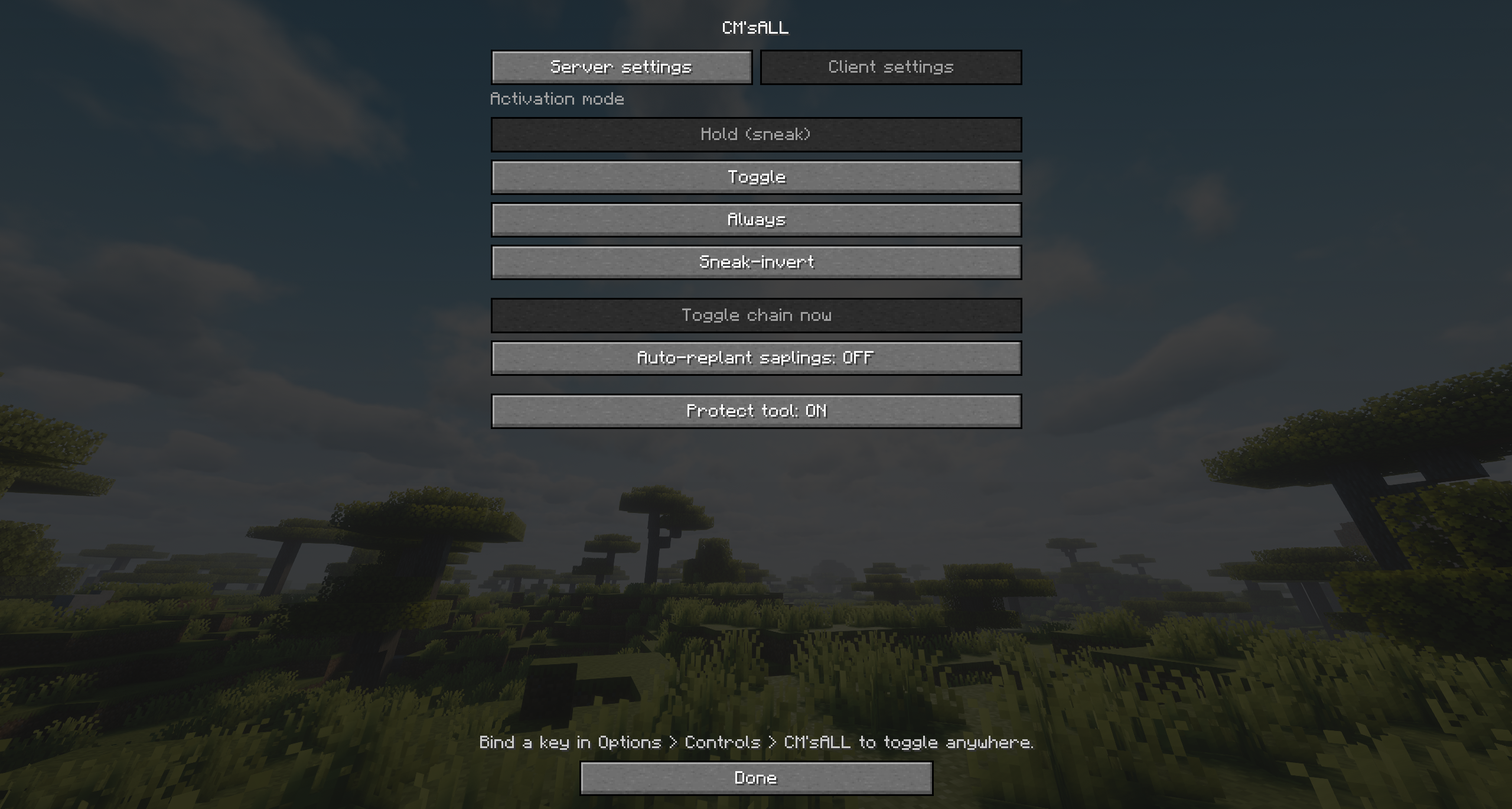 Per-Player Client Preferences Under the "Client settings" tab, individual players can choose their preferred activation mode (Hold, Toggle, Always, or Sneak-invert), toggle personal auto-replanting, and enable tool protection to prevent breaking favorite gear.
 -
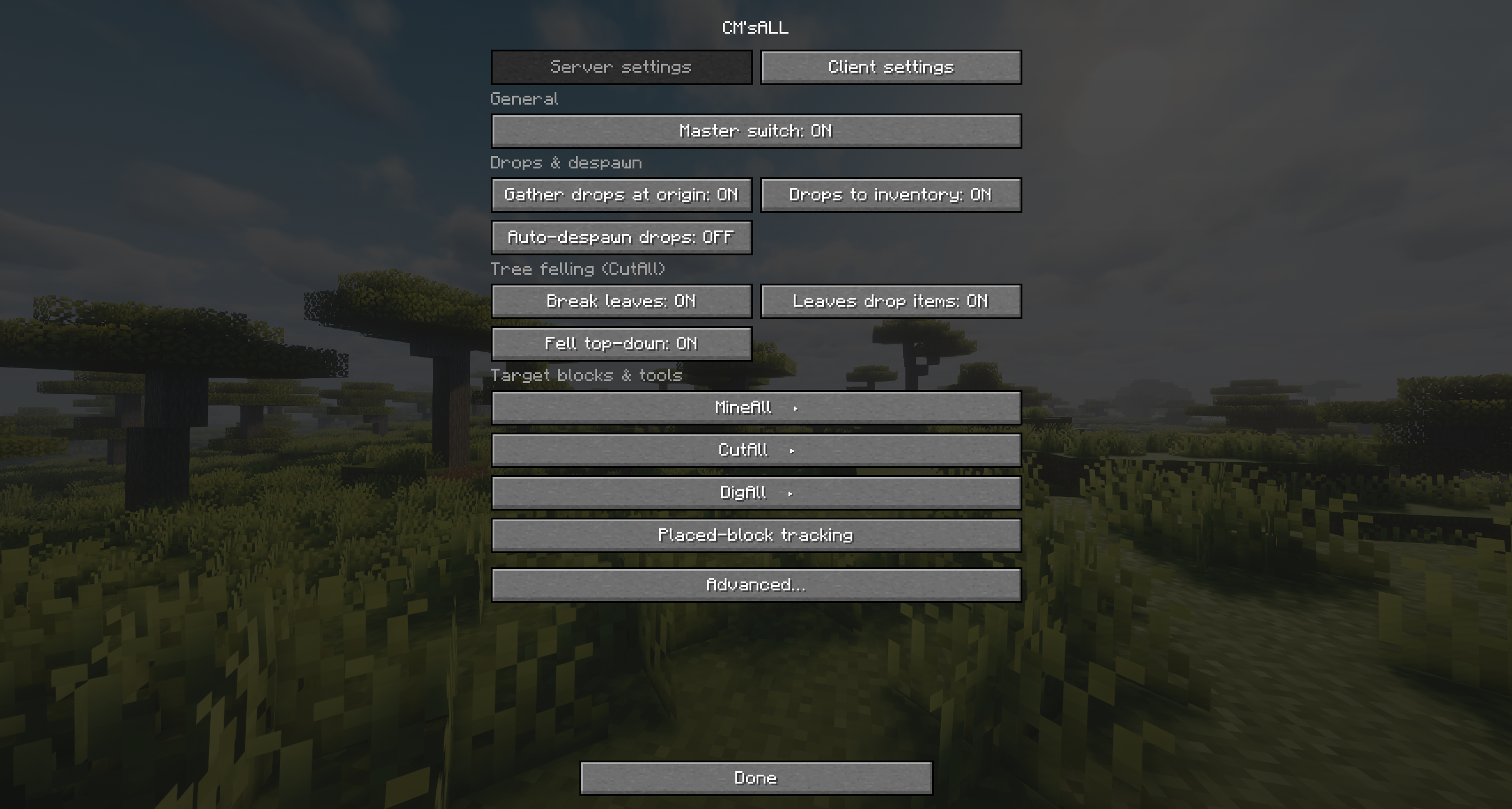 Server Settings Menu The main configuration hub accessible via the pause screen. Easily toggle the master switch, manage drop options (gather at origin / directly to inventory), and customize tree-felling behaviors such as leaf-breaking and top-down felling.
 -
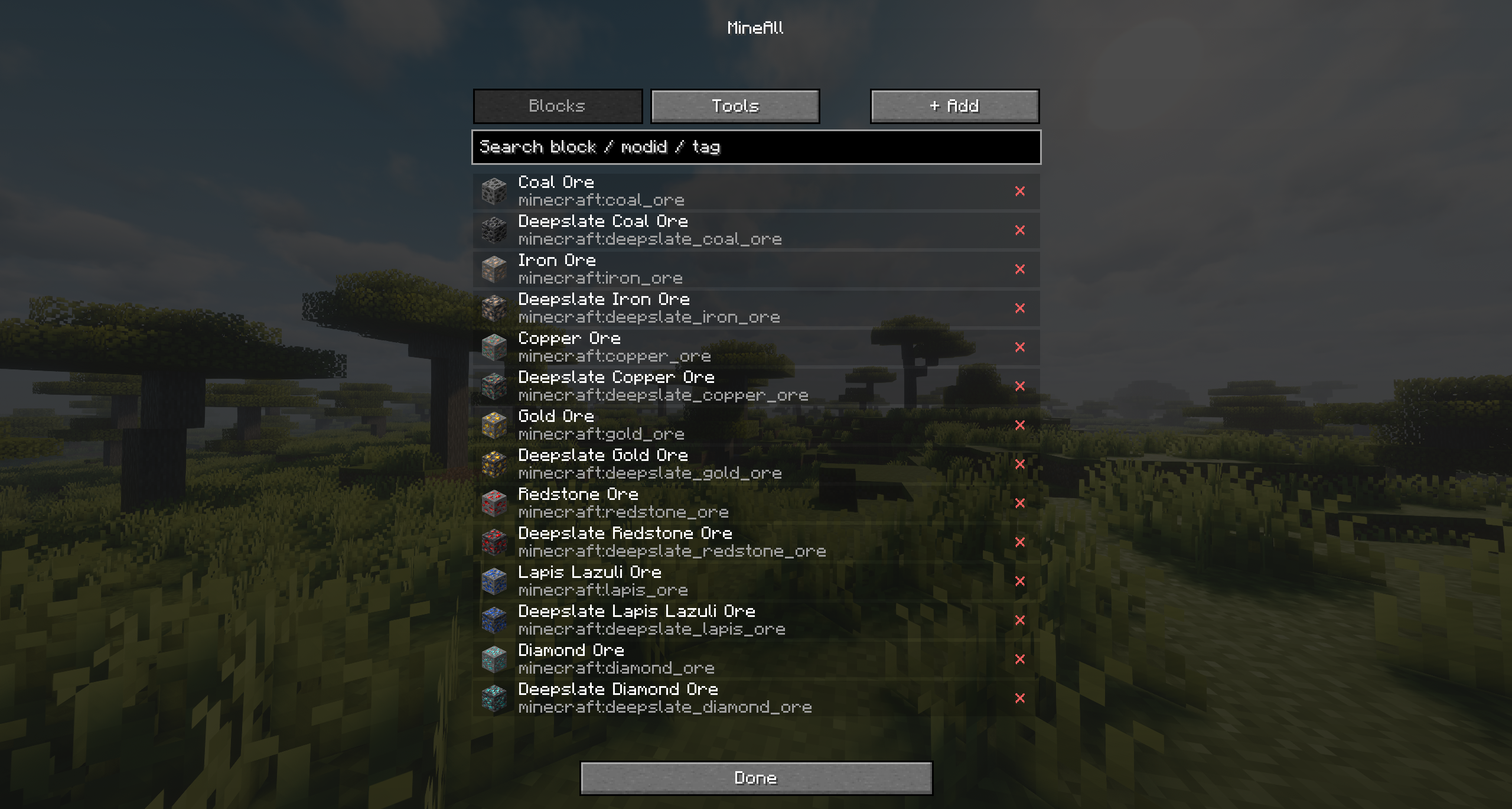 Block List & Quick Removal View all registered blocks for each harvesting function. Easily remove any vanilla or modded block from the chain list with a single click on the "×" button.
 -
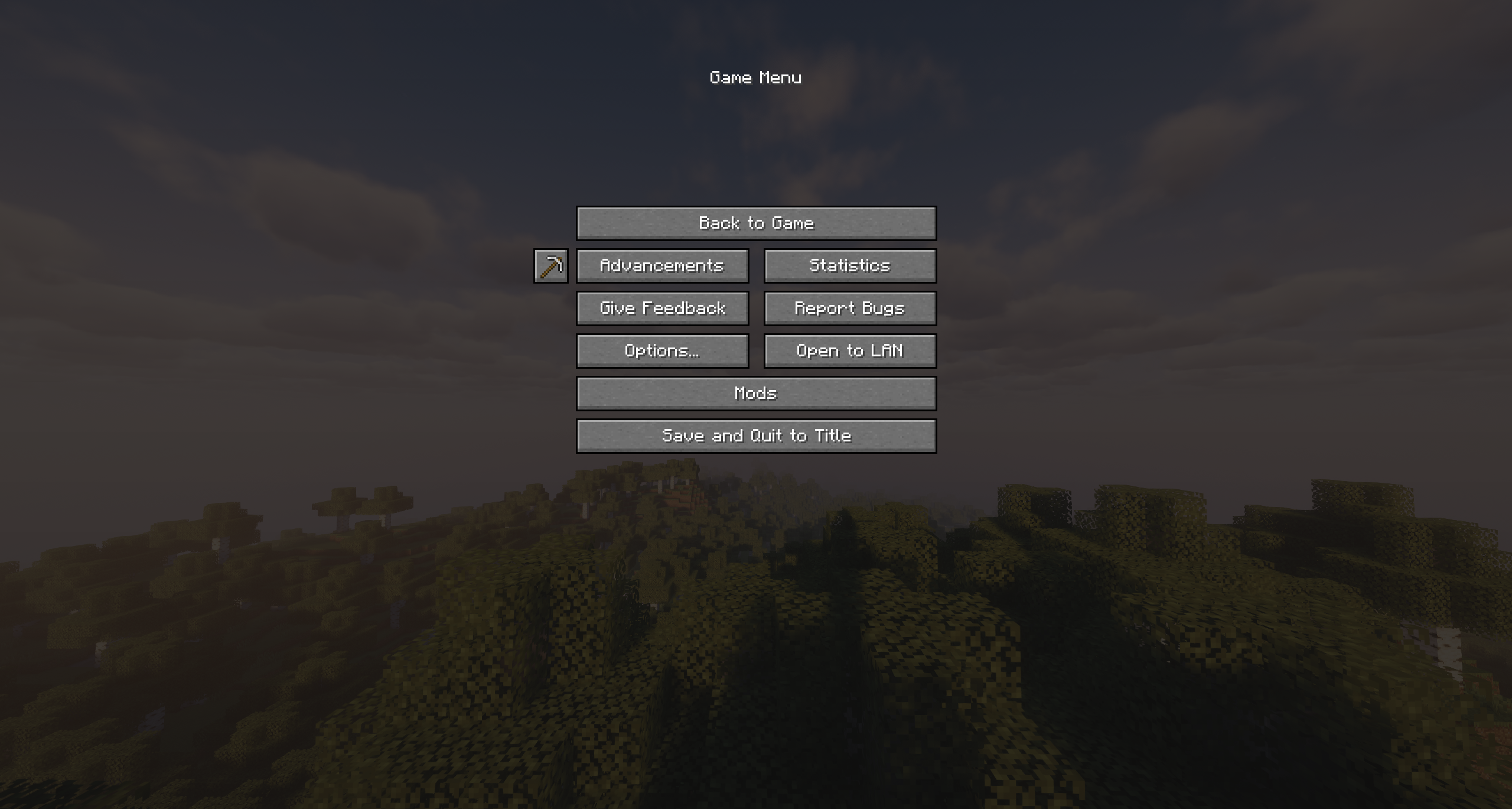 Seamless Game Menu Integration A custom iron-pickaxe button is added directly to the left of the "Advancements" button in the pause menu (Esc). This allows immediate access to all mod settings at any time, eliminating the need to type cumbersome commands in the chat.
 -
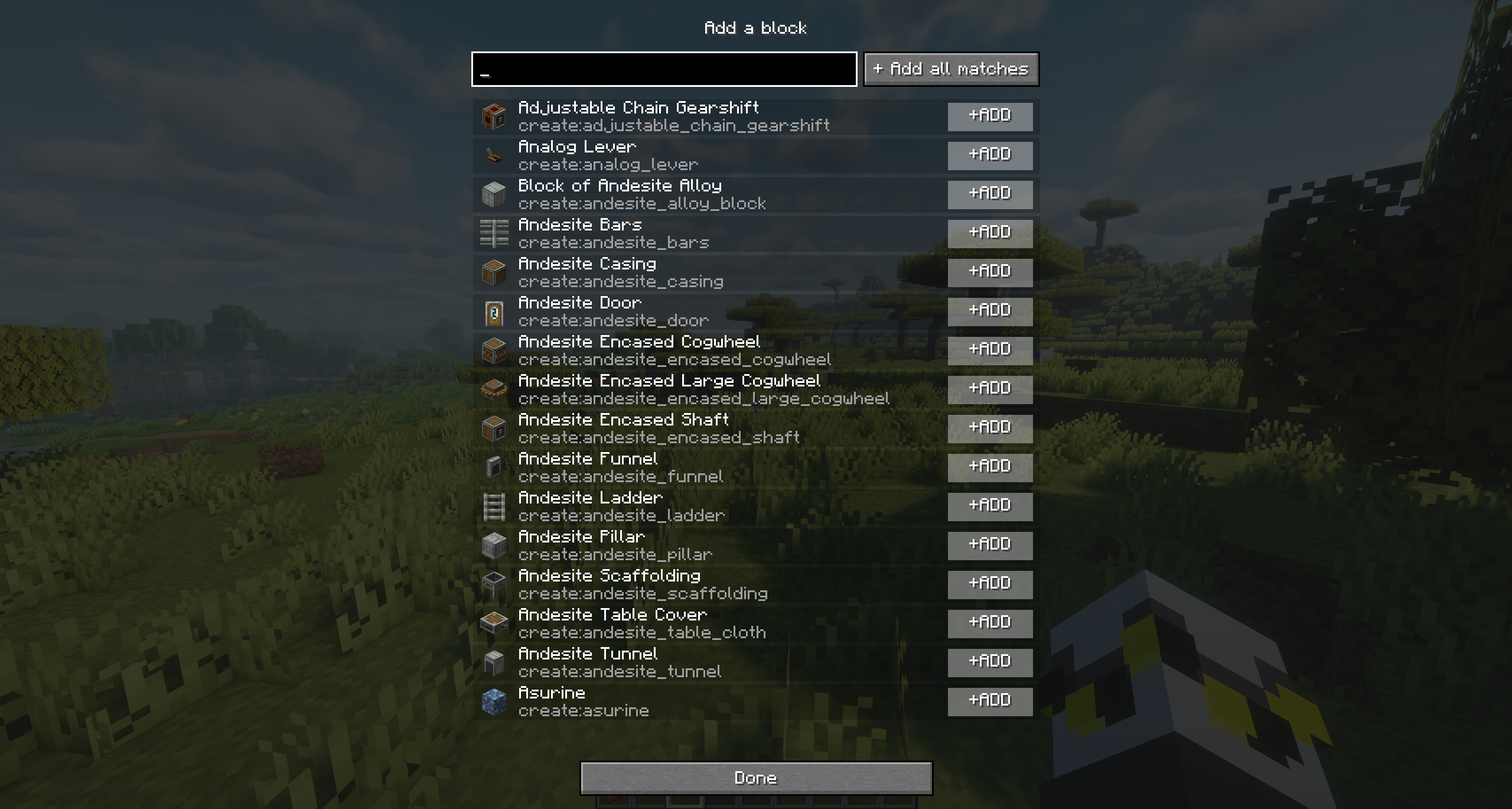 Seamless Modded Block Integration Search through any block in the game registries to expand your harvest lists. Supports full text matching and bulk-adding from other major mods (such as Create, shown here) via the "Add all matches" button.
 -
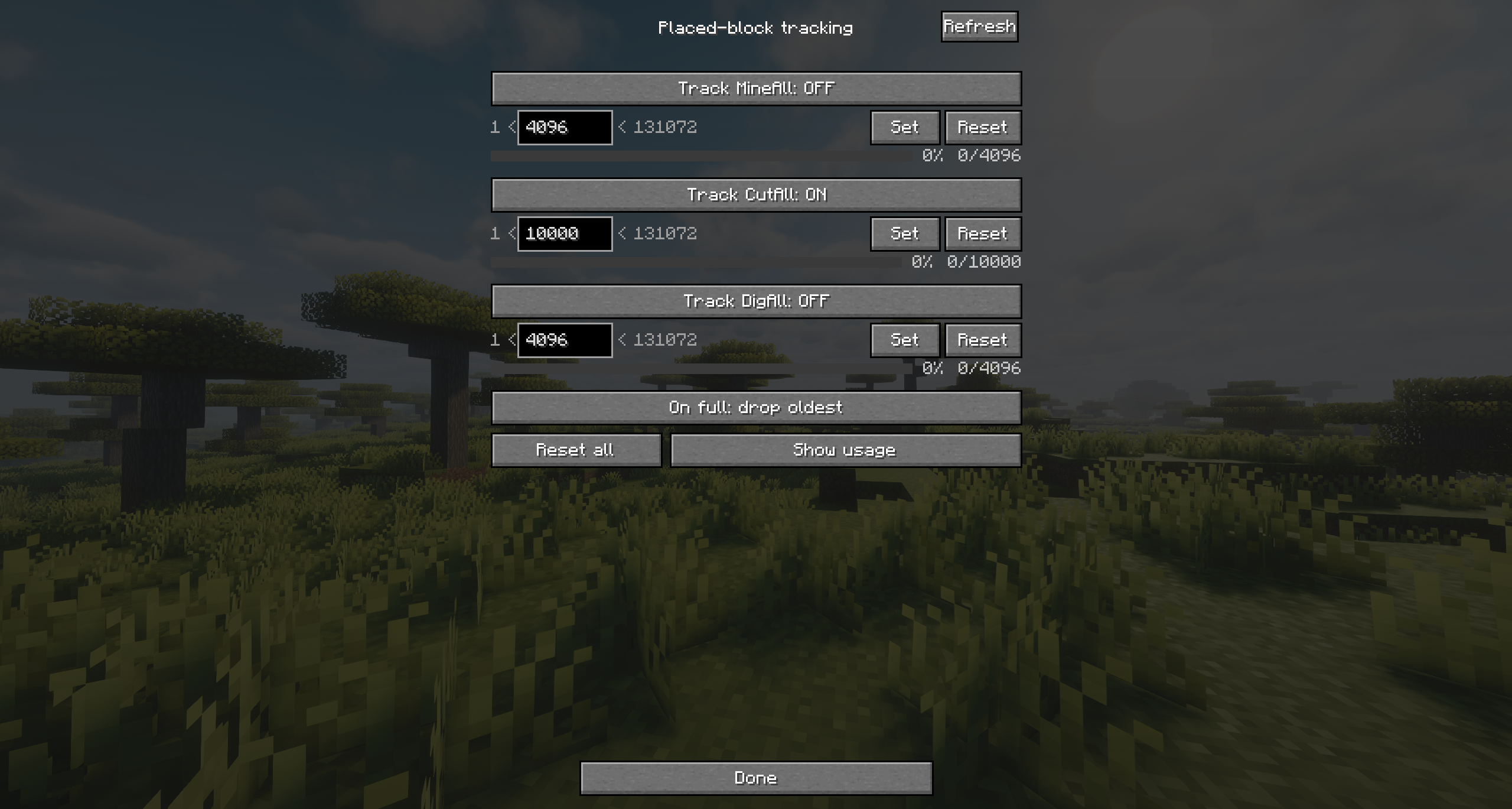 Advanced Placed-Block Tracking Advanced Placed-Block Tracking The core system that safeguards your builds. Independently toggle tracking for each function and set precise limits on remembered blocks using text inputs or sliders. You can also define the overflow behavior (e.g., dropping
Versions
Files
Relations
Project Relations
More like this
Similar Mods
Suggestions use data such as tags, dependencies, dependents, descriptions, titles, and more to rank how much they overlap with this mod.
On ModDex
Community snapshot
By the numbers
Statistics

Want to reach Minecraft players?
We're looking for a server hosting partner to feature here and other parts of the site. Interested? Send us a message!
Get in touchGet it on
Available Platforms
On ModDex
Community snapshot
By the numbers
Statistics
Resources