
Community listing page, reviews may not be monitored by the author.
Cobble EV Tracker

No reviews yet
Client-side EV training HUD for Cobblemon: EV goals per Pokémon, recommended spreads, goal and overflow alerts, EVs gained after battles.

Community voices
Reviews
No reviews yet. Be the first to review this project!
Get it on
Available Platforms
About
Project Details
For authors
Embed Badge
If you're the author of this project, you can embed a live badge anywhere that supports HTML or Markdown. It updates automatically whenever ratings change.
Use HTML for any page that supports it, or Markdown for README files and Markdown-based descriptions.
Identifiers
Platform IDs
Resources
External Links
About
Description
Cobble EV Tracker
A client-side EV training companion for Cobblemon.
Cobblemon already shows your Pokémon's EVs in the summary screen, but you have to open it after every battle, and it doesn't know what you're aiming for. Cobble EV Tracker puts your training on screen:
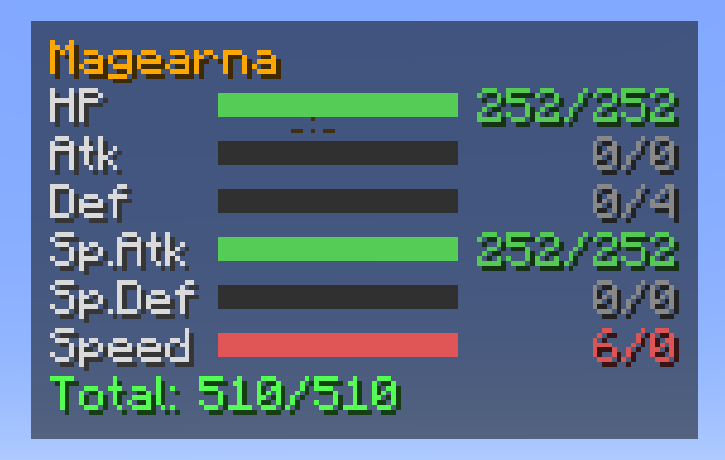
- 📊 Training HUD with one bar per stat, your goal and the total out of 510.
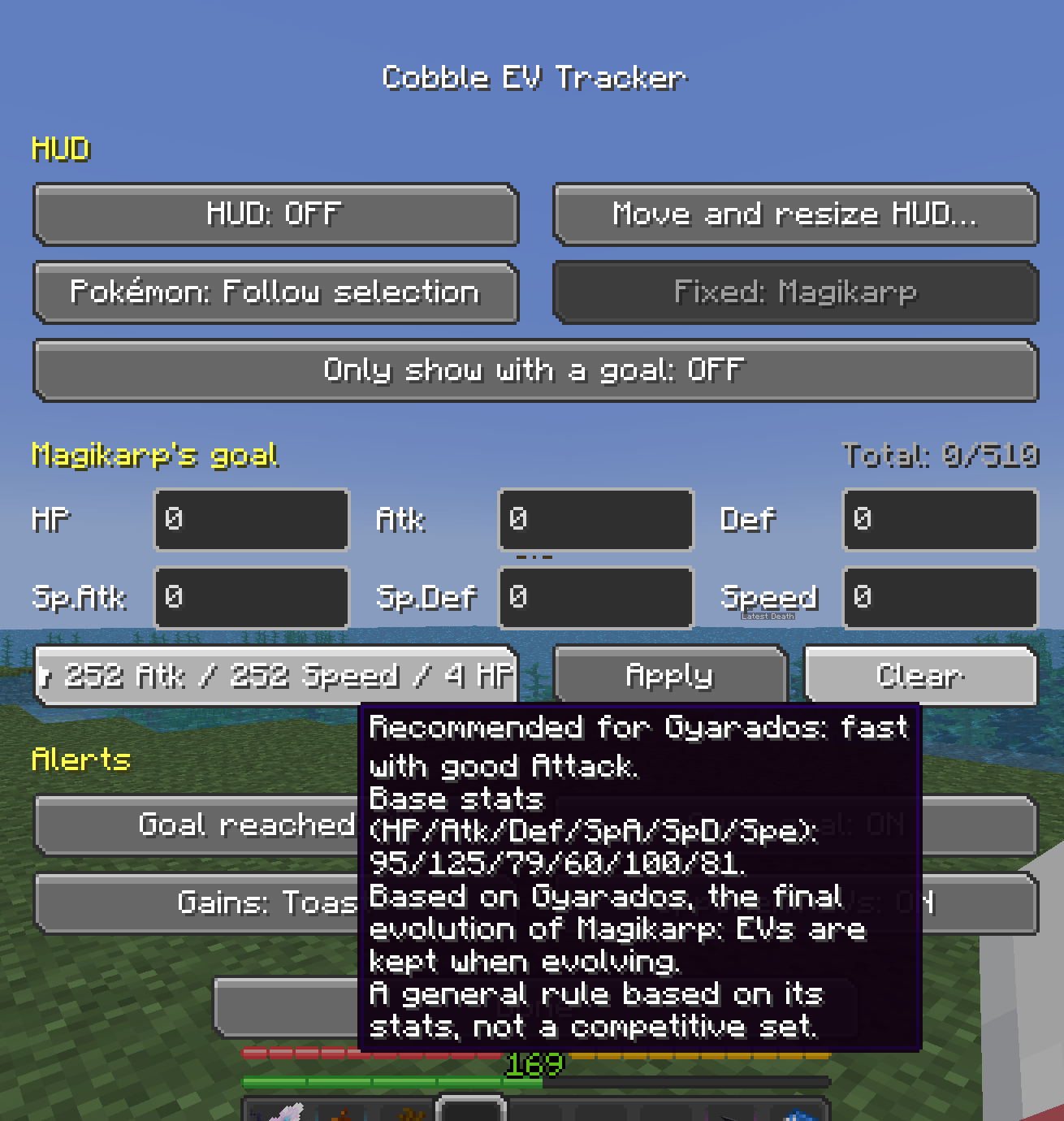
- 🎯 EV goals per Pokémon, with a recommended spread for each one.
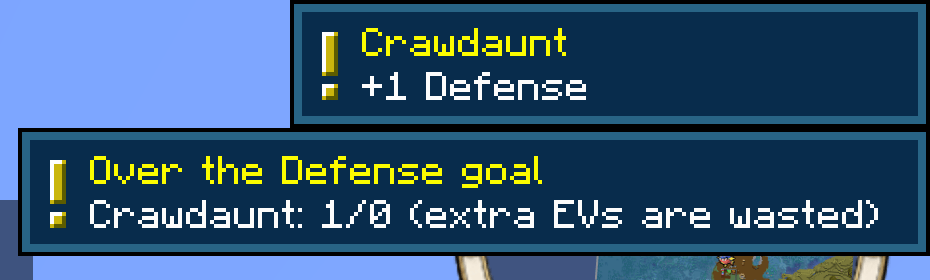
- 🔔 Alerts when a stat reaches its goal, when it goes over (wasted EVs!) and when training is complete.
- ➕ Battle summary with the EVs your whole party gained, plus vitamins and berries right away.
- 📖 EV yield in the Pokédex: see which EVs each species gives before you go hunting.
Available for Fabric and NeoForge. Works on any server: it's client-side only, nothing to install on the server.
📊 Training HUD
- Shows the Pokémon you select with the arrow keys in Cobblemon's party HUD, or a fixed Pokémon of your choice (remembered even if you reorder your party).
- Bar colors: grey = 0, blue = in progress, green = goal reached, red = over the goal.
- Move and resize it with the mouse: drag it anywhere, mouse wheel to change its size (×0.5 to ×2), arrow keys to fine-tune. It stays anchored to its nearest corner if you change resolution or GUI scale.
- Hides itself during battles (Cobblemon's battle UI uses every corner), with F1/F3 and when a screen is open.
- Option to show it only for Pokémon that have a goal.
🎯 EV goals
- Set a goal for each stat (0–252, up to 510 in total) for each Pokémon. Goals are saved per Pokémon, not per party slot.
- ★ Recommended spread for the selected Pokémon, based on its base stats: fast attacker, slow attacker, fast support or wall. EVs are kept when evolving, so it's calculated for the final evolution when there's only one path (Magikarp → Gyarados, Mareep → Ampharos). Works offline and with any species.
- Quick templates: 252/252/4 physical and special sweepers and walls.
🔔 Alerts
- Goal reached for a stat (toast + soft sound) and Training complete! when every stat matches.
- Over the goal: toast and a chat hint, since extra EVs are wasted (an EV-reducing berry lowers them).
- Battle summary: when a battle ends, one alert lists the EVs every party Pokémon gained (as a toast or in chat). You can switch to one alert per change, both, or turn it off. Vitamins and berries are shown right away.
- Opponent EVs (optional, off by default): when a battle against a wild Pokémon starts, shows the EVs its species gives.
📖 EVs in the Pokédex
In Cobblemon's Pokédex, the base stats tab shows a green +N next to each stat the species gives as EV yield (hover it for details). Handy to plan where to train. Can be turned off in the menu.
⚙️ Menu
Press N (rebindable), use the config button in Mod Menu (Fabric) or the Config button in the mods list (NeoForge). The menu scales itself to fit small windows. Everything is saved to config/cobbleevtracker/.
🛡️ Fair play
Cobble EV Tracker is not a radar. It only uses:
- your own Pokémon: the same EVs you already see in their summary screen;
- public species data (base stats, EV yield), the same information any Pokédex shows.
It never scans the world, entities or spawns, never shows IVs or EVs of other players' Pokémon, and the opponent EV yield (off by default) only covers the battle you are already in.
Still, every server has its own rules: check them before using any mod.
📦 Requirements
Available for Fabric and NeoForge (download the file for your loader).
- Minecraft 1.21.1
- Cobblemon ≥ 1.7.3 (tested up to 1.8.2)
- Fabric: Fabric Loader ≥ 0.16.0 and Fabric API. Recommended: Mod Menu.
- NeoForge: NeoForge 21.1.x. Cobblemon itself needs Kotlin for Forge on NeoForge.
Languages: English, Español.
Also by the same author: Cobble Hunt Log (wild battle recorder and shiny hunt counter) and Cobble Party HUD (move and resize Cobblemon's party HUD). The HUDs can be placed side by side: each one stays visible while you move the other.
Español
Cobble EV Tracker es un mod solo de cliente para Cobblemon que:
- Muestra un HUD de entrenamiento de EVs (barras por stat, objetivo y total sobre 510), que se mueve y escala con el ratón.
- Guarda objetivos de EVs por Pokémon, con un reparto recomendado (★) según sus stats base (pensando en su evolución final) y plantillas 252/252/4.
- Avisa al cumplir una stat, al pasarte y al completar el entrenamiento, y al acabar cada combate enseña un resumen con los EVs ganados por todo el equipo (las vitaminas y bayas, al momento).
- En la Pokédex marca con un +N verde los EVs que da cada especie.
- Opcional: los EVs que da el salvaje contra el que combates.
- Menú con la tecla N, desde Mod Menu (Fabric) o con el botón Config de la lista de mods (NeoForge). Disponible para Fabric y NeoForge.
No es un radar: solo usa tus propios Pokémon y datos públicos de especie. No escanea el mundo ni muestra datos de Pokémon ajenos.
Pokémon is a trademark of Nintendo, Game Freak and The Pokémon Company. Cobble EV Tracker is a fan-made mod, not affiliated with them or with the Cobblemon team. · Source code (MIT): GitHub
Screenshots
Gallery
-
 3-menu-recomendado.png 3-menu-recomendado.png
 -
 1-hud.png 1-hud.png
 -
 2-avisos.png 2-avisos.png
Versions
Files
Relations
Project Relations
More like this
Similar Mods
Suggestions use data such as tags, dependencies, dependents, descriptions, titles, and more to rank how much they overlap with this mod.
On ModDex
Community snapshot
By the numbers
Statistics

Get it on
Available Platforms
On ModDex
Community snapshot
By the numbers
Statistics
Resources