
Community listing page, reviews here may not be monitored by the author.
Cobble Helper


No reviews yet
Cobble Helper adds a helpful mob that automates cobblestone generation by working directly at a Cobblestone Generator.

Community voices
Reviews
No reviews yet. Be the first to review this project!
Get it on
Available Platforms
Compatibility
Supported Environments
Must be installed on both the client and the server.
About
Project Details
For authors
Embed Badge
If you're the author of this project, you can embed a live badge anywhere that supports HTML or Markdown. It updates automatically whenever ratings change.
Use HTML for any page that supports it, or Markdown for README files and Markdown-based descriptions.
Identifiers
Platform IDs
About
Description
Cobble Helper
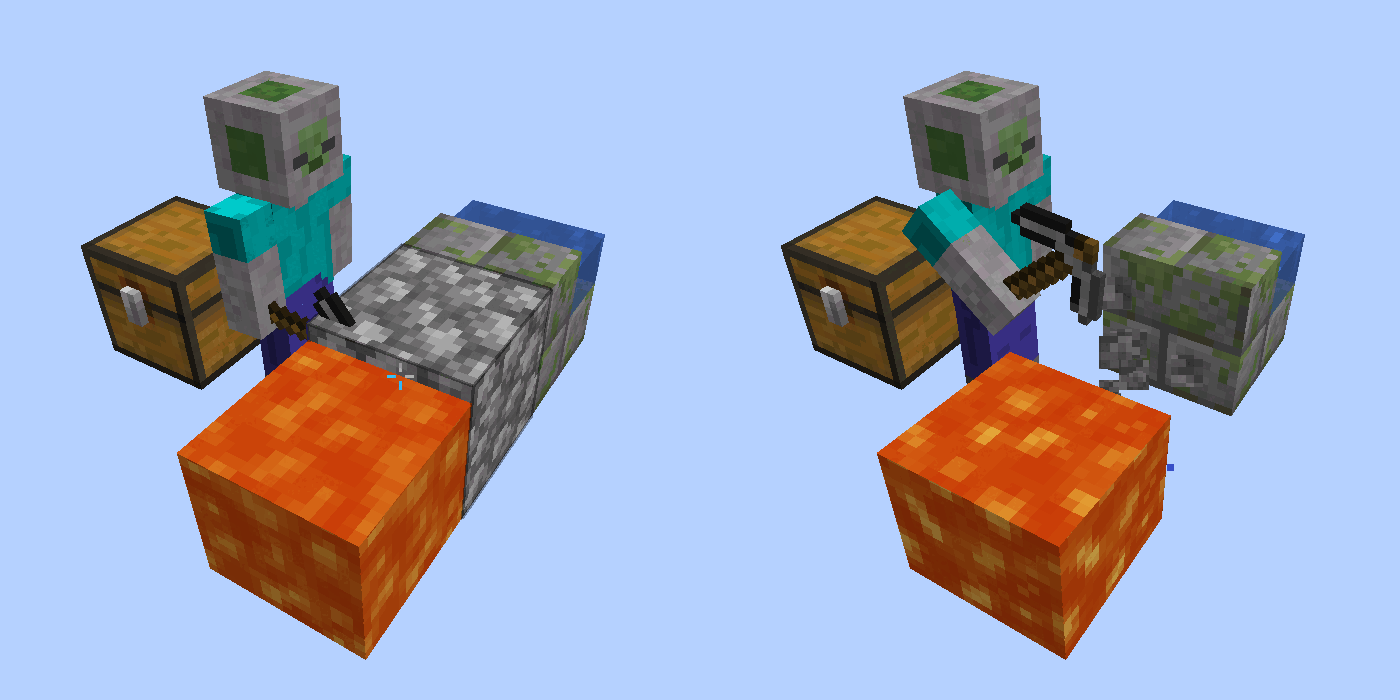
Cobble Helper adds a small but surprisingly capable automation mob that takes care of one of the most annoying early-game tasks in Minecraft (especially Skyblock): mining blocks from generators.
By default, it is used for cobblestone generators, but the mined block can be fully configured.
Instead of standing around AFK and holding down your mouse button, you can hand that job over to a dedicated helper that mines blocks for you and puts them straight into an inventory.
What does the Cobble Helper do?
- Automatically mines a configurable block in front of it
(Cobblestone by default) - Inserts mined blocks into an inventory placed behind it
- Plays a mining animation and sound while working
- Can be paused using Redstone
- Can be upgraded to improve speed and mining range

How to obtain the Cobble Helper
The Cobble Helper cannot be crafted.
Instead, you obtain it by converting a regular Minecraft Zombie through a special interaction:
- Apply a configurable status effect to a normal Zombie
(Slowness by default) - Right-click the affected Zombie with the configured block
(Cobblestone by default) - The Zombie will convert and drop a Cobble Helper Spawn Item
This interaction is intentionally designed to feel more like a ritual than a normal recipe and is documented via EMI world interaction hints.
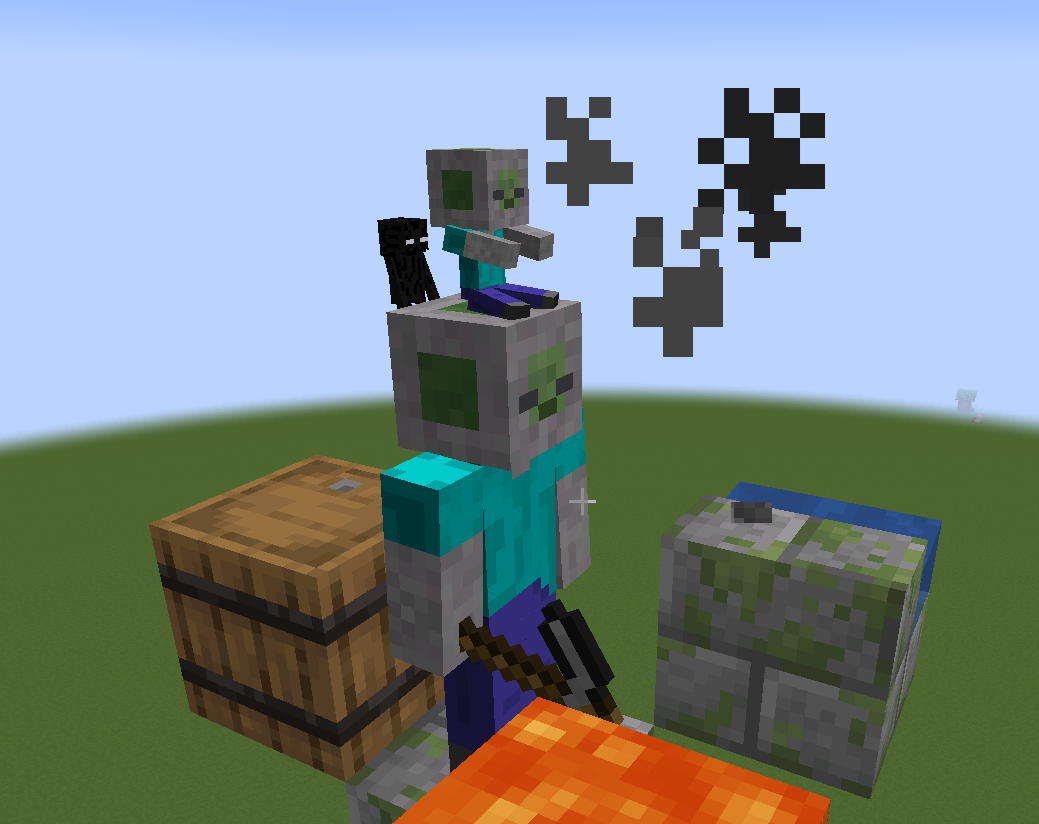
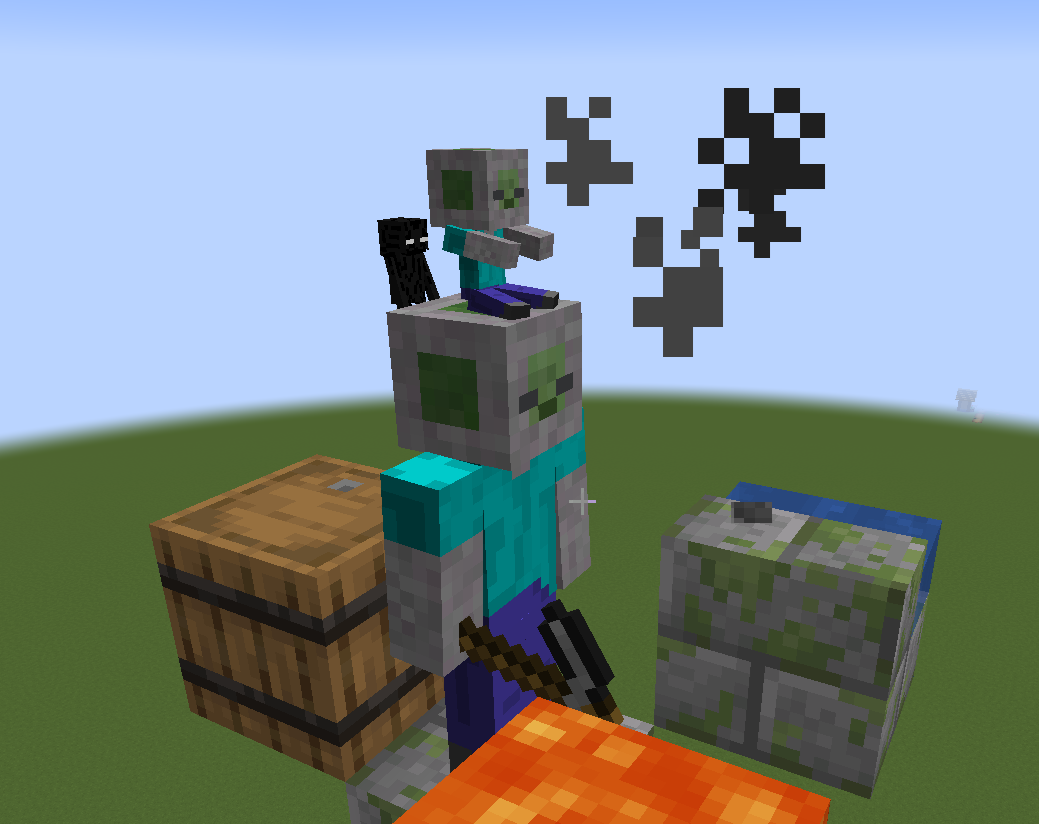
Upgrades: Speed & Range
With the latest update, the Cobble Helper can now be upgraded to make it more efficient.
Speed Upgrade
Makes the helper mine blocks faster.Range Upgrade
Increases how far in front of itself the helper can mine.
Upgrades follow the same ritual-based concept as creating the Cobble Helper itself:
- Capture the required mob
- Baby Zombie for the Speed Upgrade
- Enderman for the Range Upgrade
- Perform the same type of conversion ritual
- Apply the upgrade directly to an existing Cobble Helper
Redstone & Inventory Behavior
- An inventory (chest, barrel, hopper, etc.) must be placed behind the helper
- If no inventory is found, the helper will stop working and notify nearby players
- If the inventory is full, mining pauses automatically until space is available
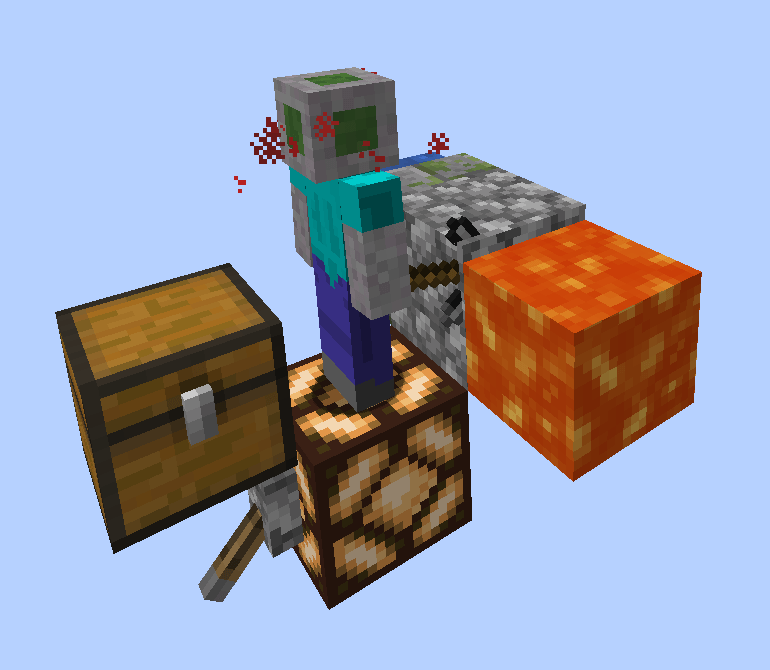
The Cobble Helper can also be disabled using Redstone:
- If the block below the helper receives a Redstone signal, mining stops immediately
- While powered, no blocks are mined or inserted
- A small particle effect appears around the helper’s head to indicate the paused state

Notes
- The Cobble Helper does not load chunks
- It only works while its chunk is loaded
- Intended as lightweight automation, not a full quarry replacement
Planned Improvements
- Better textures


Cobble Helper
Cobble Helper adds a small but surprisingly capable automation mob that takes care of one of the most annoying early-game tasks in Minecraft (especially Skyblock): mining blocks from generators.
By default, it is used for cobblestone generators, but the mined block can be fully configured.
Instead of standing around AFK and holding down your mouse button, you can hand that job over to a dedicated helper that mines blocks for you and puts them straight into an inventory.
What does the Cobble Helper do?
- Automatically mines a configurable block in front of it
(Cobblestone by default) - Inserts mined blocks into an inventory placed behind it
- Plays a mining animation and sound while working
- Can be paused using Redstone
- Can be upgraded to improve speed and mining range
How to obtain the Cobble Helper
The Cobble Helper cannot be crafted.
Instead, you obtain it by converting a regular Minecraft Zombie through a special interaction:
- Apply a configurable status effect to a normal Zombie
(Slowness by default) - Right-click the affected Zombie with the configured block
(Cobblestone by default) - The Zombie will convert and drop a Cobble Helper Spawn Item
This interaction is intentionally designed to feel more like a ritual than a normal recipe and is documented via EMI world interaction hints.
Upgrades: Speed & Range
With the latest update, the Cobble Helper can now be upgraded to make it more efficient.
-
Speed Upgrade
Makes the helper mine blocks faster. -
Range Upgrade
Increases how far in front of itself the helper can mine.
Upgrades follow the same ritual-based concept as creating the Cobble Helper itself:
- Capture the required mob
- Baby Zombie for the Speed Upgrade
- Enderman for the Range Upgrade
- Perform the same type of conversion ritual
- Apply the upgrade directly to an existing Cobble Helper
Redstone & Inventory Behavior
- An inventory (chest, barrel, hopper, etc.) must be placed behind the helper
- If no inventory is found, the helper will stop working and notify nearby players
- If the inventory is full, mining pauses automatically until space is available
The Cobble Helper can also be disabled using Redstone:
- If the block below the helper receives a Redstone signal, mining stops immediately
- While powered, no blocks are mined or inserted
- A small particle effect appears around the helper’s head to indicate the paused state
Notes
- The Cobble Helper does not load chunks
- It only works while its chunk is loaded
- Intended as lightweight automation, not a full quarry replacement
Planned Improvements
- Better textures
Screenshots
Gallery
-
 Upgrades
 -
 rs.png rs.png
 -
 Cobble Helper
-
 Now with Upgrades
 -
 Cobble Helper Gif of the Helper in action
Versions
Files
Relations
Project Relations
More like this
Similar Mods
Suggestions use data such as tags, dependencies, dependents, descriptions, titles, and more to rank how much they overlap with this mod.
On ModDex
Community snapshot
By the numbers
Statistics
 (opens in a new tab)
Get it on
Available Platforms
On ModDex
Community snapshot
By the numbers