
Cobblemon Characters
No reviews yet
O mod that adds characters with buffs and commands to cobblemon
Includes a large focus on traversing worlds with enhanced world generation, structures, dungeons, and more for players to find unique loot.
Fabric is a mod loader for versions 1.14+ of Minecraft, particularly popular for client side and optimization mods.
Community voices
Reviews
Click once to include, again to exclude, again to clear
No reviews yet. Be the first to review this project!
Get it on
Available Platforms
 CurseForge
 Modrinth
Compatibility
Supported Environments
About
Project Details
For authors
Embed Badge
If you're the author of this project, you can embed a live badge anywhere that supports HTML or Markdown. It updates automatically whenever ratings change.
Use HTML for any page that supports it, or Markdown for README files and Markdown-based descriptions.
Identifiers
Platform IDs
Resources
External Links
About
Description
# Cobblemon Characters
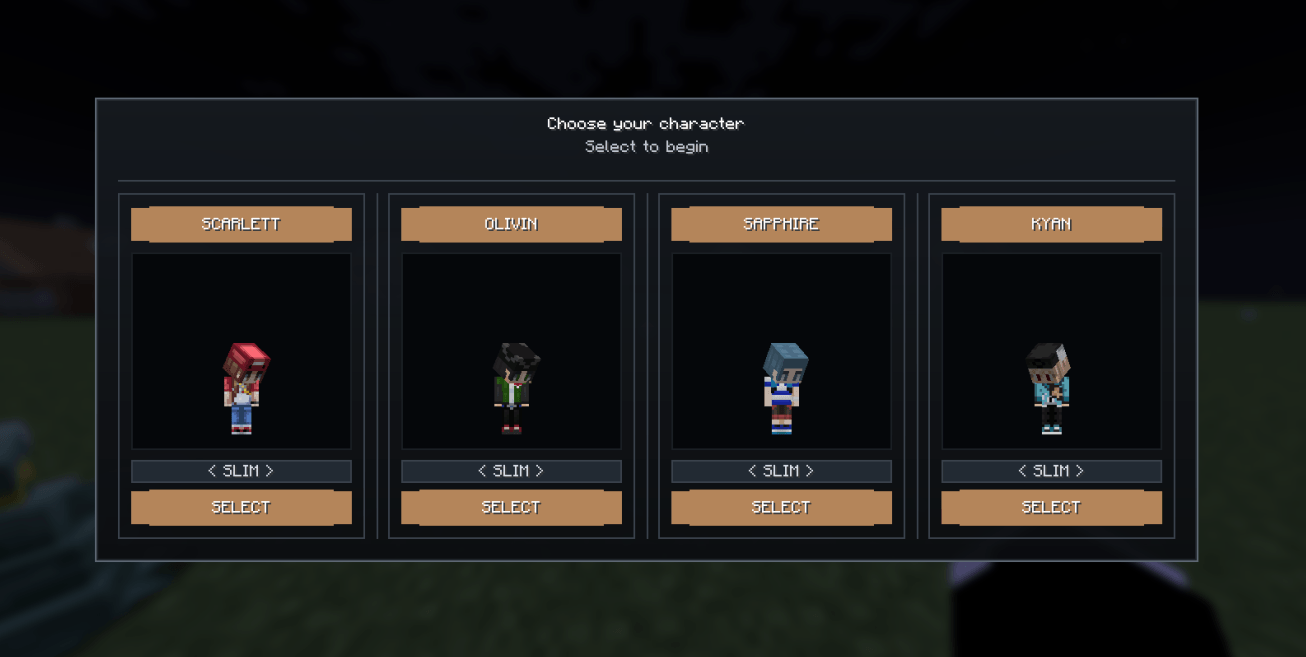
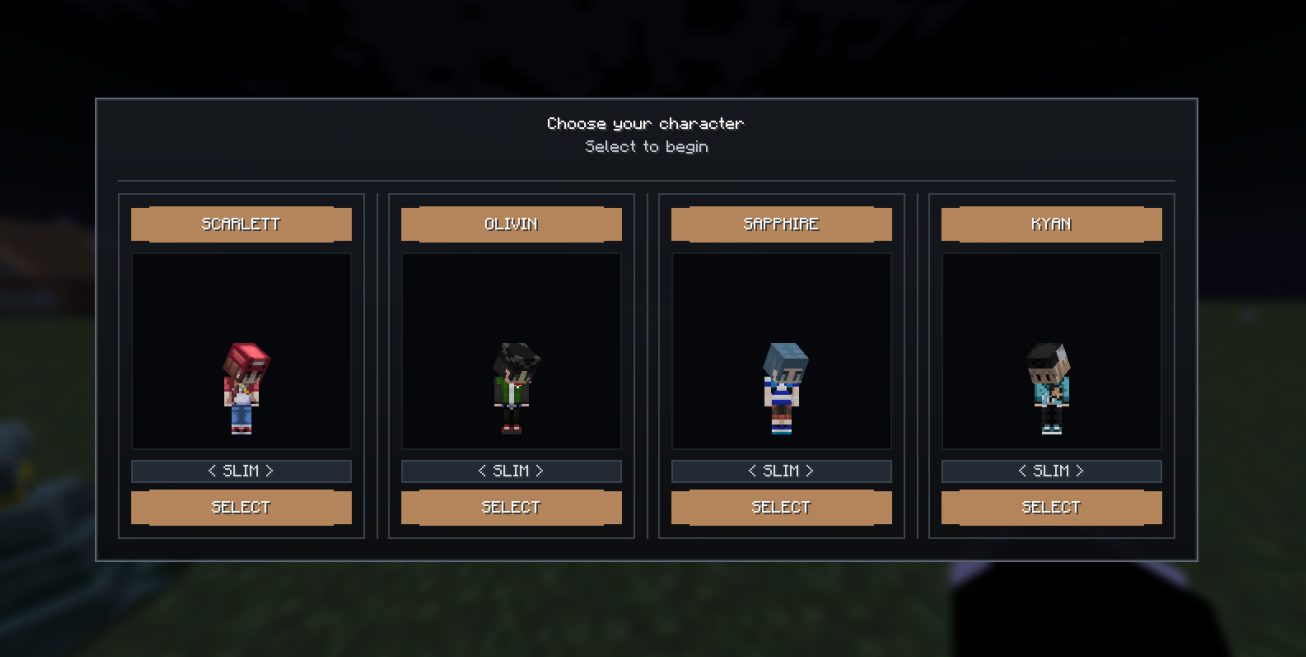
Run `/character` and a full-screen picker opens — a row of characters, each shown as a **posed 3D model of its own skin** that turns to follow your cursor. Pick one, hit **SELECT**, and the server takes it from there: teleports you, sets your gamemode, hands you buffs — whatever that character is wired to do. Choose once, and that's who you are.
**Not just a menu — the server acts on your choice.** The client draws the screen and renders the 3D skins; the server runs the commands and keeps the buffs applied. It's one jar, `environment: "*"` — the *same file* on both sides.
---
## Features
- **Command-opened character select** — `/character` *(or `/choose character`)* opens an enclosed panel, one bordered card per character: name banner, live 3D skin, a `SLIM` / `CLASSIC` model toggle, and a **SELECT** button.
- **Real 3D skin previews** — each card renders the character's actual **64×64 Minecraft skin** as a standing player model *(head tracks the mouse)*. Skins live on the server and are streamed to the client on open — players don't need the files.
- **Selection runs commands** — every character carries its own command list, run from the server console *(op-level 4, so `/tp`, `/gamemode`, `/give`, `/lp…` just work)* with placeholders `{player}` · `{uuid}` · `{character}` · `{display_name}`. Commands fire **once**, the moment you pick.
- **Persistent buffs** — potion effects re-applied every second, beacon-style, for as long as you're that character. They survive relog *(and re-apply themselves on join)*. Strategy is the config — pick the kit that fits the character.
- **One-time by default** — reopen the menu as much as you like *until* you commit; **selecting locks you in**, server-authoritative and saved to the world. A modified client can't bypass it. Grant `goodcharacters.reselect` to let someone choose again.
- **Drop-in characters** — a new character is just a folder with a `character.json` and a skin `texture.png`; switch it on and order it in `menu.json`. **No code.**
- **Admin tools** — `/character reload` *(hot-reload config)* and `/character select <id> <player>` *(force-apply)*. Per-character `permission` gates optional VIP characters.
## Config *(config/cobblemon-characters/)*
- **`menu.json`** — `title`, `subtitle`, and `active` *(the ordered list of character ids that show in the picker)*.
- **`characters/<id>/character.json`** — `display_name`, `texture`, `slim` *(Alex 3px vs Steve 4px arms)*, `description`, `permission`, `commands[]`, and `buffs[]` *(each `effect` + `amplifier`)*.
- **`characters/<id>/texture.png`** — the character's **64×64** Minecraft skin.
- Selections persist per world in `data/cobblemon_characters_selections.json` — delete an entry to free a player's one-time choice.
---
## Requirements
**Minecraft 1.21.1 — Fabric** · Fabric API · needed on **server & client**
| | Fabric |
|---|---|
| Required | Fabric API |
*No Kotlin, no hard Cobblemon dependency — it runs on any Fabric 1.21.1 server, and drops straight into a Cobblemon pack (Fabric API is already there).*
---
All Rights Reserved · Dev: **igorbescobar**
Cobblemon Characters
Run /character and a full-screen picker opens — a row of characters, each shown as a posed 3D model of its own skin that turns to follow your cursor. Pick one, hit SELECT, and the server takes it from there: teleports you, sets your gamemode, hands you buffs — whatever that character is wired to do. Choose once, and that's who you are.
Not just a menu — the server acts on your choice. The client draws the screen and renders the 3D skins; the server runs the commands and keeps the buffs applied. It's one jar, environment: "*" — the same file on both sides.
Features
- Command-opened character select —
/character(or/choose character) opens an enclosed panel, one bordered card per character: name banner, live 3D skin, aSLIM/CLASSICmodel toggle, and a SELECT button. - Real 3D skin previews — each card renders the character's actual 64×64 Minecraft skin as a standing player model (head tracks the mouse). Skins live on the server and are streamed to the client on open — players don't need the files.
- Selection runs commands — every character carries its own command list, run from the server console (op-level 4, so
/tp,/gamemode,/give,/lp…just work) with placeholders{player}·{uuid}·{character}·{display_name}. Commands fire once, the moment you pick. - Persistent buffs — potion effects re-applied every second, beacon-style, for as long as you're that character. They survive relog (and re-apply themselves on join). Strategy is the config — pick the kit that fits the character.
- One-time by default — reopen the menu as much as you like until you commit; selecting locks you in, server-authoritative and saved to the world. A modified client can't bypass it. Grant
goodcharacters.reselectto let someone choose again. - Drop-in characters — a new character is just a folder with a
character.jsonand a skintexture.png; switch it on and order it inmenu.json. No code. - Admin tools —
/character reload(hot-reload config) and/character select <id> <player>(force-apply). Per-characterpermissiongates optional VIP characters.
Config (config/cobblemon-characters/)
menu.json—title,subtitle, andactive(the ordered list of character ids that show in the picker).characters/<id>/character.json—display_name,texture,slim(Alex 3px vs Steve 4px arms),description,permission,commands[], andbuffs[](eacheffect+amplifier).characters/<id>/texture.png— the character's 64×64 Minecraft skin.- Selections persist per world in
data/cobblemon_characters_selections.json— delete an entry to free a player's one-time choice.
Requirements
Minecraft 1.21.1 — Fabric · Fabric API · needed on server & client
| Fabric | |
|---|---|
| Required | Fabric API |
No Kotlin, no hard Cobblemon dependency — it runs on any Fabric 1.21.1 server, and drops straight into a Cobblemon pack (Fabric API is already there).
All Rights Reserved · Dev: igorbescobar
Screenshots
Gallery
-
 Captura de tela de 2026-07-10 21-45-57.png Captura de tela de 2026-07-10 21-45-57.png
Versions
Files
Relations
Project Relations
More like this
Similar Mods
Suggestions use data such as tags, dependencies, dependents, descriptions, titles, and more to rank how much they overlap with this mod.
On ModDex
Community snapshot
By the numbers
Statistics
Want to reach Minecraft players?
We're looking for a server hosting partner to feature here and other parts of the site. Interested? Send us a message!
Get in touchGet it on
Available Platforms
CurseForge
On ModDex
Community snapshot
By the numbers
Statistics
Resources