
Cobblemon: Extended Battle UI
No reviews yet
This mod extends the battling UI of Cobblemon to display more useful info, similar to Showdown.
Does not follow a specific thematic focus apart from vanilla Minecraft.
Used for mods with little to no gameplay elements.
Includes quality of life improvements and small tweaks to enhance and customize gameplay.
Adds client-side tools and features to enhance the user experience.
Adds tools to customize the user interface and menus.
Adds extra features or content to an existing mod.
Fabric is a mod loader for versions 1.14+ of Minecraft, particularly popular for client side and optimization mods.
Community voices
Reviews
Click once to include, again to exclude, again to clear
No reviews yet. Be the first to review this project!
Get it on
Available Platforms
 Modrinth
Compatibility
Supported Environments
About
Project Details
For authors
Embed Badge
If you're the author of this project, you can embed a live badge anywhere that supports HTML or Markdown. It updates automatically whenever ratings change.
Use HTML for any page that supports it, or Markdown for README files and Markdown-based descriptions.
Identifiers
Platform IDs
About
Description
Cobblemon Extended Battle UI
A client-side Fabric mod that adds helpful information displays to Cobblemon battles, as well as overhauling the default Battle Log.
What does it do?
During Cobblemon battles, this mod shows you information that's normally hard to track:
Battle Info Panel
A panel on your screen that displays:
- Weather & Terrain - Shows active weather (rain, sun, sandstorm, etc.) and terrain effects with remaining turn counters
- Field Effects - Trick Room, Gravity, and other field-wide conditions
- Your Side's Effects - Screens (Reflect, Light Screen), hazards on your side, Tailwind, etc.
- Enemy's Effects - Same as above, but for the opponent
- Stat Changes - Shows every Pokemon's stat boosts and drops with easy-to-read arrows
- Volatile Effects - Taunt, Encore, Perish Song, Leech Seed, and other per-Pokemon effects
The panel shows turn ranges like "5-8" when we don't know if the opponent has items that extend duration (like Light Clay for screens or weather rocks).
This panel is also fully resizable, moveable, and collapsible if you only want to see a quick glance of relevant information!
Battle Log
We have also implemented a custom battle log that replaces Cobblemon's default log:
- Damage Percentages - Shows how much damage each attack dealt (e.g., "→ 35% to Clefable")
- Healing Tracking - Healing shown in green (e.g., "→ +15% to Charizard")
- Color-Coded Messages - Different colors for moves, HP changes, effects, and field conditions
- Turn Separators - Clear visual separation between turns to improve readability
- Auto-Scroll - Follows new messages automatically, stops when you scroll up manually
The battle log uses Cobblemon's native textures and is fully resizable, moveable, and has adjustable font size.

Team Indicators
Pokemon model indicators below each team's health bars showing:
- Visual Models - Each Pokemon displayed as a mini 3D model
- Hover Tooltips - Hover over any Pokemon to see detailed information
- Your Pokemon - Shows all moves and held items
- Opponent Pokemon - Shows only revealed pokemon, moves, items, stat changes, and effects
- Status Tracking - Status conditions shown via color tinting on models
- KO Tracking - Fainted Pokemon appear grayed out
The data in the tooltips will only display what you know with certainty for an opponent, and will update as more information is revealed. For example, in the following screenshot the opposing Porygon-Z has used Shadow Ball once, and we could see the recoil from Life Orb, but we have no idea what it's Ability, remaining moves, or Speed is exactly:
Move Tooltips
When selecting a move in battle, hover over any move to see:
- Type Effectiveness - Shows whether the move is super effective, not very effective, or has no effect against the opponent
- Move Stats - Power, accuracy, PP remaining
- Move Category - Physical, special, or status
This feature can be disabled if you prefer to use Cobblemon Move Inspector instead.
What this mod does NOT do
This mod does not give you any information that you could not otherwise have obtained. Opposition team size, team members, stats, moves, etc... are not and never will be in scope for this mod. This mod is intended to only give any information that you could get via common knowledge, note taking, or reading the match log in a quick and easy way as a QOL upgrade.
Controls
Battle Info Panel & Battle Log
- Drag the header - Move the panel anywhere on screen
- Ctrl + Scroll or [ and ] - Adjust font size (while hovering over the panel)
- Drag sides or corners - Resize panel
Battle Info
- V or Click header - Show/hide the detailed panel
Battle Log
- Click bottom-right arrow - Expand/collapse the log
Team Indicators
- Hover - Show detailed tooltip with moves, items, stats, and effects
- Ctrl + Scroll or [ and ] - Adjust tooltip font size (while hovering)
You can rebind keys in the Minecraft keybind settings menu.
Your preferences for panel/log size, position, and font sizes are saved automatically.
Configuration
If you have Mod Menu installed, you can configure features directly in-game via the mod settings screen.
Alternatively, you can edit the config file manually:
Config file location: .minecraft/config/cobblemonextendedbattleui.json
When a feature is disabled, its associated background tracking is also disabled to save resources. Note that stat change tracking is shared between the Battle Info Panel and Team Indicator tooltips - it remains active if either feature is enabled.
Screenshots
Gallery
-
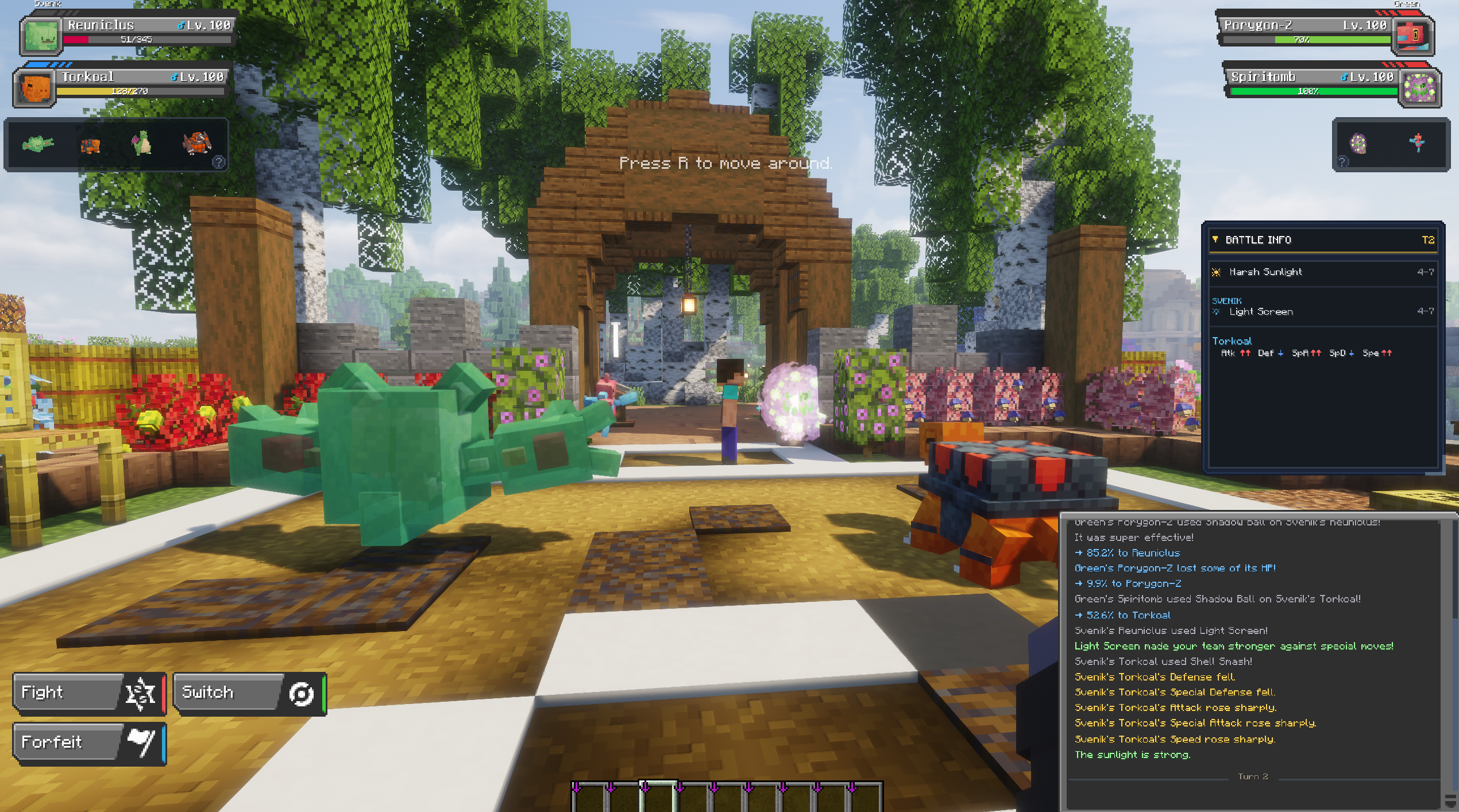 Full Showcase Entire mod showcased in battle
 -
 Battle Info Panel Expanded
 -
 Overhauled Battle Log
 -
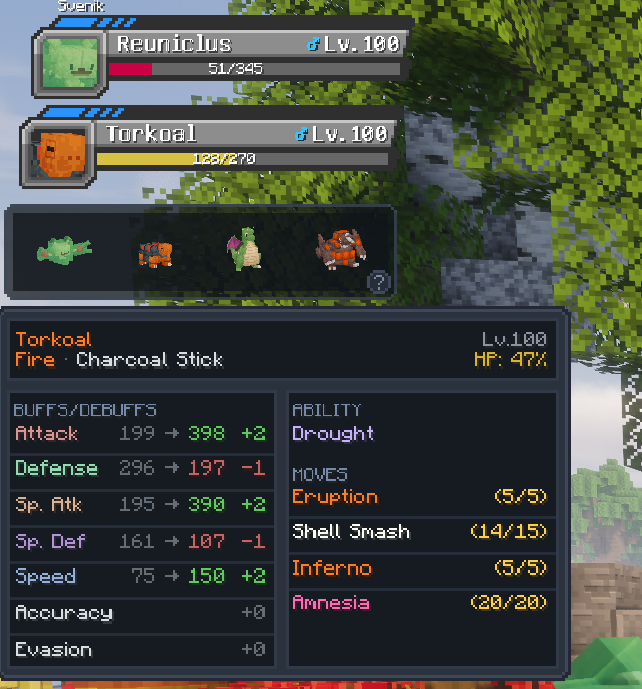 Ally Team Preview
 -
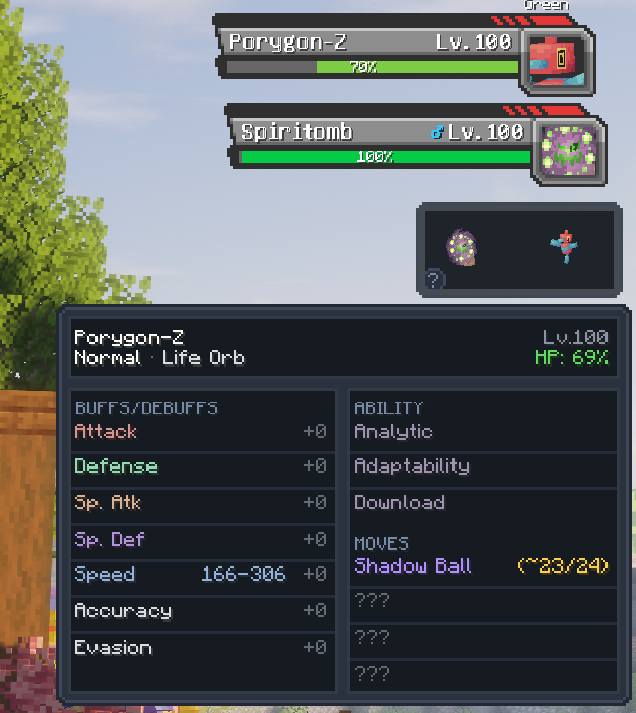 Opponent Team Preview
 -
 Move Tooltip
 -
 Battle Info Panel Collapsed
Versions
Files
Relations
Project Relations
More like this
Similar Mods
Suggestions use data such as tags, dependencies, dependents, descriptions, titles, and more to rank how much they overlap with this mod.
On ModDex
Community snapshot
By the numbers
Statistics

Want to reach Minecraft players?
We're looking for a server hosting partner to feature here and other parts of the site. Interested? Send us a message!
Get in touchGet it on
Available Platforms
On ModDex
Community snapshot
By the numbers