
Community listing page, reviews here may not be monitored by the author.
Cobblemon More PC Info


No reviews yet
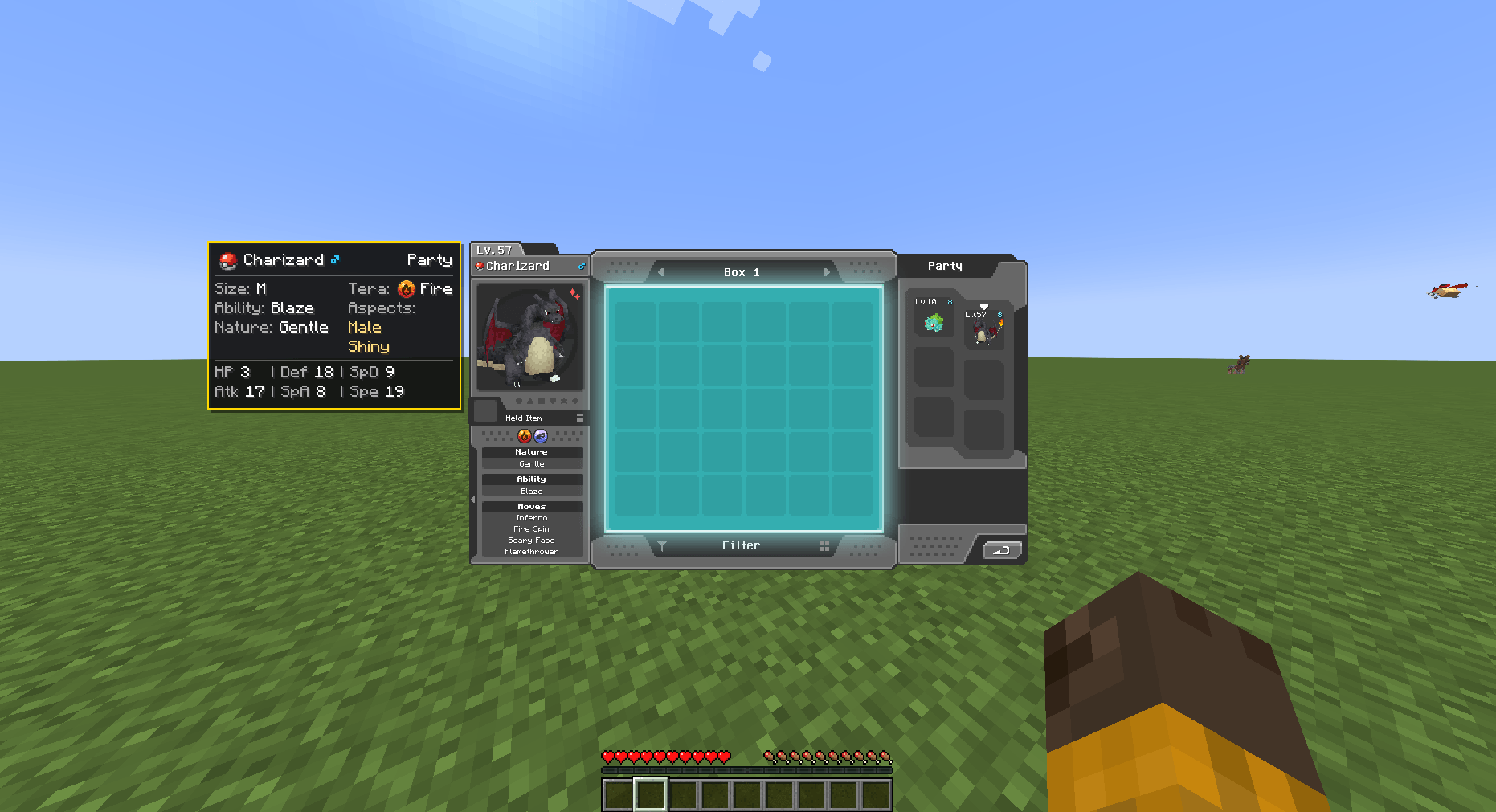
Client-side panel for Cobblemon's PC GUI. Hover or select a Pokémon to see its size, ability, nature, Tera type, aspects and color-coded IVs. Configurable, with toggle keybind and Mod Menu support.

Community voices
Reviews
No reviews yet. Be the first to review this project!
Get it on
Available Platforms
Compatibility
Supported Environments
Runs entirely on the client. Works on vanilla servers.
About
Project Details
For authors
Embed Badge
If you're the author of this project, you can embed a live badge anywhere that supports HTML or Markdown. It updates automatically whenever ratings change.
Use HTML for any page that supports it, or Markdown for README files and Markdown-based descriptions.
Identifiers
Platform IDs
Resources
External Links
About
Description
# Cobblemon More PC Info
Tired of pulling every Pokémon out of the box just to check its IVs, nature or
ability? **Cobblemon More PC Info** adds a clean, lightweight info panel right
next to your PC GUI — all the details you care about, at a glance.
It's **fully client-side**, so you can use it on any server without asking an
admin to install anything.
## ✨ What you get
Just open your PC and **hover** over any Pokémon — or **select** one — and the
panel instantly shows everything that matters:
- **Name, gender & location** — see which box or party slot it's in, plus the
Poké Ball it was caught in
- **Size** — quick category from XXS to XXL
- **Ability** — clearly marks **Hidden** abilities
- **Nature** — marks **Minted** natures so you know what was changed
- **Tera type** — shown with its proper type icon
- **Aspects** — shinies, regional forms, special variants and more
- **IVs** — color-coded for instant reading: **green = perfect (31)**,
**red = 0**
No menus, no clicks, no taking Pokémon out of storage. The info is just there.
## ⚙️ Make it yours
Everything is configurable in-game via **Mod Menu**:
- Choose the panel **side** — Auto, Left or Right
- Fine-tune **position offsets** to fit your layout
- Set a **hover delay** if you prefer the panel to appear only after a moment
- Toggle the **drop shadow**, **fade-in animation** and **aspect ID tooltip**
- **Turn the panel on/off instantly** with a configurable keybind
## 📦 Requirements
Works on **both Fabric and NeoForge** for Minecraft **1.21.1**.
**Fabric**
- Fabric Loader + **Fabric API**
- **Fabric Language Kotlin**
- *(Optional)* **Mod Menu** for the in-game config screen
**NeoForge**
- **NeoForge 21.1+**
- **Kotlin for Forge 5+**
**Both loaders**
- **Cobblemon 1.7+**
> **Client-side only** — no server installation required. Licensed under MIT.
## 🙌 Credits
- **igorbescobar** — Development
- **skannnn** — Concept & Design
Cobblemon More PC Info
Hover over any Pokémon in your PC and see all the info you need — no clicks, no pulling them out of storage.
Client-side only. Works on any server.
Features
- Name, gender, box/party slot, Poké Ball
- Size, ability (Hidden marked), nature (Minted marked)
- Tera type, aspects, IVs (color-coded: green = 31, red = 0)
Config (via Mod Menu)
Side, position offsets, hover delay, drop shadow, fade-in, aspect tooltip, toggle keybind.
Requirements
Minecraft 1.21.1 — Fabric & NeoForge
| Fabric | NeoForge | |
|---|---|---|
| Required | Fabric API, Fabric Language Kotlin | NeoForge 21.1+, Kotlin for Forge 5+ |
| Optional | Mod Menu | — |
Cobblemon 1.7+ required on both.
MIT License · Dev: igorbescobar · Concept: skannnn
Screenshots
Gallery
-
 ffa03ef098ab9fbff220e3177c5129773e3293f5.png ffa03ef098ab9fbff220e3177c5129773e3293f5.png
Versions
Files
Relations
Project Relations
More like this
Similar Mods
Suggestions use data such as tags, dependencies, dependents, descriptions, titles, and more to rank how much they overlap with this mod.
On ModDex
Community snapshot
By the numbers
Statistics
 (opens in a new tab)
Get it on
Available Platforms
On ModDex
Community snapshot
By the numbers
Statistics
Resources