
Cobblemon PC Exporter
No reviews yet
A client-side mod that exports your Cobblemon PC box data to an excel (.xlsx) workbook with images of the Pokémon.
Fabric is a mod loader for versions 1.14+ of Minecraft, particularly popular for client side and optimization mods.
Community voices
Reviews
Click once to include, again to exclude, again to clear
No reviews yet. Be the first to review this project!
Get it on
Available Platforms
 Modrinth
Compatibility
Supported Environments
About
Project Details
For authors
Embed Badge
If you're the author of this project, you can embed a live badge anywhere that supports HTML or Markdown. It updates automatically whenever ratings change.
Use HTML for any page that supports it, or Markdown for README files and Markdown-based descriptions.
Identifiers
Platform IDs
Resources
External Links
About
Description
Cobblemon PC Export
A lightweight client-side mod that exports your Cobblemon PC box data to an excel (.xlsx) workbook with images of the Pokémon.
Features
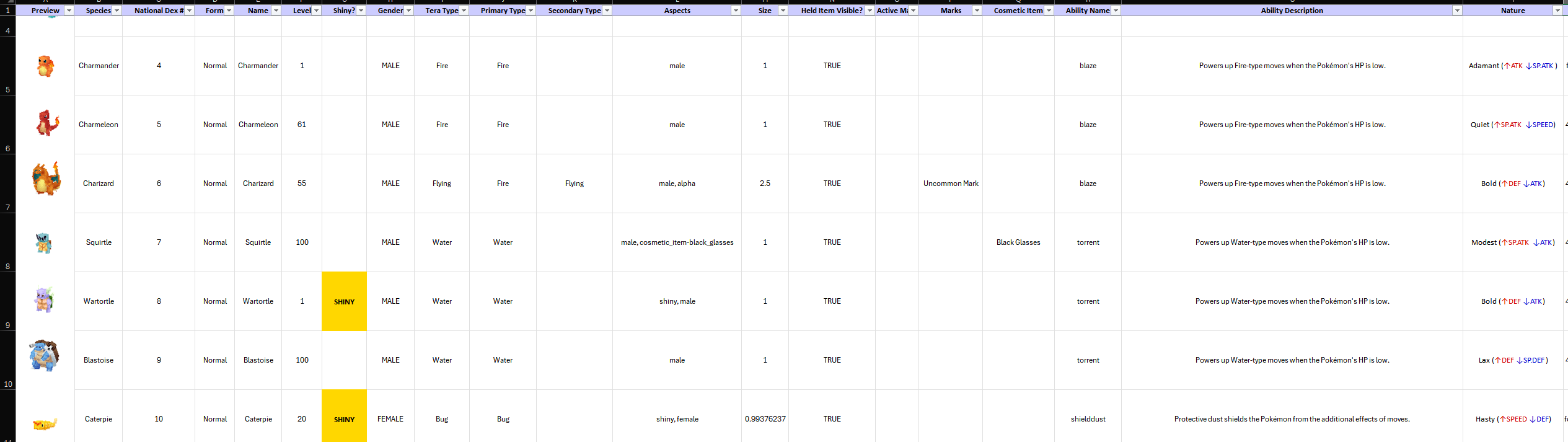
Every Pokémon is exported as a detailed row, plus the mod allows for a complete control over what fields are exported to excel.
- Box #
- Slot #
- Box Name
- PC UUID
- Species
- Dex #
- Form
- Nickname
- UUID
- Level
- XP
- Friendship
- Shiny
- Gender
- Tera Type
- Primary Type
- Secondary Type
- All Types
- Aspects
- Size
- Held Item Visible
- Marks
- Markings
- Cosmetic Item
- Ability Name
- Ability Description
- Original Nature
- Minted Nature
- Current Nature
- Original Trainer UUID
- Original Trainer Name (Not reliable, use UUID and NameMC).
- Caught Ball
- Held Item
- IVs (HP/ATK/DEF/SP.ATK/SP.DEF/SPD)
- EVs (HP/ATK/DEF/SP.ATK/SP.DEF/SPD)
- Stats (HP/ATK/DEF/SP.ATK/SP.DEF/SPD)
- Base (HP/ATK/DEF/SP.ATK/SP.DEF/SPD)
- Height (m)
- Weight (kg)
- Moves 1–4 (Name, Type, Category, Power, Accuracy, Max PP)
- Benched Moves
How to Use
Option 1: Export while in the Cobblemon PC!
- Open your Cobblemon PC in-game.
- Press F9 (default keybind) to export the currently visible box to an Excel file.
- The output folder will open automatically when the export finishes.
Option 2: You can use the /pcexport chat command to quickly export multiple boxes. When playing multiplayer you may have to open your PC box at least once before using the chat command to export.
/pcexport 1          → Export Box 1
/pcexport 1,2,3      → Export Boxes 1, 2, and 3
It is recommended to allocate at least 6gb of memory to Minecraft to prevent your client from crashing when trying to export a large number of PC boxes filled with Pokemon.
/pcexport all → Export all boxes ("Disable Export Limits" must be set to yes in settings first)
Not affiliated with the official Cobblemon project.
Screenshots
Gallery
Versions
Files
Relations
Project Relations
More like this
Similar Mods
Suggestions use data such as tags, dependencies, dependents, descriptions, titles, and more to rank how much they overlap with this mod.
On ModDex
Community snapshot
By the numbers
Statistics

Want to reach Minecraft players?
We're looking for a server hosting partner to feature here and other parts of the site. Interested? Send us a message!
Get in touchGet it on
Available Platforms
On ModDex
Community snapshot
By the numbers
Statistics
Resources