Community listing page, reviews here may not be monitored by the author.
Cobblemon Pokestop

No reviews yet
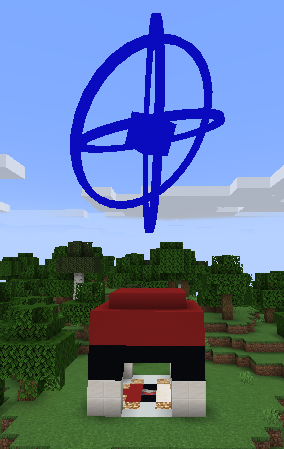
Cobblemon Pokéstop is a lightweight Fabric mod for Minecraft 1.21.1 that adds simple Pokéstop-style item drops, perfect for Pokémon-themed servers.

Community voices
Reviews
No reviews yet. Be the first to review this project!
Get it on
Available Platforms
Compatibility
Supported Environments
Must be installed on both the client and the server.
About
Project Details
For authors
Embed Badge
If you're the author of this project, you can embed a live badge anywhere that supports HTML or Markdown. It updates automatically whenever ratings change.
Use HTML for any page that supports it, or Markdown for README files and Markdown-based descriptions.
Identifiers
Platform IDs
Resources
External Links
About
Description
📘 Cobblemon Pokéstop - Configuration Guide
 This mod uses a single JSON configuration file to manage both the cooldown timer and the reward pool. You can customize these settings without needing to edit the source code.
Config File Location: config/cobblepokestop_config.json (This file is automatically generated when you launch the game for the first time.)
⚙️ Default Configuration
{
  "cooldownSeconds": 300,
  "rewards": [
    {
      "item": "minecraft:apple",
      "min": 1,
      "max": 5,
      "roll": 1
    },
    {
      "item": "cobblemon:poke_ball",
      "min": 1,
      "max": 5,
      "roll": 1
    }
  ]
}
📝 Parameters
Global Settings
-
cooldownSeconds: (Integer) The time in seconds a player must wait before they can claim rewards from the same Pokéstop again.
-
Default: 300 (5 minutes)
-
Example: Set to 60 for a 1-minute cooldown.
Rewards List
-
The "rewards" section allows you to define the items dropped by the Pokéstop.
-
item: (String) The item ID in namespace:item_name format.
-
Example: minecraft:bread or cobblemon:poke_ball.
-
min: (Integer) The minimum quantity of items to drop per roll.
-
max: (Integer) The maximum quantity of items to drop per roll.
-
Note: The game will pick a random number between min and max. If you want a fixed amount, set both to the same number.
-
roll: (Integer) The number of times the system attempts to give this item stack.
-
Example: If you drop apples (min: 1, max: 5) and set roll: 2, the game will randomize the apple amount twice (e.g., getting 3 apples on the first roll and 5 on the second, totaling 8).
💡 Custom Example (Cobblemon Integration)
Here is an example configuration with a 1-minute cooldown that rewards items from the Cobblemon mod with randomized quantities:
{
  "cooldownSeconds": 60,
  "rewards": [
    {
      "item": "minecraft:bread",
      "min": 2,
      "max": 4,
      "roll": 1
    },
    {
      "item": "cobblemon:great_ball",
      "min": 1,
      "max": 1,
      "roll": 1
    },
    {
      "item": "cobblemon:poke_ball",
      "min": 1,
      "max": 5,
      "roll": 2
    },
    {
      "item": "cobblemon:exp_candy_m",
      "min": 1,
      "max": 2,
      "roll": 1
    }
  ]
}
How to Apply Changes
- Open config/cobblepokestop_config.json with a text editor.
- Modify the values as needed.
- Save the file.
- Restart the game (or the server) for the changes to take effect.
Screenshots
Gallery
-
 Pokestop Version 1.0
 -
NewPokestopAnimation
-
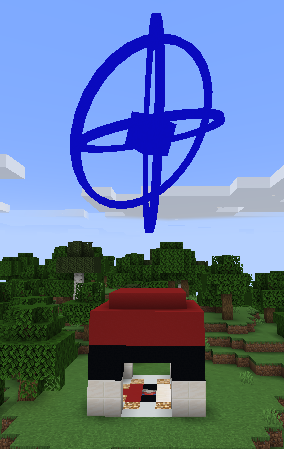 Pokestop Version 2.0
Versions
Files
Relations
Project Relations
More like this
Similar Mods
Suggestions use data such as tags, dependencies, dependents, descriptions, titles, and more to rank how much they overlap with this mod.
On ModDex
Community snapshot
By the numbers
Statistics

 (opens in a new tab)
Get it on
Available Platforms
On ModDex
Community snapshot
By the numbers
Statistics
Resources