
Coin to shop消费了!
No reviews yet
消费了(Cointoshop)是一个轻量的商店/消费系统模组,提供直观的商店 UI、分类标签、排序与渐进式同步,支持服务端/整合包定制。Cointoshop is a lightweight shop system mod that provides an intuitive shop UI, category tabs, sorting, and progressive synchronization, supporting server/modpack customization.
Forge is a popular mod loader for versions 1.1+ of Minecraft.
Neoforge is a fork of the Minecraft Forge available for versions 1.20.1+ of Minecraft. Many Forge mods are compatible with Neoforge and vice versa.
Fabric is a mod loader for versions 1.14+ of Minecraft, particularly popular for client side and optimization mods.
Community voices
Reviews
Click once to include, again to exclude, again to clear
No reviews yet. Be the first to review this project!
Get it on
Available Platforms
 Modrinth
Compatibility
Supported Environments
About
Project Details
For authors
Embed Badge
If you're the author of this project, you can embed a live badge anywhere that supports HTML or Markdown. It updates automatically whenever ratings change.
Use HTML for any page that supports it, or Markdown for README files and Markdown-based descriptions.
Identifiers
Platform IDs
Resources
External Links
About
Description
📦 消费了(Coin To Shop)
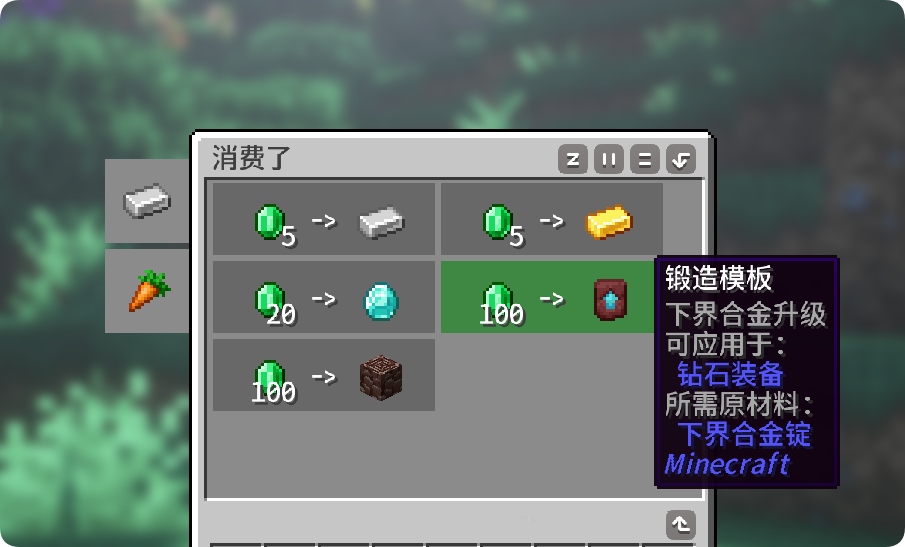
**消费了(Cointoshop)**是一个轻量的 Minecraft 商店系统模组,提供直观的商店界面、分类标签,以及可在游戏内完成的交易编辑与排序功能。
本模组最初为 下单了(Order To Cook) 提供商店支持,也可以独立使用。
✨ 主要功能
| 操作 | 说明 |
|---|---|
| 打开商店 | 默认按 O 键,也可使用指令 /cts shop。 |
| 浏览分类 | 鼠标移至左侧分类标签,点击切换分类。 |
| 购买商品 | 鼠标移至内容区网格可查看高亮与详细物品提示。支持单次购买和购买当前可负担的最大数量。 |
| 编辑模式 | OP 使用指令 /cts editmode true 进入编辑模式;使用 /cts editmode false 退出。 |
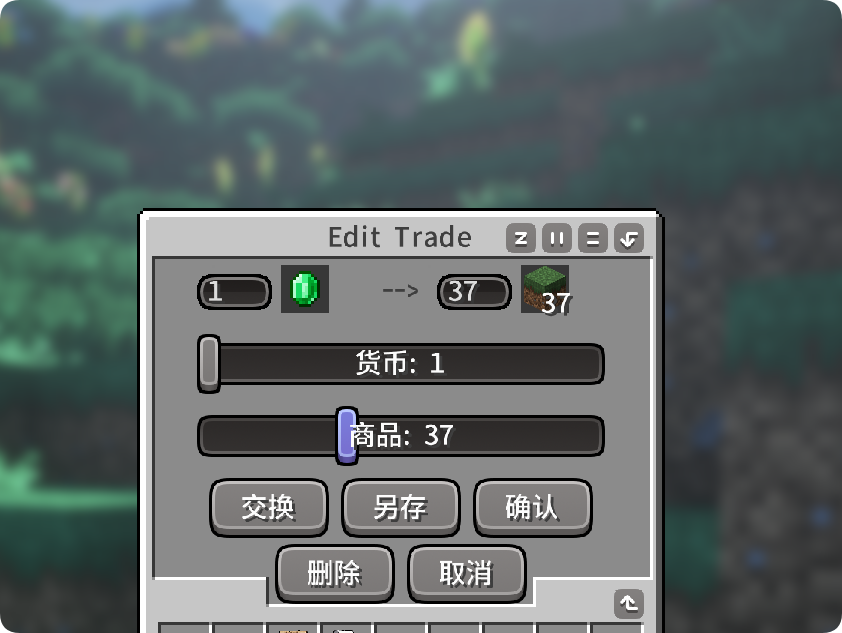
| 管理交易 | 可在编辑模式中新增、修改、复制、删除交易,并调整同分类中的交易顺序。 |
| 快速更换物品 | 在交易编辑页面中,可从背包选择交易物品:左键设置出售物品,右键设置价格物品。 |
| 配置持久化 | 所有游戏内编辑会保存至配置文件,并在客户端同步更新。 |
🌟 特色
- 简单操作:按下
O键即可打开商店;分类浏览、购买与编辑都可在直观界面中完成。 - 轻量化设计:不强制依赖其他模组,单独安装即可使用,不增加复杂的经济系统或前置要求。
- 任意货币自定义:每条交易都可将任意物品设为价格,例如绿宝石、钻石或其他模组物品。
- 游戏内管理:服主无需重启服务器,即可在编辑模式中维护商品、价格、数量和排序。
🔧 兼容性与版本
| 加载器 | Minecraft 版本 |
|---|---|
| Fabric | 1.20.1、1.21.1 |
| Forge | 1.20.1 |
| NeoForge | 1.21.1 |
Order To Cook 兼容
Order To Cook 是可选依赖。
- 安装 Order To Cook 时,商店默认使用厨师币:
chef_coin_1、chef_coin_5、chef_coin_20、chef_coin_100。 - 未安装 Order To Cook 时,厨师币价格会自动回退为等值绿宝石,无需修改交易配置。
- 厨师币支持按总面额付款与自动找零。例如,价格为
100时,可用5 × chef_coin_20直接支付。 - 非厨师币交易及绿宝石回退交易仍按原交易物品精确扣款。
⚙️ 配置
首次启动后,模组会在游戏配置目录生成:
config/cointoshop.json
该文件可定义:
- 分类 ID、图标与提示文本;
- 每个分类下的交易;
- 出售物品、价格物品、数量与物品 NBT 数据。
已有的 cointoshop.json 不会因模组更新自动重置。你可以直接编辑该文件,也可以通过游戏内编辑模式调整交易。
📦 Coin To Shop
Coin To Shop (Cointoshop) is a lightweight Minecraft shop system mod with an intuitive shop interface, category tabs, and in-game trade editing and ordering.
It was originally created to provide shop support for Order To Cook, but it can also be used independently.
✨ Main Features
| Action | Description |
|---|---|
| Open Shop | Press O by default, or use /cts shop. |
| Browse Categories | Click the category tabs on the left side of the shop. |
| Purchase Items | Hover a trade for highlighting and detailed item tooltips. Supports single purchases and the maximum affordable amount. |
| Edit Mode | Operators can enter it with /cts editmode true and leave it with /cts editmode false. |
| Manage Trades | Create, edit, duplicate, delete, and reorder trades within a category. |
| Quick Item Selection | In the trade editor, left-click an inventory item to set the offer and right-click one to set the price. |
| Persistent Configuration | In-game edits are saved to the configuration file and synchronized to clients. |
🌟 Highlights
- Simple to use: press
Oto open the shop; browsing categories, buying, and editing are all handled through an intuitive interface. - Lightweight by design: no required dependencies, no complex economy system, and no prerequisite mods.
- Use any item as currency: every trade can use any item as its price, including emeralds, diamonds, or items from other mods.
- In-game management: server owners can update items, prices, quantities, and ordering in edit mode without restarting the server.
🔧 Compatibility
| Loader | Minecraft versions |
|---|---|
| Fabric | 1.20.1, 1.21.1 |
| Forge | 1.20.1 |
| NeoForge | 1.21.1 |
Order To Cook Integration
Order To Cook is optional.
- When installed, the default shop uses
chef_coin_1,chef_coin_5,chef_coin_20, andchef_coin_100. - Without Order To Cook, chef-coin prices automatically fall back to equivalent emerald prices; no trade configuration changes are required.
- Chef coins support total-value payment and automatic change. For example, five
chef_coin_20coins can pay a price of100. - Non-chef-coin trades and emerald fallback trades continue to require the exact configured payment item.
⚙️ Configuration
The mod creates this file on first launch:
config/cointoshop.json
It defines categories, icons, tooltips, trades, item quantities, and item NBT data. Existing configuration files are never reset automatically by a mod update. You may edit the file directly or manage trades in-game through edit mode.
Screenshots
Gallery
Versions
Files
Relations
Project Relations
More like this
Similar Mods
Suggestions use data such as tags, dependencies, dependents, descriptions, titles, and more to rank how much they overlap with this mod.
On ModDex
Community snapshot
By the numbers
Statistics

Want to reach Minecraft players?
We're looking for a server hosting partner to feature here and other parts of the site. Interested? Send us a message!
Get in touchGet it on
Available Platforms
On ModDex
Community snapshot
By the numbers
Statistics
Resources